
![Wakapi]() Wakapi
Wakapi
Stack
Coding time tracker that works with the WakaTime editor plugins. Point them at your own server and get stats per project, language, editor and machine, plus badges you can put in a README. Source: https://github.com/muety/wakapi
Image details
Source details
Configuration
TypeComposelinuxghcr.io/muety/wakapi:2${WAKAPI_PORT:-3100}:3000/data : wakapi-dataWAKAPI_PASSWORD_SALT=${WAKAPI_PASSWORD_SALT:?Set a password salt}WAKAPI_COOKIE_KEY=${WAKAPI_COOKIE_KEY:-}WAKAPI_PUBLIC_URL=${WAKAPI_PUBLIC_URL:-http://localhost:3100}WAKAPI_ALLOW_SIGNUP=${WAKAPI_ALLOW_SIGNUP:-true}WAKAPI_PORT=3100unless-stoppedTemplate by NotAFlightRisk·Source
Report issueNotes
openssl rand -hex 32 makes a good one), since the stack won't start without it, and keep it the same when you redeploy. Then open http://<your-host>:3100 (or whichever port you picked) and sign up. The first account is the admin. Sign-ups stay open, so once you've made yours add WAKAPI_ALLOW_SIGNUP = false to the stack's environment variables and update the stack. The setup page shows the ~/.wakatime.cfg lines for your editor's WakaTime plugin, with your API key. Invite links point at localhost until you add WAKAPI_PUBLIC_URL (like http://192.168.1.10:3100) there too. The logged-out front page loads one badge image from badges.fw-web.space. Everything lives in SQLite, in the wakapi-data volume. Docs: github.com/muety/wakapiStandalone Install
Select an install method, to see config/commands for deploying Wakapi
Install on Portainer
Import all app templates into your Portainer instance, for easy 1-click deploys
- Ensure both Docker and Portainer are installed, and up-to-date
- Log into your Portainer web UI
- Under Settings → App Templates, paste the below URL
- Head to Home → App Templates, and the list of apps will show up
- Select Wakapi, fill in any config options, and hit Deploy
Template Import URL
https://raw.githubusercontent.com/Lissy93/portainer-templates/main/templates.json
Show Me

Original stackfile
The compose file this template deploys, straight from its repo:
services:
  wakapi:
    image: ghcr.io/muety/wakapi:2
    restart: unless-stopped
    init: true
    ports:
      - "${WAKAPI_PORT:-3100}:3000"
    environment:
      WAKAPI_PASSWORD_SALT: ${WAKAPI_PASSWORD_SALT:?Set a password salt}
      WAKAPI_COOKIE_KEY: ${WAKAPI_COOKIE_KEY:-}
      WAKAPI_PUBLIC_URL: ${WAKAPI_PUBLIC_URL:-http://localhost:3100}
      WAKAPI_ALLOW_SIGNUP: ${WAKAPI_ALLOW_SIGNUP:-true}
    volumes:
      - wakapi-data:/data

volumes:
  wakapi-data:
Or deploy it directly from the source:
git clone https://github.com/NotAFlightRisk/portainer-templates-extras
cd portainer-templates-extras
docker compose -f apps/wakapi/compose.yml up -d
More install options in our documentation, or see muety/wakapi for app-specific guidance.




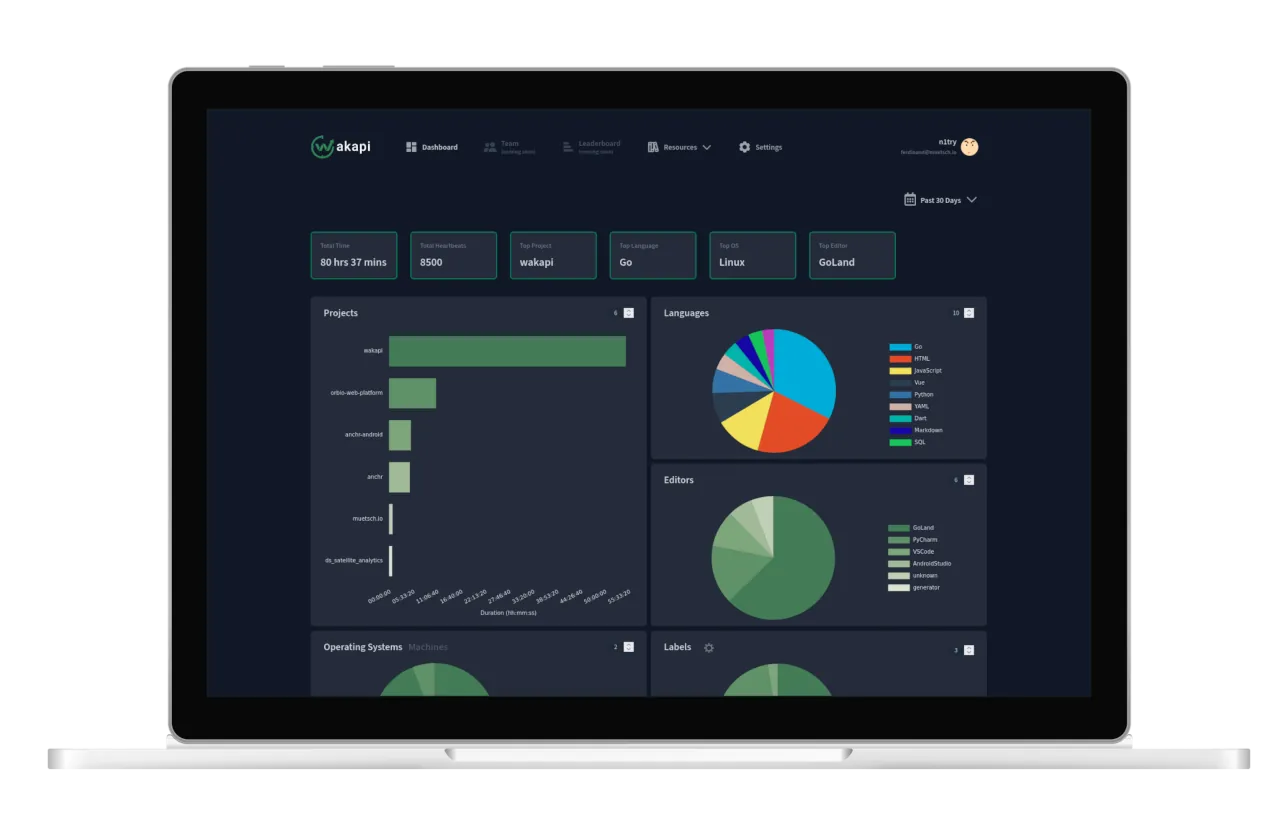
A minimalist, self-hosted WakaTime-compatible backend for coding statistics.
<a href="https://wakapi.dev">Website</a>
<span> | </span>
<a href="#-features">Features</a>
<span> | </span>
<a href="#%EF%B8%8F-how-to-use">How to use</a>
<span> | </span>
<a href="https://github.com/muety/wakapi/issues">Issues</a>
<span> | </span>
<a href="https://github.com/muety">Contact</a>
<a href="https://wakapi.dev">Website</a>
<span> | </span>
<a href="#-features">Features</a>
<span> | </span>
<a href="#%EF%B8%8F-how-to-use">How to use</a>
<span> | </span>
<a href="https://github.com/muety/wakapi/issues">Issues</a>
<span> | </span>
<a href="https://github.com/muety">Contact</a>
!IMPORTANT Due to limited time available on the maintainers' part, we temporarily do not accept pull requests. Please refrain from submitting contributions for the time being.
🚀 Features
- ✅ Free and open-source
- ✅ Built by developers for developers
- ✅ Statistics for projects, languages, editors, hosts and operating systems
- ✅ Badges
- ✅ Weekly E-Mail reports
- ✅ REST API
- ✅ Partially compatible with WakaTime
- ✅ WakaTime integration
- ✅ Support for Prometheus exports
- ✅ Lightning fast
- ✅ Self-hosted
⌨️ How to use?
There are different options for how to use Wakapi, ranging from our hosted cloud service to self-hosting it. Regardless of which option choose, you will always have to do the client setup in addition.☁️ Option 1: Use wakapi.dev
If you want to try out a free, hosted cloud service, all you need to do is create an account and then set up your client-side tooling (see below).📦 Option 2: Quick-run a release
$ curl -L https://wakapi.dev/get | bash🐳 Option 3: Use Docker
# Create a persistent volume
$ docker volume create wakapi-data

$ SALT="$(cat /dev/urandom | LC_ALL=C tr -dc 'a-zA-Z0-9' | fold -w ${1:-32} | head -n 1)"

# Run the container
$ docker run -d \
  --init \
  -p 3000:3000 \
  -e "WAKAPI_PASSWORD_SALT=$SALT" \
  -v wakapi-data:/data \
  --name wakapi \
  --restart unless-stopped \
  ghcr.io/muety/wakapi:latest
Note: By default, SQLite is used as a database. To run Wakapi in Docker with MySQL or Postgres, see Dockerfile and config.default.yml for further options.
If you want to run Wakapi on Kubernetes, there is wakapi-helm-chart for quick and easy deployment.
Docker Compose
Alternatively, you can use Docker Compose for an even more straightforward deployment. See compose.yml for configuration details.Wakapi supports Docker Secrets for the following variables:
WAKAPI_PASSWORD_SALT, WAKAPI_DB_PASSWORD, WAKAPI_MAIL_SMTP_PASS. You can set these either by having them mounted as a secret file, or directly pass them as environment variables.Example
export WAKAPI_PASSWORD_SALT=changeme
export WAKAPI_DB_PASSWORD=changeme
export WAKAPI_MAIL_SMTP_PASS=changeme

docker compose up -d
If you prefer to persist data in a local directory while using SQLite as the database, make sure to set the correct
user option in the Docker Compose configuration to avoid permission issues.🧑💻 Option 4: Compile and run from source
# Build and install
# Alternatively: go build -o wakapi
$ go install github.com/muety/wakapi@latest

# Get default config and customize
$ curl -o wakapi.yml https://raw.githubusercontent.com/muety/wakapi/master/config.default.yml
$ vi wakapi.yml

# Run it
$ ./wakapi -config wakapi.yml
Note: Check the comments in
config.yml for best practices regarding security configuration and more.💡 When running Wakapi standalone (without Docker), it is recommended to run it as a SystemD service.
💻 Client setup
Wakapi relies on the open-source WakaTime client tools. In order to collect statistics for Wakapi, you need to set them up.- Set up WakaTime for your specific IDE or editor. Please refer to the respective plugin guide
- Edit your local
~/.wakatime.cfgfile as follows.
[settings]

# Your Wakapi server URL or 'https://wakapi.dev/api' when using the cloud server
api_url = http://localhost:3000/api

# Your Wakapi API key (get it from the web interface after having created an account)
api_key = 406fe41f-6d69-4183-a4cc-121e0c524c2b
Optionally, you can set up a client-side proxy in addition.
WakaTime integration
You can use WakaTime and Wakapi in parallel, that is, have your coding activity tracked in both systems. This can be configured either on the client-side (preferred) on a system-wide- or per-project basis or using Wakapi's relay functionality (Settings → Integrations) to forward heartbeats to WakaTime.Example:
[settings]
api_key = waka-api-key

[api_urls]
.* = https://wakapi.dev/api|wakapi-api-key
The API key in
[settings] is used for WakaTime's default API, while [api_urls] defines additional destinations. Do not add multiple .* entries because duplicate keys are invalid in an INI file and are ignored by wakatime-cli.See wakatime-cli usage for details.
🔧 Configuration options
You can specify configuration options either via a config file (default:config.yml, customizable through the -c argument) or via environment variables. Here is an overview of all options.| YAML key / Env. variable | Default | Description |
|---|---|---|
env /ENVIRONMENT | dev | Whether to use development- or production settings |
app.leaderboardenabled /WAKAPILEADERBOARDENABLED | true | Whether to enable the public leaderboard |
app.leaderboardscope /WAKAPILEADERBOARDSCOPE | 7days | Aggregation interval for public leaderboard (see here for allowed values) |
app.leaderboardgenerationtime /WAKAPILEADERBOARDGENERATIONTIME | 0 0 6 ,0 0 18 | One or multiple times of day at which to re-calculate the leaderboard |
app.leaderboardrequireauth /WAKAPILEADERBOARDREQUIREAUTH | false | Restrict leaderboard access to logged in users only |
app.aggregationtime /WAKAPIAGGREGATIONTIME | 0 15 2 | Time of day at which to periodically run summary generation for all users |
app.reporttimeweekly /WAKAPIREPORTTIMEWEEKLY | 0 0 18 5 | Week day and time at which to send e-mail reports |
app.datacleanuptime /WAKAPIDATACLEANUPTIME | 0 0 6 0 | When to perform data cleanup operations (see app.dataretentionmonths) |
app.optimizedatabasetime /WAKAPIOPTIMIZEDATABASETIME | 0 0 8 1 | When to perform database vacuuming (SQLite, Postgres) or table optimization (MySQL) |
app.importenabled /WAKAPIIMPORTENABLED | true | Whether data imports from WakaTime or other Wakapi instances are permitted |
app.importbatchsize /WAKAPIIMPORTBATCHSIZE | 50 | Size of batches of heartbeats to insert to the database during importing from external services |
app.importbackoffmin /WAKAPIIMPORTBACKOFFMIN | 5 | "Cooldown" period in minutes before user may attempt another data import |
app.importmaxrate /WAKAPIIMPORTMAXRATE | 24 | Minimum number of hours to wait after a successful data import before user may attempt another one |
app.importhostswhitelist /WAKAPIIMPORTHOSTSWHITELIST | - | List of whitelisted hostnames for data import (wildcards allowed, empty list means allow all) |
app.inactivedays /WAKAPIINACTIVEDAYS | 7 | Number of days after which to consider a user inactive (only for metrics) |
app.heartbeatmaxage /WAKAPIHEARTBEATMAXAGE | 4320h | Maximum acceptable age of a heartbeat (see ParseDuration) |
app.warmcaches /WAKAPIWARMCACHES | true | Whether to perform some initial cache warming upon startup |
app.customlanguages | - | Map from file endings to language names |
app.avatarurltemplate /WAKAPIAVATARURLTEMPLATE | (see config.default.yml) | URL template for external user avatar images (e.g. from Dicebear or Gravatar) |
app.dateformat /WAKAPIDATEFORMAT | Mon, 02 Jan 2006 | Go time format strings to format human-readable date (see Time.Format) |
app.datetimeformat /WAKAPIDATETIMEFORMAT | Mon, 02 Jan 2006 15:04 | Go time format strings to format human-readable datetime (see Time.Format) |
app.supportcontact /WAKAPISUPPORTCONTACT | [email protected] | E-Mail address to display as a support contact on the page |
app.dataretentionmonths /WAKAPIDATARETENTIONMONTHS | -1 | Maximum retention period in months for user data (heartbeats) (-1 for unlimited) |
app.maxinactivemonths /WAKAPIMAXINACTIVEMONTHS | 12 | Maximum number of inactive months after which to delete user accounts without data (-1 for unlimited) |
server.port /WAKAPIPORT | 3000 | Port to listen on |
server.listenipv4 /WAKAPILISTENIPV4 | 127.0.0.1 | IPv4 network address to listen on (set to '-' to disable IPv4) |
server.listenipv6 /WAKAPILISTENIPV6 | ::1 | IPv6 network address to listen on (set to '-' to disable IPv6) |
server.listensocket /WAKAPILISTENSOCKET | - | UNIX socket to listen on (set to '-' to disable UNIX socket) |
server.listensocketmode /WAKAPILISTENSOCKETMODE | 0666 | Permission mode to create UNIX socket with |
server.logformat /WAKAPILOGFORMAT | text | Format for structured logging (plain text or JSON) (options: text, json) |
server.timeoutsec /WAKAPITIMEOUTSEC | 30 | Request timeout in seconds |
server.tlscertpath /WAKAPITLSCERTPATH | - | Path of SSL server certificate (leave blank to not use HTTPS) |
server.tlskeypath /WAKAPITLSKEYPATH | - | Path of SSL server private key (leave blank to not use HTTPS) |
server.basepath /WAKAPIBASEPATH | / | Web base path (change when running behind a proxy under a sub-path) |
server.publicurl /WAKAPIPUBLICURL | http://localhost:3000 | URL at which your Wakapi instance can be found publicly |
security.disablelocalauth /WAKAPIDISABLELOCALAUTH | false | Disables login via local credentials (username and password) to enforce OIDC provider login |
security.disablewebauthn /WAKAPIDISABLEWEBAUTHN | true | Disables login via WebAuthn (security keys, biometrics, etc.) |
security.passwordsalt /WAKAPIPASSWORDSALT | - | Pepper to use for password hashing |
security.cookiekey /WAKAPICOOKIEKEY | - | Base64 encoded key (should decode to at least 32 bytes) used to used derive session and authentication keys. If left empty, a random key is generated on startup. |
security.insecurecookies /WAKAPIINSECURECOOKIES | true | Whether or not to allow cookies over HTTP. For production, it is highly recommended to serve Wakapi via HTTPS and set this to false. |
security.cookiemaxage /WAKAPICOOKIEMAXAGE | 172800 | Lifetime of authentication cookies in seconds or 0 to use Session cookies |
security.allowsignup /WAKAPIALLOWSIGNUP | true | Whether to enable local user registration |
security.oidcallowsignup /WAKAPIOIDCALLOWSIGNUP | true | Whether to enable user registration via OIDC |
security.oidcinsecure /WAKAPIOIDCINSECURE | false | Skip TLS certificate validation for OIDC provider (only for debugging purposes!) |
security.signupcaptcha /WAKAPISIGNUPCAPTCHA | false | Whether the registration form requires solving a CAPTCHA |
security.invitecodes /WAKAPIINVITECODES | true | Whether to enable registration by invite codes. Primarily useful if registration is disabled (invite-only server). |
security.disablefrontpage /WAKAPIDISABLEFRONTPAGE | false | Whether to disable landing page (useful for personal instances) |
security.exposemetrics /WAKAPIEXPOSEMETRICS | false | Whether to expose Prometheus metrics under /api/metrics |
security.trustedheaderauth /WAKAPITRUSTEDHEADERAUTH | false | Whether to enable trusted header authentication for reverse proxies (see #534). Use with caution! |
security.trustedheaderauthkey /WAKAPITRUSTEDHEADERAUTHKEY | Remote-User | Header field for trusted header authentication. Caution: proxy must be configured to strip this header from client requests! |
security.trustedheaderauthallowsignup /WAKAPITRUSTEDHEADERAUTHALLOWSIGNUP | false | Whether to allow creation of new users based on upstream trusted header authentication (see #808) |
security.trustreverseproxyips /WAKAPITRUSTREVERSEPROXYIPS | - | Comma-separated list of IPv4 or IPv6 addresses or CIDRs of reverse proxies to trust to handle authentication (e.g. 172.17.0.1, 192.168.0.0/24, ::1). |
security.signupmaxrate /WAKAPISIGNUPMAXRATE | 5/1h | Rate limiting config for signup endpoint in format <maxreq>/<multiplier><unit>, where unit is one of s, m or h. |
security.loginmaxrate /WAKAPILOGINMAXRATE | 10/1m | Rate limiting config for login endpoint in format <maxreq>/<multiplier><unit>, where unit is one of s, m or h. |
security.passwordresetmaxrate /WAKAPIPASSWORDRESETMAXRATE | 5/1h | Rate limiting config for password reset endpoint in format <maxreq>/<multiplier><unit>, where unit is one of s, m or h. |
security.oidc | | List of OpenID Connect provider configurations (for details, see wiki)) |
security.oidc0.name /WAKAPIOIDCPROVIDERS0NAME | - | Name / identifier for the OpenID Connect provider (e.g. gitlab), case-insensitive (normalized to lowercase internally) |
security.oidc0.displayname /WAKAPIOIDCPROVIDERS0DISPLAYNAME | - | Optional "human-readable" display name for the provider presented to the user |
security.oidc0.clientid /WAKAPIOIDCPROVIDERS0CLIENTID | - | OAuth client name with this provider |
security.oidc0.clientsecret /WAKAPIOIDCPROVIDERS0CLIENTSECRET | - | OAuth client secret with this provider |
security.oidc0.endpoint /WAKAPIOIDCPROVIDERS0ENDPOINT | - | OpenID Connect provider API entrypoint (for discovery) |
security.oidc0.usernameclaim /WAKAPIOIDCPROVIDERS0USERNAMECLAIM | - | Optionally spcified custom OIDC ID token claim to read username from (by preferredusername, nickname and sub are checked) |
security.oidc0.scopes /WAKAPIOIDCPROVIDERS0SCOPES | - | Additional OAuth scopes to request beyond openid, profile and email (to be used in custom username claim). If you want the OIDC provider to issue refresh tokens for longer lasting sessions, add the offlineaccess scope. |
db.host /WAKAPIDBHOST | - | Database host |
db.port /WAKAPIDBPORT | - | Database port |
db.socket /WAKAPIDBSOCKET | - | Database UNIX socket (alternative to host) (for MySQL only) |
db.user /WAKAPIDBUSER | - | Database user |
db.password /WAKAPIDBPASSWORD | - | Database password |
db.name /WAKAPIDBNAME | wakapidb.db | Database name |
db.dialect /WAKAPIDBTYPE | sqlite3 | Database type (one of sqlite3, mysql, postgres) |
db.charset /WAKAPIDBCHARSET | utf8mb4 | Database connection charset (for MySQL only) |
db.maxconn /WAKAPIDBMAXCONNECTIONS | 2 | Maximum number of database connections |
db.ssl /WAKAPIDBSSL | false | Whether to use TLS encryption for database connection (Postgres only) |
db.compress /WAKAPIDBCOMPRESS | false | Whether to enable compression for database connection (MySQL only) |
db.automgiratefailsilently /WAKAPIDBAUTOMIGRATEFAILSILENTLY | false | Whether to ignore schema auto-migration failures when starting up |
mail.enabled /WAKAPIMAILENABLED | false | Whether to allow Wakapi to send e-mail (e.g. for password resets) |
mail.sender /WAKAPIMAILSENDER | - | Default sender address for outgoing mails |
mail.skipverifymxrecord /WAKAPIMAILSKIPVERIFYMXRECORD | false | Whether to skip validating MX DNS record for user email addresses |
mail.provider /WAKAPIMAILPROVIDER | smtp | Implementation to use for sending mails (one of smtp) |
mail.smtp.host /WAKAPIMAILSMTPHOST | - | SMTP server address for sending mail (if using smtp mail provider) |
mail.smtp.port /WAKAPIMAILSMTPPORT | - | SMTP server port (usually 465) |
mail.smtp.username /WAKAPIMAILSMTPUSER | - | SMTP server authentication username |
mail.smtp.password /WAKAPIMAILSMTPPASS | - | SMTP server authentication password |
mail.smtp.tls /WAKAPIMAILSMTPTLS | false | Whether the SMTP server requires TLS encryption (false for STARTTLS or no encryption) |
mail.smtp.skipverify /WAKAPIMAILSMTPSKIPVERIFY | false | Whether to allow invalid or self-signed certificates for TLS-encrypted SMTP |
sentry.dsn /WAKAPISENTRYDSN | – | DSN for to integrate Sentry for error logging and tracing (leave empty to disable) |
sentry.environment /WAKAPISENTRYENVIRONMENT | (env) | Sentry environment tag (defaults to env / ENV) |
sentry.enabletracing /WAKAPISENTRYTRACING | false | Whether to enable Sentry request tracing |
sentry.samplerate /WAKAPISENTRYSAMPLERATE | 0.75 | Probability of tracing a request in Sentry |
sentry.samplerateheartbeats /WAKAPISENTRYSAMPLERATEHEARTBEATS | 0.1 | Probability of tracing a heartbeat request in Sentry |
quickstart /WAKAPIQUICKSTART | false | Whether to skip initial boot tasks. Use only for development purposes! |
enablepprof /WAKAPIENABLEPPROF | false | Whether to expose pprof profiling data as an endpoint for debugging |
Supported databases
Wakapi uses GORM as an ORM. As a consequence, a set of different relational databases is supported.- SQLite (>= 3.31) (default, easy setup)
- MySQL (>= 8.0 LTS) (recommended, because most extensively tested)
- MariaDB (>= 11.4 LTS) (open-source MySQL alternative)
- Postgres (open-source as well)
🔐 Authentication
Wakapi supports different types of user authentication.- Cookie: This method is used in the browser. Users authenticate by sending along an encrypted, secure, HTTP-only cookie (
wakapi_auth) that was set in the server's response upon login. - API key:
* **Via header:** This method is inspired by [WakaTime's auth. mechanism](https://wakatime.com/developers/#authentication) and is the common way to authenticate against API endpoints. Users set the `Authorization` header to `Basic <BASE64_TOKEN>`, where the latter part corresponds to your base64-hashed API key.
* **Via query param:** Alternatively, users can also pass their plain API key as a query parameter (e.g. `?api_key=86648d74-19c5-452b-ba01-fb3ec70d4c2f`) in the URL with every request.
* Note that API keys are only accepted for API endpoints (i.e. routes under `/api`), but not for regular web routes- Trusted header: This mechanism allows to delegate authentication to a reverse proxy (e.g. for SSO), that Wakapi will then trust blindly. See #534 for details.
* Must be enabled via `trusted_header_auth` and configuring `trust_reverse_proxy_ip` in the config
* Warning: This type of authentication is quite prone to misconfiguration. Make sure that your reverse proxy properly strips relevant headers from client requests.
Single Sign-On / OpenID Connect
Wakapi supports login via external identity providers via OpenID Connect. See our wiki) for details.You can also disable local authentication (username and password) entirely by setting
security.disable_local_auth to true.
This enforces login exclusively via your configured OIDC providers.🔧 API endpoints
See our Swagger API Documentation.Generating Swagger docs
$ go install github.com/swaggo/swag/cmd/swag@latest
$ swag init -o static/docs
🤝 Integrations
Prometheus export
You can export your Wakapi statistics to Prometheus to view them in a Grafana dashboard or so. Here is how.# 1. Start Wakapi with the feature enabled
$ export WAKAPI_EXPOSE_METRICS=true
$ ./wakapi
# 2. Get your API key and hash it
$ echo "<YOUR_API_KEY>" | base64
# 3. Add a Prometheus scrape config to your prometheus.yml (see below)Scrape config example
# prometheus.yml
# (assuming your Wakapi instance listens at localhost, port 3000)

scrape_configs:
  - job_name: 'wakapi'
    scrape_interval: 1m
    metrics_path: '/api/metrics'
    bearer_token: '<YOUR_BASE64_HASHED_TOKEN>'
    static_configs:
      - targets: [ 'localhost:3000' ]
Grafana
There is also a nice Grafana dashboard, provided by the author of wakatimeexporter.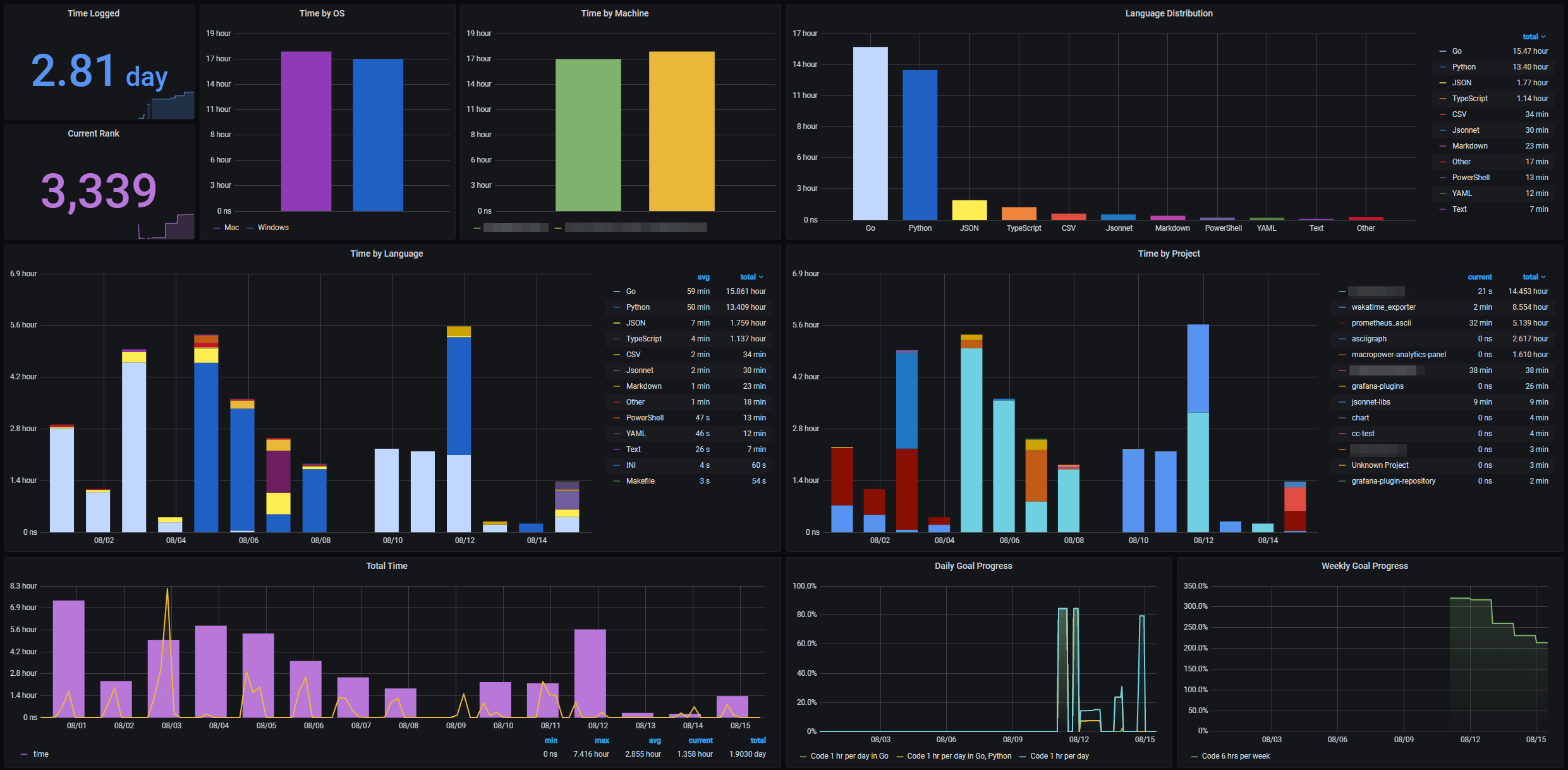
WakaTime integration
Wakapi plays well together with WakaTime. For one thing, you can forward heartbeats from Wakapi to WakaTime to effectively use both services simultaneously. In addition, there is the option to import historic data from WakaTime for consistency between both services. Both features can be enabled in the Integrations section of your Wakapi instance's settings page.GitHub Readme Stats integrations
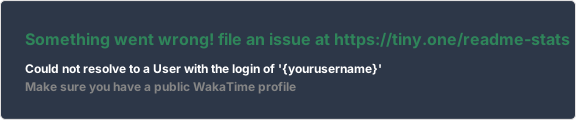
Wakapi also integrates with GitHub Readme Stats to generate fancy cards for you. Here is an example. To use this, don't forget to enable public data under Settings -> Permissions.Click to view code
GitHub Readme Metrics integration
There is a WakaTime plugin for GitHub Metrics that is also compatible with Wakapi. To use this, don't forget to enable public data under Settings -> Permissions.Preview:

Click to view code
- uses: lowlighter/metrics@latest
  with:
    # ... other options
    plugin_wakatime: yes
    plugin_wakatime_token: ${{ secrets.WAKATIME_TOKEN }}      # Required
    plugin_wakatime_days: 7                                   # Display last week stats
    plugin_wakatime_sections: time, projects, projects-graphs # Display time and projects sections, along with projects graphs
    plugin_wakatime_limit: 4                                  # Show 4 entries per graph
    plugin_wakatime_url: http://wakapi.dev                    # Wakatime url endpoint
    plugin_wakatime_user: .user.login                         # User
Browser Plugin (Chrome & Firefox)
The browser-wakatime plugin enables you to track your web surfing in WakaTime (and Wakapi, of course). Visited websites will appear as "files" in the summary. Follow these instructions to get started:- Install the browser extension from the official store (Firefox, Chrome)
- Open the extension settings dialog
- Configure it like so (see screenshot below):
* API Key: Your personal API key (get it at [wakapi.dev](https://wakapi.dev))
* Logging Type: _Only the domain_
* API URL: `https://wakapi.dev/api/compat/wakatime/v1` (alternatively, replace _wakapi.dev_ with your self-hosted instance hostname)- Save
- Start browsing!
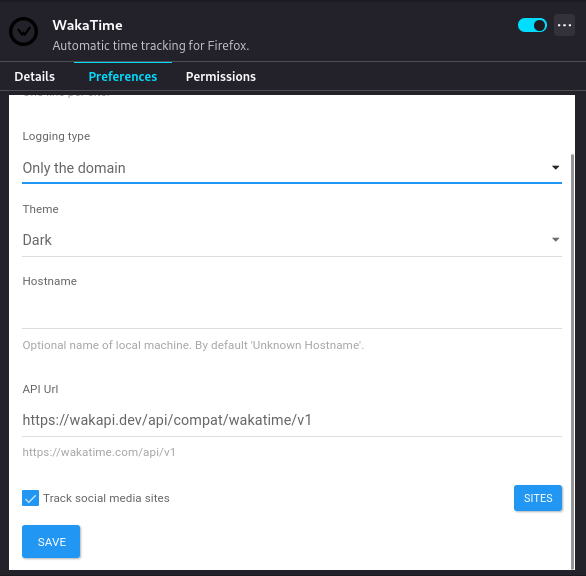
Note: the plugin will only sync heartbeats once in a while, so it might take some time for them to appear on Wakapi. To "force" it to sync, simply bring up the plugin main dialog.
Gnome Extension
If you're using the GNOME desktop, there is a quick way to display your today's coding statistics in the status bar.
Simply install the Executor extension and add the following command as a status bar indicator:
~/.wakatime/wakatime-cli-linux-amd64 --today📦 Data Export
You can export your coding activity from Wakapi to CSV in the form of raw heartbeats. While there is no way to achieve this directly through the web UI, we provide an easy-to-use Python script instead.$ pip install requests tqdm
$ python scripts/download_heartbeats.py --api_key API_KEY [--url URL] [--from FROM] [--to TO] [--output OUTPUT]Example
python scripts/download_heartbeats.py --api_key 04648d14-15c9-432b-b901-dbeec70d4eaf \
  --url https://wakapi.dev/api \
  --from 2023-01-01 \
  --to 2023-01-31 \
  --output wakapi_export.csv
👍 Best practices
It is recommended to use wakapi behind a reverse proxy, like Caddy or nginx, to enable TLS encryption (HTTPS).However, if you want to expose your wakapi instance to the public anyway, you need to set
server.listen_ipv4 to 0.0.0.0 in config.yml.🧪 Tests
Unit tests
Unit tests are supposed to test business logic on a fine-grained level. They are implemented as part of the application, using Go's testing package alongside stretchr/testify.How to run
$ go install github.com/mfridman/tparse@latest  # optional
$ CGO_ENABLED=0 go test -json -coverprofile=coverage/coverage.out ./... -run ./... | tparse -all
API tests
API tests are implemented as black box tests, which interact with a fully-fledged, standalone Wakapi through HTTP requests. They are supposed to check Wakapi's web stack and endpoints, including response codes, headers and data on a syntactical level, rather than checking the actual content that is returned.Our API (or end-to-end, in some way) tests are implemented as a Bruno collection and can be run either from inside Bruno, or using Bruno CLI as a command-line runner.
To get a predictable environment, tests are run against a fresh and clean Wakapi instance with a SQLite database that is populated with nothing but some seed data (see data.sql). It is usually recommended for software tests to be safe, stateless and without side effects. In contrary to that paradigm, our API tests strictly require a fixed execution order (which Bruno assures) and their assertions may rely on specific previous tests having succeeded.
Prerequisites (Linux only)
# 1. sqlite (cli)
$ sudo apt install sqlite  # Fedora: sudo dnf install sqlite

# 2. bruno cli
$ npm install -g @usebruno/cli
How to run (Linux only)
$ ./testing/run_api_tests.sh🤓 Developer notes
Building web assets
To keep things minimal, all JS and CSS assets are included as static files and checked in to Git. TailwindCSS and Iconify require an additional build step. To only require this at the time of development, the compiled assets are checked in to Git as well.$ yarn
$ yarn build # or: yarn watchNew icons can be added by editing the
icons array in scripts/bundleicons.js.Precompression
As explained in #284, precompressed (using Brotli) versions of some of the assets are delivered to save additional bandwidth. This was inspired by Caddy'sprecompressed directive. gzipped.FileServer checks for every static file's .br or .gz equivalents and, if present, delivers those instead of the actual file, alongside Content-Encoding: br. Currently, compressed assets are simply checked in to Git. Later we might want to have this be part of a new build step.To pre-compress files, run this:
# Install brotli first
$ sudo apt install brotli  # or: sudo dnf install brotli

# Watch, build and compress
$ yarn watch:compress

# Alternatively: build and compress only
$ yarn build:all:compress

# Alternatively: compress only
$ yarn compress
❔ FAQs
Since Wakapi heavily relies on the concepts provided by WakaTime, their FAQs largely apply to Wakapi as well. You might find answers there.What data are sent to Wakapi?
- File names
- Project names
- Editor names
- Your computer's host name
- Timestamps for every action you take in your editor
- ...
See the related WakaTime FAQ section for details.
If you host Wakapi yourself, you have control over all your data. However, if you use our webservice and are concerned about privacy, you can also exclude or obfuscate certain file- or project names.
What happens if I'm offline?
All data are cached locally on your machine and sent in batches once you're online again.
How did Wakapi come about?
Wakapi was started when I was a student, who wanted to track detailed statistics about my coding time. Although I'm a big fan of WakaTime I didn't want to pay $9 a month back then. Luckily, most parts of WakaTime are open source!
How does Wakapi compare to WakaTime?
Wakapi is a small subset of WakaTime and has a lot less features. Cool WakaTime features, that are missing Wakapi, include:
- Leaderboards
- Embeddable Charts
- Personal Goals
- Team- / Organization Support
- Additional Integrations (with GitLab, etc.)
- Richer API
WakaTime is worth the price. However, if you only need basic statistics and like to keep sovereignty over your data, you might want to go with Wakapi.
How are durations calculated?
Inferring a measure for your coding time from heartbeats works similar to WakaTime, see their docs. Traditionally, Wakapi used to pad every heartbeat before a
<timeout>-long break with a padding of 2 minutes by default. Now, after the refactoring addressed in #675, Wakapi's logic is prtty much the same as WakaTime's, including a manually configurable timeout (default is 10 minutes).Here is an example (circles are heartbeats):
|---o---o--------------o---o---|
|   |10s|      3m      |10s|   |
It is unclear how to handle the three minutes in between. Did the developer do a 3-minute break, or were just no heartbeats being sent, e.g. because the developer was staring at the screen trying to find a solution, but not actually typing code?
- With 10 min timeout:: 3 min 20 sec
- With 2 min timeout: 20 sec
- Previously (with 2 min timeout + padding): 10 sec + 2 min + 10 sec = 2 min 20 sec
See this comment for another example.
👥 Community contributions
- 💻 Code Image generator from Wakapi stats – LacazeThomas/wakapi-stats (
Go) - 💻 Code Discord integration for Wakapi - LLoneDev6/Wakapi-Discord (
JavaScript) - 💻 Code Alternative heartbeats export script - wakapiexporter.nim (
Nim) - 💻 Code Wakapi Helm chart for K8s deployments - andreymaznyak/wakapi-helm-chart (
YAML) - 🗒 Article Wakamonth: hours reporting tool
👏 Support
Coding in open source is my passion, and I would love to do it on a full-time basis and make a living from it one day. So if you like this project, please consider supporting it 🙂. You can donate either through buying me a coffee or becoming a GitHub sponsor. Every little donation is highly appreciated and boosts my motivation to keep improving Wakapi!🙏 Thanks
I highly appreciate the efforts of @alanhamlett and the WakaTime team and am thankful for their software being open source.Moreover, thanks to server.camp for donating server infrastructure for Wakapi.dev.

📓 License
MIT @ Ferdinand MütschCheck the logs first
Nine times out of ten the logs tell you exactly what went wrong.
- In Portainer, go to Containers, click the container, then Logs. Or run
docker logs <container> - Exit codes help too:
137means killed, usually out of memory.126or127means the command inside the image is broken.
Image won't pull
Test the pull directly on the host: docker pull ghcr.io/muety/wakapi:2
- "manifest unknown" means the tag no longer exists.
- "toomanyrequests" is the Docker Hub rate limit. Log in with
docker loginto raise it. - "no space left on device" means a full disk. Reclaim space with
docker system prune
"exec format error"
This means the image was built for a different CPU architecture than your server.
- This image supports:
amd64, arm64, arm/v7 - Check yours with
uname -m: x86_64 is amd64, aarch64 is arm64. Raspberry Pi and other ARM boards are the usual culprits.
Container keeps restarting
The unless-stopped restart policy relaunches the app after every crash, so the real error can scroll past.
- Check the logs right after a restart, the last few lines before it died are the useful ones.
- Get the exit code with
docker inspect <container> --format '{{.State.ExitCode}}' - Still stuck? Redeploy once with the restart policy set to
noso the failure stays visible.
Stack won't deploy
Compose stacks fail fast on small mistakes, and Portainer shows the reason just above the editor.
- YAML only accepts spaces for indentation, a single tab breaks the whole file.
Raise an issue
Found something which isn't working as it should? Here's how to report it.
- Bug within the app: Open an issue on muety/wakapi
- Template not working: Open an issue on NotAFlightRisk/portainer-templates-extras
- This website not working: Open an issue on lissy93/portainer-templates
A Compose stack
Wakapi is a Compose stack, a set of containers defined in one file and brought up together by Portainer, then started and stopped as a single app.
The app image
An image is the app packed up ready to go, everything Wakapi needs bundled into one download. This template pulls ghcr.io/muety/wakapi:2, which Docker fetches once (about 18 MB) and then starts your own copy from.
Where the image comes from
Docker pulls its images from registries, public libraries of ready-built apps. Wakapi's comes from the GitHub Container Registry, published by muety.
Version tags
The bit after the colon in the image name is the version tag. This one pins 2, so every redeploy gives you that exact build until you bump it yourself.
Which machines it runs on
Every image is built for particular CPU types. This one ships for amd64, arm64, arm/v7, so it runs on both regular x86 servers and ARM boards like a Raspberry Pi.
Volumes
A volume is where Wakapi keeps its files so they survive an update or a restart. Without one, anything it saves would sit inside the container and vanish the moment it's recreated. This template mounts:
/datakept in thewakapi-datavolume Docker manages
Environment variables
Environment variables are the settings you hand over when you deploy, things like a password or a timezone. Wakapi takes 5 of them, and one needs a value before it'll start properly:
WAKAPI_PASSWORD_SALT, needs a value. Mixed into every password hash. Generate one with: openssl rand -hex 32. Keep it the same when you redeploy, or nobody can log in.WAKAPI_COOKIE_KEY, pulled from your own environment. Keeps you logged in when it restarts. Generate one with: openssl rand -base64 32. Leave it blank and every restart logs everyone out.WAKAPI_PUBLIC_URL, defaults tohttp://localhost:3100WAKAPI_ALLOW_SIGNUP, defaults totrueWAKAPI_PORT, defaults to3100. Host port for the web UI
Restart policy
The restart policy here is unless-stopped, so Docker restarts Wakapi after a crash or reboot, but leaves it off when you stop it on purpose. You can change this on the deploy screen. The choices are no (never restart), on-failure (only after a crash), unless-stopped (restart unless you stop it), and always (bring it back no matter what).
Networking
Nothing custom is set, so Wakapi sits on Docker's default bridge network: its own private space that reaches the outside world only through the ports it publishes.
Container name
Once it's deployed, Portainer names the container wakapi. That's what you'll spot in the containers list and use in commands like docker logs wakapi.
Platform
The platform is linux, the kind of system the container is built to run on. Docker and Portainer handle this on a normal Linux server.
Open source license
Wakapi is open source, released under the MIT license. In plain terms the code is out in the open, so you're free to run it and change it to fit what you need.
Portainer app templates
Zooming out, this whole page comes from a Portainer app template: a short recipe telling Portainer how to set Wakapi up. Add the template list to Portainer once, then deploying Wakapi is a click rather than a wall of config.