
![SiteWatcher]() SiteWatcher
Stack
Self-hosted website monitoring for uptime, response times, TLS and domain expiry, with shareable status pages. Source: https://github.com/NikKurkov/sitewatcher
Source details
Configuration
TypeComposelinuxSITEWATCHER_PORT=18080unless-stoppedNotes
sitewatcher setup once to create the owner. Then sign in at http://127.0.0.1:18080 on the Docker host, or forward the port over SSH. The web service and worker share a named volume at /data.Services
web
Configuration
Imageghcr.io/nikkurkov/sitewatcher@sha256:c66f8916f531331b11c732ee389f2d255e68f21707e155e5db76454c54894e8dsitewatcher,web127.0.0.1:${SITEWATCHER_PORT:-18080}:8080/data : sitewatcher-dataDATABASE_PATH=/data/sitewatcher.dbSITEWATCHER_WEB_BIND=0.0.0.0unless-stoppedworker
Configuration
Imageghcr.io/nikkurkov/sitewatcher@sha256:c66f8916f531331b11c732ee389f2d255e68f21707e155e5db76454c54894e8dsitewatcher,worker/data : sitewatcher-dataDATABASE_PATH=/data/sitewatcher.dbunless-stoppedStandalone Install
Select an install method, to see config/commands for deploying SiteWatcher
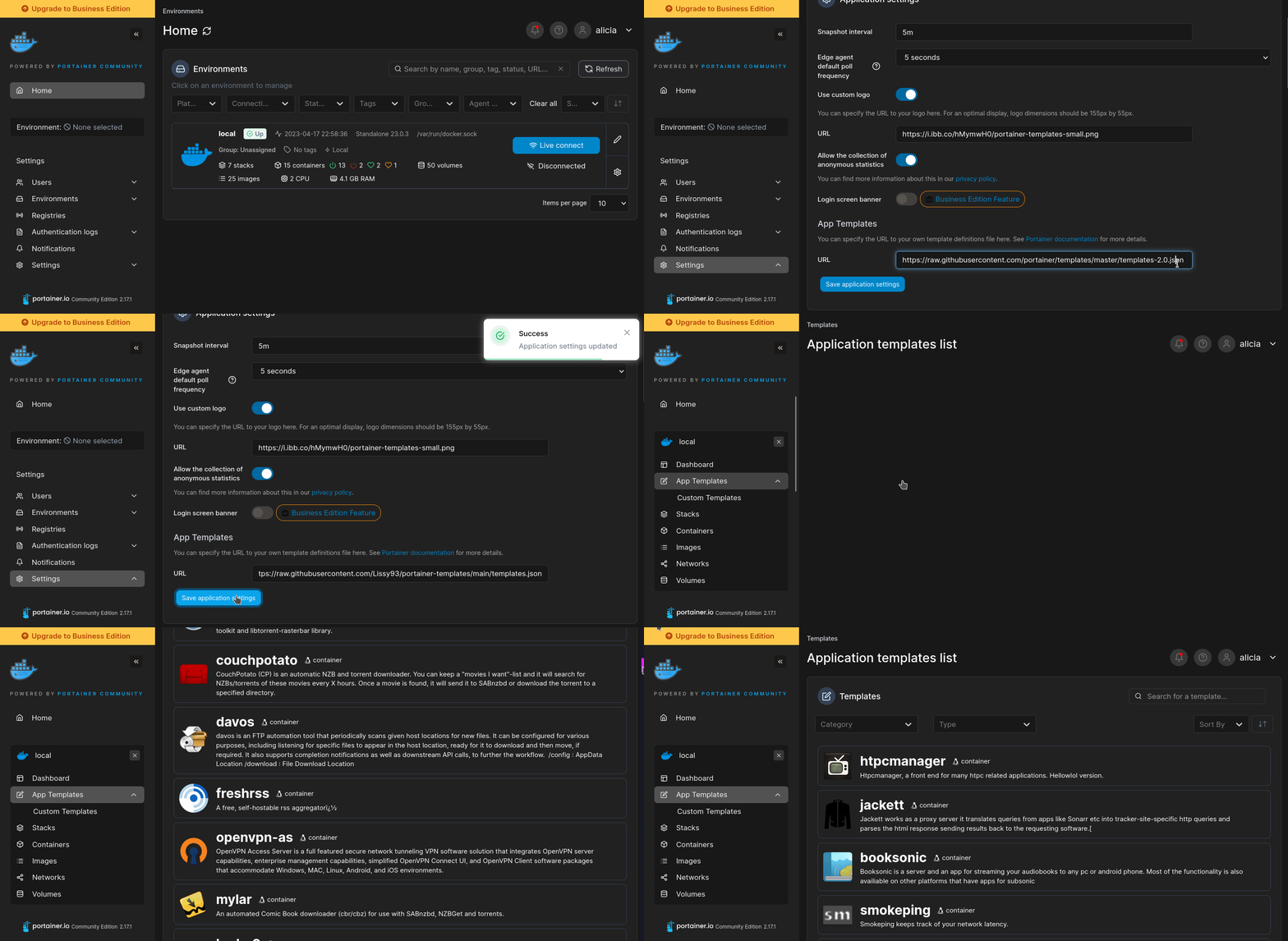
Install on Portainer
Import all app templates into your Portainer instance, for easy 1-click deploys
- Ensure both Docker and Portainer are installed, and up-to-date
- Log into your Portainer web UI
- Under Settings → App Templates, paste the below URL
- Head to Home → App Templates, and the list of apps will show up
- Select SiteWatcher, fill in any config options, and hit Deploy
Template Import URL
https://raw.githubusercontent.com/Lissy93/portainer-templates/main/templates.json
Show Me
Original stackfile
The compose file this template deploys, straight from its repo:
x-sitewatcher: &sitewatcher
  image: ghcr.io/nikkurkov/sitewatcher@sha256:c66f8916f531331b11c732ee389f2d255e68f21707e155e5db76454c54894e8d
  restart: unless-stopped
  environment: &database
    DATABASE_PATH: /data/sitewatcher.db
  volumes:
    - sitewatcher-data:/data

services:
  web:
    <<: *sitewatcher
    command: [sitewatcher, web]
    environment:
      <<: *database
      SITEWATCHER_WEB_BIND: 0.0.0.0
    ports:
      - "127.0.0.1:${SITEWATCHER_PORT:-18080}:8080"
    healthcheck:
      test: [CMD, python, -c, 'import urllib.request; urllib.request.urlopen("http://127.0.0.1:8080/healthz", timeout=3)']
      interval: 15s
      timeout: 5s
      start_period: 10s
  worker:
    <<: *sitewatcher
    command: [sitewatcher, worker]
    depends_on:
      web:
        condition: service_healthy

volumes:
  sitewatcher-data:
Or deploy it directly from the source:
git clone https://github.com/NikKurkov/sitewatcher
cd sitewatcher
docker compose -f deploy/portainer/compose.yaml up -d
More install options in our documentation, or see NikKurkov/sitewatcher for app-specific guidance.
<source media="(prefers-color-scheme: dark)" srcset="assets/brand/logo-dark.svg">
<img src="https://raw.githubusercontent.com/NikKurkov/sitewatcher/HEAD/assets/brand/logo-light.svg" alt="SiteWatcher" width="360">
<source media="(prefers-color-scheme: dark)" srcset="assets/brand/logo-dark.svg">
<img src="https://raw.githubusercontent.com/NikKurkov/sitewatcher/HEAD/assets/brand/logo-light.svg" alt="SiteWatcher" width="360">Checks your websites and lets you know when something goes wrong.
Русский · English

The demo is a public status page. You can see the monitored sites and open the Signal room without signing in. The screenshots above show the signed-in workspace with sample data.
What can I monitor?
- Whether a site opens, what HTTP status it returns, and how long the request takes.
- When its HTTPS certificate and domain registration expire.
- Whether a page still contains the words you expect, or shows signs of defacement.
- Changes to its IP addresses, blocklist and reputation reports, TCP ports, and the route to the server.
Choose the checks and alert channels for each site. Group sites in the dashboard, look back through their check history, and share selected sites or groups on public or private status pages. Alerts can go to email, Telegram, or both.
Some checks use external data. VirusTotal needs an API key, and its reports are cached for 24 hours. The user guide explains how to set up each check and read its results.
Get started
Install Git and Docker with Compose, then run:git clone --depth 1 https://github.com/NikKurkov/sitewatcher.git
cd sitewatcher
docker compose run --rm --build setup
docker compose up -dThe
setup command asks for a username and password. Once both commands finish, open http://127.0.0.1:8080, sign in and click Add domain (the + icon at the top).Basic checks work straight away. You can connect Telegram and other services later. The dashboard is local by default. Leave the computer or server running so checks can continue.
Next steps
The user guide covers installation without Docker, adding websites, understanding results, Telegram, proxies, extra checks, public status pages, updates and backups.Changelog · Report a problem · MIT license
Check the logs first
Nine times out of ten the logs tell you exactly what went wrong.
- In Portainer, go to Containers, click the container, then Logs. Or run
docker logs <container> - Exit codes help too:
137means killed, usually out of memory.126or127means the command inside the image is broken.
Image won't pull
Test the pull directly on the host: docker pull ghcr.io/nikkurkov/sitewatcher@sha256:c66f8916f531331b11c732ee389f2d255e68f21707e155e5db76454c54894e8d
- "manifest unknown" means the tag no longer exists.
- "toomanyrequests" is the Docker Hub rate limit. Log in with
docker loginto raise it. - "no space left on device" means a full disk. Reclaim space with
docker system prune
"exec format error"
This means the image was built for a different CPU architecture than your server.
- Check yours with
uname -m: x86_64 is amd64, aarch64 is arm64. Raspberry Pi and other ARM boards are the usual culprits.
Container keeps restarting
The unless-stopped restart policy relaunches the app after every crash, so the real error can scroll past.
- Check the logs right after a restart, the last few lines before it died are the useful ones.
- Get the exit code with
docker inspect <container> --format '{{.State.ExitCode}}' - Still stuck? Redeploy once with the restart policy set to
noso the failure stays visible.
Stack won't deploy
Compose stacks fail fast on small mistakes, and Portainer shows the reason just above the editor.
- YAML only accepts spaces for indentation, a single tab breaks the whole file.
Raise an issue
Found something which isn't working as it should? Here's how to report it.
- Bug within the app: Open an issue on NikKurkov/sitewatcher
- Template not working: Open an issue on NikKurkov/sitewatcher
- This website not working: Open an issue on lissy93/portainer-templates
A Compose stack
SiteWatcher is a Compose stack, a set of containers (2 of them) defined in one file and brought up together by Portainer, then started and stopped as a single app.
The services
This stack is built from 2 containers that run side by side. Here's each one, with the image it runs and anything it waits for first:
webrunsghcr.io/nikkurkov/sitewatcher@sha256:c66f8916f531331b11c732ee389f2d255e68f21707e155e5db76454c54894e8dworkerrunsghcr.io/nikkurkov/sitewatcher@sha256:c66f8916f531331b11c732ee389f2d255e68f21707e155e5db76454c54894e8d, starts after web
Volumes
A volume is where SiteWatcher keeps its files so they survive an update or a restart. Without one, anything it saves would sit inside the container and vanish the moment it's recreated. This template mounts:
/datakept in thesitewatcher-datavolume Docker manages
Environment variables
Environment variables are the settings you hand over when you deploy, things like a password or a timezone. SiteWatcher takes 2 of them, all with defaults you can leave alone or tweak:
DATABASE_PATH, defaults to/data/sitewatcher.dbSITEWATCHER_WEB_BIND, defaults to0.0.0.0
Restart policy
The restart policy here is unless-stopped, so Docker restarts SiteWatcher after a crash or reboot, but leaves it off when you stop it on purpose. You can change this on the deploy screen. The choices are no (never restart), on-failure (only after a crash), unless-stopped (restart unless you stop it), and always (bring it back no matter what).
Networking
Portainer puts these services on one shared private network, so they can find each other by name (like web) while only the ports above are open to you.
Platform
The platform is linux, the kind of system the container is built to run on. Docker and Portainer handle this on a normal Linux server.
Open source license
SiteWatcher is open source, released under the MIT license. In plain terms the code is out in the open, so you're free to run it and change it to fit what you need.
Portainer app templates
Zooming out, this whole page comes from a Portainer app template: a short recipe telling Portainer how to set SiteWatcher up. Add the template list to Portainer once, then deploying SiteWatcher is a click rather than a wall of config.