
![AsoBeast]() AsoBeast
Stack
App Store Optimization for iOS and Android apps: tracks your App Store and Google Play keyword rankings every day, along with competitors, reviews and a list of fixes ranked by impact. Source: https://github.com/AsoBeast/asobeast
Source details
Configuration
TypeComposelinuxPOSTGRES_PASSWORD=''AUTH_SECRET=''WEB_PUBLIC_URL=http://localhost:3001TRUST_PROXY=0unless-stoppedNotes
openssl rand -hex 32 makes both, and the stack won't start without them. AsoBeast listens on port 3001. Its session cookie is always secure, so sign in over https: put a reverse proxy with a certificate in front and set the address and proxy count above. Chrome and Firefox also accept it on http://localhost:3001, which works from another machine through ssh -N -L 3001:localhost:3001 you@<your-host>. The first account created at /register becomes the owner and registration closes after that, so create it right away. Any other API setting, such as SMTP or OpenAI, goes in as an extra environment variable on the stack. Data lives in the <stack name>_pgdata and <stack name>_redisdata volumes, and the stack needs about 2.5 GB of memory. To update, back up, then pull and redeploy the stack: the compose file on main pins the current release. Docs: docs.asobeast.com/install/published-imagesInstall on Portainer
Import all app templates into your Portainer instance, for easy 1-click deploys
- Ensure both Docker and Portainer are installed, and up-to-date
- Log into your Portainer web UI
- Under Settings → App Templates, paste the below URL
- Head to Home → App Templates, and the list of apps will show up
- Select AsoBeast, fill in any config options, and hit Deploy
Template Import URL
https://raw.githubusercontent.com/Lissy93/portainer-templates/main/templates.json
Show Me
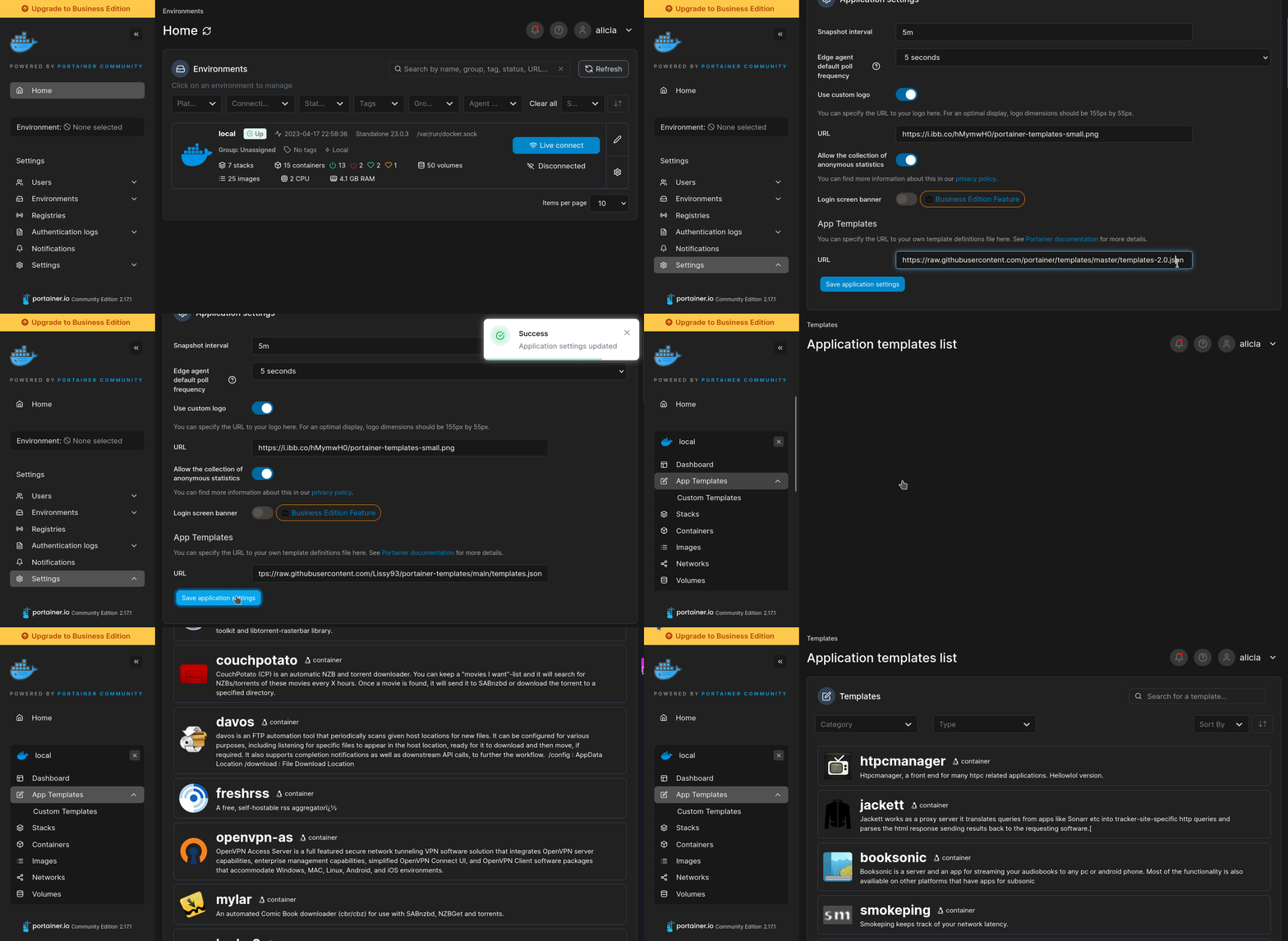
More install options in our documentation, or see AsoBeast/asobeast for app-specific guidance.

AsoBeast
AsoBeast is an open source App Store Optimization (ASO) tool and keyword rank tracker for the Apple App Store and Google Play.
Use the hosted service at asobeast.com, or self-host the open source edition on your own server.
<a href="https://github.com/AsoBeast/asobeast/blob/HEAD/LICENSE"><img alt="License: AGPL-3.0" src="https://img.shields.io/badge/license-AGPL--3.0-blue.svg" /></a>
<a href="https://github.com/AsoBeast/asobeast/releases"><img alt="Latest release" src="https://img.shields.io/github/v/release/AsoBeast/asobeast" /></a>
<a href="https://github.com/AsoBeast/asobeast/actions/workflows/ci.yml"><img alt="CI status" src="https://img.shields.io/github/actions/workflow/status/AsoBeast/asobeast/ci.yml?branch=main&label=CI" /></a>
<a href="https://github.com/AsoBeast/asobeast/commits/main"><img alt="Commits per month" src="https://img.shields.io/github/commit-activity/m/AsoBeast/asobeast" /></a>
<a href="https://github.com/AsoBeast/asobeast/stargazers"><img alt="GitHub stars" src="https://img.shields.io/github/stars/AsoBeast/asobeast?style=flat" /></a>
<a href="https://docs.asobeast.com"><img alt="Documentation" src="https://img.shields.io/badge/docs-docs.asobeast.com-orange" /></a>
<a href="https://asobeast.com"><strong>Website</strong></a> ·
<a href="https://docs.asobeast.com/quickstart"><strong>Quickstart</strong></a> ·
<a href="https://docs.asobeast.com/install/docker-compose"><strong>Self-host</strong></a> ·
<a href="https://docs.asobeast.com/mcp/introduction"><strong>MCP server</strong></a> ·
<a href="https://docs.asobeast.com/api-reference/introduction"><strong>API</strong></a> ·
<a href="https://docs.asobeast.com/support"><strong>Support</strong></a> ·
<a href="https://github.com/AsoBeast/asobeast/blob/HEAD/CHANGELOG.md"><strong>Changelog</strong></a>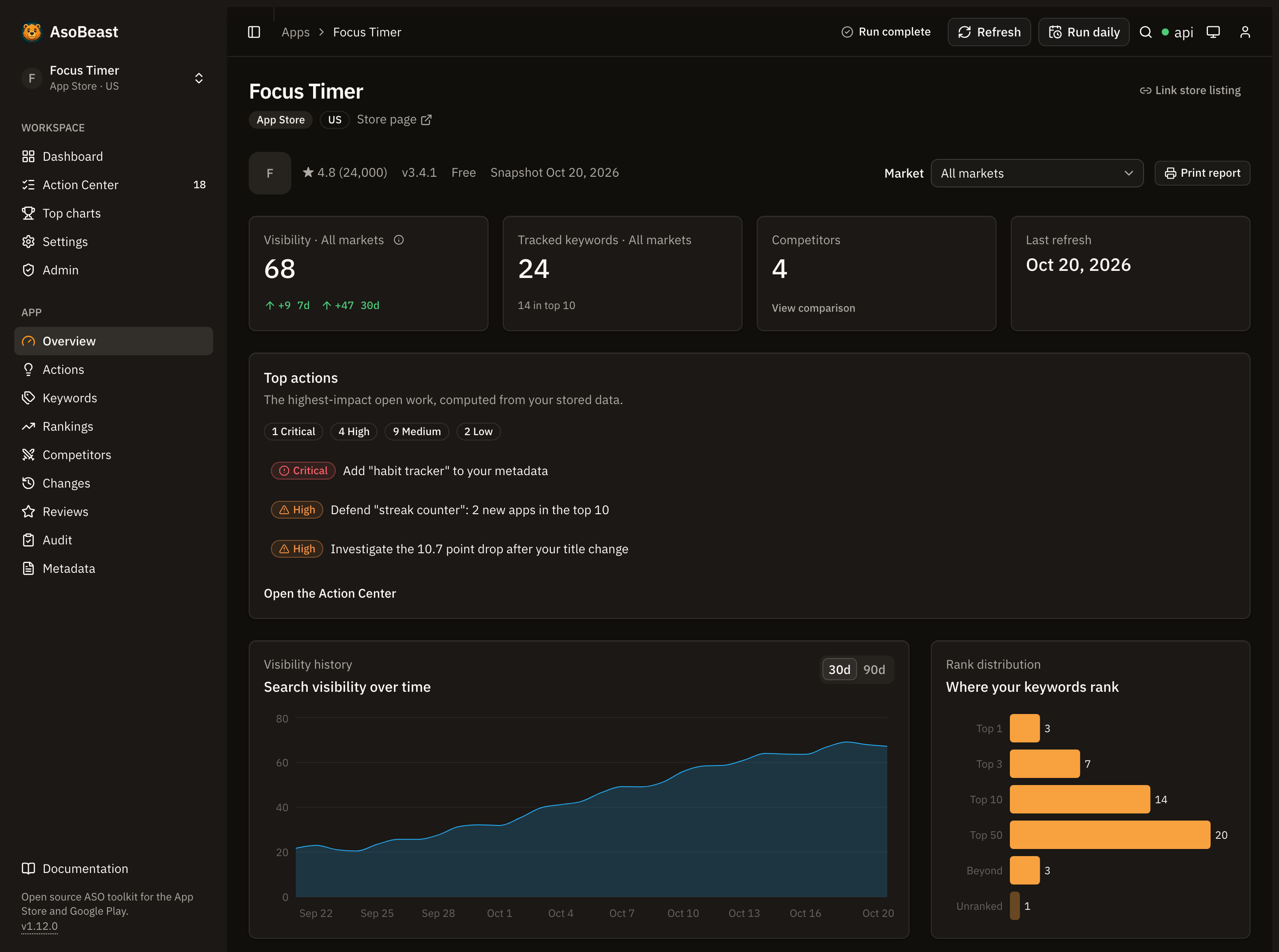
What is AsoBeast?
AsoBeast is an App Store Optimization (ASO) tool and keyword rank tracker for the Apple App Store and Google Play. It imports a listing, tracks keyword rankings daily to a depth of 200, watches competitors, reviews and metadata, and turns that history into a prioritized queue of ASO work. This repository is the free, open source edition that you run on your own server, and the hosted service at asobeast.com runs the same code.Every store request runs on the machine hosting AsoBeast as an ordinary public search or page request, so Apple and Google see each tracked phrase the way they see any search. You sign up with no ASO vendor, buy no API key, and share your keyword list with nobody. Beyond those store requests, your data stays in your deployment unless you explicitly enable an outbound integration such as webhook alerts, email, OpenAI assistance, Apple Ads search popularity or store status updates.
Who is AsoBeast for?
AsoBeast is built for people who ship apps and want their ASO data to stay theirs: indie developers, small studios and agencies tracking a handful of apps across several storefronts. It fits if you want ASO tracking without a per keyword subscription, need the data on your own infrastructure, or want to query your ASO history from an agent or a script instead of a dashboard. It collects from the public store endpoints at a deliberately modest rate, so it suits a portfolio measured in apps rather than hundreds. See who AsoBeast is for.Why AsoBeast?
- No accounts, no vendor API keys. AsoBeast collects from the public store endpoints at a deliberately modest rate. You need Docker and nothing else.
- Your keyword list stays yours. It lives in your database and is never sent to an ASO vendor, so no competitor intelligence product assembles it from your searches. The stores only ever see one search at a time.
- Both stores as one tracking entity. One app row tracks keywords across many storefronts, so
usanddeare markets on the same listing rather than two subscriptions. - Every score shows its evidence. Popularity and difficulty carry their source, calculation version, capture date and confidence, so you can argue with a number instead of trusting it.
- Deterministic recommendations. Seventeen rules turn stored history into an explainable work queue. AI is optional garnish that can summarize an action, never invent or reorder one.
- AGPL-3.0, no open core. Every feature the hosted service runs is in this repository.
Features
| Feature | What it does |
|---|---|
| Two live stores | Import an Apple App Store or Google Play URL, snapshot the metadata, refresh on demand and diff every field |
| Keyword tracking | Track any validated storefront, see daily positions and history, bulk edit, and keep the private 100 character iOS keyword field by hand |
| Market suggestions | Reads the languages your listing ships and suggests the storefronts that read them, with the daily request cost, then seeds a chosen market with the keywords of its own listing |
| Rank checks to depth 200 | One search per keyword and market serves your app and all of its competitors, so competitor tracking costs no extra requests |
| Transparent scoring | Popularity and difficulty with provenance and confidence, plus opportunity derived on read |
| SERP and category intelligence | Retained SERP snapshots, volatility, entrants and movers, and top charts by country and category with movement, trending apps and chart follows |
| Competitor discovery | Find competitors from live search results, compare listings and find keyword gaps |
| Reviews and change detection | Sync reviews and rating history, draft replies to them with AI and post them to the store, mine review language for keyword ideas, and detect owned and competitor metadata changes |
| Store funnel | Optionally connect an App Store Connect key or a Google Play service account and see each store's own funnel by market beside your rankings and every listing change: impressions, product page views, Get taps and conversion with history back to 2024 on the App Store, store listing visitors, acquisitions and installs per search term on Google Play |
| ASO audit and metadata workbench | A deterministic audit rubric with history, store metadata lints and strategic keyword buckets |
| ASO Action Center | Seventeen deterministic rules produce recommendations with a priority, an estimated impact, the evidence behind them, a deep link, a full lifecycle and a verified outcome |
| Portfolio analysis | Group linked listings across stores and countries, compare group visibility and generate weekly digests |
| Alerts | Signed webhooks or SMTP email for rank, SERP, metadata, review and new action events, with resumable batched delivery |
| MCP server | 37 read tools, plus 7 opt-in tools that change keywords, competitors, actions and annotations, over stdio or a remote endpoint, so Claude Code, Claude Desktop, Cursor, VS Code and other MCP clients can work with your instance |
A guide for each of these lives in the documentation.
Quick start
One-click deploy

Runs the published images on Railway with PostgreSQL and Redis, and generates every secret for you. See deploy on Railway.
Docker Compose
You need Docker with Compose, roughly 2 GB of memory and 5 GB of disk.git clone https://github.com/AsoBeast/asobeast.git
cd asobeast
printf 'POSTGRES_PASSWORD=%s\nAUTH_SECRET=%s\n' "$(openssl rand -hex 32)" "$(openssl rand -hex 32)" > .env
chmod 600 .env
docker compose up --build -d --waitOpen http://localhost:3001 and create the owner account. Registration closes automatically once it exists. Safari does not keep the session cookie over plain HTTP, so use Chrome or Firefox for a local evaluation, or see signing in returns to the sign in form. Import a store URL and keyword tracking starts immediately.
Prefer published images to a build?
docker-compose.pull.yml runs the same stack from GHCR without a clone:curl -fsSLO https://raw.githubusercontent.com/AsoBeast/asobeast/main/docker-compose.pull.yml
printf 'POSTGRES_PASSWORD=%s\nAUTH_SECRET=%s\n' "$(openssl rand -hex 32)" "$(openssl rand -hex 32)" > .env
chmod 600 .env
docker compose -f docker-compose.pull.yml up -d --waitFull walkthrough: quickstart. Image tags, pinning and upgrades: run a published release.
Connect an AI agent
Every instance serves a Model Context Protocol endpoint. Create a personal API token on the Integrations page, then point Claude Code at it:claude mcp add --transport http asobeast https://your-host/api/backend/mcp --header "Authorization: Bearer asob_…"Ask it which keywords dropped this week, which competitor entered the top 10 or what the Action Center wants done first. Configuration for Claude Desktop, Cursor, VS Code, Gemini CLI, Windsurf and the local stdio server is in set up the MCP server, and MCP recipes has prompts to start from.
How AsoBeast compares
| AsoBeast (self-hosted) | Subscription ASO platforms | |
|---|---|---|
| Where store requests run | Your machine | Their infrastructure |
| Who sees your keyword list | You | The vendor |
| Cost model | Your hosting bill | Per seat, per app or per keyword |
| Keyword history | Yours, retained on your terms | Ends when the subscription does |
| Score methodology | Published, versioned, inspectable | Usually proprietary |
| Extending it | Fork it, it is AGPL-3.0 | File a feature request |
A hosted AsoBeast is a separate product built from this same repository. Self-hosted installations get every feature.
Tech stack
pnpm and Turborepo, TypeScript strict throughout, NestJS, Prisma, PostgreSQL 18, BullMQ, Redis 8, Next.js with Tailwind, Docker Compose.Contributor setup, architecture and the module map: local development and how AsoBeast works.
Configuration
Every environment variable, with defaults and what each one changes, is documented in the configuration reference.apps/api/.env.example and apps/web/.env.example are the authoritative lists in the repository.A default installation needs two variables,
POSTGRES_PASSWORD and AUTH_SECRET. Everything else has a working default.FAQ
What is App Store Optimization?
App Store Optimization is the practice of improving how an app ranks and converts in App Store and Google Play search. It covers keyword targeting in indexed metadata fields, competitor positioning, ratings and reviews, and category performance.Does AsoBeast need an App Store Connect or Google Play Console account?
No. AsoBeast reads public store data, so you can track any app including your competitors, and it never needs an ASO vendor API key. Connecting an App Store Connect key or a Google Play service account is optional: it adds the store's own visits, downloads and conversion for your apps, and the key is sealed at rest. See the store funnel.Which app stores does AsoBeast support?
Both the Apple App Store and Google Play. Apple indexes a title, a subtitle and a private 100 character keyword field. Google Play indexes a title, an 80 character short description and a long description, so subtitle and keyword field stay Apple only concepts. See stores.How often does it check rankings?
Once a day by default, on a UTC cron you control. Rank checks capture position to a depth of 200, and a position ofnull means checked and not found within that depth rather than zero. See positions.Can I track more than one country?
Yes. An app is imported once, and keyword tracking carries its own storefront, so one listing can track keywords in many markets at once. Each added market multiplies daily store requests, and the settings page shows a budget card that estimates the fan-out. See countries and markets.Is any of my data sent anywhere?
Only the store requests themselves, which send each tracked phrase to the App Store or Google Play as an ordinary search, from your own address or through a proxy provider if you configure one. Beyond those, webhook alerts, SMTP email, OpenAI assistance, Apple Ads search popularity and the store status poll are the only outbound integrations, and each is off until configured. There is no telemetry. See what leaves your deployment.Can I connect AsoBeast to Claude or another AI agent?
Yes. AsoBeast ships a Model Context Protocol server with 37 read tools, available as a local stdio process or as a remote endpoint on your instance. Every connection needs a personal API token and reads by default. Seven more tools that change keywords, competitors, actions and annotations are listed only to a token you give the write scope. See MCP.Is AsoBeast really free?
The software is, entirely. It is AGPL-3.0 with no open core and no feature held back for a commercial edition, so a self-hosted installation has everything. A hosted service built from this same repository is charged for the hosting it uses, never for features. If you run a modified version as a network service, the AGPL asks you to offer that modified source to its users.Documentation
| Topic | Link |
|---|---|
| Quickstart and first import | docs.asobeast.com/quickstart |
| Self-hosting with Docker Compose | install/docker-compose |
| Configuration reference | configuration/reference |
| Concepts: scoring, positions, countries | concepts |
| Guides: keywords, competitors, alerts | guides |
| Operations: backups, restore, upgrades | operations |
| Troubleshooting and support | support |
| API reference and OpenAPI | api-reference |
| MCP tools | mcp/tools |
| The whole site for an LLM | llms.txt and llms-full.txt |
Limitations
Worth knowing before you rely on it:- Scores are store-specific estimates. Popularity and difficulty come from different public evidence on each store, so the numbers are not comparable across stores and are not a substitute for first-party acquisition data.
- Scrapers can break. AsoBeast reads public endpoints. When a store changes one, a parser can fail. Failures fail the job, which BullMQ retries with backoff, and never take down request handling.
- Store rate limits cap capacity before hardware does. The public endpoints tolerate only modest request rates per address, which is what limits how many keyword markets one instance can track. See capacity and limits.
- Operations are yours. Backups, TLS, secret rotation, monitoring and upgrades are the operator's responsibility. Verify a restore before you rely on a backup.
Roadmap
The1.x line is current, and the changelog names the latest release. What remains open:- A per-user permission model finer than owner and member, and one account in several workspaces.
- Better popularity calibration using licensed or first-party acquisition data.
- Per-market reviews, category ranks and ratings history. Listings and their screenshot captions are already captured and switched per market.
- More MCP write tools behind the same opt-in, one reversible change at a time.
Release policy and the
1.x compatibility promise: upgrade and roll back.Contributing
Pull requests are welcome. Read CONTRIBUTING.md first for the commit conventions, the compatibility promise and how the test suites are run. Bugs go to GitHub issues, while questions and ideas go to GitHub Discussions. Security reports go through SECURITY.md, never a public issue.License
This repository's source code is available under the AGPL-3.0 license.Check the logs first
Nine times out of ten the logs tell you exactly what went wrong.
- In Portainer, go to Containers, click the container, then Logs. Or run
docker logs <container> - Exit codes help too:
137means killed, usually out of memory.126or127means the command inside the image is broken.
Container keeps restarting
The unless-stopped restart policy relaunches the app after every crash, so the real error can scroll past.
- Check the logs right after a restart, the last few lines before it died are the useful ones.
- Get the exit code with
docker inspect <container> --format '{{.State.ExitCode}}' - Still stuck? Redeploy once with the restart policy set to
noso the failure stays visible.
Required settings are blank
POSTGRES_PASSWORD, AUTH_SECRET have no default value, and asobeast may crash or misbehave if left empty.
- Fill them in on the deploy screen before hitting deploy.
Stack won't deploy
Compose stacks fail fast on small mistakes, and Portainer shows the reason just above the editor.
- YAML only accepts spaces for indentation, a single tab breaks the whole file.
Raise an issue
Found something which isn't working as it should? Here's how to report it.
- Bug within the app: Open an issue on AsoBeast/asobeast
- Template not working: Open an issue on AsoBeast/asobeast
- This website not working: Open an issue on lissy93/portainer-templates
A Compose stack
AsoBeast is a Compose stack, a set of containers defined in one file and brought up together by Portainer, then started and stopped as a single app.
Environment variables
Environment variables are the settings you hand over when you deploy, things like a password or a timezone. AsoBeast takes 4 of them, and 2 need a value before it'll start properly:
POSTGRES_PASSWORD, needs a value. Generate one with: openssl rand -hex 32. It goes into the database URL unencoded, so characters such as # @ / : % break the connection. Keep it the same on every redeploy, or the API can't reach its database.AUTH_SECRET, needs a value. Signs sign-in sessions. Generate one with: openssl rand -hex 32. The API refuses to start when it is shorter than 32 characters.WEB_PUBLIC_URL, defaults tohttp://localhost:3001. Builds the links in alert, confirmation and password reset emails. Use your https address when AsoBeast sits behind a reverse proxy.TRUST_PROXY, pick one of0, 1, 2. The number of proxies you control between the internet and AsoBeast, so rate limits see each visitor's own address.
Restart policy
The restart policy here is unless-stopped, so Docker restarts AsoBeast after a crash or reboot, but leaves it off when you stop it on purpose. You can change this on the deploy screen. The choices are no (never restart), on-failure (only after a crash), unless-stopped (restart unless you stop it), and always (bring it back no matter what).
Networking
Nothing custom is set, so AsoBeast sits on Docker's default bridge network: its own private space that reaches the outside world only through the ports it publishes.
Container name
Once it's deployed, Portainer names the container asobeast. That's what you'll spot in the containers list and use in commands like docker logs asobeast.
Platform
The platform is linux, the kind of system the container is built to run on. Docker and Portainer handle this on a normal Linux server.
Open source license
AsoBeast is open source, released under the AGPL-3.0 license. In plain terms the code is out in the open, so you're free to run it and change it to fit what you need.
Portainer app templates
Zooming out, this whole page comes from a Portainer app template: a short recipe telling Portainer how to set AsoBeast up. Add the template list to Portainer once, then deploying AsoBeast is a click rather than a wall of config.