
![Paperless-AI]() Paperless-AI
Container
AI sidekick for Paperless-ngx that reads each new document and fills in its title, tags, correspondent, type and date, plus a chat for asking questions across your whole archive. Works with OpenAI, Claude, Ollama and other compatible APIs. Source: https://github.com/clusterzx/paperless-ai
Image details
Source details
Configuration
TypeContainerlinuxclusterzx/paperless-ai:latest3900:3000/tcp/app/dataunless-stoppedTemplate by NotAFlightRisk
Report issueNotes
http://<your-host>:3900 straight away, since whoever gets to the setup wizard first makes the login. It asks for your Paperless-ngx address and an API token (in Paperless, your profile --> API Auth Token), then an AI provider. Use the host's IP rather than localhost for Paperless or a local Ollama, as localhost means the container itself. Out of the box it works through your WHOLE archive every 30 minutes, so with a paid API you'll want "Only process documents with specific tags" switched on first. Settings, history and the search index live in the /app/data volume, along with a 130 MB embedding model it downloads from Hugging Face the first time it indexes. Docs: github.com/clusterzx/paperless-aiStandalone Install
Select an install method, to see config/commands for deploying Paperless-AI
Install on Portainer
Import all app templates into your Portainer instance, for easy 1-click deploys
- Ensure both Docker and Portainer are installed, and up-to-date
- Log into your Portainer web UI
- Under Settings → App Templates, paste the below URL
- Head to Home → App Templates, and the list of apps will show up
- Select Paperless-AI, fill in any config options, and hit Deploy
Template Import URL
https://raw.githubusercontent.com/Lissy93/portainer-templates/main/templates.json
Show Me
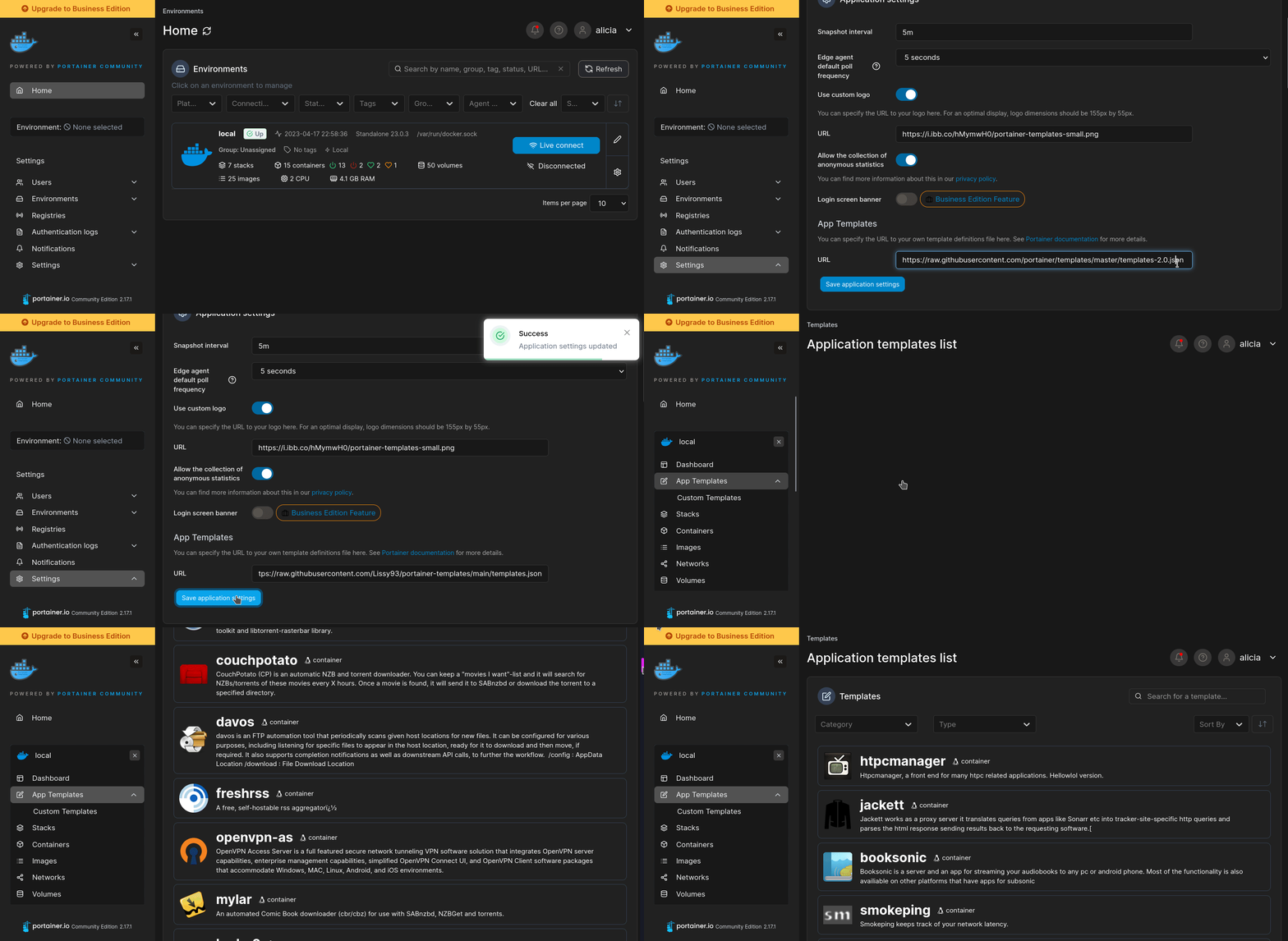
More install options in our documentation, or see clusterzx/paperless-ai for app-specific guidance.




Paperless-AI
An automated document analyzer for Paperless-ngx using OpenAI API, Ollama and all OpenAI API compatible Services to automatically analyze and tag your documents. \ It features: Automode, Manual Mode, Ollama and OpenAI, a Chat function to query your documents with AI, a modern and intuitive Webinterface. \ \ Following Services and OpenAI API compatible services have been successfully tested:- Ollama
- OpenAI
- DeepSeek.ai
- OpenRouter.ai
- Perplexity.ai
- Together.ai
- VLLM
- LiteLLM
- Fastchat
- Gemini (Google)
- ... and there are possibly many more
Features
Automated Document Management
- Automatic Scanning: Identifies and processes new documents within Paperless-ngx.
- AI-Powered Analysis: Leverages OpenAI API and Ollama (Mistral, Llama, Phi 3, Gemma 2) for precise document analysis.
- Metadata Assignment: Automatically assigns titles, tags, documenttype and correspondent details.
Advanced Customization Options
- Predefined Processing Rules: Specify which documents to process based on existing tags. (Optional) 🆕
- Selective Tag Assignment: Use only selected tags for processing. (Disables the prompt dialog) 🆕
- Custom Tagging: Assign a specific tag (of your choice) to AI-processed documents for easy identification. 🆕
Manual Mode
- AI-Assisted Analysis: Manually analyze documents with AI support in a modern web interface. (Accessible via the
/manualendpoint) 🆕
Interactive Chat Functionality
- Document Querying: Ask questions about your documents and receive accurate, AI-generated answers. 🆕
Installation
Visit the Wiki for installation:\ [Click here for Installation](https://github.com/clusterzx/paperless-ai/wiki/2.-Installation) -------------------------------------------Docker Support
The application comes with full Docker support:- Automatic container restart on failure
- Health monitoring
- Volume persistence for database
- Resource management
- Graceful shutdown handling
Development
To run the application locally without Docker:- Install dependencies:
npm install- Start the development server:
npm run testContributing
- Fork the repository
- Create your feature branch (
git checkout -b feature/AmazingFeature) - Commit your changes (
git commit -m 'Add some AmazingFeature') - Push to the branch (
git push origin feature/AmazingFeature) - Open a Pull Request
License
This project is licensed under the MIT License - see the LICENSE file for details.Acknowledgments
- Paperless-ngx for the amazing document management system
- OpenAI API
- The Express.js and Node.js communities for their excellent tools
Support
If you encounter any issues or have questions:- Check the Issues section
- Create a new issue if yours isn't already listed
- Provide detailed information about your setup and the problem
Roadmap (DONE)
Serve Paperless-AI on your own domain behind Caddy, Nginx or Traefik. Fill in your domain and copy the result. It's a starting point, some apps need their own base URL or extra headers set too.
Proxying paperless-ai.example.com to http://paperless-ai:3000
Add this to your Caddyfile
paperless-ai.example.com {
	reverse_proxy http://paperless-ai:3000
}Check the logs first
Nine times out of ten the logs tell you exactly what went wrong.
- In Portainer, go to Containers, click the container, then Logs. Or run
docker logs paperless-ai - Exit codes help too:
137means killed, usually out of memory.126or127means the command inside the image is broken.
Port already in use
If deployment fails with "Bind for 0.0.0.0:3900 failed: port is already allocated", something else on your server is using that port.
- Find what's using it:
sudo ss -tlnp | grep :3900 - Stop the other service, or pick a different host port. In
3900:3000only the left number is yours to change, the right one belongs to the app.
Running but the page won't load
The container is up but nothing appears in your browser.
- Use your server's real IP:
http://your-server-ip:3900. The 0.0.0.0 link Portainer shows isn't a real address. - Give it a minute after first deploy, paperless-ai can take a while to initialise.
- Make sure your firewall allows the port, e.g.
sudo ufw allow 3900
Image won't pull
Test the pull directly on the host: docker pull clusterzx/paperless-ai:latest
- "manifest unknown" means the tag no longer exists. This template uses
latest, so try pinning a specific version instead. - "toomanyrequests" is the Docker Hub rate limit. Log in with
docker loginto raise it. - "no space left on device" means a full disk. Reclaim space with
docker system prune
"exec format error"
This means the image was built for a different CPU architecture than your server.
- This image supports:
amd64, arm64, arm64/v8 - Check yours with
uname -m: x86_64 is amd64, aarch64 is arm64. Raspberry Pi and other ARM boards are the usual culprits.
Container keeps restarting
The unless-stopped restart policy relaunches the app after every crash, so the real error can scroll past.
- Check the logs right after a restart, the last few lines before it died are the useful ones.
- Get the exit code with
docker inspect paperless-ai --format '{{.State.ExitCode}}' - Still stuck? Redeploy once with the restart policy set to
noso the failure stays visible.
Raise an issue
Found something which isn't working as it should? Here's how to report it.
- Bug within the app: Open an issue on clusterzx/paperless-ai
- Template not working: Open an issue on NotAFlightRisk/portainer-templates-extras
- This website not working: Open an issue on lissy93/portainer-templates
A single container
Paperless-AI runs as one container, the simplest kind of app here. Just the one image to pull and nothing else wired up alongside it.
The app image
An image is the app packed up ready to go, everything Paperless-AI needs bundled into one download. This template pulls clusterzx/paperless-ai:latest, which Docker fetches once (about 2.2 GB) and then starts your own copy from.
Where the image comes from
Docker pulls its images from registries, public libraries of ready-built apps. Paperless-AI's comes from Docker Hub, published by clusterzx.
Version tags
The bit after the colon in the image name is the version tag. Here it's latest, which always points at the newest build, so a redeploy can bump you to a newer release without you asking. Newest right now is 4.1.0-cuda. Pin a specific tag if you would rather stay on one version.
Which machines it runs on
Every image is built for particular CPU types. This one ships for amd64, arm64, arm64/v8, so it runs on both regular x86 servers and ARM boards like a Raspberry Pi.
Ports
A port is the door the app answers on. A mapping like 3900:3000 means it's reachable on port 3900 of your server, where the left number is yours to change and the right one belongs to the app. Once it's running, open http://your-server-ip:3900 in a browser. It opens:
3900:3000, likely the web interface
Volumes
A volume is where Paperless-AI keeps its files so they survive an update or a restart. Without one, anything it saves would sit inside the container and vanish the moment it's recreated. This template mounts:
/app/dataas a volume Docker manages for you
Restart policy
The restart policy here is unless-stopped, so Docker restarts Paperless-AI after a crash or reboot, but leaves it off when you stop it on purpose. You can change this on the deploy screen. The choices are no (never restart), on-failure (only after a crash), unless-stopped (restart unless you stop it), and always (bring it back no matter what).
Networking
Nothing custom is set, so Paperless-AI sits on Docker's default bridge network: its own private space that reaches the outside world only through the ports it publishes.
Container name
Once it's deployed, Portainer names the container paperless-ai. That's what you'll spot in the containers list and use in commands like docker logs paperless-ai.
Platform
The platform is linux, the kind of system the container is built to run on. Docker and Portainer handle this on a normal Linux server.
Open source license
Paperless-AI is open source, released under the MIT license. In plain terms the code is out in the open, so you're free to run it and change it to fit what you need.
Portainer app templates
Zooming out, this whole page comes from a Portainer app template: a short recipe telling Portainer how to set Paperless-AI up. Add the template list to Portainer once, then deploying Paperless-AI is a click rather than a wall of config.