
![Aldine]() Aldine
Aldine
Stack
Collaborative LaTeX editor you host yourself, an alternative to Overleaf. Real-time editing, a git repository per project, and a sandboxed TeX Live compiler. Source: https://github.com/trahloff/Aldine
Source details
Notes
http://<your-host>:8080. The stack has two containers: the app, and a compiler that runs TeX Live on an internal network with no internet access, all Linux capabilities dropped and bounded memory and processes. The compiler image is about 2.4 GB to download, so the first deploy takes a while. There is no login by default, so anyone who can reach the port can open every project; to require accounts, edit the stack and add AUTH_ENABLED: "1" under the app service's environment. Docs: deploy/README.mdServices
app
Configuration
Imageghcr.io/trahloff/aldine-app:${ALDINE_VERSION:-1.2.0}8080:3000/data : aldine-data/secrets : aldine-secretsunless-stoppedcompiler
Configuration
Imageghcr.io/trahloff/aldine-compiler:${ALDINE_VERSION:-1.2.0}${ALDINE_TEXLIVE:-}/data : aldine-dataunless-stoppedStandalone Install
Select an install method, to see config/commands for deploying Aldine
Install on Portainer
Import all app templates into your Portainer instance, for easy 1-click deploys
- Ensure both Docker and Portainer are installed, and up-to-date
- Log into your Portainer web UI
- Under Settings → App Templates, paste the below URL
- Head to Home → App Templates, and the list of apps will show up
- Select Aldine, fill in any config options, and hit Deploy
Template Import URL
https://raw.githubusercontent.com/Lissy93/portainer-templates/main/templates.json
Show Me

Original stackfile
The compose file this template deploys, straight from its repo:
# Minimal Aldine: prebuilt images, two services, done. This is all you need.
# Everything else (building from source, auth/SSO/AI/email options, TLS,
# Postgres/Redis) lives in docker-compose.full.yml. Both files share the same
# project name and volumes, so you can switch between them without losing data.
name: aldine

services:
  app:
    image: ghcr.io/trahloff/aldine-app:${ALDINE_VERSION:-1.2.0}
    ports:
      - "8080:3000"
    volumes:
      - aldine-data:/data
      - aldine-secrets:/secrets
    networks:
      - frontend
      - backend
    init: true # reap orphaned git/compile children (node runs as PID 1 otherwise)
    restart: unless-stopped

  compiler:
    image: ghcr.io/trahloff/aldine-compiler:${ALDINE_VERSION:-1.2.0}${ALDINE_TEXLIVE:-}
    volumes:
      - aldine-data:/data
    # Hardening: no external egress (internal network), drop all Linux caps, no
    # privilege escalation, bounded memory and PIDs. Packages are baked into the
    # image at build time, so the compiler never needs the network. LaTeX
    # processes untrusted input; keep these. (docker-compose.full.yml adds a CPU
    # cap on top; it is left out here because `cpus:` above the host's core
    # count makes the container refuse to start.)
    networks:
      - backend
    mem_limit: 2g
    pids_limit: 256
    cap_drop:
      - ALL
    security_opt:
      - no-new-privileges
    init: true # reap orphaned pdflatex/biber children left by killed latexmk runs
    restart: unless-stopped

networks:
  frontend: {}
  backend:
    internal: true # the compiler has no route to the internet

volumes:
  aldine-data:
  aldine-secrets:
Or deploy it directly from the source:
git clone https://github.com/trahloff/Aldine
cd Aldine
docker compose -f docker-compose.yml up -d
More install options in our documentation, or see trahloff/Aldine for app-specific guidance.
Aldine
Write LaTeX together. Fast, versioned, yours.



Aldine is a self-hosted, open-source collaborative LaTeX editor and an Overleaf alternative. It is slim and built for speed: real-time multi-cursor editing, every project a real git repo with branches, native Zotero, ~2s warm recompiles. Two containers and flat files by default: no database to migrate, nothing to babysit.
Homepage · Try the live demo (resets nightly) · Quick start · How Aldine compares · Screenshots · Self-hosting · Contributing
Guides on aldine.dev: Self-hosting Overleaf (Community Edition, Server Pro) compared with Aldine · Git with Overleaf and a git-native alternative · A LaTeX MCP server for Claude

Live collaboration, a recompile, and a SyncTeX jump, in one real recording (compile wait trimmed):

Status: Aldine reached 1.0 in October 2026, three months after its first release. Within 1.x an upgrade starts on older data with no manual step, and stable settings, MCP tools and the plugin API keep their names until 2.0 (docs/STABILITY.md). That is a promise about upgrades, not a long track record. It compiles real papers daily and every headline feature has a Playwright end-to-end test; CI runs those on every pull request, next to typecheck, build and the integration suites. Expect rough edges, and file issues generously.
Features
- Bring your Overleaf projects, and take them with you: download any Overleaf project as a ZIP,
- Real-time collaboration: CRDT-based (Yjs), multi-cursor with live
- Git-native with branches: every project is a real git repository.
- Fast, sandboxed compiles: TeX Live + latexmk with persistent
- GitHub/GitLab/Gitea/Forgejo sync: import from GitHub, GitLab, Gitea or
- Native Zotero integration: link your whole Zotero library or a single
.bib in sync with cheap
version-aware refresh, insert citations from a search panel or via \cite{
autocomplete.- Claude as a collaborator (optional,
ALDINE_MCP=1): Aldine has a
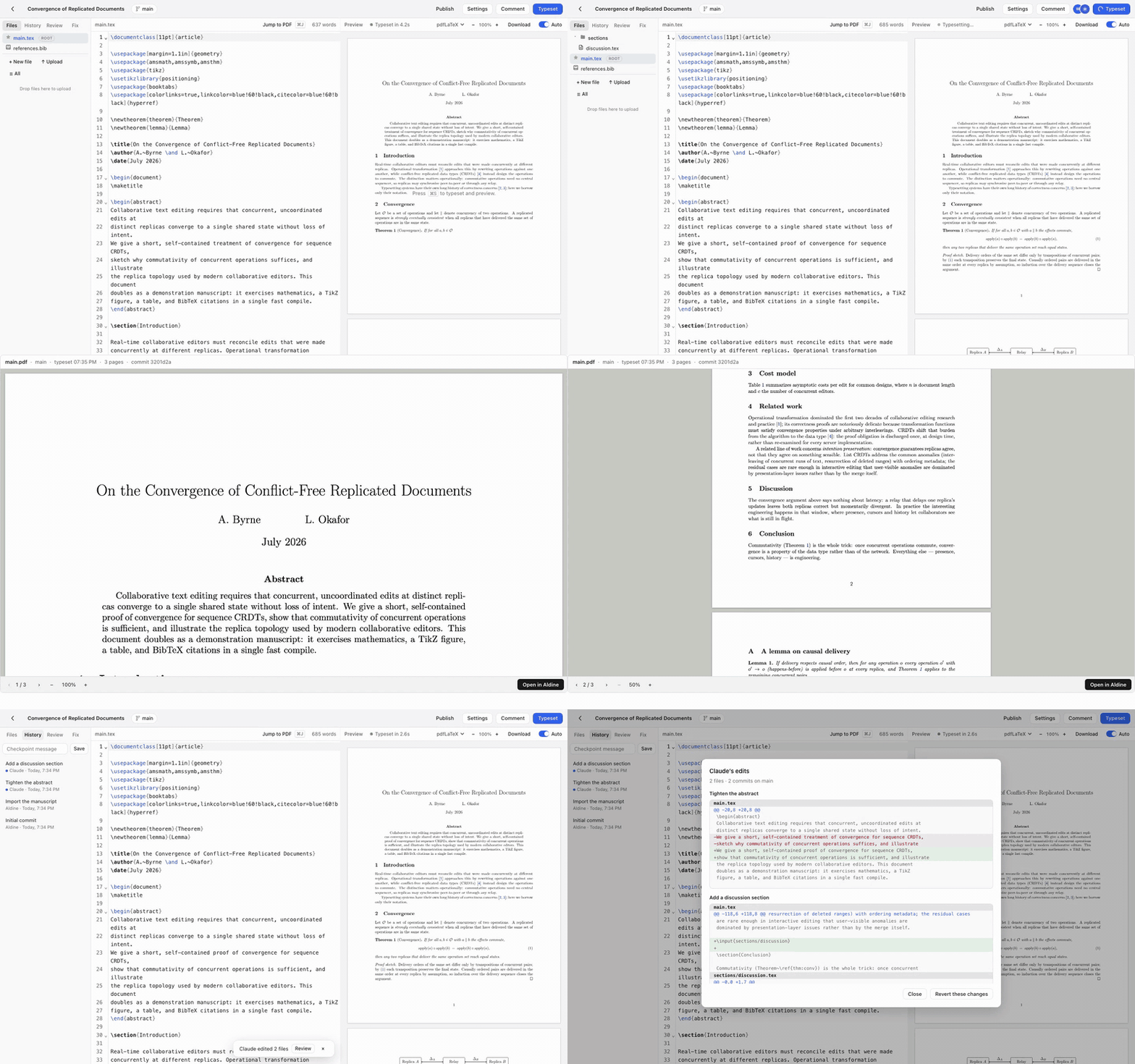
Everything else: visual editor, review mode, AI error fix, SyncTeX, plugins, auth, scaling…
- Visual editing mode: LaTeX renders as formatted text while the source
\label,
alignment, a comment or a line break inside, opens as source), editable
tables, inline tracked changes from review suggestions,
paste-rich-text-to-LaTeX, image-previewing figure chips, and an outline.
From the keyboard, Ctrl+Enter (⌘Enter on a Mac) with the caret in a
formula's or a table's source opens its editor. Cursor-reveal shows raw
source under the caret, including a remote collaborator's. Switch between
Source and Visual in the toolbar or the command palette (⌘K); a .tex file
opens as source until you pick Visual, and your browser remembers the last
choice.- Review mode: select text and leave an anchored, threaded comment;
- AI error fix (optional, BYO key): on a failed typeset, get a
OPENROUTER_API_KEY,
OPENAI_API_KEY, or ANTHROPIC_API_KEY on the server to enable (that
precedence order if several are set; ALDINE_AI_MODEL overrides the model).
With ALDINE_AI_AUTOFIX=1 a failed typeset opens the Fix tab and runs the
diagnosis without a click, once per new error. The key stays server-side and never reaches the browser. Unset the key and
Aldine is a 100% AI-free editor.- Find and cite papers without leaving the editor: search the literature
\cite (no account, free public APIs).- SyncTeX both ways: double-click the PDF to jump to source; ⌘J to jump
- Plugin system: manifest + ES module plugins add sidebar panels and
- Templates & import: article, IAC conference paper, beamer and
TEMPLATE_REPOS). Or import an existing project from an Overleaf ZIP.- Editor niceties: auto-typeset on idle, live whole-document word count,
- Search and replace across the project: every text file on the branch,
- Multi-user auth (optional): set
AUTH_ENABLED=1for login, per-project
ALDINE_SSO_ONLY=1 disables passwords entirely. Off by default
(single-tenant); the collab socket is access-checked.
[email protected] opens /admin: accounts, active
users (7 / 30 days, editing now), projects, compile time. Metadata only.
No compose file passes this variable through; add it under environment:
of the app service.- Scales when you need it: flat-file storage by default; set
DATABASE_URL for Postgres and REDIS_URL for shared rate limits and
cross-node collab events. One app node is still the supported topology;
docs/SCALING.md says exactly what is and isn't built.- Apple-style UI: system fonts, hairline borders, light & dark mode,
Quick start
No clone, no build: save this asdocker-compose.yml and run docker compose up -d:name: aldine
services:
app:
image: ghcr.io/trahloff/aldine-app:${ALDINE_VERSION:-1.2.0}
ports:
- "8080:3000"
volumes:
- aldine-data:/data
- aldine-secrets:/secrets
networks: [frontend, backend]
init: true
restart: unless-stopped
compiler:
image: ghcr.io/trahloff/aldine-compiler:${ALDINE_VERSION:-1.2.0}${ALDINE_TEXLIVE:-}
volumes:
- aldine-data:/data
# The compiler runs untrusted LaTeX. Keep this block.
networks: [backend]
mem_limit: 2g
pids_limit: 256
cap_drop: [ALL]
security_opt: [no-new-privileges]
init: true
restart: unless-stopped
networks:
frontend: {}
backend:
internal: true # no route to the internet
volumes:
aldine-data:
aldine-secrets:Open http://localhost:8080. That's it. Projects live in the
aldine-data
volume, and everything else (auth, SSO, AI fix, email) is opt-in via
environment variables when you want it.That is equivalent to the repo-root
docker-compose.yml (same services,
images and sandbox settings), so a clone works identically: `git clone https://github.com/trahloff/Aldine && cd Aldine &&
docker compose up -d. Keep the name: aldine` line wherever you save it: it
fixes the volume names, which is what lets you switch compose files later and
what deploy/backup.sh looks for.- You are pinned to a version. The block above says
${ALDINE_VERSION:-1.2.0}, so a fresh copy installs the current release and
nothing under a running install changes on its own. To upgrade, read the
CHANGELOG, back up (deploy/backup.sh), write the new
version into a .env file next to docker-compose.yml, then pull:# .env
ALDINE_VERSION=<new version>
docker compose pull && docker compose up -d.env on every call, so a later up stays on that version.
A prefix (ALDINE_VERSION=… docker compose pull && docker compose up -d)
reaches only the first command, and up starts the old version again. To
roll back, put the previous release in .env and run the same two
commands. Your projects live in the aldine-data and aldine-secrets
volumes and an image swap does not touch them. :latest still exists and
points at the newest release; pinning is what lets you choose when to move.- Stability. Versions follow SemVer. A 1.x release starts on data from
:latest moves to them. Before that, it is also started on volumes
left by the previous release and by 0.14.4, on the JSON store and on
Postgres, and the projects, comments, shares and tokens have to survive.
Back up first anyway. Watch the repo's Releases for security fixes: per
SECURITY.md, only the latest release gets them. Which data,
settings and APIs every 1.x keeps working, and how each promise is
checked, is in docs/STABILITY.md.- The first pull is big. TeX Live lives in the compiler image: about
curl localhost:8080/api/health returns
{"ok":true,"name":"aldine"}.- Need a package it does not have? The missing-package error in the
docker-compose.override.yml next to`docker-compose.yml` that builds a derived compiler image, then
`docker compose up -d --build`. `tlmgr` installs from the same dated
TeX Live snapshot the release was built from, so this keeps working
after the release ages:
```yaml
services:
compiler:
image: aldine-compiler-local
build:
dockerfile_inline: |
FROM ghcr.io/trahloff/aldine-compiler:1.2.0
RUN tlmgr install pgfplots tikz-cd
```
Bump the `FROM` tag when you bump `ALDINE_VERSION`. Compose builds the
image on your machine, so this works for `arm64` servers as well.`-full` (about 2.8 GB compressed, 9 GB on disk; CJK is only here). Add
`ALDINE_TEXLIVE=-full` next to `ALDINE_VERSION` and pull again.- Port 8080 taken? Change the left side of
ports:; with
docker-compose.full.yml, set ALDINE_PORT=8081 in .env instead.- On a NAS, with the same compiler sandbox:
deploy/casaos/docker-compose.yml under App Store → Custom Install.
- TrueNAS 24.10 and later: docs/TRUENAS.md (Install via YAML).
- Unraid: docs/UNRAID.md (Compose Manager Plus).- Everything beyond the minimum: building from source (latest
main,
docker-compose.full.yml, which carries
the same compiler sandbox and the same volumes, so you can switch without
losing data: docker compose -f docker-compose.full.yml up -d --build.
The first build installs TeX Live into the compiler image; expect 20–60
minutes (the tlmgr install step is most of it), then seconds per start.
ALDINE_TEXLIVE_SCHEME=full builds the all-of-TeX-Live variant instead.How Aldine compares
| Aldine | Overleaf CE (self-hosted) | git + VS Code + LaTeX Workshop | |
|---|---|---|---|
| Deploy | 2 containers, docker compose up | Overleaf Toolkit; sharelatex, mongo and redis containers (sourceol-req) | n/a (local) |
| Real-time collaboration | ✅ CRDT, unlimited collaborators | ✅ (sourceol-repo) | ❌ (async via git) |
| Review comments / suggested edits | ✅ | ❌ commenting and track changes are Server Pro only (sourceol-cmp) | PR reviews |
| Git branches from the UI | ✅ projects are git repos | ❌ git integration is Server Pro only (sourceol-cmp) | ✅ (it is git) |
| GitHub/GitLab/Gitea sync + PRs/MRs from the editor | ✅ | Overleaf documents GitHub synchronization as "a premium feature for Overleaf Cloud users" (sourceol-gitdocs); absent from its on-premises comparison (sourceol-cmp) | ✅ natively |
| Zotero | Whole library or one collection | Overleaf lists Zotero among the third-party integrations of its cloud platform (sourceol-onprem); absent from its on-premises comparison (sourceol-cmp) | Via Better BibTeX auto-export |
| Warm recompile | ~2s (persistent latexmk cache) | Not measured | Local |
| Templates gallery | 4 starter templates, one per publisher class in the compiler's TeX Live (15 in the published images), 25 conference and journal kits fetched from the publisher, plus your own from git repositories | ❌ private template management is Server Pro only (sourceol-cmp) | CTAN / your own |
| Package coverage | TeX Live medium + pictures, latexextra, bibtexextra, publisher classes, most scripts by default (about 5 GB on disk); any extra with one tlmgr install line; all of TeX Live with ALDINETEXLIVE=-full | Minimal TeX Live in the image; full with tlmgr install scheme-full (sourceol-tl) | Whatever you install |
| Rich-text / visual editing | ✅ byte-stable, WYSIWYG math, editable tables, review suggestions shown inline (accept/dismiss) | ✅ Visual Editor; its code is in the open-source repository (sourceol-visual) | ❌ |
| Maturity | Young: 1.0 since October 2026, first release July 2026 | Overleaf dates from 2011 (sourceol-about) | Very mature |
| License | AGPL-3.0 | AGPL-3.0 (sourceol-repo) | MIT/varies |
If Overleaf CE fits you, use it; it's good software. Aldine exists for people who want review comments with suggested edits, git and Zotero without paid tiers, in a deployment they can hold in their head.
Every Overleaf CE cell except "Not measured" links to the Overleaf page it was checked against on 2026-10-12. For GitHub synchronization and Zotero we found no Overleaf page that states them for the on-premises editions, so those cells quote what Overleaf does say. A longer, dated version of this comparison is at aldine.dev/self-hosted-overleaf.
Screenshots

Home: every project shows page 1 of its last typeset. Search, sort, or start a new one from a template, a ZIP or a git host.

Visual editing: the source rendered as formatted text, byte-stable, with math and tables editable in place. Switch with Source/Visual in the toolbar.
 |  |
| Review mode: threads + one-click suggestions | Branches: create, switch, merge from the UI |
 |  |
| Zotero: cite from your library or collection | History: auto-checkpoints, named checkpoints, diffs |
Development
npm install
npm run dev:server     # API + collab on :3000
npm run dev:web        # Vite on :5173 (proxies to :3000)
docker build -t aldine-compiler apps/compiler
docker run -d -p 4020:4020 -v $PWD/.data:/data aldine-compiler
Tests
npm run typecheck -w apps/web && npm run test -w apps/web   # tsc + vitest
npm run test:github -w apps/server                          # GitHub-sync integration
npm run test:gitlab -w apps/server                          # GitLab-sync integration
npm run test:gitea -w apps/server                           # Gitea/Forgejo-sync integration
npm run test:db -w apps/server                              # datastore conformance
End-to-end (Playwright; covers compile, collab, branches, plugins, Zotero). The suite starts its own app on :3100 but not the compiler, and it runs against
.data-e2e, so the compiler has to point at that directory or every compile
test fails against a healthy-looking compiler:npx playwright install chromium
DATA_DIR=$(pwd)/.data-e2e PORT=4020 node apps/compiler/server.js & # or a container on the same dir
npm run test:e2e
ALDINE_URL=http://localhost:8080 npm run test:e2e # against a running compose stack insteadProduction deploy
Settings live in a.env file next to the compose files, so every later
docker compose call picks them up. Give each comment its own line: anything
after a value becomes part of the value, and AUTH_ENABLED=1 multi-user login
is not 1, so auth silently stays off.# app on loopback only; your reverse proxy fronts it
ALDINE_APP_BIND=127.0.0.1
# absolute URL of the app, used in OAuth callbacks, password-reset links and
# the PDF links the MCP connector hands out. Give it a path to serve Aldine
# under a prefix (https://server/internal/aldine); the Claude connector URL
# is <ALDINE_PUBLIC_URL>/mcp
ALDINE_PUBLIC_URL=https://aldine.example.com
# signs the connector's 15-minute PDF links; generated into META_DIR when
# unset — set it explicitly when several nodes do not share that volume.
# At least 32 characters (`openssl rand -base64 32`); shorter values refuse to boot
ALDINE_SIGNING_SECRET=
# MCP endpoint for Claude (docs/AGENT_API.md); needs AUTH_ENABLED=1 or ALDINE_MCP_TOKEN
ALDINE_MCP=
# static bearer for /mcp with auth off (single-tenant); ignored when AUTH_ENABLED=1
ALDINE_MCP_TOKEN=
# Everything below is optional and off unless set.
# multi-user login, ownership and sharing (unset = single-tenant)
AUTH_ENABLED=1
# Google SSO
GOOGLE_OAUTH_CLIENT_ID=
GOOGLE_OAUTH_CLIENT_SECRET=
# GitHub SSO
GITHUB_LOGIN_CLIENT_ID=
GITHUB_LOGIN_CLIENT_SECRET=
# ORCID SSO: a Public API client (orcid.org/developer-tools, HTTPS callback
# <ALDINE_PUBLIC_URL>/api/auth/oauth/orcid/callback); ORCID_SANDBOX=1 for sandbox.orcid.org
ORCID_CLIENT_ID=
ORCID_CLIENT_SECRET=
# OpenID Connect SSO (Keycloak, Authentik, Authelia, Pocket ID, …): redirect URI
# <ALDINE_PUBLIC_URL>/api/auth/oauth/oidc/callback; every option in docs/OIDC.md
OIDC_ISSUER=
OIDC_CLIENT_ID=
OIDC_CLIENT_SECRET=
OIDC_LABEL=
OIDC_ALLOWED_GROUPS=
# GitHub repo sync: a separate OAuth app with repo scope
GITHUB_CLIENT_ID=
GITHUB_CLIENT_SECRET=
# GitLab sync (gitlab.com or self-hosted); PAT connect works without these
GITLAB_URL=https://gitlab.com
GITLAB_CLIENT_ID=
GITLAB_CLIENT_SECRET=
# Gitea / Forgejo sync needs nothing here: users paste a token and their instance URL
# REMOTE_PROVIDERS=github,gitlab,gitea # hide a provider by leaving it out
# Optional: every new project is also created on GitLab in this group (service
# account PAT with scope api and Owner on the group). Off unless both are set.
GITLAB_TOKEN=
GITLAB_DEFAULT_GROUP=
# GITLAB_DEFAULT_VISIBILITY=private # or internal | public
# AUTOPUSH_DEBOUNCE_MS=30000
# AI error fix, bring your own key
OPENROUTER_API_KEY=
# password-reset email: SMTP, or SES_FROM + AWS_REGION instead
SMTP_HOST=
SMTP_PORT=587
SMTP_USER=
SMTP_PASS=
SMTP_FROM=
# error tracking, and which instance the errors came from
SENTRY_DSN=
SENTRY_ENVIRONMENT=production
# Templates from your own git repositories (see templates/README.md)
# TEMPLATE_REPOS='[{"id":"lab","label":"Lab templates","url":"https://gitlab.example.org/latex/templates.git","tokenEnv":"TEMPLATE_REPO_LAB_TOKEN"}]'
# TEMPLATE_REPO_LAB_TOKEN=# Behind your existing reverse proxy (nginx, Traefik, …), the usual setup. The
# prod overlay trusts proxy headers, sets secure cookies, and rotates logs;
# point your proxy at 127.0.0.1:8080.
# Sample nginx vhost (WebSocket + body-size gotchas handled): deploy/nginx.conf
docker compose -f docker-compose.full.yml -f deploy/docker-compose.prod.yml \
up -d --build
# …or, if nothing else owns ports 80/443, add the bundled Caddy for
# zero-config HTTPS: append `--profile tls` and set ALDINE_DOMAIN in .env.
# Back up the data + secrets volumes (and the bundled Postgres, if you use it):
deploy/backup.sh aldine-backup.tar.gz
# Restore, after stopping the stack with `docker compose down` (with Postgres,
# start the database alone first: deploy/README.md, "Restore"):
# deploy/restore.sh aldine-backup.tar.gzEvery variable Aldine reads is listed in deploy/README.md.
Isolation & limits. The compiler runs on an internal-only Docker network (no internet egress), drops all Linux capabilities, and is bounded on CPU / memory / PIDs; LaTeX compiles with restricted shell-escape (whitelist only) and
openin_any=p. Per-client rate limits guard login, AI, and
reference lookups; compiles are concurrency-capped, with optional per-user
compile quotas (ALDINE_COMPILE_QUOTA_MIN) if you host for a group.See deploy/README.md for the full single-VPS runbook (nginx/Traefik/Caddy ingress, backups, SSO setup, Postgres/Redis, every config variable), deploy/aws for a Terraform/Fargate deployment, and SECURITY.md for the threat model and how to report vulnerabilities.
Architecture
┌────────────┐   HTTP/WS    ┌──────────────────────────────┐
│  Browser   │ ───────────► │  app (Node 22)               │
│  React +   │              │  Fastify API + Hocuspocus    │
│  CM6 + Yjs │              │  git repos + worktrees       │
└────────────┘              └──────────┬───────────────────┘
                                       │ shared volume /data
                            ┌──────────▼───────────────────┐
                            │  compiler (TeX Live medium)  │
                            │  latexmk wrapper, sandboxed  │
└──────────────────────────────┘- One Yjs document per file per branch (
project::branch::path), persisted
- Branches are git worktrees, so every branch is editable concurrently.
- Compile output stays inside the project tree (
.aldine-out/, kept out of
Data & storage
Two separate concerns, behind two seams:- Project files: real git repos + worktrees on disk (
store.ts). This is
- Relational/metadata: users, sessions, project metadata, review comments,
DataStore interface (db/). Two backends:
- JSON files (default, zero-dependency): the slim single-node self-host.
- Postgres (set DATABASE_URL): the horizontally-scalable backend, andthe prerequisite for ever running multiple app nodes. `pg` is an optional
dependency; the same conformance suite runs against both.Plugins
A plugin is a folder inplugins/:plugins/hello/
├── manifest.json # { "id": "hello", "name": "Hello", "version": "1.0.0", "entry": "index.js" }
└── index.js # export default { activate(aldine) { ... } }The
aldine API exposes ui.registerSidebarPanel, ui.showPanel (select
one of the plugin's own panels), editor.insertAtCursor, project context,
compile(), toast(), and fetch(). See
plugins/zotero for a complete example.Templates
A template is a folder with atemplate.json and the files to start from;
the shipped ones live in templates/. A group that keeps its own thesis,
poster or report templates puts the same layout in any git repository
(GitHub, GitLab, Gitea, a bare repo over https), lists it in
TEMPLATE_REPOS, and the templates appear in the gallery under the
repository's name, refreshed on an interval or with "Refresh templates", with
{{PROJECT_NAME}}, {{AUTHOR}}, {{DATE}} and {{YEAR}} filled in on
create. Layout, manifest fields, placeholders and private-repository tokens:
templates/README.md.License
Copyright (C) 2026 Tobias Rahloff.AGPL-3.0: self-host freely; if you offer a modified Aldine as a service, share your changes. Third-party plugins interact with Aldine over its plugin API and may use any license. Each folder under
templates/ carries its
own LICENSE and states it in template.json (the gallery shows it on the
tile): the generic templates are MIT, and templates/iac-paper is LPPL-1.3c,
the customary license for a LaTeX class file. Venue templates are generated
from the classes installed in the compiler image, with the license tlmgr
reports. Venue kits are downloaded from the publisher when a project is
created, and their tile links the publisher's terms instead of naming a
license. No publisher file is stored in this repository. Overleaf is a
trademark of its owner. Claude, Zotero, GitHub, GitLab and other names are
trademarks of their respective owners. Aldine is an independent project, not
affiliated with or endorsed by any of them.Two things stated plainly, because finding them out later feels like a bait-and-switch. A hosted Aldine service is planned, and contributions are accepted under a CLA that permits relicensing, so a commercially licensed edition is possible in future. What will not change: the self-hosted edition stays AGPL-3.0, and no feature that works today moves behind a paid tier. The name is handled separately in TRADEMARK.md.
Serve Aldine on your own domain behind Caddy, Nginx or Traefik. Fill in your domain and copy the result. It's a starting point, some apps need their own base URL or extra headers set too.
Proxying aldine.example.com to http://app:3000
Add this to your Caddyfile
aldine.example.com {
	reverse_proxy http://app:3000
}Check the logs first
Nine times out of ten the logs tell you exactly what went wrong.
- In Portainer, go to Containers, click the container, then Logs. Or run
docker logs <container> - Exit codes help too:
137means killed, usually out of memory.126or127means the command inside the image is broken.
Port already in use
If deployment fails with "Bind for 0.0.0.0:8080 failed: port is already allocated", something else on your server is using that port.
- Find what's using it:
sudo ss -tlnp | grep :8080 - Stop the other service, or pick a different host port. In
8080:3000only the left number is yours to change, the right one belongs to the app.
Running but the page won't load
The container is up but nothing appears in your browser.
- Use your server's real IP:
http://your-server-ip:8080. The 0.0.0.0 link Portainer shows isn't a real address. - Give it a minute after first deploy, aldine can take a while to initialise.
- Make sure your firewall allows the port, e.g.
sudo ufw allow 8080
Image won't pull
Test the pull directly on the host: docker pull ghcr.io/trahloff/aldine-app:${ALDINE_VERSION:-1.2.0}
- "manifest unknown" means the tag no longer exists.
- "toomanyrequests" is the Docker Hub rate limit. Log in with
docker loginto raise it. - "no space left on device" means a full disk. Reclaim space with
docker system prune
"exec format error"
This means the image was built for a different CPU architecture than your server.
- Check yours with
uname -m: x86_64 is amd64, aarch64 is arm64. Raspberry Pi and other ARM boards are the usual culprits.
Container keeps restarting
The unless-stopped restart policy relaunches the app after every crash, so the real error can scroll past.
- Check the logs right after a restart, the last few lines before it died are the useful ones.
- Get the exit code with
docker inspect <container> --format '{{.State.ExitCode}}' - Still stuck? Redeploy once with the restart policy set to
noso the failure stays visible.
Stack won't deploy
Compose stacks fail fast on small mistakes, and Portainer shows the reason just above the editor.
- YAML only accepts spaces for indentation, a single tab breaks the whole file.
Raise an issue
Found something which isn't working as it should? Here's how to report it.
- Bug within the app: Open an issue on trahloff/Aldine
- Template not working: Open an issue within the template's repo
- This website not working: Open an issue on lissy93/portainer-templates
A Compose stack
Aldine is a Compose stack, a set of containers (2 of them) defined in one file and brought up together by Portainer, then started and stopped as a single app.
The services
This stack is built from 2 containers that run side by side. Here's each one, with the image it runs and anything it waits for first:
apprunsghcr.io/trahloff/aldine-app:1.2.0compilerrunsghcr.io/trahloff/aldine-compiler:1.2.0
Ports
A port is the door the app answers on. A mapping like 8080:3000 means it's reachable on port 8080 of your server, where the left number is yours to change and the right one belongs to the app. Once it's running, open http://your-server-ip:8080 in a browser. It opens:
8080:3000, likely the web interface
Volumes
A volume is where Aldine keeps its files so they survive an update or a restart. Without one, anything it saves would sit inside the container and vanish the moment it's recreated. This template mounts:
/datakept in thealdine-datavolume Docker manages/secretskept in thealdine-secretsvolume Docker manages
Restart policy
The restart policy here is unless-stopped, so Docker restarts Aldine after a crash or reboot, but leaves it off when you stop it on purpose. You can change this on the deploy screen. The choices are no (never restart), on-failure (only after a crash), unless-stopped (restart unless you stop it), and always (bring it back no matter what).
Networking
Portainer puts these services on one shared private network, so they can find each other by name (like app) while only the ports above are open to you.
Platform
The platform is linux, the kind of system the container is built to run on. Docker and Portainer handle this on a normal Linux server.
Open source license
Aldine is open source, released under the AGPL-3.0 license. In plain terms the code is out in the open, so you're free to run it and change it to fit what you need.
Portainer app templates
Zooming out, this whole page comes from a Portainer app template: a short recipe telling Portainer how to set Aldine up. Add the template list to Portainer once, then deploying Aldine is a click rather than a wall of config.