
![jotty·page]() jotty·page
Container
Checklists and notes app that keeps everything as plain Markdown files, with kanban boards, sharing between users, optional note encryption and a mobile-friendly PWA. Source: https://github.com/fccview/jotty
Image details
Source details
Configuration
TypeContainerlinuxghcr.io/fccview/jotty:latest1122:3000/tcp/app/data/app/configunless-stoppedTemplate by NotAFlightRisk
Report issueNotes
http://<your-host>:1122 and you'll land on a setup page, where whoever gets there first creates the admin account. There are no open sign-ups after that, the admin adds everyone else from the user menu under Settings --> Admin Dashboard --> Users. Checklists and notes are plain Markdown files in the first volume, with users and sessions alongside them, and themes and custom CSS sit in the second, so everything survives updates. It runs fine over plain http. If you put it behind an HTTPS proxy, add HTTPS=true to the container's environment so the login cookie is marked secure. No analytics, but the server checks GitHub for new releases, which you can switch off with Notify me of new updates under Admin Dashboard --> App preferences. Docs: github.com/fccview/jottyStandalone Install
Select an install method, to see config/commands for deploying jotty·page
Install on Portainer
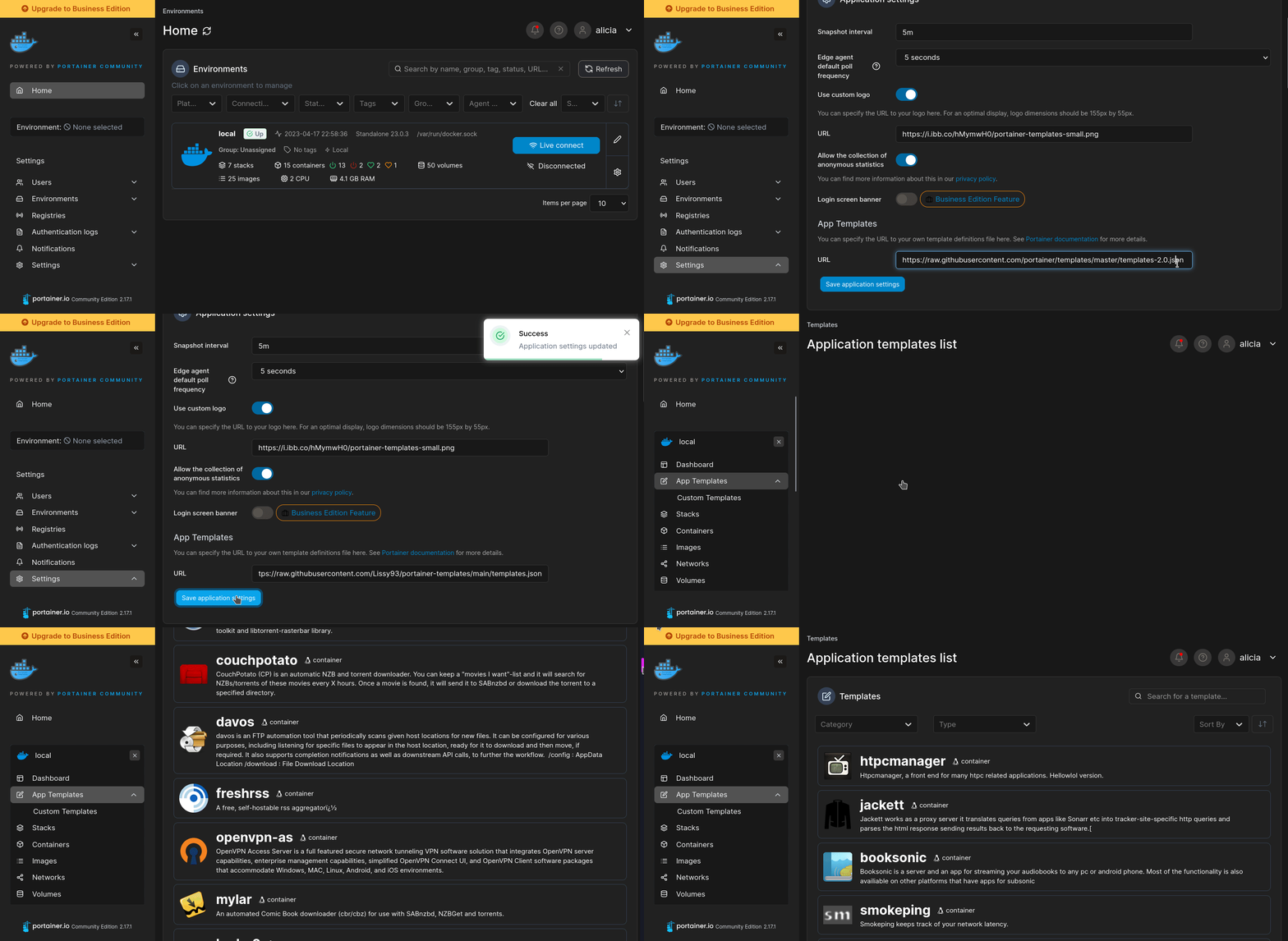
Import all app templates into your Portainer instance, for easy 1-click deploys
- Ensure both Docker and Portainer are installed, and up-to-date
- Log into your Portainer web UI
- Under Settings → App Templates, paste the below URL
- Head to Home → App Templates, and the list of apps will show up
- Select jotty·page, fill in any config options, and hit Deploy
Template Import URL
https://raw.githubusercontent.com/Lissy93/portainer-templates/main/templates.json
Show Me
More install options in our documentation, or see fccview/jotty for app-specific guidance.

jotty·page
A self-hosted app for your checklists and notes.
jotty·page is a lightweight alternative for managing your personal checklists and notes. It's extremely easy to deploy, keeps all your data on your own server and allows you to encrypt/decrypt your notes for your personal peace of mind.
ex rwMarkable
<img width="40" src="https://raw.githubusercontent.com/fccview/jotty/HEAD/public/repo-images/discord.svg"><img width="40" src="https://raw.githubusercontent.com/fccview/jotty/HEAD/public/repo-images/reddit.svg"><img width="40" src="https://raw.githubusercontent.com/fccview/jotty/HEAD/public/repo-images/telegram.svg">
Join our communities
<em>Clean, intuitive interface for managing your checklists and tasks.</em>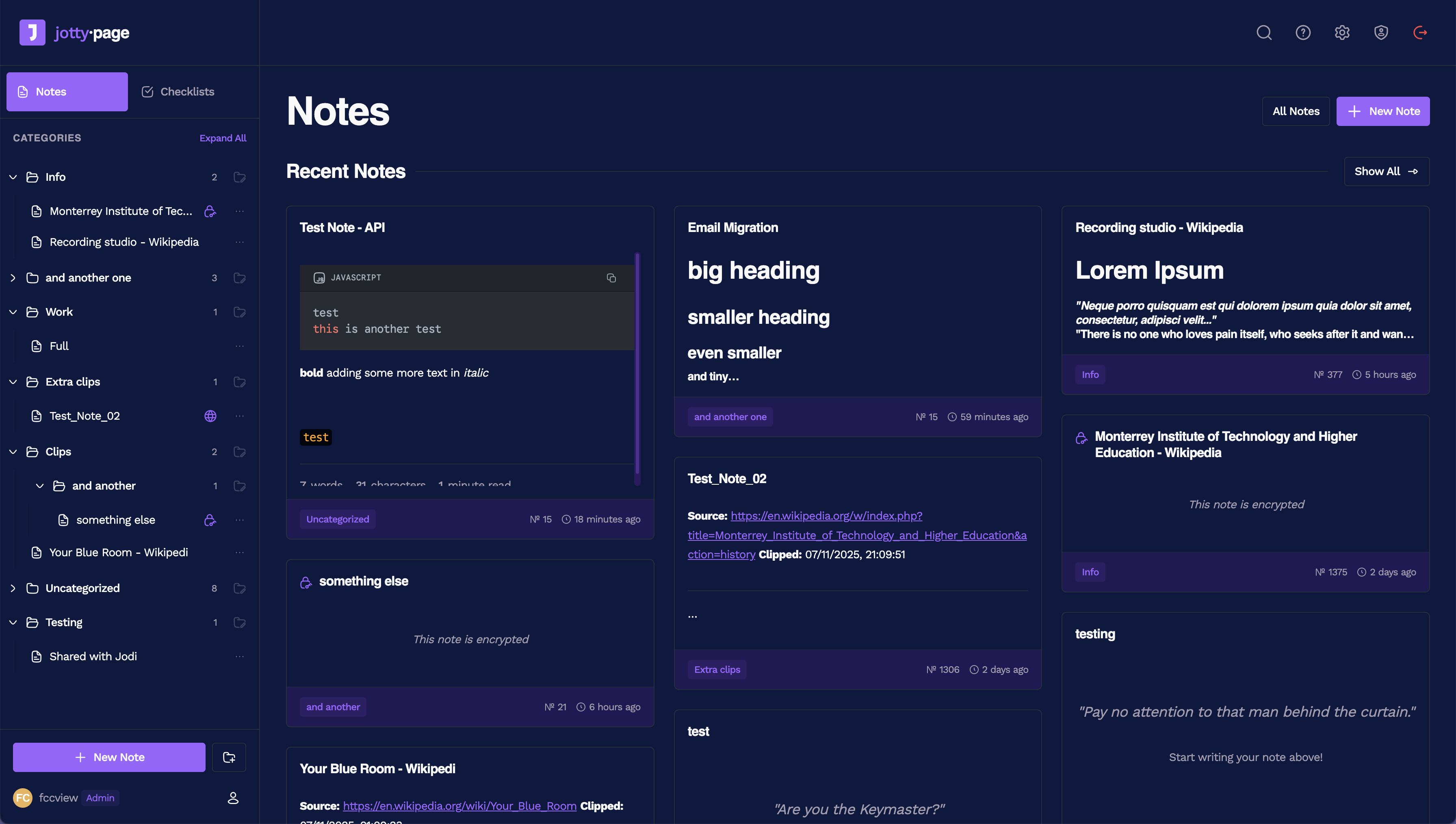
<em>Rich text editor for notes.</em>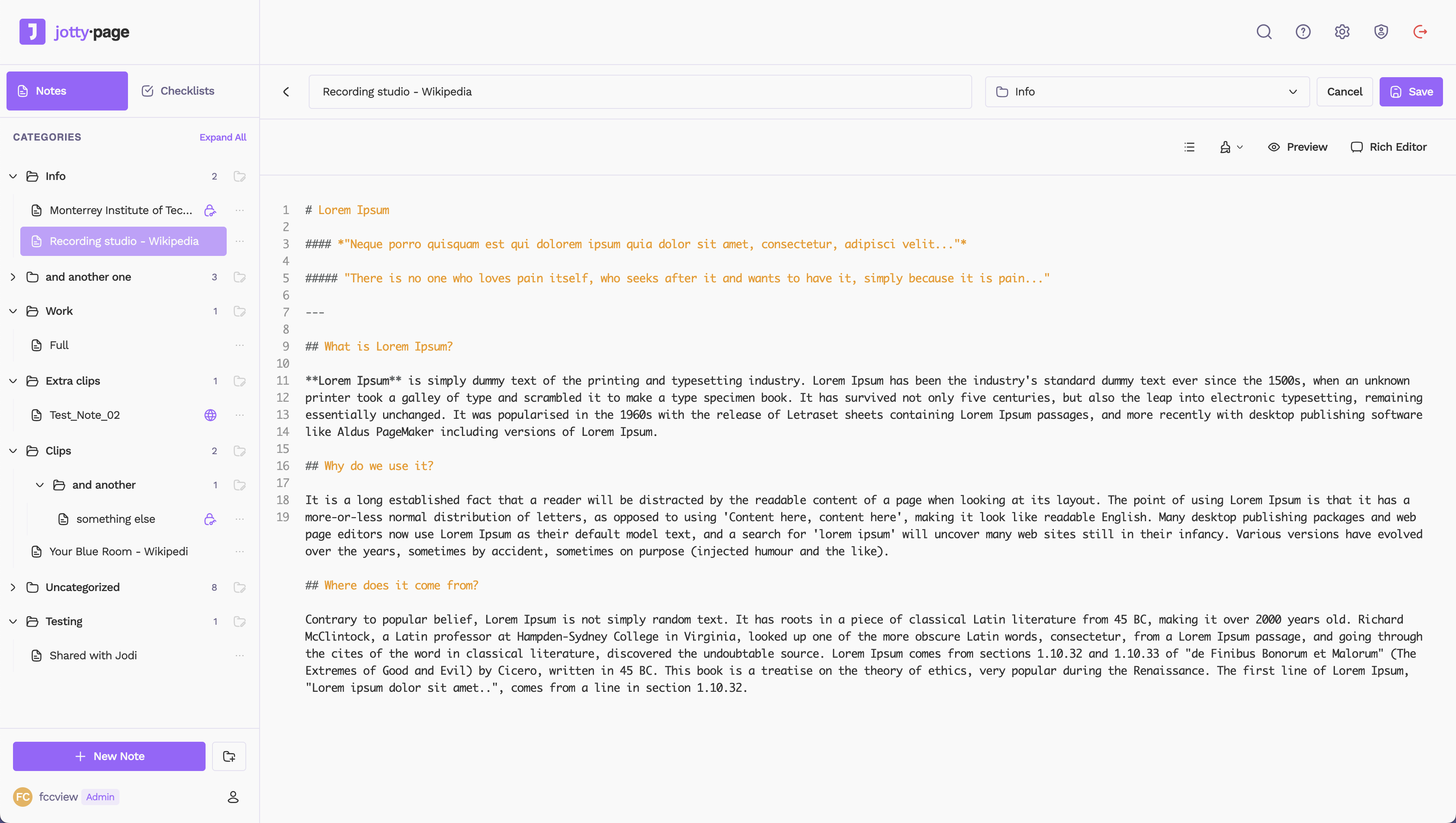
Quick nav
- Docker Compose (Recommended) - Initial Setup- Data Storage
- Versioning Scheme
- Encryption
- API
- Shortcuts
- Single Sign-On (SSO) with OIDC
- Multi-Factor Authentication (MFA)
- Translations
- Custom Themes and Emojis
Features
- Checklists: Create task lists with drag & drop reordering, progress bars, and categories. Supports both simple checklists and advanced task projects with Kanban boards and time tracking.
- Rich Text Notes: A clean WYSIWYG editor for your notes, powered by TipTap with full Markdown support and syntax highlighting.
- Sharing: Share checklists or notes with other users on your instance, including public sharing with shareable links.
- File-Based: No database needed! Everything is stored in simple Markdown and JSON files in a single data directory.
- User Management: An admin panel to create and manage user accounts with session tracking.
- Customisable: 14 built-in themes plus custom theme support with custom emojis and icons.
- Encryption: Full on PGP encryption, read more about it in howto/ENCRYPTION.md
- API Access: Programmatic access to your checklists and notes via REST API with authentication.
- PWA Jotty doesn't have a native app, but it's built mobile first. Once installed the PWA on your device it will feel like you installed it from the app store. There's also partial offline caching, as long as you visited a page while online Jotty will allow you to re-visit it while offline. At the moment there's no current support for offline CRUD operation.
Getting Started
My recommended way to runjotty·page is with Docker. You can also use:- The Proxmox community script for Proxmox VE
- The Unraid template for Unraid Community Applications
Running it without Docker, from source or from the prebuilt tarball, needs Node.js 24 or later.
Docker Compose (Recommended)
- Create a
docker-compose.ymlfile:
**📖 For advanced settings and more information about how the docker compose file works and what these variables do, please read [howto/DOCKER.md](https://github.com/fccview/jotty/blob/HEAD/howto/DOCKER.md)**

```yaml
services:
  jotty:
    image: ghcr.io/fccview/jotty:latest
    container_name: jotty
    user: "1000:1000"
    ports:
      - "1122:3000"
    volumes:
      - ./data:/app/data:rw
      - ./config:/app/config:rw
      - ./cache:/app/.next/cache:rw
    restart: unless-stopped
    environment:
      - NODE_ENV=production
```- Create the data directory and set permissions:
```bash
mkdir -p config data/users data/checklists data/notes data/sharing data/encryption cache
sudo chown -R 1000:1000 data/
sudo chown -R 1000:1000 config/
sudo chown -R 1000:1000 cache/
```

**Note:** The cache directory is optional. If you don't want cache persistence, you can comment out the cache volume line in your `docker-compose.yml`.- Start the container:
```bash
docker compose up -d
```http://localhost:1122.Initial Setup
On your first visit, you'll be redirected to/auth/setup to create your admin account if SSO is disabled, otherwise you'll be prompted to sign in via your choosen SSO provider.Once that's done, you're ready to go! First user will be admin by default.
Data Storage
jotty·page uses a simple file-based storage system inside the data/ directory.data/checklists/: Stores all checklists as.mdfiles.data/notes/: Stores all notes as.mdfiles.data/users/: Containsusers.jsonandsessions.json.data/sharing/: Containsshared-items.json.data/encryption/: Contains all public/private keys for all users.
Make sure you back up the
data directory!Versioning Scheme
This project uses a[STABLE].[FEATURE].[FIX] versioning scheme, not strict SemVer. As a product (not a package), this format makes more sense for my specific release cycle.My format is
1.10.1, which breaks down as:1.x.x(Stable): The1represents the current stable generation. I will only change this (e.g., to2.0.0) for a complete rewrite or a fundamental shift in the product or seriously breaking changes.
x.10.x(Feature): This is the main release number. I increment this for new features, code refactors, or significant changes (e.g.,1.9.0->1.10.0). This is the equivalent of a SemVerMINORbump.
x.x.1(Fix): This is incremented only for hotfixes, bug-fix-only and very minor feature releases (e.g.,1.10.0->1.10.1). This is the equivalent of a SemVerPATCHbump.
A Note on "Breaking" Changes
A Feature release (like1.10.0) may include major backend or data structure changes. When this happens, I will always provide an automatic migration script that runs on first launch to update your data seamlessly.Because the migration is automatic, I do not consider this a "breaking" change that requires a
2.0.0 version.I will always detail these migrations in the release notes. I highly recommend you back up your data before any feature update, just in case.
SUPPORTED MARKDOWN
jotty·page supports GitHub Flavored Markdown (GFM) and some custom syntax for complex functionality.📖 For the complete MARKDOWN documentation, see howto/MARKDOWN.md
📖 For links, wikilinks and the brain view, see howto/BRAIN.md
ENCRYPTION
jotty·page uses industry standard PGP encryption.📖 For the complete ENCRYPTION documentation, see howto/ENCRYPTION.md
API
jotty·page includes a REST API for programmatic access to your checklists and notes. This is perfect for:- Automation: Create tasks from external systems
- Integrations: Connect with other tools and services
- Scripts: Automate repetitive tasks
- Dashboards: Build custom interfaces
📖 For the complete API documentation, see howto/API.md
SHORTCUTS
jotty·page supports a wide range of keyboard shortcuts to help you navigate and edit more efficiently without leaving the keyboard. They are divided into two main categories: global shortcuts that work anywhere in the app, and editor-specific shortcuts that work when you are writing a note.📖 For the complete SHORTCUTS documentation, see howto/SHORTCUTS.md
Single Sign-On (SSO) with OIDC
jotty·page supports any OIDC provider (Authentik, Auth0, Keycloak, Okta, Google, EntraID, etc.)📖 For the complete SSO documentation, see howto/SSO.md
Multi-Factor Authentication (MFA)
jotty·page supports MFA, this needs to be enabled in settings -> profile📖 For the complete MFA documentation, see howto/MFA.md
Translations
jotty·page can be translated in multiple languages, all translations are community driven and can be found in the app/\_translations directory.📖 For the complete translations documentation, see howto/TRANSLATIONS.md
Custom Manifest
You can completely customize your PWA by creating an override manifest file. This allows you to change the app name, description, icons, colors, and more. Custom themes and emojis can be managed through the admin UI.📖 For the complete customisation and PWA documentation, see howto/CUSTOMISATIONS.md
Community shouts
I would like to thank the following members for raising issues and help test/debug them!Star History
Serve jotty·page on your own domain behind Caddy, Nginx or Traefik. Fill in your domain and copy the result. It's a starting point, some apps need their own base URL or extra headers set too.
Proxying jotty-page.example.com to http://jotty:3000
Add this to your Caddyfile
jotty-page.example.com {
	reverse_proxy http://jotty:3000
}Check the logs first
Nine times out of ten the logs tell you exactly what went wrong.
- In Portainer, go to Containers, click the container, then Logs. Or run
docker logs jotty - Exit codes help too:
137means killed, usually out of memory.126or127means the command inside the image is broken.
Port already in use
If deployment fails with "Bind for 0.0.0.0:1122 failed: port is already allocated", something else on your server is using that port.
- Find what's using it:
sudo ss -tlnp | grep :1122 - Stop the other service, or pick a different host port. In
1122:3000only the left number is yours to change, the right one belongs to the app.
Running but the page won't load
The container is up but nothing appears in your browser.
- Use your server's real IP:
http://your-server-ip:1122. The 0.0.0.0 link Portainer shows isn't a real address. - Give it a minute after first deploy, jotty can take a while to initialise.
- Make sure your firewall allows the port, e.g.
sudo ufw allow 1122
Image won't pull
Test the pull directly on the host: docker pull ghcr.io/fccview/jotty:latest
- "manifest unknown" means the tag no longer exists. This template uses
latest, so try pinning a specific version instead. - "toomanyrequests" is the Docker Hub rate limit. Log in with
docker loginto raise it. - "no space left on device" means a full disk. Reclaim space with
docker system prune
"exec format error"
This means the image was built for a different CPU architecture than your server.
- This image supports:
amd64, arm64 - Check yours with
uname -m: x86_64 is amd64, aarch64 is arm64. Raspberry Pi and other ARM boards are the usual culprits.
Container keeps restarting
The unless-stopped restart policy relaunches the app after every crash, so the real error can scroll past.
- Check the logs right after a restart, the last few lines before it died are the useful ones.
- Get the exit code with
docker inspect jotty --format '{{.State.ExitCode}}' - Still stuck? Redeploy once with the restart policy set to
noso the failure stays visible.
Raise an issue
Found something which isn't working as it should? Here's how to report it.
- Bug within the app: Open an issue on fccview/jotty
- Template not working: Open an issue on NotAFlightRisk/portainer-templates-extras
- This website not working: Open an issue on lissy93/portainer-templates
A single container
jotty·page runs as one container, the simplest kind of app here. Just the one image to pull and nothing else wired up alongside it.
The app image
An image is the app packed up ready to go, everything jotty·page needs bundled into one download. This template pulls ghcr.io/fccview/jotty:latest, which Docker fetches once (about 225 MB) and then starts your own copy from.
Where the image comes from
Docker pulls its images from registries, public libraries of ready-built apps. jotty·page's comes from the GitHub Container Registry, published by fccview.
Version tags
The bit after the colon in the image name is the version tag. Here it's latest, which always points at the newest build, so a redeploy can bump you to a newer release without you asking. Pin a specific tag if you would rather stay on one version.
Which machines it runs on
Every image is built for particular CPU types. This one ships for amd64, arm64, so it runs on both regular x86 servers and ARM boards like a Raspberry Pi.
Ports
A port is the door the app answers on. A mapping like 1122:3000 means it's reachable on port 1122 of your server, where the left number is yours to change and the right one belongs to the app. Once it's running, open http://your-server-ip:1122 in a browser. It opens:
1122:3000, likely the web interface
Volumes
A volume is where jotty·page keeps its files so they survive an update or a restart. Without one, anything it saves would sit inside the container and vanish the moment it's recreated. This template mounts:
/app/dataas a volume Docker manages for you/app/configas a volume Docker manages for you
Restart policy
The restart policy here is unless-stopped, so Docker restarts jotty·page after a crash or reboot, but leaves it off when you stop it on purpose. You can change this on the deploy screen. The choices are no (never restart), on-failure (only after a crash), unless-stopped (restart unless you stop it), and always (bring it back no matter what).
Networking
Nothing custom is set, so jotty·page sits on Docker's default bridge network: its own private space that reaches the outside world only through the ports it publishes.
Container name
Once it's deployed, Portainer names the container jotty. That's what you'll spot in the containers list and use in commands like docker logs jotty.
Platform
The platform is linux, the kind of system the container is built to run on. Docker and Portainer handle this on a normal Linux server.
Open source license
jotty·page is open source, released under the AGPL-3.0 license. In plain terms the code is out in the open, so you're free to run it and change it to fit what you need.
Portainer app templates
Zooming out, this whole page comes from a Portainer app template: a short recipe telling Portainer how to set jotty·page up. Add the template list to Portainer once, then deploying jotty·page is a click rather than a wall of config.