
![CrateDB]() CrateDB
CrateDB
Container
An open-source distributed SQL database
Image details
Configuration
TypeContainerlinuxcrate:latest4200/tcp4300/tcp/dataTemplate by portainer
Report issueStandalone Install
Select an install method, to see config/commands for deploying CrateDB
Install on Portainer
Import all app templates into your Portainer instance, for easy 1-click deploys
- Ensure both Docker and Portainer are installed, and up-to-date
- Log into your Portainer web UI
- Under Settings → App Templates, paste the below URL
- Head to Home → App Templates, and the list of apps will show up
- Select CrateDB, fill in any config options, and hit Deploy
Template Import URL
https://raw.githubusercontent.com/Lissy93/portainer-templates/main/templates.json
Show Me

More install options in our documentation.
Quick reference
- Maintained by:
[Crate.io](https://github.com/crate/docker-crate)- Where to get help:
[project documentation](https://crate.io/docs/), [StackOverflow](https://stackoverflow.com/tags/cratedb), [support channels](https://crate.io/support/)Supported tags and respective Dockerfile links
Quick reference (cont.)
- Where to file issues:
[https://github.com/crate/docker-crate/issues](https://github.com/crate/docker-crate/issues?q=is:issue+is:pr)- Supported architectures: (more info)
[`amd64`](https://hub.docker.com/r/amd64/crate/), [`arm64v8`](https://hub.docker.com/r/arm64v8/crate/)- Published image artifact details:
[repo-info repo's `repos/crate/` directory](https://github.com/docker-library/repo-info/blob/master/repos/crate) ([history](https://github.com/docker-library/repo-info/commits/master/repos/crate))
(image metadata, transfer size, etc)- Image updates:
[official-images repo's `library/crate` label](https://github.com/docker-library/official-images/issues?q=label%3Alibrary%2Fcrate)
[official-images repo's `library/crate` file](https://github.com/docker-library/official-images/blob/master/library/crate) ([history](https://github.com/docker-library/official-images/commits/master/library/crate))- Source of this description:
[docs repo's `crate/` directory](https://github.com/docker-library/docs/tree/master/crate) ([history](https://github.com/docker-library/docs/commits/master/crate))
What Is CrateDB?
CrateDB is a distributed SQL database that makes it simple to store and analyze massive amounts of machine data in real-time.CrateDB offers the scalability and flexibility typically associated with a NoSQL database, is designed to run on inexpensive commodity servers and can be deployed and run on any sort of network - from personal computers to multi-region hybrid clouds.
The smallest CrateDB clusters can easily ingest tens of thousands of records per second. The data can be queried, ad-hoc, in parallel across the whole cluster in real time.
Features
- Standard SQL plus dynamic schemas, queryable objects, geospatial features, time series data, first-class BLOB support, and realtime full-text search.
- Dynamic schemas, queryable objects, geospatial features, time series data support, and realtime full-text search providing functionality for handling both relational and document oriented nested data structures.
- Horizontally scalable, highly available and fault tolerant clusters that run very well in virtualized and containerised environments.
- Extremely fast distributed query execution.
- Auto-partitioning, auto-sharding, and auto-replication.
- Self-healing and auto-rebalancing.
Screenshots
CrateDB provides an Admin UI: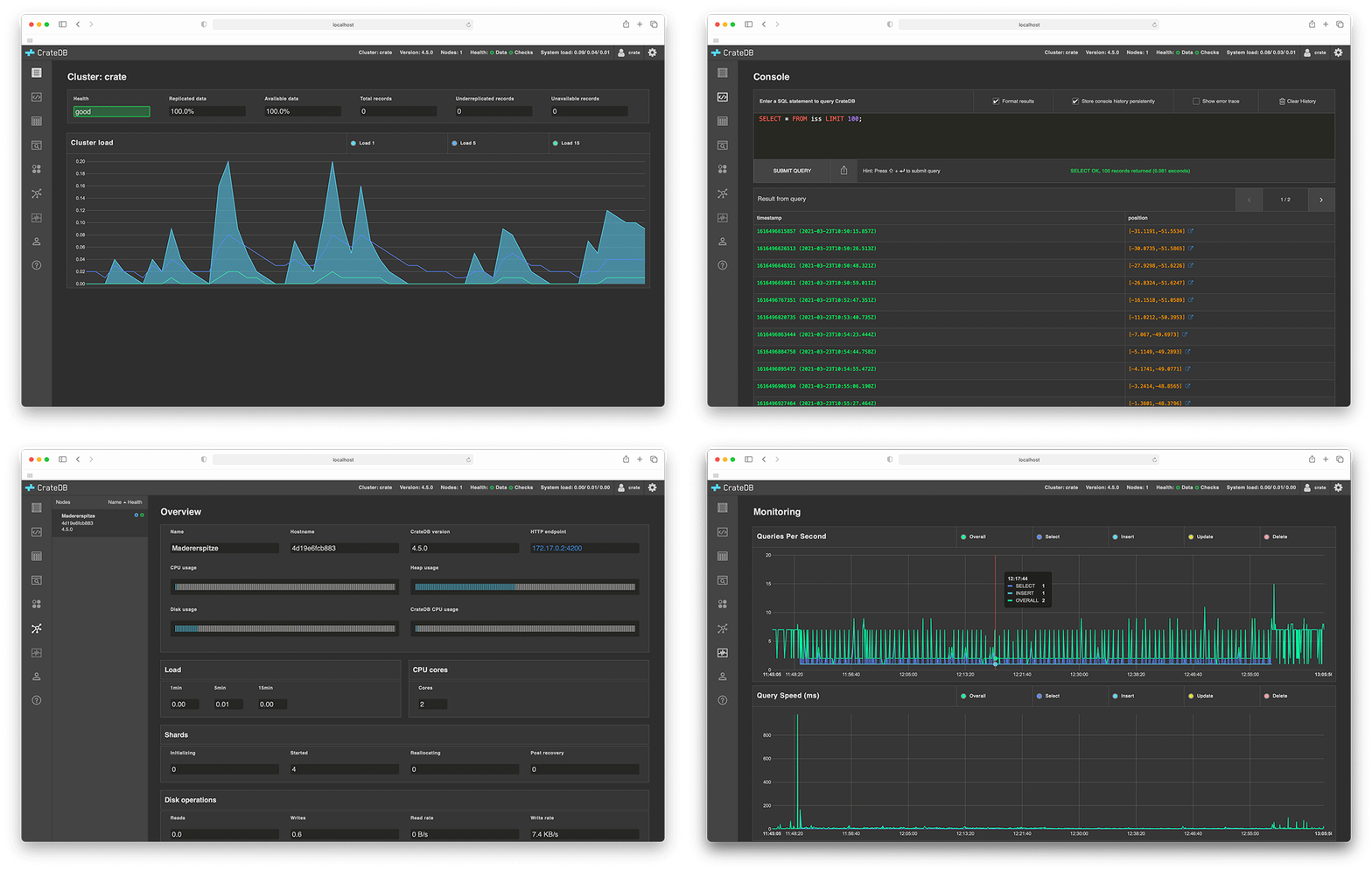
Try CrateDB
Spin up this Docker image like so:$ docker run --publish 4200:4200 --publish 5432:5432 crate -Cdiscovery.type=single-nodeVisit the getting started page to see all the available download and install options.
Once you're up and running, head over to the introductory docs. To interact with CrateDB, you can use the Admin UI web console or the CrateDB shell CLI tool. Alternatively, review the list of recommended clients and tools that work with CrateDB.
For container-specific documentation, check out the CrateDB on Docker how-to guide or the CrateDB on Kubernetes how-to guide.
Issues
Memory Accounting
The combinations of Linux kernel version 3.x and Docker >= 1.12 could lead to a major problem with memory accounting causing the kernel to kill the CrateDB process in the container. This problems occurs because of a slab shrinker issue that is fixed in kernel versions >= 4.0.Others
For issue specific to the CrateDB Docker image, report issues via thedocker-crate GitHub issue trackerFor issues with CrateDB itself, report issues via the
crate GitHub issue trackerContributing
This image is primarily maintained by Crate.io, but we welcome community contributions!See the contribution docs for more information.
License
CrateDB is licensed under the Apache License 2.0.See LICENSE for more information.
As with all Docker images, these likely also contain other software which may be under other licenses (such as Bash, etc from the base distribution, along with any direct or indirect dependencies of the primary software being contained).
Some additional license information which was able to be auto-detected might be found in the
repo-info repository's crate/ directory.As for any pre-built image usage, it is the image user's responsibility to ensure that any use of this image complies with any relevant licenses for all software contained within.
Serve CrateDB on your own domain behind Caddy, Nginx or Traefik. Fill in your domain and copy the result. It's a starting point, some apps need their own base URL or extra headers set too.
Proxying cratedb.example.com to http://cratedb:4200
Add this to your Caddyfile
cratedb.example.com {
	reverse_proxy http://cratedb:4200
}Check the logs first
Nine times out of ten the logs tell you exactly what went wrong.
- In Portainer, go to Containers, click the container, then Logs. Or run
docker logs <container> - Exit codes help too:
137means killed, usually out of memory.126or127means the command inside the image is broken.
Published on a random port
This template exposes 4200/tcp without setting a host port,
so Docker picks a random free one on every deploy.
- Find it in the Ports column of Portainer's container list, or with
docker port <container>
Image won't pull
Test the pull directly on the host: docker pull crate:latest
- "manifest unknown" means the tag no longer exists. This template uses
latest, so try pinning a specific version instead. - "toomanyrequests" is the Docker Hub rate limit. Log in with
docker loginto raise it. - "no space left on device" means a full disk. Reclaim space with
docker system prune
"exec format error"
This means the image was built for a different CPU architecture than your server.
- This image supports:
amd64, arm64, arm64/v8 - Check yours with
uname -m: x86_64 is amd64, aarch64 is arm64. Raspberry Pi and other ARM boards are the usual culprits.
Raise an issue
Found something which isn't working as it should? Here's how to report it.
- Bug within the app: Open an issue within the app's repo
- Template not working: Open an issue on portainer/templates
- This website not working: Open an issue on lissy93/portainer-templates
A single container
CrateDB runs as one container, the simplest kind of app here. Just the one image to pull and nothing else wired up alongside it.
The app image
An image is the app packed up ready to go, everything CrateDB needs bundled into one download. This template pulls crate:latest, which Docker fetches once (about 249 MB) and then starts your own copy from.
Where the image comes from
Docker pulls its images from registries, public libraries of ready-built apps. CrateDB's comes from Docker Hub as one of its official, curated images.
Version tags
The bit after the colon in the image name is the version tag. Here it's latest, which always points at the newest build, so a redeploy can bump you to a newer release without you asking. Newest right now is 6.4.5. Pin a specific tag if you would rather stay on one version.
Which machines it runs on
Every image is built for particular CPU types. This one ships for amd64, arm64, arm64/v8, so it runs on both regular x86 servers and ARM boards like a Raspberry Pi.
Ports
A port is the door the app answers on. Here the app exposes a port but leaves the host side blank, so Docker picks a free one for you. It opens:
4200, published on a random host port4300, published on a random host port
Volumes
A volume is where CrateDB keeps its files so they survive an update or a restart. Without one, anything it saves would sit inside the container and vanish the moment it's recreated. This template mounts:
/dataas a volume Docker manages for you
Networking
Nothing custom is set, so CrateDB sits on Docker's default bridge network: its own private space that reaches the outside world only through the ports it publishes.
Platform
The platform is linux, the kind of system the container is built to run on. Docker and Portainer handle this on a normal Linux server.
Portainer app templates
Zooming out, this whole page comes from a Portainer app template: a short recipe telling Portainer how to set CrateDB up. Add the template list to Portainer once, then deploying CrateDB is a click rather than a wall of config.