
![Contrack]() Contrack
Container
Self-hosted personal CRM with contacts, notes, reminders, interaction history, and local semantic search in one SQLite file. Optional AI providers and calendar, IMAP, and CardDAV connectors. Source: https://github.com/arvarik/contrack
Image details
Source details
Configuration
TypeContainerlinuxghcr.io/arvarik/contrack:23210:3210/tcp/app/dataAUTH_REQUIRED=truePUBLIC_URL=TRUST_PROXY_HOPS=0ALLOWED_HOSTS=unless-stoppedTemplate by arvarik
Report issueNotes
http://<your-host>:3210 right after deploying: the first visitor to open port 3210 creates the admin account, so complete setup before exposing the port publicly.All persistent data (SQLite database, uploads, snapshots, and generated
secret.key) is stored in /app/data, and local search models are bundled in the image. AI keys, OpenID Connect, outgoing mail, and connectors can be configured in Settings inside the app. Behind an HTTPS reverse proxy, set PUBLIC_URL and TRUST_PROXY_HOPS=1. See the self-hosting docs.Standalone Install
Select an install method, to see config/commands for deploying Contrack
Install on Portainer
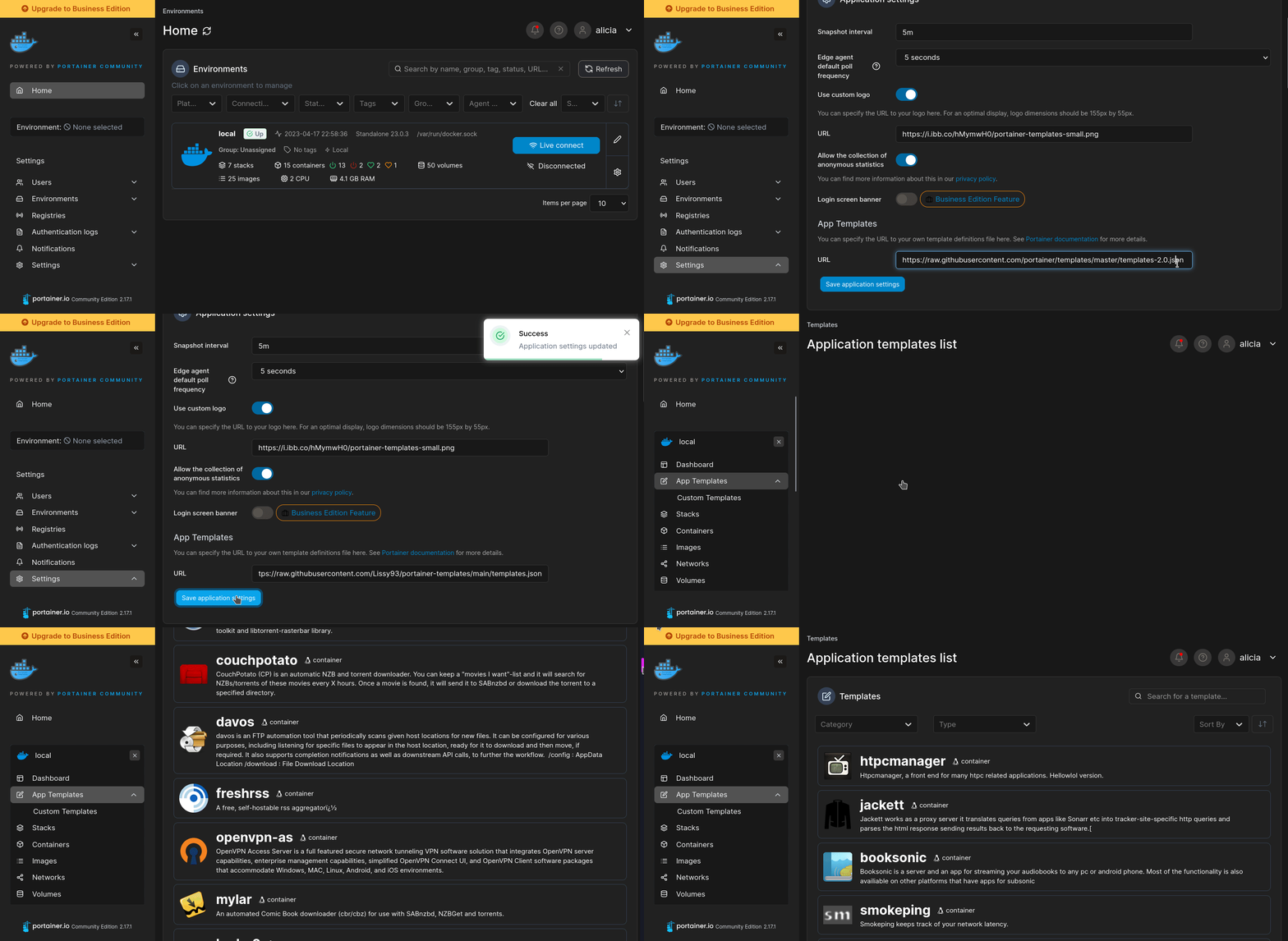
Import all app templates into your Portainer instance, for easy 1-click deploys
- Ensure both Docker and Portainer are installed, and up-to-date
- Log into your Portainer web UI
- Under Settings → App Templates, paste the below URL
- Head to Home → App Templates, and the list of apps will show up
- Select Contrack, fill in any config options, and hit Deploy
Template Import URL
https://raw.githubusercontent.com/Lissy93/portainer-templates/main/templates.json
Show Me
More install options in our documentation, or see arvarik/contrack for app-specific guidance.
<picture>
  <source media="(prefers-color-scheme: dark)" srcset="docs/brand/contrack-lockup-animated-dark.svg" />
  <img src="https://raw.githubusercontent.com/arvarik/contrack/HEAD/docs/brand/contrack-lockup-animated.svg" alt="Contrack" width="400" />
</picture>
<picture>
<source media="(prefers-color-scheme: dark)" srcset="docs/brand/contrack-lockup-animated-dark.svg" />
<img src="https://raw.githubusercontent.com/arvarik/contrack/HEAD/docs/brand/contrack-lockup-animated.svg" alt="Contrack" width="400" />
</picture>Privacy focused people management and search





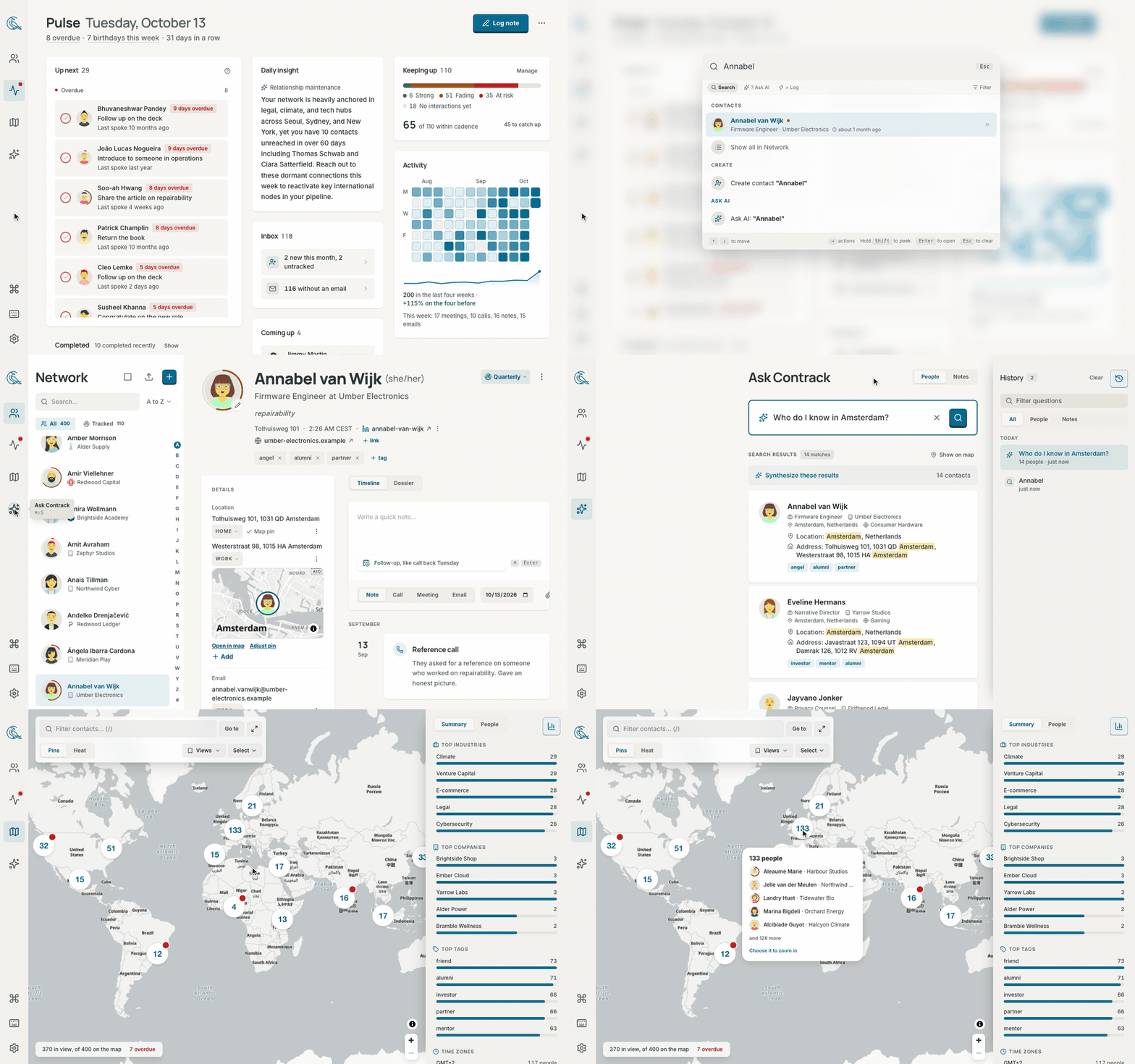
Contacts are scattered all over your apps, often have a large overlap, and aren't necessarily filled in with the most amount of information you'd like. When every app requests access to your contacts, it doesn't really feel like you own your network.
And even when you meticulously update your private Apple contacts, there's no good way to keep building the relationship or continuously updating their important details.
Contrack solves all of these by being an all-in-one, self-hosted contact management app that a follows a simple 4 step process:
Import → Dedupe → Enrich → Track
|
ImportEveryone, from everywhere. Drop in your contacts from Apple, Google, LinkedIn or Facebook. 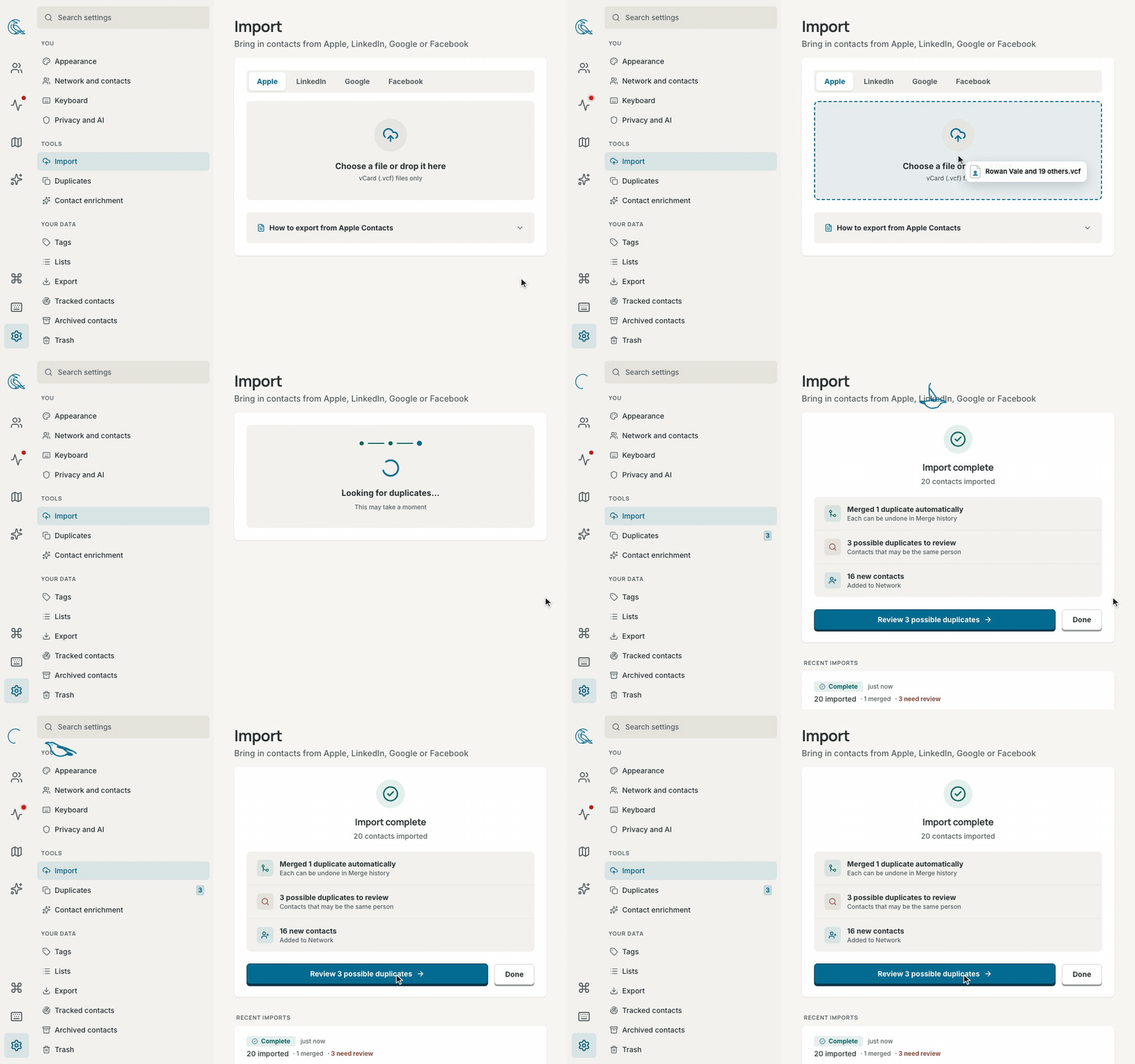
|
DedupeOne person. One clean story. The same friend from three address books becomes a single profile. 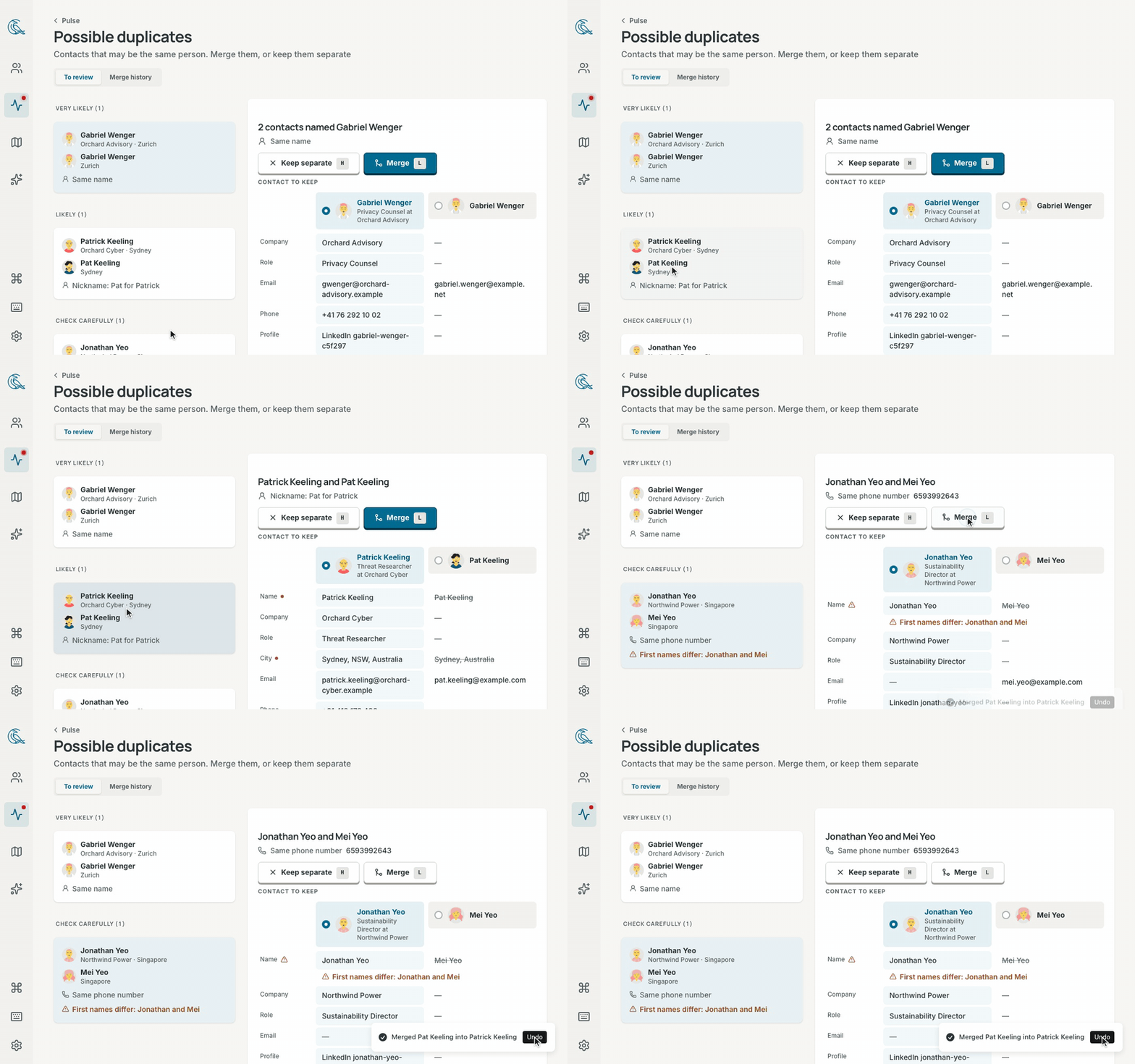
|
|
EnrichAll the context you never had time to type. Paste a quick note like "Met at Sarah's wedding, loves natural wine, kids are Leo and Maya, catch up every quarter" or "Partner at Sequoia, follow up next Tuesday on seed round", and Contrack turns it into a complete profile with dates, tags, and reminders. 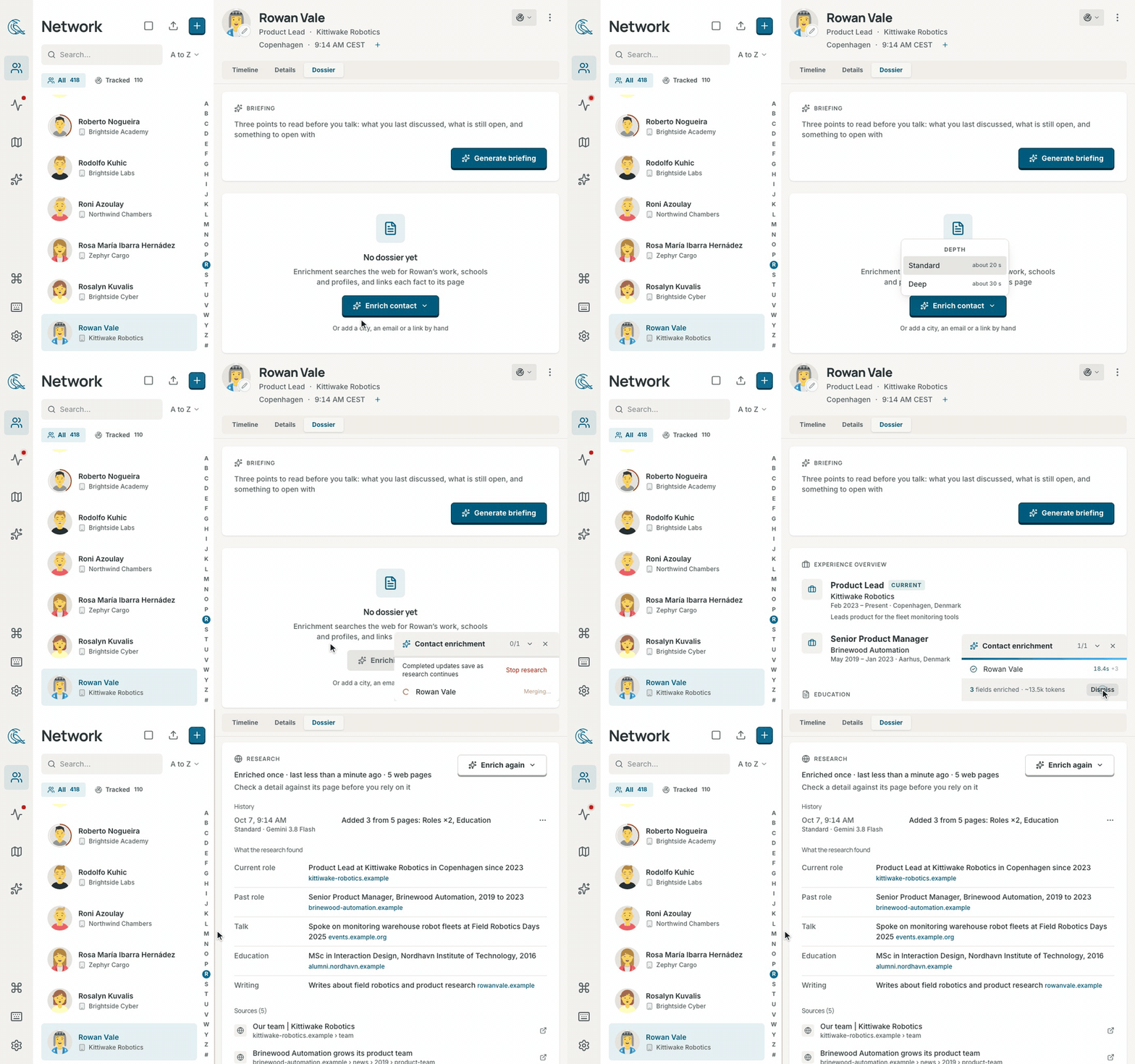
|
|
TrackNever let someone important drift away. Write a note in plain language and "next Tuesday" becomes a reminder automatically. 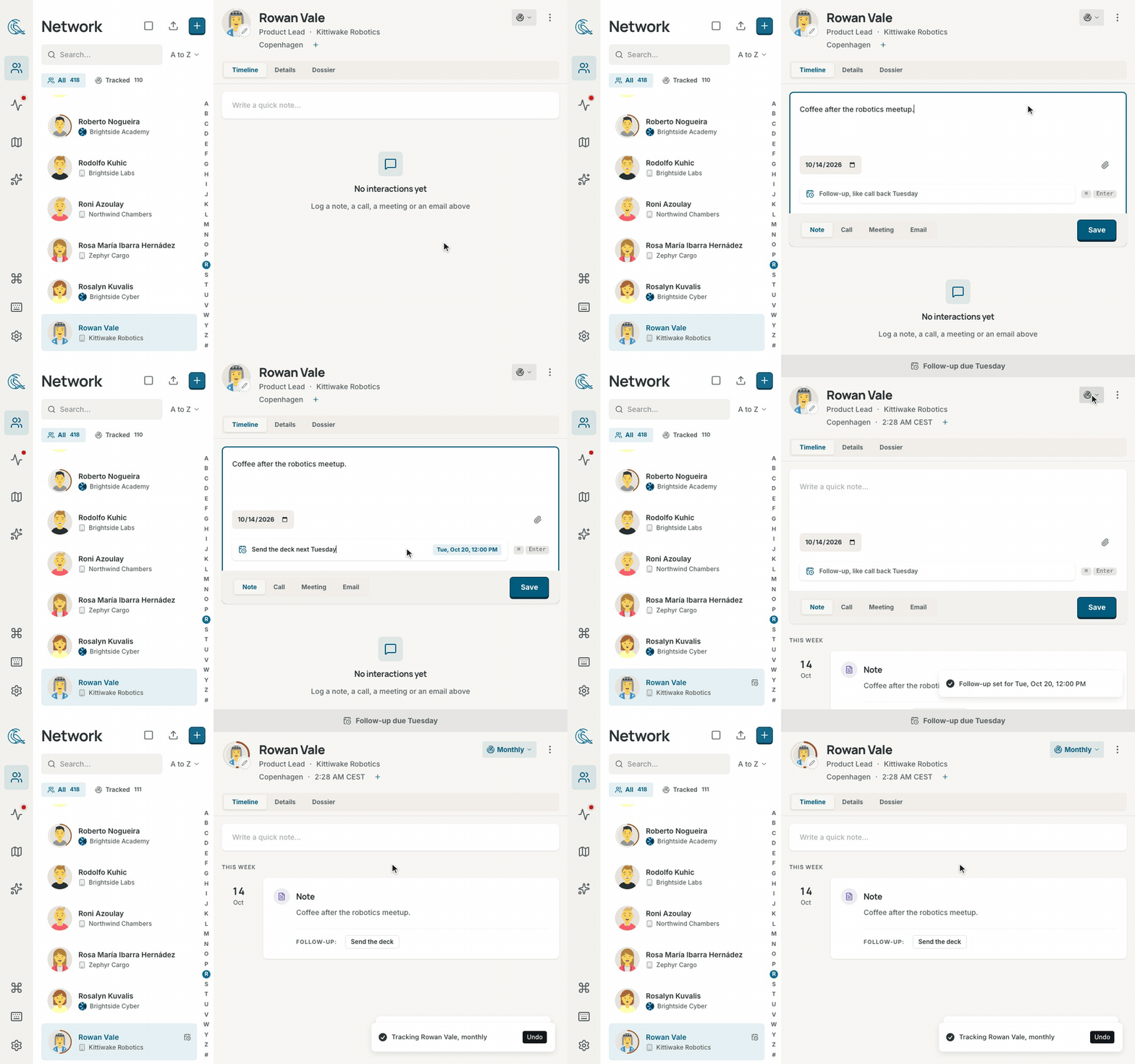
|
Highlights
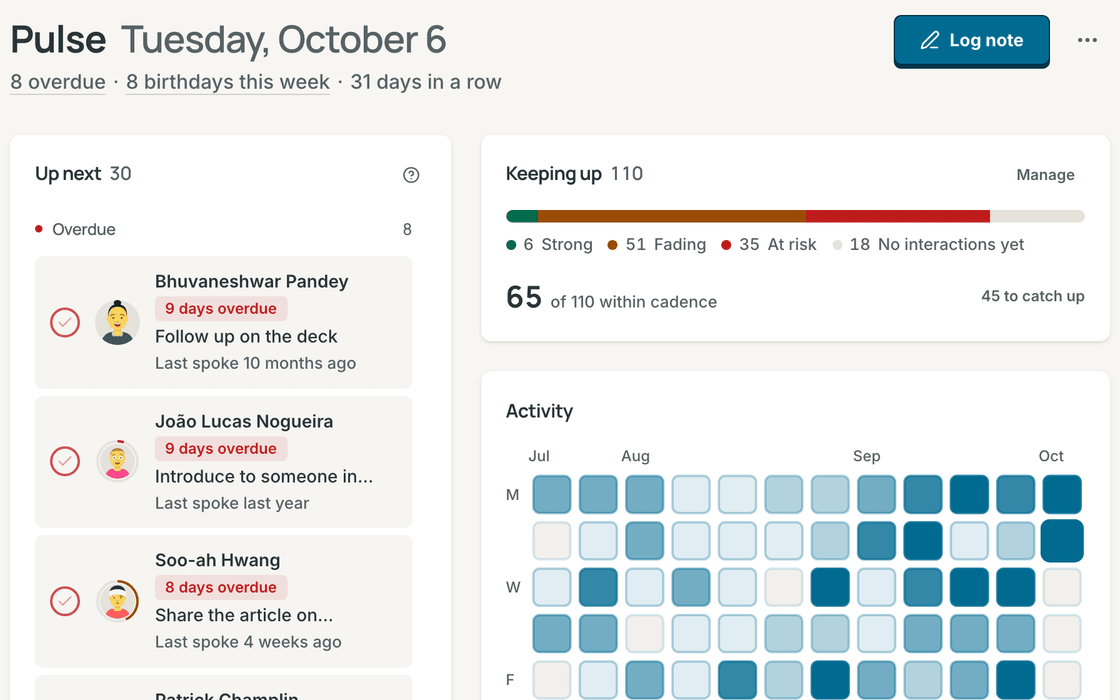
PulseYour calm morning briefing. See the follow-ups due today, friends and colleagues you haven't spoken with in a while, and upcoming birthdays, anniversaries, and custom milestones. |
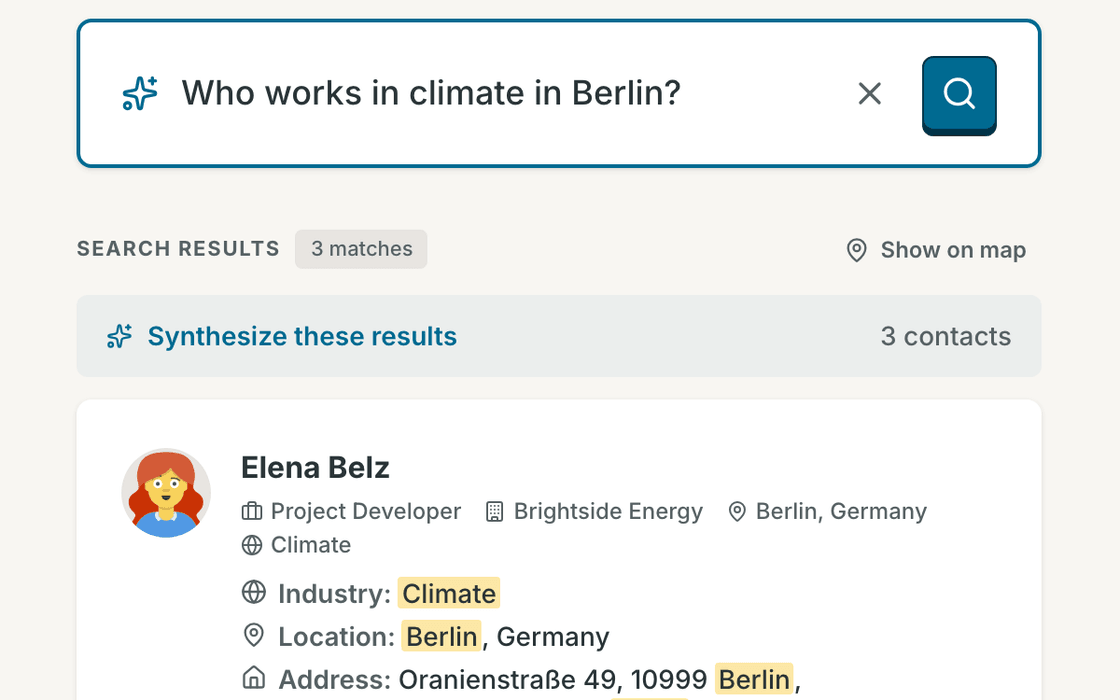
Ask ContrackAsk in plain words, like "Who do I know in Lisbon?" or "Who loves natural wine?" Answers come straight from your own contacts and notes, searched privately on your machine. |
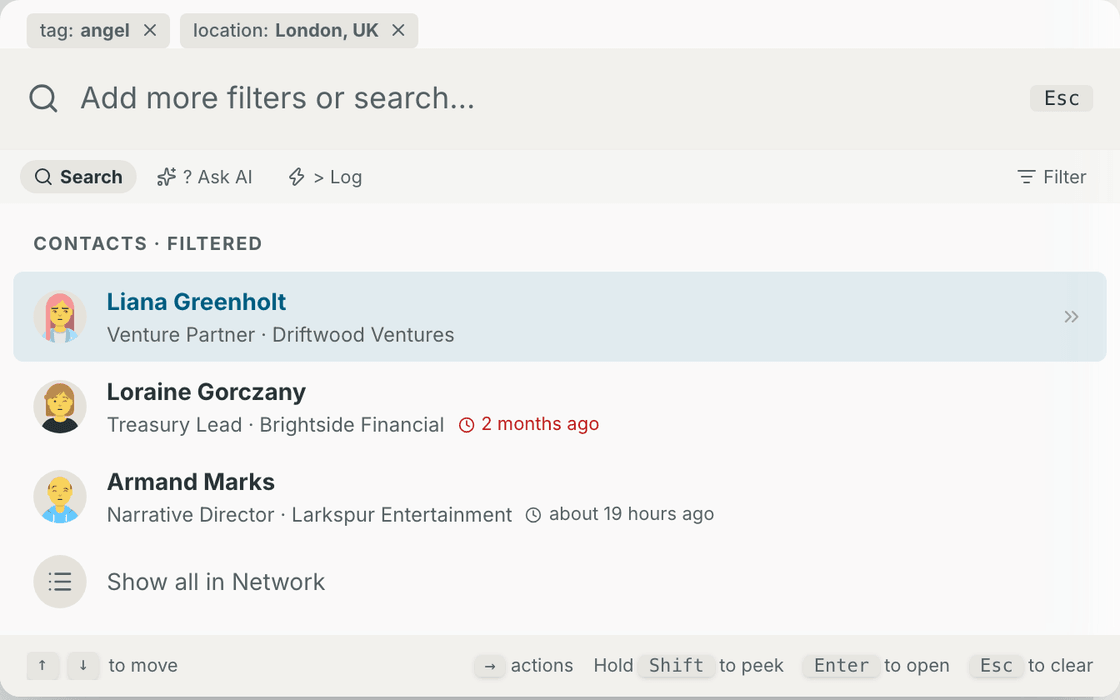
Command palettePress Cmd+K to jump to anyone, filter by company or tag, or log a quick note without ever lifting your hands from the keyboard. |
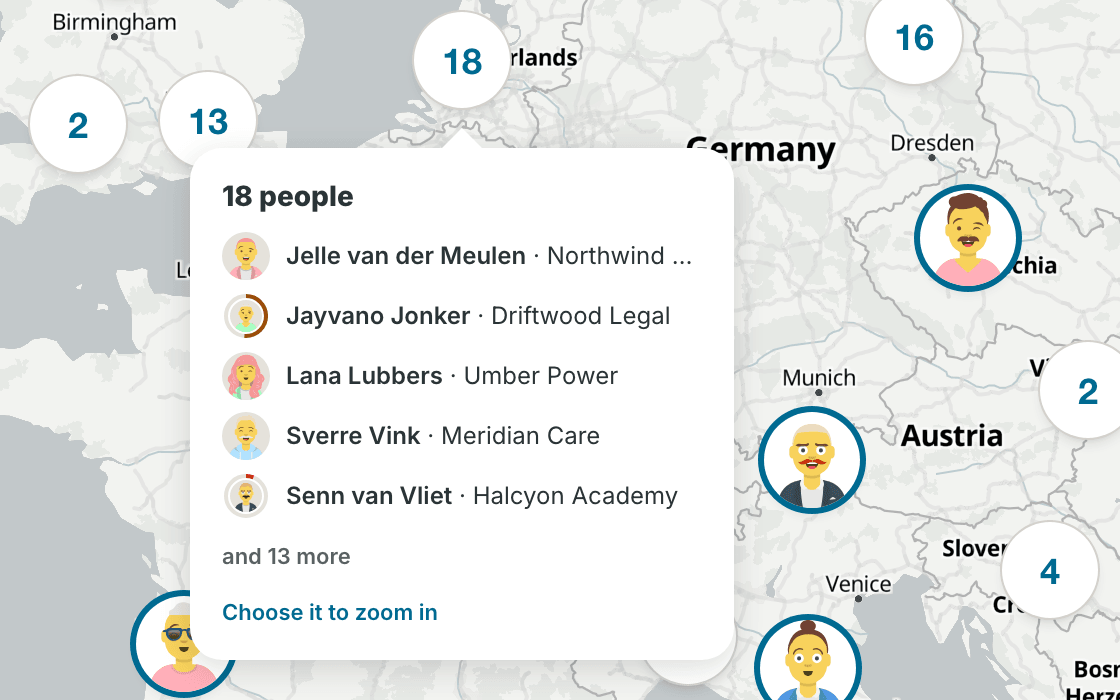
MapPlanning a trip? See everyone you know in a city at a glance. Draw a loop around a neighborhood to select everyone there and add them to a dinner list. |
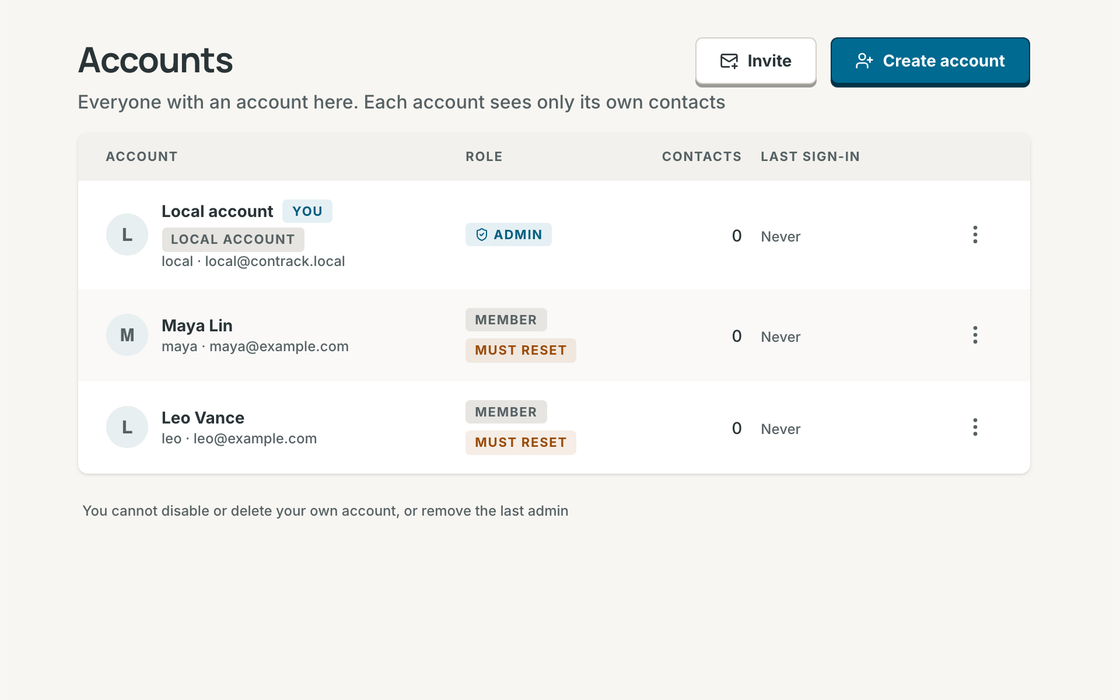
Multiple profiles, one homeRun one Contrack for your family or team. Invite someone with a link or create their profile in seconds. Every person gets their own private address book, notes, and reminders. |
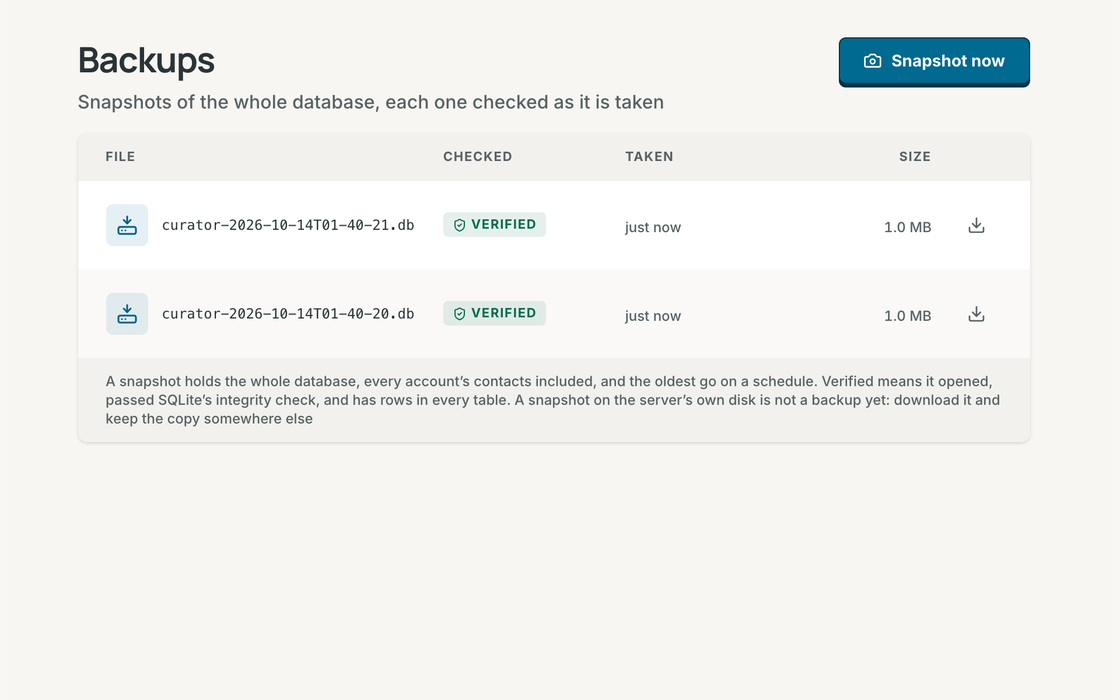
Verified backupsYour history is irreplaceable. Take a complete, integrity-checked snapshot of your address book in one click, or let Contrack back itself up automatically on your schedule. |
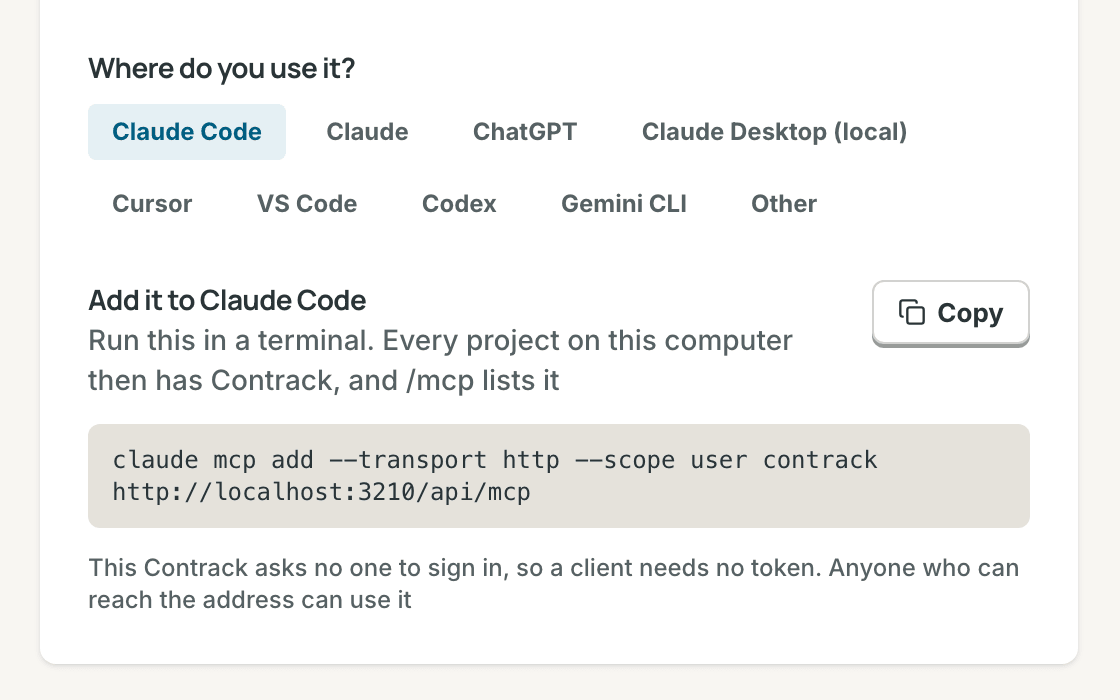
Works with your AI assistantConnect Claude, ChatGPT, or Cursor in one click so your favorite assistant can look up context and log notes for you, with read-only access whenever you prefer. |
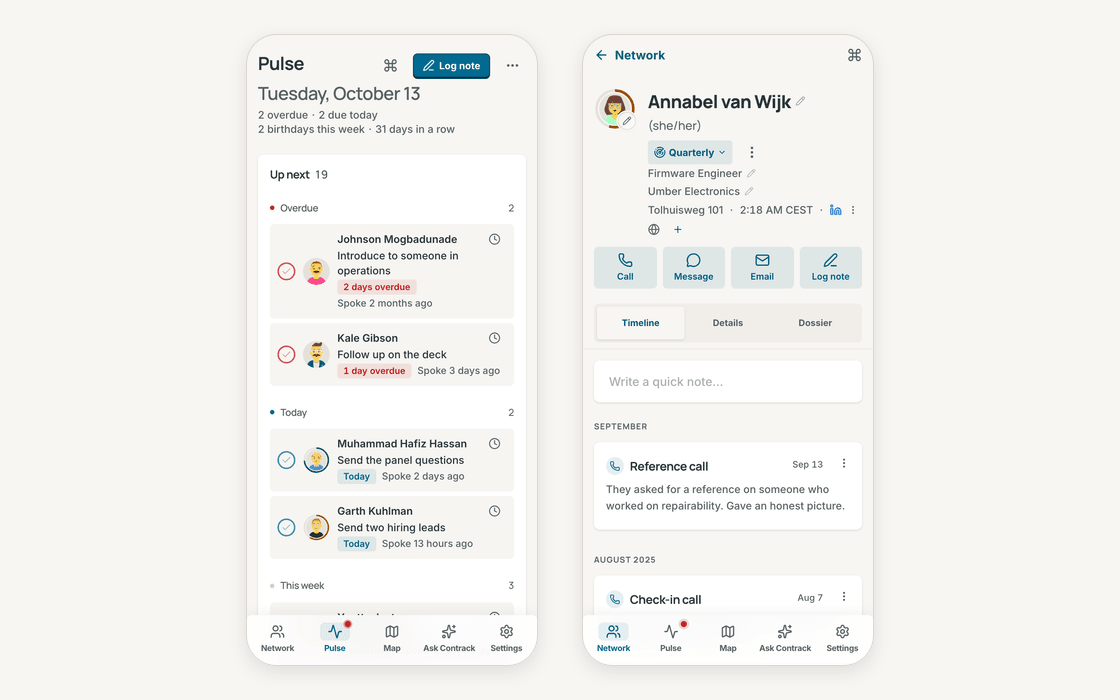
Right in your pocketAdd Contrack to your phone's home screen. Before you walk into coffee or a meeting, every note and detail is one tap away. |
And everything else you expect: rich notes with file & image attachments,
@mentions that link people together, custom dates and anniversaries, lists and tags, passkey sign-in, a 90-day trash with undo, open exports anytime, and warm light and dark themes.Privacy
Privacy isn't a setting. It's the foundation. Contrack lives on your own computer or home server. Your relationships aren't training anyone's model, sitting on a rented cloud, or locked behind a monthly subscription. Search happens right on your device.Share one home server with your family or team while keeping everyone's address book completely private to them. And when you want AI to research a contact or turn a quick note into a rich profile, you bring the model you trust, or use none at all.
Comparing personal CRMs?
- Contrack vs Monica
- Contrack vs Clay
- Contrack vs Folk
- Contrack vs Twenty
- Contrack vs Huly
- Contrack vs EspoCRM
- Contrack vs Nextcloud Contacts.
Start in a minute
Run Contrack on your machine with Docker:docker run -d --name contrack -p 127.0.0.1:3210:3210 \
-v contrack-data:/app/data ghcr.io/arvarik/contrack:latestThen open http://localhost:3210. There is no cloud account to sign up for and no API key required. Everything stays in your
contrack-data folder. Whenever you want AI features, open Settings → Administration → AI.Other ways to run it
Docker Compose with the published image:
services:
  contrack:
    image: ghcr.io/arvarik/contrack:latest
    container_name: contrack
    restart: unless-stopped
    ports:
      - "127.0.0.1:3210:3210"
    volumes:
      - contrack-data:/app/data
    environment:
      - AUTH_REQUIRED=false # Set to true before exposing beyond localhost

volumes:
  contrack-data:
Or build the image from this repository:
git clone https://github.com/arvarik/contrack.git && cd contrack
docker compose up -d
From source, with Node.js 26.13 or later:
git clone https://github.com/arvarik/contrack.git && cd contrack
npm install
npm run dev
For your household or team: turn on sign-in with
-e AUTH_REQUIRED=true. Your first visit creates the admin profile, and you can invite family or teammates from Settings → Administration → Accounts. See the Self-hosting guide for remote access, backups, and upgrades.Try it in your browser

Open a live demo in your browser preloaded with 400 fictional people, with no installation and no API key needed.


Serve Contrack on your own domain behind Caddy, Nginx or Traefik. Fill in your domain and copy the result. It's a starting point, some apps need their own base URL or extra headers set too.
Proxying contrack.example.com to http://contrack:3210
Add this to your Caddyfile
contrack.example.com {
	reverse_proxy http://contrack:3210
}Check the logs first
Nine times out of ten the logs tell you exactly what went wrong.
- In Portainer, go to Containers, click the container, then Logs. Or run
docker logs contrack - Exit codes help too:
137means killed, usually out of memory.126or127means the command inside the image is broken.
Port already in use
If deployment fails with "Bind for 0.0.0.0:3210 failed: port is already allocated", something else on your server is using that port.
- Find what's using it:
sudo ss -tlnp | grep :3210 - Stop the other service, or pick a different host port. In
3210:3210only the left number is yours to change, the right one belongs to the app.
Running but the page won't load
The container is up but nothing appears in your browser.
- Use your server's real IP:
http://your-server-ip:3210. The 0.0.0.0 link Portainer shows isn't a real address. - Give it a minute after first deploy, contrack can take a while to initialise.
- Make sure your firewall allows the port, e.g.
sudo ufw allow 3210
Image won't pull
Test the pull directly on the host: docker pull ghcr.io/arvarik/contrack:2
- "manifest unknown" means the tag no longer exists.
- "toomanyrequests" is the Docker Hub rate limit. Log in with
docker loginto raise it. - "no space left on device" means a full disk. Reclaim space with
docker system prune
"exec format error"
This means the image was built for a different CPU architecture than your server.
- This image supports:
amd64, arm64 - Check yours with
uname -m: x86_64 is amd64, aarch64 is arm64. Raspberry Pi and other ARM boards are the usual culprits.
Container keeps restarting
The unless-stopped restart policy relaunches the app after every crash, so the real error can scroll past.
- Check the logs right after a restart, the last few lines before it died are the useful ones.
- Get the exit code with
docker inspect contrack --format '{{.State.ExitCode}}' - Still stuck? Redeploy once with the restart policy set to
noso the failure stays visible.
Required settings are blank
PUBLIC_URL, ALLOWED_HOSTS have no default value, and contrack may crash or misbehave if left empty.
- Fill them in on the deploy screen before hitting deploy.
Raise an issue
Found something which isn't working as it should? Here's how to report it.
- Bug within the app: Open an issue on arvarik/contrack
- Template not working: Open an issue on arvarik/contrack
- This website not working: Open an issue on lissy93/portainer-templates
A single container
Contrack runs as one container, the simplest kind of app here. Just the one image to pull and nothing else wired up alongside it.
The app image
An image is the app packed up ready to go, everything Contrack needs bundled into one download. This template pulls ghcr.io/arvarik/contrack:2, which Docker fetches once (about 147 MB) and then starts your own copy from.
Where the image comes from
Docker pulls its images from registries, public libraries of ready-built apps. Contrack's comes from the GitHub Container Registry, published by arvarik.
Version tags
The bit after the colon in the image name is the version tag. This one pins 2, so every redeploy gives you that exact build until you bump it yourself.
Which machines it runs on
Every image is built for particular CPU types. This one ships for amd64, arm64, so it runs on both regular x86 servers and ARM boards like a Raspberry Pi.
Ports
A port is the door the app answers on. A mapping like 3210:3210 means it's reachable on port 3210 of your server, where the left number is yours to change and the right one belongs to the app. It opens:
3210:3210
Volumes
A volume is where Contrack keeps its files so they survive an update or a restart. Without one, anything it saves would sit inside the container and vanish the moment it's recreated. This template mounts:
/app/dataas a volume Docker manages for you
Environment variables
Environment variables are the settings you hand over when you deploy, things like a password or a timezone. Contrack takes 4 of them, and 2 need a value before it'll start properly:
AUTH_REQUIRED, pick one oftrue, false. Keep enabled when reachable beyond localhost. On first visit, Contrack opens a setup screen to create the admin account.PUBLIC_URL, needs a value. Root origin people open (e.g. https://crm.example.com, with no path) when behind a reverse proxy. Needed for passkeys, emailed links, and OAuth.TRUST_PROXY_HOPS, defaults to0. 0 for direct access, or 1 behind one reverse proxy so rate limits, secure cookies, and audit logs use forwarded headers.ALLOWED_HOSTS, needs a value. Comma-separated extra hostnames (such as a Tailscale .ts.net name) allowed before the first account is created or while sign-in is off.
Restart policy
The restart policy here is unless-stopped, so Docker restarts Contrack after a crash or reboot, but leaves it off when you stop it on purpose. You can change this on the deploy screen. The choices are no (never restart), on-failure (only after a crash), unless-stopped (restart unless you stop it), and always (bring it back no matter what).
Networking
Nothing custom is set, so Contrack sits on Docker's default bridge network: its own private space that reaches the outside world only through the ports it publishes.
Container name
Once it's deployed, Portainer names the container contrack. That's what you'll spot in the containers list and use in commands like docker logs contrack.
Platform
The platform is linux, the kind of system the container is built to run on. Docker and Portainer handle this on a normal Linux server.
Open source license
Contrack is open source, released under the AGPL-3.0 license. In plain terms the code is out in the open, so you're free to run it and change it to fit what you need.
Portainer app templates
Zooming out, this whole page comes from a Portainer app template: a short recipe telling Portainer how to set Contrack up. Add the template list to Portainer once, then deploying Contrack is a click rather than a wall of config.