
![Hister]() Hister
Stack
Search engine for your own browsing history. A browser extension sends every page you visit to it, and you search the full text of everything you've read, with previews, rules for what gets kept and an MCP server for AI tools. Source: https://github.com/asciimoo/hister
Image details
Source details
Configuration
TypeComposelinuxghcr.io/asciimoo/hister:latest${HISTER_PORT:-4433}:4433/hister/data : hister-dataHISTER__SERVER__ADDRESS=0.0.0.0:4433HISTER__SERVER__BASE_URL=${HISTER_URL:?Set the address you'll open it on}HISTER__APP__ACCESS_TOKEN=${HISTER_TOKEN:?Set an access token}HISTER_TOKEN=''HISTER_URL=''HISTER_PORT=4433unless-stoppedTemplate by NotAFlightRisk·Source
Report issueNotes
openssl rand -hex 32 makes a good one) and the address before you deploy, since the stack won't start without both. The address has to be exactly what you type in the browser, like http://192.168.1.20:4433, with the same port as the host port field. Get it wrong and the page still loads, but search just says "Cannot connect to Hister", so fix the address and update the stack. Then open it and sign in with the token as the password. To fill it, install the Hister extension for Firefox or Chrome and give it the same address and token. Pages are only indexed from then on, and importing your old history is done with the hister command line tool. Everything, the index and settings included, lives in the hister-data volume. Docs: hister.org/docsStandalone Install
Select an install method, to see config/commands for deploying Hister
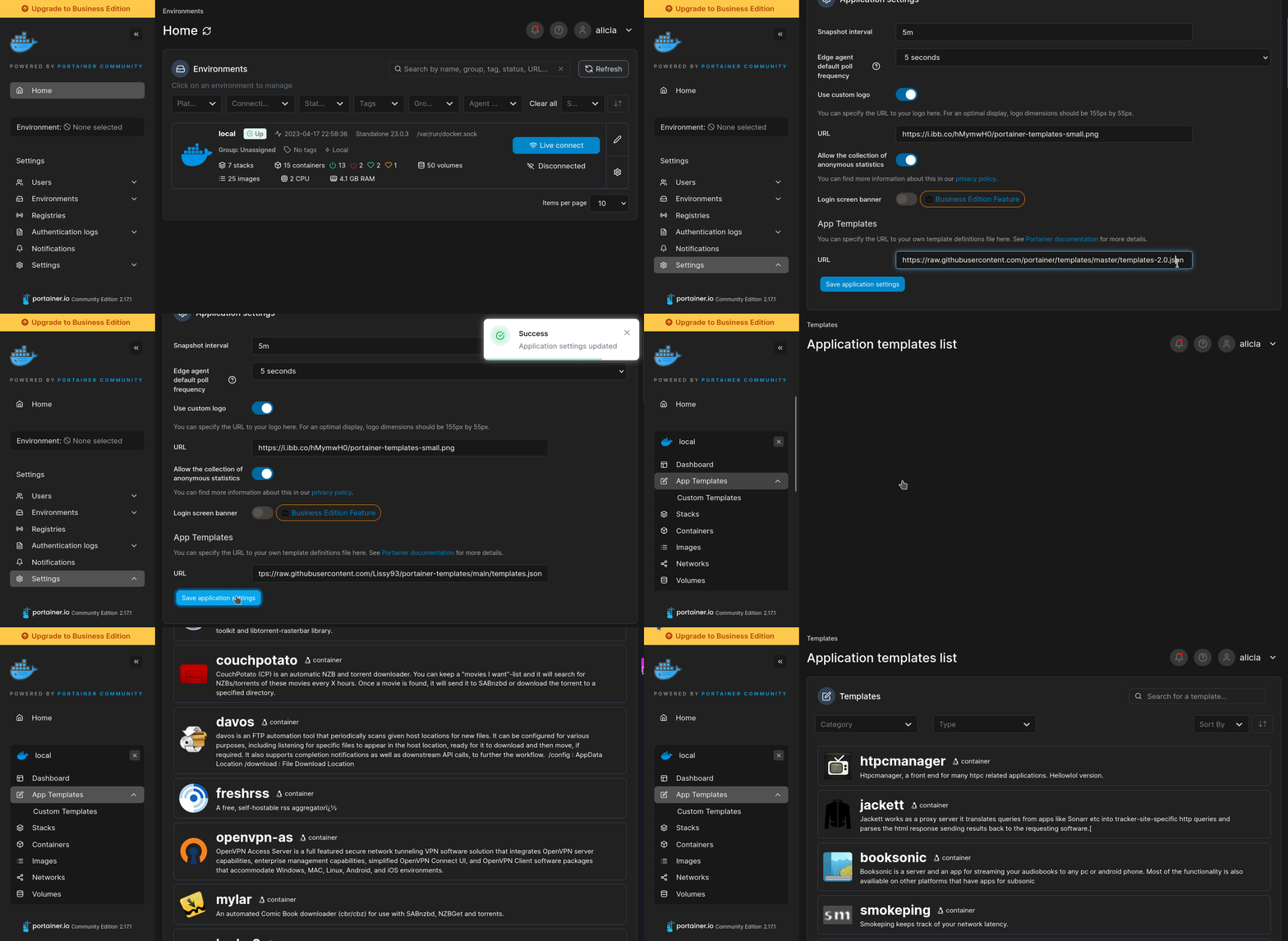
Install on Portainer
Import all app templates into your Portainer instance, for easy 1-click deploys
- Ensure both Docker and Portainer are installed, and up-to-date
- Log into your Portainer web UI
- Under Settings → App Templates, paste the below URL
- Head to Home → App Templates, and the list of apps will show up
- Select Hister, fill in any config options, and hit Deploy
Template Import URL
https://raw.githubusercontent.com/Lissy93/portainer-templates/main/templates.json
Show Me
Original stackfile
The compose file this template deploys, straight from its repo:
services:
  hister:
    image: ghcr.io/asciimoo/hister:latest
    restart: unless-stopped
    ports:
      - "${HISTER_PORT:-4433}:4433"
    environment:
      HISTER__SERVER__ADDRESS: "0.0.0.0:4433"
      HISTER__SERVER__BASE_URL: ${HISTER_URL:?Set the address you'll open it on}
      HISTER__APP__ACCESS_TOKEN: ${HISTER_TOKEN:?Set an access token}
    volumes:
      - hister-data:/hister/data

volumes:
  hister-data:
Or deploy it directly from the source:
git clone https://github.com/NotAFlightRisk/portainer-templates-extras
cd portainer-templates-extras
docker compose -f apps/hister/compose.yml up -d
More install options in our documentation, or see asciimoo/hister for app-specific guidance.
Hister
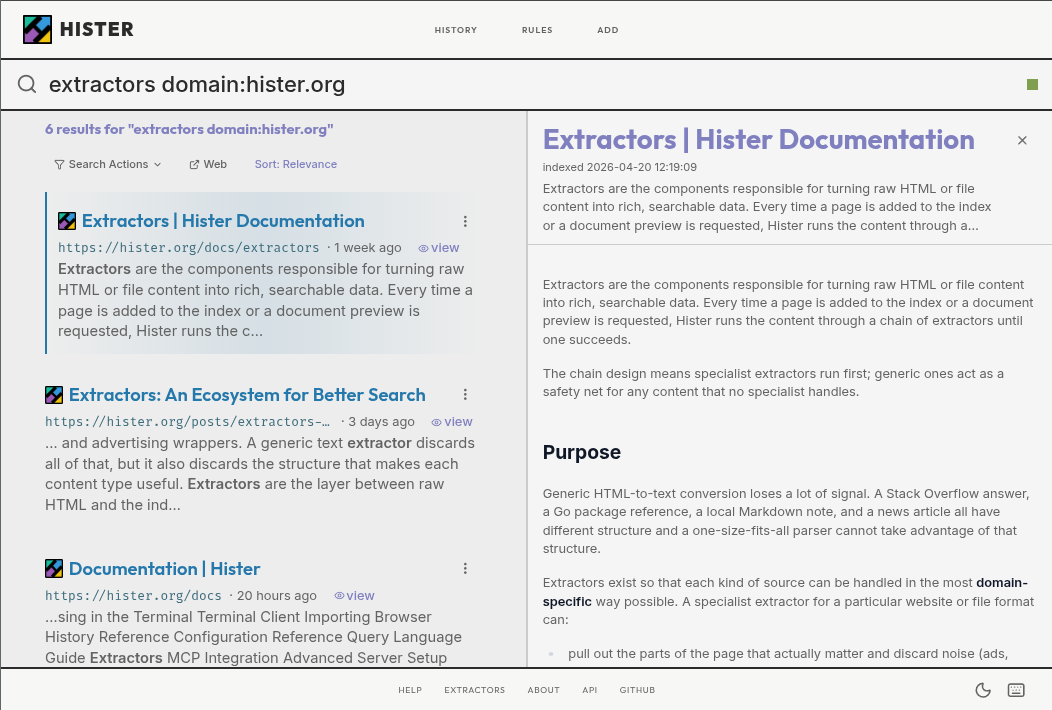
Your own search engineHister is a private search engine for the pages you visit and the files you keep. It indexes their full contents so you can find information again from the web interface, terminal, or an AI assistant connected through MCP.
Try the demo · Download Hister · Read the quickstart · Documentation · Support the development
Quickstart
- Download the binary for your platform from the latest release, then rename it to
hister(hister.exeon Windows).
- On Linux or macOS, make it executable:
```bash
chmod +x hister
```- Start Hister on Linux or macOS:
```bash
./hister listen
```

On Windows, run `.\hister.exe listen` in PowerShell.

Keep this terminal open while using Hister. The server must be running to index pages and search them.- Visit a web page with the extension enabled, then return to Hister and search for a phrase from that page to find your first indexed result.
No configuration is required for a local personal setup. See the complete quickstart to choose what Hister indexes.
To search existing content, import browser history, import browser bookmarks, index local directories, or import files.
Alternative installation methods include Homebrew (
brew install hister), Docker, and Nix. See the installation guide for instructions.Features
- Privacy focused: No telemetry or mandatory cloud service. Run Hister locally or on infrastructure you control.
- Full text indexing: Search the actual contents of visited pages and local files, not only titles and URLs.
- Automatic browser indexing: Save newly visited pages with the Firefox or Chrome extension.
- Powerful queries: Use field filters, phrases, wildcards, negation, aliases, and result priorities.
- Optional semantic search: Find documents by meaning through an embeddings endpoint you configure.
- Crawler and browser import: Index websites or bring in existing browser history and bookmarks.
- Web, terminal, and MCP clients: Search from the browser, TUI, command line, or an AI assistant.
- Multi user support: Keep each user's documents and search results separate on a shared server.

Privacy
By default, Hister has no telemetry and no cloud sync. The browser extension sends indexed page content only to the Hister server you configure, apart from downloading page favicons. The server stores documents and search indexes on that server.Optional semantic search sends document text to the embeddings endpoint you choose. Review the privacy overview and semantic search configuration before enabling remote integrations.
Why Hister?
Unlike traditional search engines, Hister builds a personal search index from the web pages and files you choose to keep. Your content stays on your Hister server, making it useful for finding information you've already encountered without relying on a third-party search provider.Development
Requirements are Go 1.26, npm, and a C compiler for CGO dependencies.git clone https://github.com/asciimoo/hister.git
cd hister
./manage.sh buildTo work on the web app with hot reload and automatic Go rebuilds:
npm run serve:appThis starts a Vite development server and the Go backend with automatic rebuilds through air.
Community and contributing
Join us on IRCNet in#hister or on Discord.Read CONTRIBUTING.md before submitting a change. Bugs and suggestions belong in the issue tracker. For security reports, see SECURITY.md.
Sponsors

License
AGPLv3 or any later versionCheck the logs first
Nine times out of ten the logs tell you exactly what went wrong.
- In Portainer, go to Containers, click the container, then Logs. Or run
docker logs <container> - Exit codes help too:
137means killed, usually out of memory.126or127means the command inside the image is broken.
Image won't pull
Test the pull directly on the host: docker pull ghcr.io/asciimoo/hister:latest
- "manifest unknown" means the tag no longer exists. This template uses
latest, so try pinning a specific version instead. - "toomanyrequests" is the Docker Hub rate limit. Log in with
docker loginto raise it. - "no space left on device" means a full disk. Reclaim space with
docker system prune
"exec format error"
This means the image was built for a different CPU architecture than your server.
- This image supports:
amd64, arm64 - Check yours with
uname -m: x86_64 is amd64, aarch64 is arm64. Raspberry Pi and other ARM boards are the usual culprits.
Container keeps restarting
The unless-stopped restart policy relaunches the app after every crash, so the real error can scroll past.
- Check the logs right after a restart, the last few lines before it died are the useful ones.
- Get the exit code with
docker inspect <container> --format '{{.State.ExitCode}}' - Still stuck? Redeploy once with the restart policy set to
noso the failure stays visible.
Required settings are blank
HISTER_TOKEN, HISTER_URL have no default value, and hister may crash or misbehave if left empty.
- Fill them in on the deploy screen before hitting deploy.
Stack won't deploy
Compose stacks fail fast on small mistakes, and Portainer shows the reason just above the editor.
- YAML only accepts spaces for indentation, a single tab breaks the whole file.
Raise an issue
Found something which isn't working as it should? Here's how to report it.
- Bug within the app: Open an issue on asciimoo/hister
- Template not working: Open an issue on NotAFlightRisk/portainer-templates-extras
- This website not working: Open an issue on lissy93/portainer-templates
A Compose stack
Hister is a Compose stack, a set of containers defined in one file and brought up together by Portainer, then started and stopped as a single app.
The app image
An image is the app packed up ready to go, everything Hister needs bundled into one download. This template pulls ghcr.io/asciimoo/hister:latest, which Docker fetches once (about 120 MB) and then starts your own copy from.
Where the image comes from
Docker pulls its images from registries, public libraries of ready-built apps. Hister's comes from the GitHub Container Registry, published by asciimoo.
Version tags
The bit after the colon in the image name is the version tag. Here it's latest, which always points at the newest build, so a redeploy can bump you to a newer release without you asking. Pin a specific tag if you would rather stay on one version.
Which machines it runs on
Every image is built for particular CPU types. This one ships for amd64, arm64, so it runs on both regular x86 servers and ARM boards like a Raspberry Pi.
Volumes
A volume is where Hister keeps its files so they survive an update or a restart. Without one, anything it saves would sit inside the container and vanish the moment it's recreated. This template mounts:
/hister/datakept in thehister-datavolume Docker manages
Environment variables
Environment variables are the settings you hand over when you deploy, things like a password or a timezone. Hister takes 6 of them, and 4 need a value before it'll start properly:
HISTER__SERVER__ADDRESS, defaults to0.0.0.0:4433HISTER__SERVER__BASE_URL, needs a valueHISTER__APP__ACCESS_TOKEN, needs a valueHISTER_TOKEN, needs a value. What you'll log in with, and what the browser extension sends. Generate one with: openssl rand -hex 32HISTER_URL, needs a value. Exactly what you'll type in the browser, port included and no slash at the end, like http://192.168.1.20:4433HISTER_PORT, defaults to4433. Host port for the web UI
Restart policy
The restart policy here is unless-stopped, so Docker restarts Hister after a crash or reboot, but leaves it off when you stop it on purpose. You can change this on the deploy screen. The choices are no (never restart), on-failure (only after a crash), unless-stopped (restart unless you stop it), and always (bring it back no matter what).
Networking
Nothing custom is set, so Hister sits on Docker's default bridge network: its own private space that reaches the outside world only through the ports it publishes.
Container name
Once it's deployed, Portainer names the container hister. That's what you'll spot in the containers list and use in commands like docker logs hister.
Platform
The platform is linux, the kind of system the container is built to run on. Docker and Portainer handle this on a normal Linux server.
Open source license
Hister is open source, released under the AGPL-3.0 license. In plain terms the code is out in the open, so you're free to run it and change it to fit what you need.
Portainer app templates
Zooming out, this whole page comes from a Portainer app template: a short recipe telling Portainer how to set Hister up. Add the template list to Portainer once, then deploying Hister is a click rather than a wall of config.