
![LinkAce]() LinkAce
Stack
Bookmark archive for keeping links you want to come back to, with tags, lists, notes, private or shared links, a browser bookmarklet, imports from any browser, and regular checks for links that have died. Source: https://github.com/Kovah/LinkAce
Source details
Configuration
TypeComposelinuxLINKACE_APP_KEY=''LINKACE_URL=''LINKACE_PORT=9180unless-stoppedTemplate by NotAFlightRisk·Source
Report issueNotes
openssl rand -hex 16 makes one) and the address before you deploy, since the stack won't start without both. Keep the key the same from then on, as it signs logins. The address is what you type in the browser, like http://192.168.1.20:9180. LinkAce only answers on that host name, so open it any other way (a different IP, or a domain you add later) and you just get "Bad Request" until you fix the address and update the stack. Then open it and click through the setup: the database step is already filled in for SQLite, so just continue, and the account you make next is the admin. There are no open sign-ups, invite people from User Management in the menu under your name. A second container runs the scheduler, which handles bookmark imports and checks your links every couple of hours. It can fetch links on your own network (like http://192.168.1.10) for titles and checks, so anyone you invite can point it at things on your LAN. Add LINKACE_LAN_LINKS=false to the stack's environment variables to stop that, though on Docker's default network it then can't reach sites that also have an IPv6 address either. By default every link you save is also sent to the Internet Archive's Wayback Machine, private ones included, which you can turn off under Settings --> Wayback Machine backups. It also asks updates.linkace.org once a day whether there's a new version. Everything lives in the linkace-storage volume. Docs: linkace.org/docsServices
linkace
Configuration
Imagelinkace/linkace:2.xsh,-c,touch /app/storage/linkace.sqlite && exec supervisord -c /etc/supervisor.d/supervisord.ini${LINKACE_PORT:-9180}:80/app/storage : linkace-storageAPP_KEY=${LINKACE_APP_KEY:?Set an app key of exactly 32 characters}APP_URL=${LINKACE_URL:?Set the address you'll open it on}DB_CONNECTION=sqliteDB_DATABASE=/app/storage/linkace.sqliteDB_USERNAME=linkaceMETA_ALLOW_PRIVATE_IP_RANGES=${LINKACE_LAN_LINKS:-true}unless-stoppedImage details
scheduler
Configuration
Imagelinkace/linkace:2.xsh,-c,touch /app/storage/linkace.sqlite && while :; do php artisan schedule:run; sleep 60; done/app/storage : linkace-storageAPP_KEY=${LINKACE_APP_KEY:?Set an app key of exactly 32 characters}APP_URL=${LINKACE_URL:?Set the address you'll open it on}DB_CONNECTION=sqliteDB_DATABASE=/app/storage/linkace.sqliteDB_USERNAME=linkaceMETA_ALLOW_PRIVATE_IP_RANGES=${LINKACE_LAN_LINKS:-true}unless-stoppedImage details
Standalone Install
Select an install method, to see config/commands for deploying LinkAce
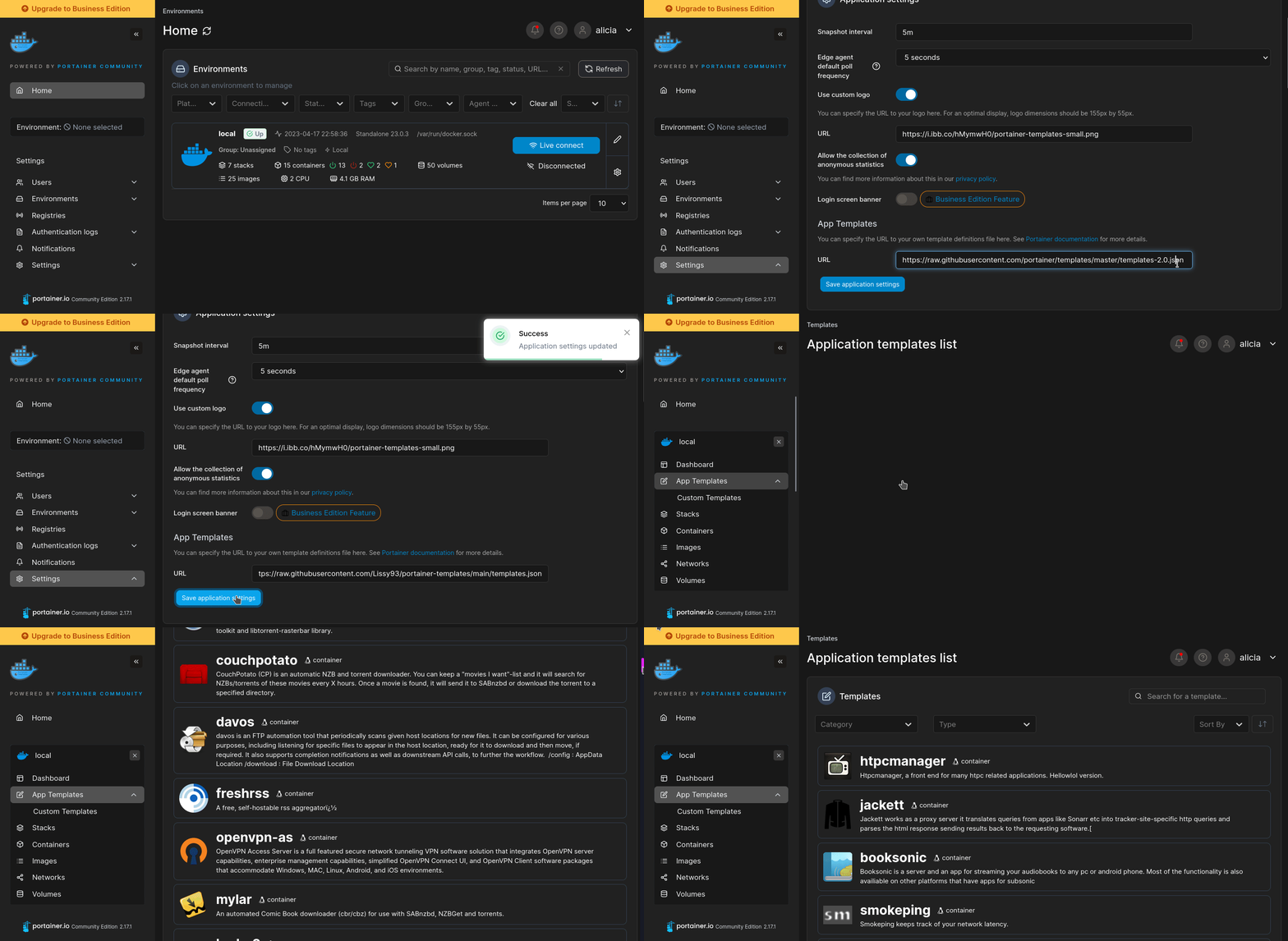
Install on Portainer
Import all app templates into your Portainer instance, for easy 1-click deploys
- Ensure both Docker and Portainer are installed, and up-to-date
- Log into your Portainer web UI
- Under Settings → App Templates, paste the below URL
- Head to Home → App Templates, and the list of apps will show up
- Select LinkAce, fill in any config options, and hit Deploy
Template Import URL
https://raw.githubusercontent.com/Lissy93/portainer-templates/main/templates.json
Show Me
Original stackfile
The compose file this template deploys, straight from its repo:
x-linkace: &linkace
  image: linkace/linkace:2.x
  restart: unless-stopped
  environment:
    APP_KEY: ${LINKACE_APP_KEY:?Set an app key of exactly 32 characters}
    APP_URL: ${LINKACE_URL:?Set the address you'll open it on}
    DB_CONNECTION: sqlite
    DB_DATABASE: /app/storage/linkace.sqlite
    DB_USERNAME: linkace
    META_ALLOW_PRIVATE_IP_RANGES: ${LINKACE_LAN_LINKS:-true}
  volumes:
    - linkace-storage:/app/storage

services:
  linkace:
    <<: *linkace
    command: ["sh", "-c", "touch /app/storage/linkace.sqlite && exec supervisord -c /etc/supervisor.d/supervisord.ini"]
    ports:
      - "${LINKACE_PORT:-9180}:80"

  scheduler:
    <<: *linkace
    command: ["sh", "-c", "touch /app/storage/linkace.sqlite && while :; do php artisan schedule:run; sleep 60; done"]

volumes:
  linkace-storage:
Or deploy it directly from the source:
git clone https://github.com/NotAFlightRisk/portainer-templates-extras
cd portainer-templates-extras
docker compose -f apps/linkace/compose.yml up -d
More install options in our documentation, or see Kovah/LinkAce for app-specific guidance.
Container Documentation
linkace Documentation
LinkAce is a self-hosted archive to collect links of your favorite websites.
scheduler Documentation
LinkAce is a self-hosted archive to collect links of your favorite websites.
Check the logs first
Nine times out of ten the logs tell you exactly what went wrong.
- In Portainer, go to Containers, click the container, then Logs. Or run
docker logs <container> - Exit codes help too:
137means killed, usually out of memory.126or127means the command inside the image is broken.
Image won't pull
Test the pull directly on the host: docker pull linkace/linkace:2.x
- "manifest unknown" means the tag no longer exists.
- "toomanyrequests" is the Docker Hub rate limit. Log in with
docker loginto raise it. - "no space left on device" means a full disk. Reclaim space with
docker system prune
"exec format error"
This means the image was built for a different CPU architecture than your server.
- Check yours with
uname -m: x86_64 is amd64, aarch64 is arm64. Raspberry Pi and other ARM boards are the usual culprits.
Container keeps restarting
The unless-stopped restart policy relaunches the app after every crash, so the real error can scroll past.
- Check the logs right after a restart, the last few lines before it died are the useful ones.
- Get the exit code with
docker inspect <container> --format '{{.State.ExitCode}}' - Still stuck? Redeploy once with the restart policy set to
noso the failure stays visible.
Stack won't deploy
Compose stacks fail fast on small mistakes, and Portainer shows the reason just above the editor.
- YAML only accepts spaces for indentation, a single tab breaks the whole file.
Raise an issue
Found something which isn't working as it should? Here's how to report it.
- Bug within the app: Open an issue on Kovah/LinkAce
- Template not working: Open an issue on NotAFlightRisk/portainer-templates-extras
- This website not working: Open an issue on lissy93/portainer-templates
A Compose stack
LinkAce is a Compose stack, a set of containers (2 of them) defined in one file and brought up together by Portainer, then started and stopped as a single app.
The services
This stack is built from 2 containers that run side by side. Here's each one, with the image it runs and anything it waits for first:
linkacerunslinkace/linkace:2.xschedulerrunslinkace/linkace:2.x
Volumes
A volume is where LinkAce keeps its files so they survive an update or a restart. Without one, anything it saves would sit inside the container and vanish the moment it's recreated. This template mounts:
/app/storagekept in thelinkace-storagevolume Docker manages
Environment variables
Environment variables are the settings you hand over when you deploy, things like a password or a timezone. LinkAce takes 6 of them, and 2 need a value before it'll start properly:
APP_KEY, needs a valueAPP_URL, needs a valueDB_CONNECTION, defaults tosqliteDB_DATABASE, defaults to/app/storage/linkace.sqliteDB_USERNAME, defaults tolinkaceMETA_ALLOW_PRIVATE_IP_RANGES, defaults totrue
Restart policy
The restart policy here is unless-stopped, so Docker restarts LinkAce after a crash or reboot, but leaves it off when you stop it on purpose. You can change this on the deploy screen. The choices are no (never restart), on-failure (only after a crash), unless-stopped (restart unless you stop it), and always (bring it back no matter what).
Networking
Portainer puts these services on one shared private network, so they can find each other by name (like linkace) while only the ports above are open to you.
Platform
The platform is linux, the kind of system the container is built to run on. Docker and Portainer handle this on a normal Linux server.
Open source license
LinkAce is open source, released under the GPL-3.0 license. In plain terms the code is out in the open, so you're free to run it and change it to fit what you need.
Portainer app templates
Zooming out, this whole page comes from a Portainer app template: a short recipe telling Portainer how to set LinkAce up. Add the template list to Portainer once, then deploying LinkAce is a click rather than a wall of config.