
![Papra]() Papra
Papra
Stack
Document archive for receipts, contracts, payslips and all the other paperwork you need to keep: upload them, search their text (scans included), and tag them by hand or with rules, in separate organisations for home and work. Source: https://github.com/papra-hq/papra
Image details
Source details
Configuration
TypeComposelinuxghcr.io/papra-hq/papra:latest${PAPRA_PORT:-1221}:1221/app/app-data : papra-dataAPP_BASE_URL=${PAPRA_URL:?Set the address you'll open it on}AUTH_SECRET=${PAPRA_AUTH_SECRET:?Set an auth secret}AUTH_IS_REGISTRATION_ENABLED=${PAPRA_SIGNUPS:-true}PAPRA_URL=''PAPRA_AUTH_SECRET=''PAPRA_PORT=1221unless-stoppedTemplate by NotAFlightRisk·Source
Report issueNotes
http://192.168.1.20:1221: the port you're using, and no slash at the end. Papra only accepts logins from that address, so if it's wrong the page still loads but signing up or logging in fails with Invalid callbackURL. To fix it, change the address in the stack's environment variables and redeploy. The first account you make is the admin, and sign-ups stay open after that. To close them, add PAPRA_SIGNUPS set to false to the stack's environment variables and redeploy. Documents and the database live in the papra-data volume. Docs: docs.papra.appStandalone Install
Select an install method, to see config/commands for deploying Papra
Install on Portainer
Import all app templates into your Portainer instance, for easy 1-click deploys
- Ensure both Docker and Portainer are installed, and up-to-date
- Log into your Portainer web UI
- Under Settings → App Templates, paste the below URL
- Head to Home → App Templates, and the list of apps will show up
- Select Papra, fill in any config options, and hit Deploy
Template Import URL
https://raw.githubusercontent.com/Lissy93/portainer-templates/main/templates.json
Show Me

Original stackfile
The compose file this template deploys, straight from its repo:
services:
  papra:
    image: ghcr.io/papra-hq/papra:latest
    restart: unless-stopped
    ports:
      - "${PAPRA_PORT:-1221}:1221"
    environment:
      APP_BASE_URL: ${PAPRA_URL:?Set the address you'll open it on}
      AUTH_SECRET: ${PAPRA_AUTH_SECRET:?Set an auth secret}
      AUTH_IS_REGISTRATION_ENABLED: ${PAPRA_SIGNUPS:-true}
    volumes:
      - papra-data:/app/app-data

volumes:
  papra-data:
Or deploy it directly from the source:
git clone https://github.com/NotAFlightRisk/portainer-templates-extras
cd portainer-templates-extras
docker compose -f apps/papra/compose.yml up -d
More install options in our documentation, or see papra-hq/papra for app-specific guidance.
<source srcset="./.github/icon-dark.png" media="(prefers-color-scheme: light)">
<source srcset="./.github/icon-light.png" media="(prefers-color-scheme: dark)">
<img src="https://raw.githubusercontent.com/papra-hq/papra/HEAD/.github/icon-dark.png" alt="Header banner">
Papra - Document management platform
Minimalistic document management and archiving platform.
Demo • Docs • Self-hosting • Roadmap • Discord
Introduction
Papra is a minimalistic document management and archiving platform. It is designed to be simple to use and accessible to everyone. Papra is a platform for long-term document storage and management, like a digital archive for your documents.Forget about that receipt of that gift you bought for your friend last year, or that warranty for your new phone. With Papra, you can easily store, forget, and retrieve your documents whenever you need them.
A live demo of the platform is available at demo.papra.app (no backend, client-side local storage only).
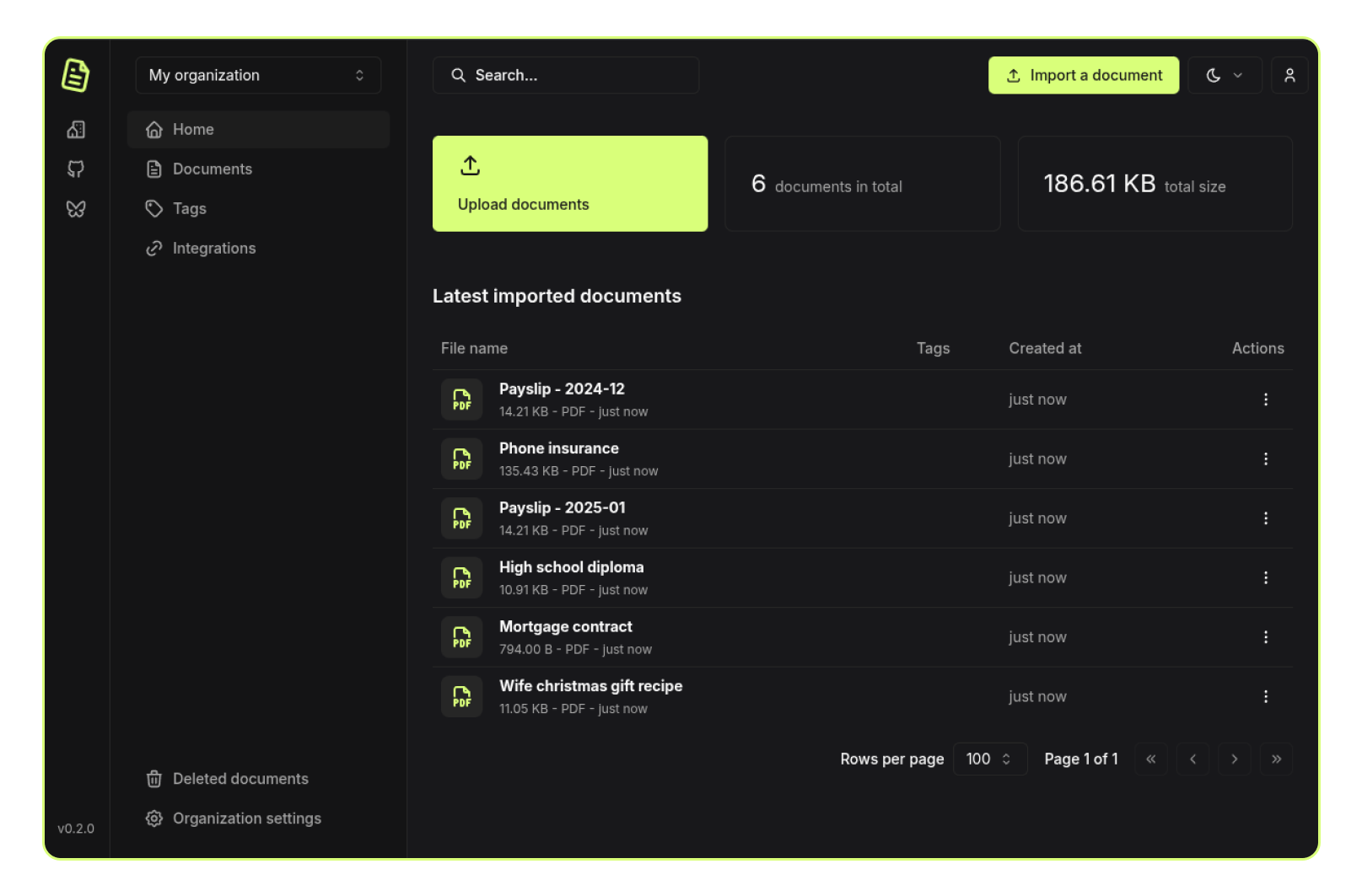
Features
- Document management: Upload, store, and manage your documents in one place.
- Organizations: Create organizations to manage documents with family, friends, or colleagues.
- Search: Quickly search for documents with full-text search and advanced filters.
- Authentication: User accounts and authentication.
- Dark Mode: A dark theme for those late-night document management sessions.
- Responsive Design: Works on all devices, from desktops to mobile phones.
- Open Source: The project is open-source and free to use.
- Self-hosting: Host your own instance of Papra using Docker or other methods.
- Tags: Organize your documents with tags.
- Email ingestion: Send/forward emails to a generated address to automatically import documents.
- Content extraction: Automatically extract text from images or scanned documents for search.
- Tagging Rules: Automatically tag documents based on custom rules.
- Folder ingestion: Automatically import documents from a folder.
- CLI: Manage your documents from the command line.
- API, SDK and webhooks: Build your own applications on top of Papra.
- i18n: Support for multiple languages.
- Custom properties: Define per-organization custom properties to store additional information about documents.
- Document sharing: Share documents with external users with optional expiration dates and password protection.
- Coming soon: Document requests: Generate upload links for people to add documents.
- Coming maybe one day: Mobile app: Access and upload documents on the go.
- Coming maybe one day: Desktop app: Access and upload documents from your computer.
- Coming maybe one day: Browser extension: Upload documents from your browser.
- Coming maybe one day: AI: Use AI to help you manage or tag your documents.
Support
Papra is a free and open-source project, but it is not free to run and develop. If you want to support the project, you can become a sponsor on GitHub Sponsors or Buy me a coffee. If you are a company, you can also contact me to discuss a sponsorship.Self-hosting
Papra is dedicated to providing a simple yet highly configurable self-hosting experience.For a quick start, simply run the following command:
docker run -d --name papra -p 1221:1221 -e AUTH_SECRET=a-dummy-secret-for-testing-purposes-only ghcr.io/papra-hq/papra:latestTheAUTH_SECRETabove is fine for kicking the tires, but for any real instance you should generate your own withopenssl rand -hex 48(or similar).
Please refer to the self-hosting documentation for more information and configuration options.
Contributing
Contributions are welcome! Please refer to theCONTRIBUTING.md file for guidelines on how to get started, report issues, and submit pull requests.
You can find easy-to-pick-up tasks with the good first issue or PR welcome labels.License
This project is licensed under the AGPL-3.0 License - see the LICENSE file for details.Community
Join the community on Papra's Discord server to discuss the project, ask questions, or get help.Credits
This project is crafted with ❤️ by Corentin Thomasset. If you find this project helpful, please consider supporting my work.Acknowledgements
Stack
Papra would not have been possible without the following open-source projects:- Frontend
- Backend
- Documentation
- Project
- Infrastructure
Inspiration
This project would not have been possible without the inspiration and work of others. Here are some projects that inspired me:- Paperless-ngx: A full-featured document management system.
Sponsors
Shout-out to our current sponsors:
Check the logs first
Nine times out of ten the logs tell you exactly what went wrong.
- In Portainer, go to Containers, click the container, then Logs. Or run
docker logs <container> - Exit codes help too:
137means killed, usually out of memory.126or127means the command inside the image is broken.
Image won't pull
Test the pull directly on the host: docker pull ghcr.io/papra-hq/papra:latest
- "manifest unknown" means the tag no longer exists. This template uses
latest, so try pinning a specific version instead. - "toomanyrequests" is the Docker Hub rate limit. Log in with
docker loginto raise it. - "no space left on device" means a full disk. Reclaim space with
docker system prune
"exec format error"
This means the image was built for a different CPU architecture than your server.
- This image supports:
amd64, arm64 - Check yours with
uname -m: x86_64 is amd64, aarch64 is arm64. Raspberry Pi and other ARM boards are the usual culprits.
Container keeps restarting
The unless-stopped restart policy relaunches the app after every crash, so the real error can scroll past.
- Check the logs right after a restart, the last few lines before it died are the useful ones.
- Get the exit code with
docker inspect <container> --format '{{.State.ExitCode}}' - Still stuck? Redeploy once with the restart policy set to
noso the failure stays visible.
Required settings are blank
PAPRA_URL, PAPRA_AUTH_SECRET have no default value, and papra may crash or misbehave if left empty.
- Fill them in on the deploy screen before hitting deploy.
Stack won't deploy
Compose stacks fail fast on small mistakes, and Portainer shows the reason just above the editor.
- YAML only accepts spaces for indentation, a single tab breaks the whole file.
Raise an issue
Found something which isn't working as it should? Here's how to report it.
- Bug within the app: Open an issue on papra-hq/papra
- Template not working: Open an issue on NotAFlightRisk/portainer-templates-extras
- This website not working: Open an issue on lissy93/portainer-templates
A Compose stack
Papra is a Compose stack, a set of containers defined in one file and brought up together by Portainer, then started and stopped as a single app.
The app image
An image is the app packed up ready to go, everything Papra needs bundled into one download. This template pulls ghcr.io/papra-hq/papra:latest, which Docker fetches once (about 290 MB) and then starts your own copy from.
Where the image comes from
Docker pulls its images from registries, public libraries of ready-built apps. Papra's comes from the GitHub Container Registry, published by papra-hq.
Version tags
The bit after the colon in the image name is the version tag. Here it's latest, which always points at the newest build, so a redeploy can bump you to a newer release without you asking. Pin a specific tag if you would rather stay on one version.
Which machines it runs on
Every image is built for particular CPU types. This one ships for amd64, arm64, so it runs on both regular x86 servers and ARM boards like a Raspberry Pi.
Volumes
A volume is where Papra keeps its files so they survive an update or a restart. Without one, anything it saves would sit inside the container and vanish the moment it's recreated. This template mounts:
/app/app-datakept in thepapra-datavolume Docker manages
Environment variables
Environment variables are the settings you hand over when you deploy, things like a password or a timezone. Papra takes 6 of them, and 4 need a value before it'll start properly:
APP_BASE_URL, needs a valueAUTH_SECRET, needs a valueAUTH_IS_REGISTRATION_ENABLED, defaults totruePAPRA_URL, needs a value. Exactly what you'll type in the browser, port included and no slash at the end, like http://192.168.1.20:1221.PAPRA_AUTH_SECRET, needs a value. At least 32 characters. Generate one with: openssl rand -hex 32. Keep it the same when you redeploy.PAPRA_PORT, defaults to1221. Host port for the web UI
Restart policy
The restart policy here is unless-stopped, so Docker restarts Papra after a crash or reboot, but leaves it off when you stop it on purpose. You can change this on the deploy screen. The choices are no (never restart), on-failure (only after a crash), unless-stopped (restart unless you stop it), and always (bring it back no matter what).
Networking
Nothing custom is set, so Papra sits on Docker's default bridge network: its own private space that reaches the outside world only through the ports it publishes.
Container name
Once it's deployed, Portainer names the container papra. That's what you'll spot in the containers list and use in commands like docker logs papra.
Platform
The platform is linux, the kind of system the container is built to run on. Docker and Portainer handle this on a normal Linux server.
Open source license
Papra is open source, released under the AGPL-3.0 license. In plain terms the code is out in the open, so you're free to run it and change it to fit what you need.
Portainer app templates
Zooming out, this whole page comes from a Portainer app template: a short recipe telling Portainer how to set Papra up. Add the template list to Portainer once, then deploying Papra is a click rather than a wall of config.