
![SolidPing]() SolidPing
SolidPing
Container
Uptime and synthetic monitoring with status pages, incidents and alerts. Checks HTTP, DNS, TCP, ICMP, TLS expiry, databases, message brokers, heartbeats and headless browser scenarios. Source: https://github.com/fclairamb/solidping
Image details
Source details
Configuration
TypeContainerlinuxghcr.io/fclairamb/solidping:latest4000:4000/tcp/dataSP_NODE_NAME=solidpingSP_BASE_URL=http://localhost:4000unless-stoppedNotes
http://<your-host>:4000. First login: [email protected] / solidpass, organization default. You are asked to set a new password right away. The SQLite database and uploads live in the /data volume. No secret is needed to start. Configuration: docs.solidping.ioStandalone Install
Select an install method, to see config/commands for deploying SolidPing
Install on Portainer
Import all app templates into your Portainer instance, for easy 1-click deploys
- Ensure both Docker and Portainer are installed, and up-to-date
- Log into your Portainer web UI
- Under Settings → App Templates, paste the below URL
- Head to Home → App Templates, and the list of apps will show up
- Select SolidPing, fill in any config options, and hit Deploy
Template Import URL
https://raw.githubusercontent.com/Lissy93/portainer-templates/main/templates.json
Show Me

More install options in our documentation, or see fclairamb/solidping for app-specific guidance.

SolidPing
Distributed, self-hostable uptime monitoring. 43 check types, multi-region workers, private agents, status pages, incidents and on-call escalation — in a single Go binary.









From docker run to the first result
https://github.com/user-attachments/assets/471694b0-b136-4764-86c1-5f85615c45f4The whole thing, start to finish:
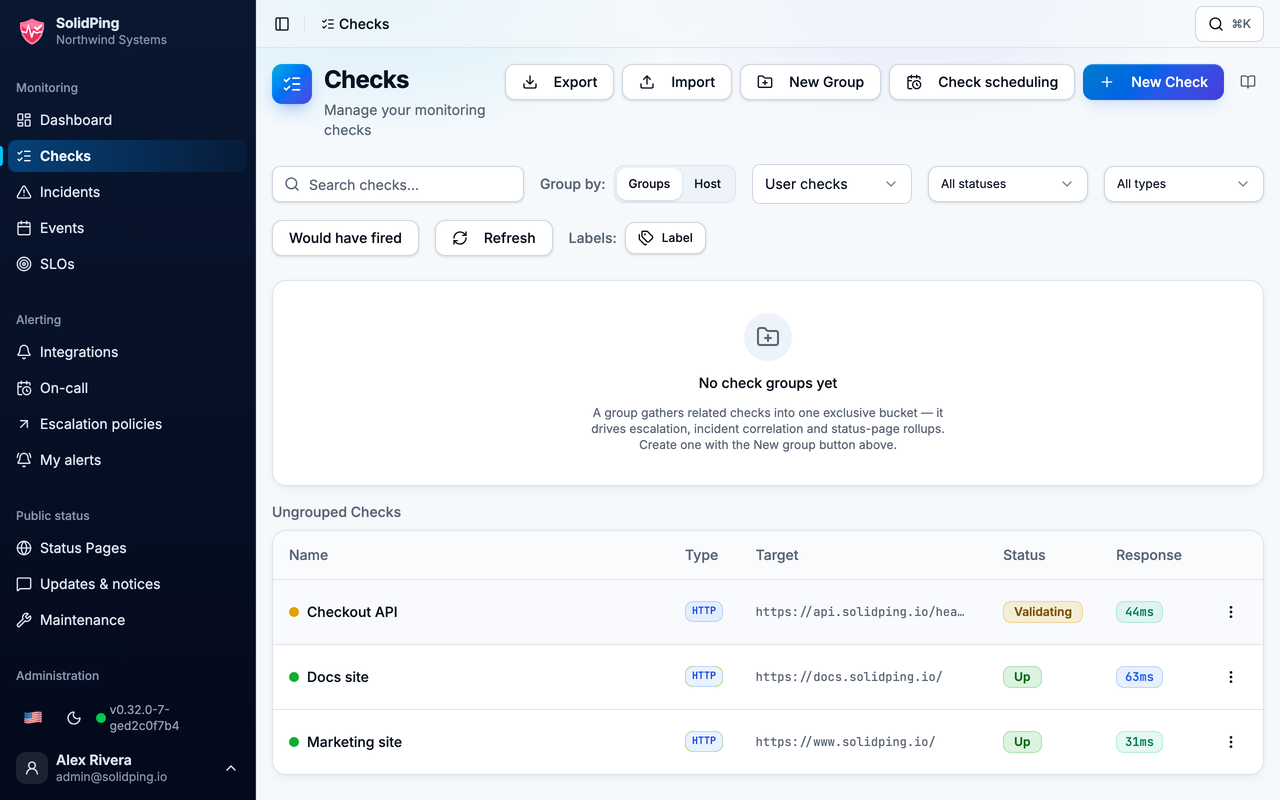
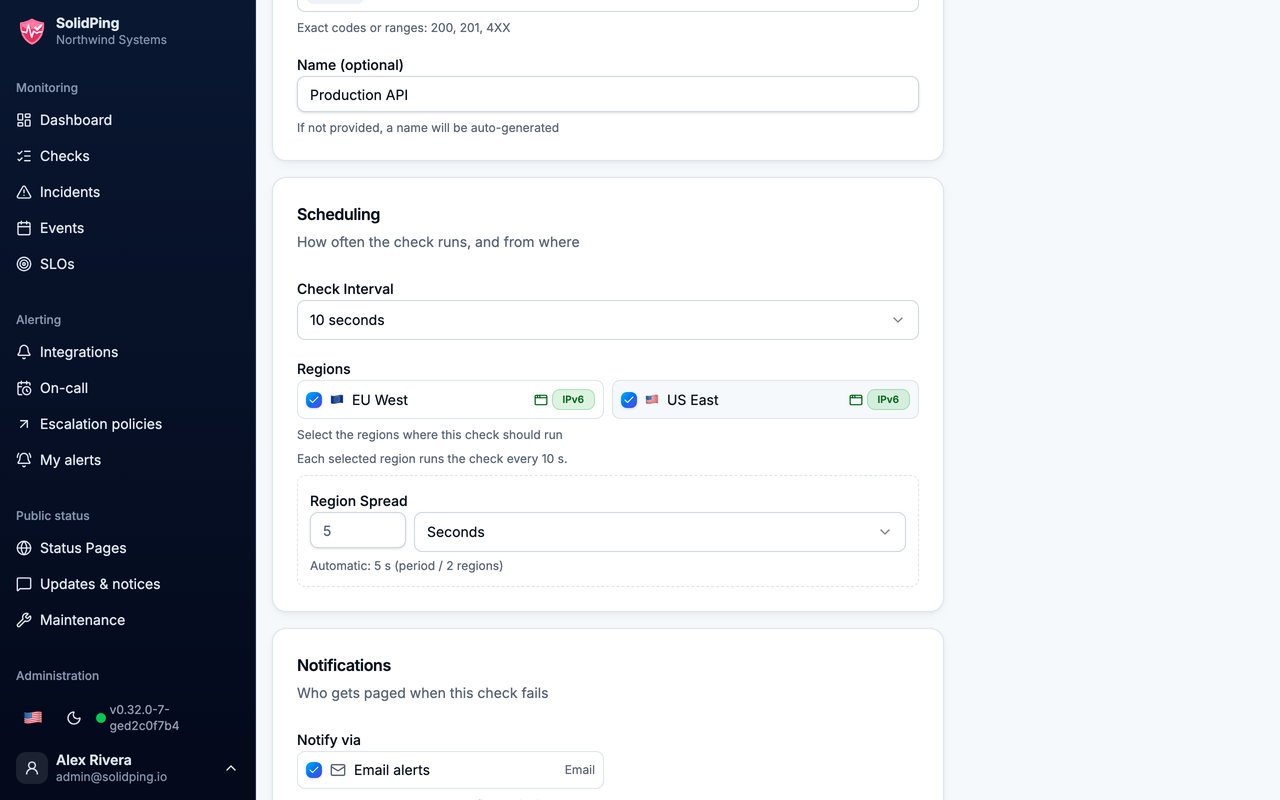
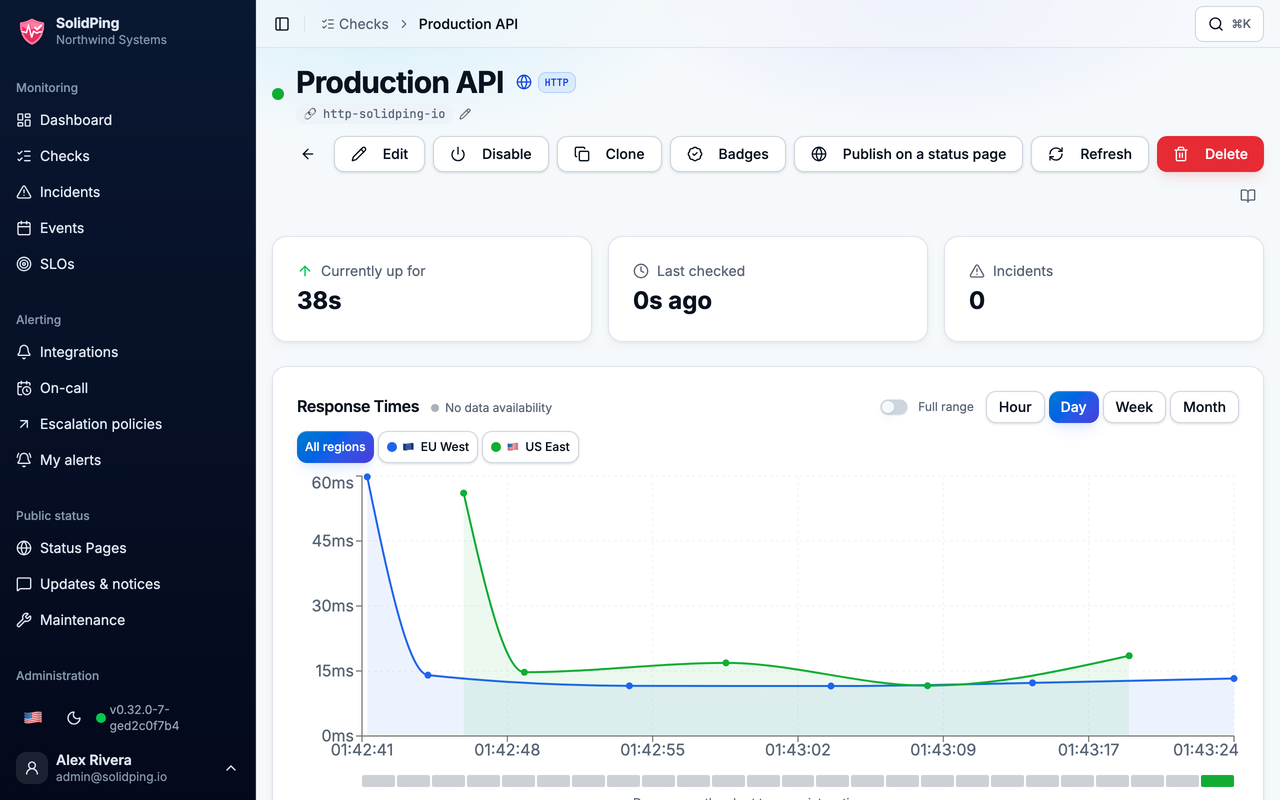
docker run, the first sign-in and its forced password change, an HTTP check created against https://solidping.io/api/mgmt/health, and its first response times plotted from two regions. Regenerated from the live dashboard with make showcase — nothing here is a mock-up. The same cut plays on the Tour page if the player above does not load.Screenshots
| Checks list | New-check form | Check detail |
|---|---|---|
 |  |  |
Try it
| Hosted | www.solidping.io — sign up, no card needed |
| Live status page | status.solidping.io — a real SolidPing instance watching the production one, from another provider in another country |
| Documentation | docs.solidping.io |
| Self-host | docker run -p 4000:4000 --hostname solidping ghcr.io/fclairamb/solidping (also on Docker Hub as fclairamb/solidping) — SQLite by default, no other service needed. First login is [email protected] / solidpass, and you must change it (see Default Credentials). Prefer a bare binary? Every release also publishes one for Linux, macOS and Windows — see the installation guides. Also: brew install fclairamb/tap/solidping (tap), scoop bucket add fclairamb https://github.com/fclairamb/scoop-bucket then scoop install solidping, and a Helm chart. |
Overview
SolidPing is a multi-tenant monitoring system that enables organizations to monitor their infrastructure through distributed workers executing health checks. It's designed for low resource consumption and easy self-hosting.Key Features
- 43 check types: HTTP, TCP, UDP, ICMP, DNS, DNSBL, NTP, SSL/Domain, SSH, RDP, VNC, FTP/SFTP, SMTP/POP3/IMAP, Email (JMAP passive inbox), WebSocket, SIP, gRPC, Prometheus, 7 databases (Postgres, MySQL, MSSQL, Oracle, ClickHouse, MongoDB, Redis), 3 message queues (Kafka, RabbitMQ, MQTT), Docker, Kubernetes, SNMP, Freebox line, game server (Source/A2S, Minecraft), headless browser, custom JS, website crawl, health endpoint, heartbeat
- Distributed workers: Multi-region check execution with lease-based scheduling, per-region check periods with spread control, and per-org check-rate quotas
- Private locations: Deported agents run checks from inside your own network over an outbound WebSocket, with per-org agent quotas
- Multi-tenant: Organization-scoped data isolation, RBAC, 2FA (TOTP), labels with autocomplete
- Low footprint: Single binary; SQLite, embedded Postgres, or external Postgres
- Fast checks: Sub-minute frequencies supported
- Notifications (10 native): Slack (OAuth + threads + Marketplace install), Discord (OAuth + webhook), Email, Webhooks, Google Chat, Mattermost, Ntfy, PagerDuty, Pushover, Web Push (VAPID)
- Incidents: Adaptive resolution with cooldown, group-incident correlation (one alert per outage, not per check), acknowledgment, snooze, manual resolve, and per-incident comments
- Check groups: Organize checks into groups with grouped pagination and group-level incident correlation
- On-call & escalation: Rotation schedules with overrides, multi-step escalation policies (user / schedule / connection / all-admins targets, repeats)
- Credentials encryption at rest: Envelope encryption with out-of-band master key; secrets never echoed back to the dashboard
- SSH tunnels: Reach otherwise-unreachable targets through SSH jump hosts
- Status pages: Sections, resources, public availability metrics, locale-aware date formatting
- Maintenance windows: Recurring suppression of alerts
- JavaScript scripting: Sandboxed custom monitoring logic
- Browser monitoring: Headless Chrome via Rod
- MCP server: AI/LLM tool access via Model Context Protocol (listed on Smithery)
- SSO / OAuth: Google, GitHub, GitLab, Microsoft, Slack, Discord, plus generic OIDC, SAML, and LDAP / Active Directory (per-provider enable toggle, with self-service token revocation)
- Observability: Prometheus
/metrics, Sentry integration, OpenTelemetry - CLI client: Manage checks and results from the terminal
- i18n: Multi-language dashboard (English, French, German, Spanish)
Quick Start
Prerequisites
- Go 1.24+
- PostgreSQL 15+
- Docker (for development)
- Bun (for frontend development)
Development Setup
# Start PostgreSQL
docker-compose up -d

# Build and run
make build && ./solidping serve

# Or use hot reload for development
make dev-test   # Backend + frontend with hot reload
Default Credentials
- Email:
[email protected] - Password:
solidpass - Organization:
default
Both halves of that pair are published here, so the first login on a fresh database must set a new password before the account can do anything else. The dashboard takes you straight to the form; over the API the login succeeds and every endpoint except
POST /api/v1/auth/change-password,
GET /api/v1/auth/me and POST /api/v1/auth/logout answers 403 with code
PASSWORD_CHANGE_REQUIRED until you rotate it.API Example
# Get a JWT token
TOKEN=$(curl -s -X POST -H 'Content-Type: application/json' \
  -d '{"org":"default","email":"[email protected]","password":"solidpass"}' \
  'http://localhost:4000/api/v1/auth/login' | jq -r '.accessToken')

# List checks
curl -s -H "Authorization: Bearer $TOKEN" \
  'http://localhost:4000/api/v1/orgs/default/checks'
Supported Check Types
Network
| Protocol | Description |
|---|---|
| HTTP/HTTPS | Status codes, body matching, JSON assertions, Basic Auth |
| TCP | Port connectivity |
| UDP | Port reachability |
| ICMP | Ping |
| DNS | Record resolution |
| DNSBL | DNS blocklist (RBL) membership |
| NTP | Time server reachability and clock drift |
| WebSocket | Connection check |
| SIP | VoIP SIP server (OPTIONS ping) |
Security & Certificates
| Protocol | Description |
|---|---|
| SSL/TLS | Certificate validity and expiration |
| Domain | Domain name expiration (WHOIS) |
| Protocol | Description |
|---|---|
| SMTP | Server connectivity, STARTTLS, AUTH |
| POP3 | Server availability |
| IMAP | Server availability |
| Email (JMAP) | Passive inbox monitoring — receive a known message via JMAP and assert delivery |
Databases
| Protocol | Description |
|---|---|
| PostgreSQL | Connection + query execution |
| MySQL/MariaDB | Connection + query execution |
| MSSQL | Connection + query execution |
| Oracle | Connection + query execution |
| ClickHouse | Connection + query execution |
| MongoDB | Ping command |
| Redis | PING command |
Remote Access
| Protocol | Description |
|---|---|
| SSH | Server availability |
| RDP | Pre-auth RDP negotiation handshake (no credentials) |
| FTP | Server availability |
| SFTP | Server availability |
Message Queues
| Protocol | Description |
|---|---|
| Kafka | Broker connectivity |
| RabbitMQ | Broker connectivity |
| MQTT | Broker connectivity |
Infrastructure
| Type | Description |
|---|---|
| Docker | Container health |
| Kubernetes | Cluster / API server health |
| SNMP | Device monitoring |
| gRPC | Service health |
| A2S | Source / Steam game server query (Valve A2S) |
| Minecraft | Minecraft server query |
| Prometheus | Scrape a Prometheus endpoint and assert on a metric |
Specialized
| Type | Description |
|---|---|
| Heartbeat | Passive monitoring via incoming pings |
| JavaScript | Sandboxed custom monitoring logic |
| Browser | Headless Chrome (Rod) — JS, CSS, full render |
| Freebox Line | Freebox xDSL/fiber line quality (via connected Freebox) |
Configuration
Everything is configured withSP_-prefixed environment variables. Precedence:
environment variables > config.local.yml > config.yml > defaults.You only need the database settings to get started — the defaults cover the rest.
SQLite (the default — good for a single instance)
Nothing to configure. The image already stores the SQLite database and every uploaded blob (org logos, status-page assets, screenshots) under/data, so a
single mounted named volume is enough:docker run -p 4000:4000 \
--hostname solidping \
-v solidping-data:/data \
ghcr.io/fclairamb/solidping--hostname solidping is not optional: the worker name is derived from the
hostname and must match ^[a-z][a-z0-9-]{2,20}$. Docker's default hostname is
the random container ID, which starts with a digit most of the time, and the
server then refuses to start. Pass --hostname, or set SP_NODE_NAME instead.If you use a bind mount instead of a named volume (
-v ./solidping-data:/data),
the host directory keeps its own ownership, which is usually not writable by
the image's nonroot user (uid/gid 65532). Either chown 65532:65532 the
host directory first, or run with -u "$(id -u):$(id -g)". A named volume, as
used above, doesn't have this problem — Docker seeds it from the image with
the right ownership.PostgreSQL (recommended for production)
Schema migrations run on first boot, so point it at an empty database and let it create its own tables:docker run -p 4000:4000 \
--hostname solidping \
-e SP_DB_TYPE=postgres \
-e SP_DB_URL='postgresql://solidping:password@postgres:5432/solidping?sslmode=disable' \
ghcr.io/fclairamb/solidpingsslmode=disable is right for a database on the same private network, and is
what a stock postgres container accepts — it serves no TLS, so sslmode=require
fails against one with SSL is not enabled on the server. For a managed or
remote database, use sslmode=require (or verify-full) instead.The variables you actually need
| Variable | Default | Description |
|---|---|---|
SPDBTYPE | sqlite | sqlite or postgres |
SPDBURL | — | PostgreSQL connection string (required when SPDBTYPE=postgres) |
SPDBDIR | /data in the image, . for the bare binary | Where the SQLite file lives — set it to a volume |
SPSERVERLISTEN | :4000 | Listen address |
SPBASEURL | http://localhost:4000 | Public URL, used in links and notifications |
SPNODENAME | the hostname | Worker name, ^a-za-z0-9-{2,20}$. Set it, or pass --hostname — the server will not start if the hostname does not match |
SPLOGLEVEL | info | debug, info, warn, error |
That is the whole getting-started surface. Everything else — authentication and SSO, email and the other notification channels, custom domains and TLS, multi-region workers, data retention, storage — is optional and documented at docs.solidping.io:
| Configuration overview | every variable, grouped by area |
| Database | connection strings, SSL modes, pooling, backups |
| Authentication | OAuth providers, OIDC, SAML, LDAP, 2FA |
| Notifications | Slack, Discord, email, webhooks and the rest |
Architecture
Core Components
- API Server: REST API for managing checks, incidents, and results
- Dashboard (
web/dash0): Admin UI (React + TanStack Router + shadcn/ui) - Status Page (
web/status0): Public-facing status dashboard - Workers: Distributed agents executing monitoring checks
- Notifications: Slack, Discord, Email, Webhooks, Google Chat, Mattermost, Ntfy, PagerDuty, Pushover, Web Push
- Database: PostgreSQL (partitioned results) or SQLite
Technology Stack
- Backend: Go 1.24+, go-chi/chi v5, Bun ORM, koanf
- Frontend: React 19, TypeScript, Vite, TanStack Router/Query, Tailwind CSS, shadcn/ui
- Database: PostgreSQL (production), SQLite (development/single-node)
Project Structure
solidping/
├── server/
│   ├── main.go                  # CLI entry point (serve, migrate, client)
│   └── internal/
│       ├── app/                 # Server setup, services, embedded assets
│       ├── handlers/            # HTTP handlers + business logic
│       ├── checkers/            # Protocol checker implementations
│       ├── notifications/       # Notification channels
│       ├── db/                  # Bun models + Postgres/SQLite migrations
│       └── middleware/          # Auth, CORS, org context
├── web/
│   ├── dash0/                   # Admin dashboard (React)
│   └── status0/                 # Public status page
├── docker-compose.yml           # Development PostgreSQL
├── Dockerfile                   # Production container
└── Makefile                     # Build targets
Development
Commands
make build            # Build complete application
make dev-test         # Hot-reload backend + frontend
make dev-backend      # Backend only with hot reload (air)
make dev-dash0        # Dashboard dev server
make test             # Run backend tests
make lint             # Lint all code
make fmt              # Format all code
make docker-build     # Build Docker image
CLI Client
# Build the CLI
make build-cli

# Usage
./bin/sp auth login
./bin/sp checks list
./bin/sp results list
Goals
Primary
- Many protocols and test types
- Low memory footprint
- Fast execution (sub-minute checks)
- Easy self-hosting (single binary + PostgreSQL)
- Cross-platform (Linux, macOS, Windows)
- Public status pages
Non-Goals
- Multi-step transactional / scripted user-flow testing (use Playwright directly for that)
- Application Performance Monitoring / RUM (use Datadog, New Relic, or Site24x7)
Inspiration
- uptime-kuma - Great self-hosted monitoring tool
Contributing
Bug reports and pull requests are welcome — seeCONTRIBUTING.md
for local setup and PR conventions. Found a security issue? See
SECURITY.md rather than opening a public issue.License
AGPL-3.0 - See LICENSE.Serve SolidPing on your own domain behind Caddy, Nginx or Traefik. Fill in your domain and copy the result. It's a starting point, some apps need their own base URL or extra headers set too.
Proxying solidping.example.com to http://solidping:4000
Add this to your Caddyfile
solidping.example.com {
	reverse_proxy http://solidping:4000
}Check the logs first
Nine times out of ten the logs tell you exactly what went wrong.
- In Portainer, go to Containers, click the container, then Logs. Or run
docker logs solidping - Exit codes help too:
137means killed, usually out of memory.126or127means the command inside the image is broken.
Port already in use
If deployment fails with "Bind for 0.0.0.0:4000 failed: port is already allocated", something else on your server is using that port.
- Find what's using it:
sudo ss -tlnp | grep :4000 - Stop the other service, or pick a different host port. In
4000:4000only the left number is yours to change, the right one belongs to the app.
Running but the page won't load
The container is up but nothing appears in your browser.
- Use your server's real IP:
http://your-server-ip:4000. The 0.0.0.0 link Portainer shows isn't a real address. - Give it a minute after first deploy, solidping can take a while to initialise.
- Make sure your firewall allows the port, e.g.
sudo ufw allow 4000
Image won't pull
Test the pull directly on the host: docker pull ghcr.io/fclairamb/solidping:latest
- "manifest unknown" means the tag no longer exists. This template uses
latest, so try pinning a specific version instead. - "toomanyrequests" is the Docker Hub rate limit. Log in with
docker loginto raise it. - "no space left on device" means a full disk. Reclaim space with
docker system prune
"exec format error"
This means the image was built for a different CPU architecture than your server.
- This image supports:
amd64, arm64 - Check yours with
uname -m: x86_64 is amd64, aarch64 is arm64. Raspberry Pi and other ARM boards are the usual culprits.
Container keeps restarting
The unless-stopped restart policy relaunches the app after every crash, so the real error can scroll past.
- Check the logs right after a restart, the last few lines before it died are the useful ones.
- Get the exit code with
docker inspect solidping --format '{{.State.ExitCode}}' - Still stuck? Redeploy once with the restart policy set to
noso the failure stays visible.
Raise an issue
Found something which isn't working as it should? Here's how to report it.
- Bug within the app: Open an issue on fclairamb/solidping
- Template not working: Open an issue within the template's repo
- This website not working: Open an issue on lissy93/portainer-templates
A single container
SolidPing runs as one container, the simplest kind of app here. Just the one image to pull and nothing else wired up alongside it.
The app image
An image is the app packed up ready to go, everything SolidPing needs bundled into one download. This template pulls ghcr.io/fclairamb/solidping:latest, which Docker fetches once (about 116 MB) and then starts your own copy from.
Where the image comes from
Docker pulls its images from registries, public libraries of ready-built apps. SolidPing's comes from the GitHub Container Registry, published by fclairamb.
Version tags
The bit after the colon in the image name is the version tag. Here it's latest, which always points at the newest build, so a redeploy can bump you to a newer release without you asking. Pin a specific tag if you would rather stay on one version.
Which machines it runs on
Every image is built for particular CPU types. This one ships for amd64, arm64, so it runs on both regular x86 servers and ARM boards like a Raspberry Pi.
Ports
A port is the door the app answers on. A mapping like 4000:4000 means it's reachable on port 4000 of your server, where the left number is yours to change and the right one belongs to the app. It opens:
4000:4000
Volumes
A volume is where SolidPing keeps its files so they survive an update or a restart. Without one, anything it saves would sit inside the container and vanish the moment it's recreated. This template mounts:
/dataas a volume Docker manages for you
Environment variables
Environment variables are the settings you hand over when you deploy, things like a password or a timezone. SolidPing takes 2 of them, all with defaults you can leave alone or tweak:
SP_NODE_NAME, defaults tosolidping. Worker name, lowercase letters, digits and dashes, starting with a letter (3 to 21 characters). The server refuses to start without a valid one.SP_BASE_URL, defaults tohttp://localhost:4000. URL people use to reach SolidPing. Used in links and notifications.
Restart policy
The restart policy here is unless-stopped, so Docker restarts SolidPing after a crash or reboot, but leaves it off when you stop it on purpose. You can change this on the deploy screen. The choices are no (never restart), on-failure (only after a crash), unless-stopped (restart unless you stop it), and always (bring it back no matter what).
Networking
Nothing custom is set, so SolidPing sits on Docker's default bridge network: its own private space that reaches the outside world only through the ports it publishes.
Container name
Once it's deployed, Portainer names the container solidping. That's what you'll spot in the containers list and use in commands like docker logs solidping.
Platform
The platform is linux, the kind of system the container is built to run on. Docker and Portainer handle this on a normal Linux server.
Open source license
SolidPing is open source, released under the AGPL-3.0 license. In plain terms the code is out in the open, so you're free to run it and change it to fit what you need.
Portainer app templates
Zooming out, this whole page comes from a Portainer app template: a short recipe telling Portainer how to set SolidPing up. Add the template list to Portainer once, then deploying SolidPing is a click rather than a wall of config.