
![Seawise.io Client]() Seawise.io Client
Seawise.io Client
Stack
Share self-hosted apps with family and friends, no port forwarding. Client for the Seawise.io service (free account required).
Image details
Source details
Configuration
TypeComposelinuxghcr.io/seawise-io/seawise-client:latest/config : seawise-dataSEAWISE_HOST_NETWORK=trueunless-stoppedTemplate by seawise-io·Source
Report issueNotes
http://<your-host>:8082 and set a password within 5 minutes of the container starting. Requires a free account at seawise.io.Standalone Install
Select an install method, to see config/commands for deploying Seawise.io Client
Install on Portainer
Import all app templates into your Portainer instance, for easy 1-click deploys
- Ensure both Docker and Portainer are installed, and up-to-date
- Log into your Portainer web UI
- Under Settings → App Templates, paste the below URL
- Head to Home → App Templates, and the list of apps will show up
- Select Seawise.io Client, fill in any config options, and hit Deploy
Template Import URL
https://raw.githubusercontent.com/Lissy93/portainer-templates/main/templates.json
Show Me

Original stackfile
The compose file this template deploys, straight from its repo:
services:
  seawise:
    image: ghcr.io/seawise-io/seawise-client:latest
    container_name: seawise
    restart: unless-stopped
    network_mode: host
    environment:
      SEAWISE_HOST_NETWORK: "true"
    volumes:
      - seawise-data:/config
    logging:
      options:
        max-size: 10m
        max-file: "3"

volumes:
  seawise-data:
Or deploy it directly from the source:
git clone https://github.com/seawise-io/seawise-client
cd seawise-client
docker compose -f deploy/portainer/docker-compose.yml up -d
More install options in our documentation, or see seawise-io/seawise-client for app-specific guidance.
<img src="https://assets.seawise.io/email/seawise-logo-black.png" alt="Seawise.io" width="300">




Seawise.io Client
Share your self-hosted apps with family, friends or clients. Jellyfin, Plex, Seerr, Immich, Home Assistant or anything else with a web page.Run one Docker container, connect it to your Seawise.io account, and pick which apps to make reachable. Visitors sign in with Google, GitHub or an email link and only see the apps you share with them. Nothing for them to install.
Works behind CGNAT, double NAT and firewalls. No port forwarding, no VPN, no domain or DNS setup.
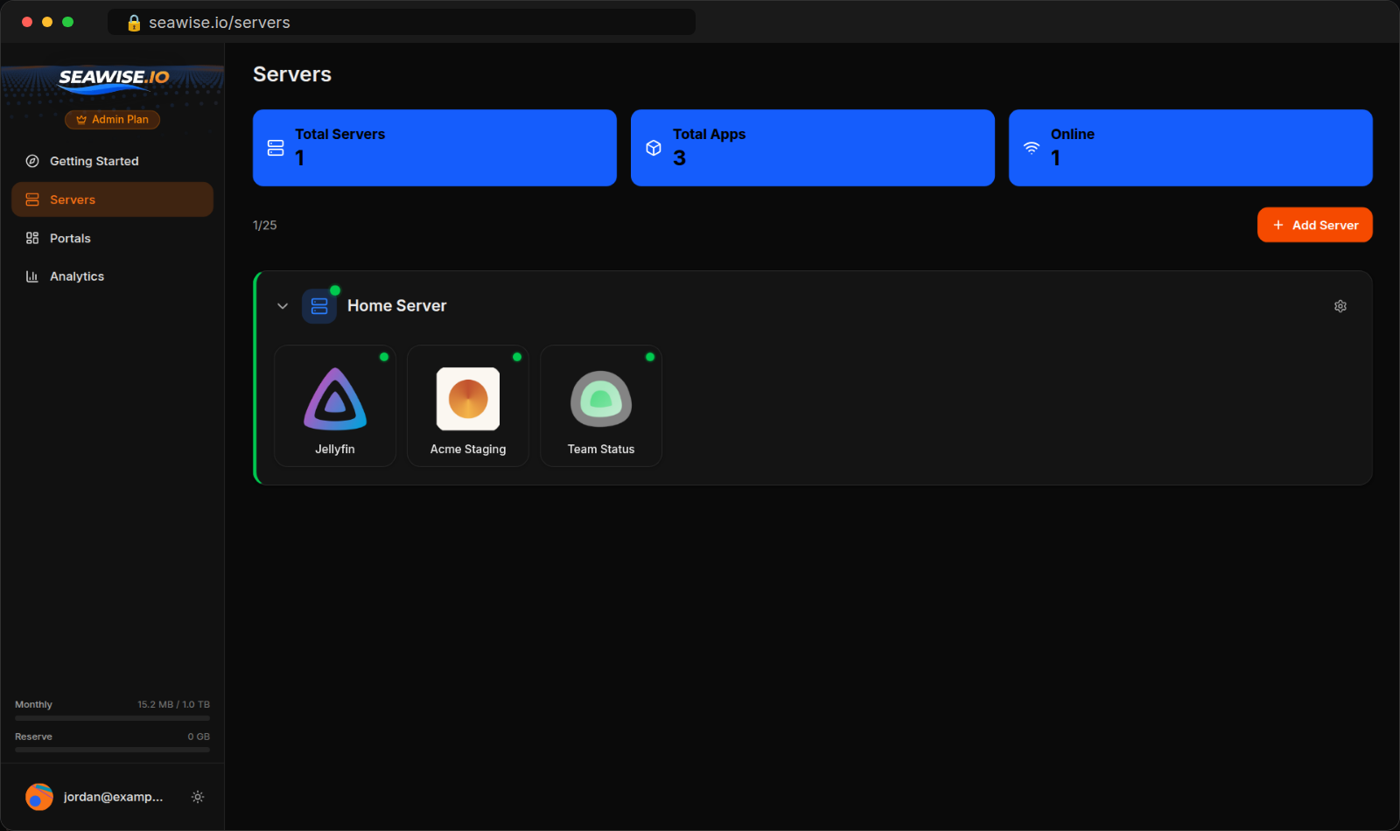
Quick Start
Linux:docker run -d --name seawise \
--restart unless-stopped \
--network host \
-e SEAWISE_HOST_NETWORK=true \
-v seawise-data:/config \
--log-opt max-size=10m --log-opt max-file=3 \
ghcr.io/seawise-io/seawise-client:latestDocker Desktop (macOS, Windows):
docker run -d --name seawise \
  --restart unless-stopped \
  -p 8082:8082 \
  -v seawise-data:/config \
  --log-opt max-size=10m --log-opt max-file=3 \
  ghcr.io/seawise-io/seawise-client:latest
Docker Compose: use the
docker-compose.yml in this repo.The
--log-opt flags cap Docker's copy of the client's logs at 30 MB.Then open http://localhost:8082, or
http://your-server-ip:8082 from another computer on your network.Setup
- Set a password for the web UI right away. This has to happen within 5 minutes of the container starting. If the window passes, run
docker restart seawiseto open it again. - Click Connect to Seawise.io and approve the connection in your browser.
- Add apps by name, host and port.
Each app gets its own address on
seawise.dev. Apps are private: only you can open them after signing in, until you add them to a portal and invite people.What People Use It For
| App | Guide |
|---|---|
| Jellyfin | Share Jellyfin with family |
| Seerr (Jellyseerr, Overseerr) | Let friends request movies |
| Sonarr, Radarr, Prowlarr | Your arr stack from anywhere |
| Plex | Plex in the browser |
| Immich | Share Immich with family |
| Home Assistant | Home Assistant from anywhere |
| Open WebUI, ComfyUI | Share your local AI |
More in the guides, including CGNAT, sharing with clients and per-person access.
Adding Apps
| Your app runs... | Host to use |
|---|---|
On the same machine, client started with --network host | localhost |
| In the same Docker Compose file | The service name, e.g. grafana |
| On the same machine, client on Docker Desktop | host.docker.internal |
| On another device on your network | Its IP, e.g. 192.168.1.50 |
Link-local addresses (
169.254.0.0/16, fe80::/10), including cloud metadata endpoints, can't be added.FAQ
Do I need port forwarding, a public IP or a domain? No. The client connects out to Seawise.io, so nothing on your router changes. It works behind CGNAT.Is it safe to share Jellyfin or Immich this way? Apps are private by default. Visitors sign in before they reach anything, and you choose who can open each app. Nothing on your network is opened to the internet.
Do the people I share with need an account or an app? They sign in with Google, GitHub or an email link in any browser. Nothing to install.
How is this different from Cloudflare Tunnel, Tailscale or ngrok? See the comparison. In short: no domain needed, sign-in for guests is built in, and you get portals, one page per group of people with the apps you share.
What does it cost? The free plan covers one server, 30 apps and one portal. See pricing.
Docker Compose
services:
  seawise:
    image: ghcr.io/seawise-io/seawise-client:latest
    container_name: seawise
    restart: unless-stopped
    network_mode: host
    environment:
      SEAWISE_HOST_NETWORK: "true"
    volumes:
      - seawise-data:/config
    logging:
      options:
        max-size: 10m
        max-file: "3"

volumes:
  seawise-data:
On Docker Desktop, replace
network_mode and environment with ports: ["8082:8082"].Security
- Outbound only. The client opens the connection to Seawise.io. Nothing on your network is opened to the internet.
- This client decides what is reachable. Apps are added and changed only here. The Seawise.io website and servers can't add apps or change where they point.
- Verified tunnel. The client only connects to
*.seawise.devand checks the server's TLS certificate. - Protected web UI. Password required, stored as a bcrypt hash, with a growing delay after failed attempts. The first-run password window closes after 5 minutes.
To report a vulnerability, see SECURITY.md.
What the Client Sends
To Seawise.io:- The server name you choose when connecting.
- Each app's name, host and port, when you add it.
- Every 30 seconds: whether the tunnel is connected, how many apps there are and the client version.
- Whether each app is up or down.
To the tunnel server: the tunnel login, which includes the FRP version, operating system, CPU type and the machine's hostname, and then the traffic for the apps you've shared.
To GitHub: a check for new releases, which powers the update banner.
It never sends your apps' content or files, its logs, the web UI password, or anything about apps you haven't added. It doesn't scan your network.
Environment Variables
| Variable | Default | Description |
|---|---|---|
SEAWISEPORT | 8082 | Web UI port |
SEAWISEBINDADDR | 0.0.0.0 | Bind address. Set to 127.0.0.1 to only allow the UI from the same machine. |
SEAWISEDATADIR | /config | Persistent data directory |
SEAWISEHOSTNETWORK | false | Set to true when running with --network host. |
SEAWISETLS | (unset) | Set to auto to serve the web UI over HTTPS with a self-signed certificate. |
SEAWISETRUSTPROXY | false | Set to true behind a reverse proxy so login rate limiting uses X-Forwarded-For. |
SEAWISEALLOWEDHOSTS | (unset) | Comma-separated DNS names allowed to reach the web UI, e.g. client.mycompany.com behind an ingress. Not needed for localhost, LAN IPs or .local. |
SEAWISELOGLEVEL | info | debug, info, warn or error |
PUID / PGID | 1000 | User and group ID to run as |
Health Checks
| Endpoint | Returns | Use for |
|---|---|---|
GET /healthz | 200 while the web server responds | Liveness. The image's built-in Docker HEALTHCHECK uses it. |
GET /readyz | 200 when paired and the tunnel is running, otherwise 503 | Readiness. The body includes paired, frprunning and version. |
Both are unauthenticated.
Updating
docker pull ghcr.io/seawise-io/seawise-client:latest
docker stop seawise && docker rm seawise
# Run the same docker run command again. Pairing, apps and password are kept in the volume.
With Compose:
docker compose pull && docker compose up -d.The web UI shows a banner when a new version is available.
Platform Support
- Images: Linux amd64 and arm64 (Raspberry Pi, most NAS devices)
- Hosts: Linux, macOS and Windows with Docker, Unraid, Synology, TrueNAS
- Requirements: Docker 20+, outbound HTTPS (port 443)
Documentation
License
MIT. Tunnels use FRP (Apache 2.0); its license ships in the image at/app/licenses/frp-LICENSE.Check the logs first
Nine times out of ten the logs tell you exactly what went wrong.
- In Portainer, go to Containers, click the container, then Logs. Or run
docker logs <container> - Exit codes help too:
137means killed, usually out of memory.126or127means the command inside the image is broken.
Image won't pull
Test the pull directly on the host: docker pull ghcr.io/seawise-io/seawise-client:latest
- "manifest unknown" means the tag no longer exists. This template uses
latest, so try pinning a specific version instead. - "toomanyrequests" is the Docker Hub rate limit. Log in with
docker loginto raise it. - "no space left on device" means a full disk. Reclaim space with
docker system prune
"exec format error"
This means the image was built for a different CPU architecture than your server.
- This image supports:
amd64, arm64 - Check yours with
uname -m: x86_64 is amd64, aarch64 is arm64. Raspberry Pi and other ARM boards are the usual culprits.
Container keeps restarting
The unless-stopped restart policy relaunches the app after every crash, so the real error can scroll past.
- Check the logs right after a restart, the last few lines before it died are the useful ones.
- Get the exit code with
docker inspect <container> --format '{{.State.ExitCode}}' - Still stuck? Redeploy once with the restart policy set to
noso the failure stays visible.
Stack won't deploy
Compose stacks fail fast on small mistakes, and Portainer shows the reason just above the editor.
- YAML only accepts spaces for indentation, a single tab breaks the whole file.
Raise an issue
Found something which isn't working as it should? Here's how to report it.
- Bug within the app: Open an issue on seawise-io/seawise-client
- Template not working: Open an issue on seawise-io/seawise-client
- This website not working: Open an issue on lissy93/portainer-templates
A Compose stack
Seawise.io Client is a Compose stack, a set of containers defined in one file and brought up together by Portainer, then started and stopped as a single app.
The app image
An image is the app packed up ready to go, everything Seawise.io Client needs bundled into one download. This template pulls ghcr.io/seawise-io/seawise-client:latest, which Docker fetches once (about 14 MB) and then starts your own copy from.
Where the image comes from
Docker pulls its images from registries, public libraries of ready-built apps. Seawise.io Client's comes from the GitHub Container Registry, published by seawise-io.
Version tags
The bit after the colon in the image name is the version tag. Here it's latest, which always points at the newest build, so a redeploy can bump you to a newer release without you asking. Pin a specific tag if you would rather stay on one version.
Which machines it runs on
Every image is built for particular CPU types. This one ships for amd64, arm64, so it runs on both regular x86 servers and ARM boards like a Raspberry Pi.
Volumes
A volume is where Seawise.io Client keeps its files so they survive an update or a restart. Without one, anything it saves would sit inside the container and vanish the moment it's recreated. This template mounts:
/configkept in theseawise-datavolume Docker manages
Environment variables
Environment variables are the settings you hand over when you deploy, things like a password or a timezone. Seawise.io Client takes 1 of them, all with defaults you can leave alone or tweak:
SEAWISE_HOST_NETWORK, defaults totrue
Restart policy
The restart policy here is unless-stopped, so Docker restarts Seawise.io Client after a crash or reboot, but leaves it off when you stop it on purpose. You can change this on the deploy screen. The choices are no (never restart), on-failure (only after a crash), unless-stopped (restart unless you stop it), and always (bring it back no matter what).
Networking
Nothing custom is set, so Seawise.io Client sits on Docker's default bridge network: its own private space that reaches the outside world only through the ports it publishes.
Container name
Once it's deployed, Portainer names the container seawise. That's what you'll spot in the containers list and use in commands like docker logs seawise.
Platform
The platform is linux, the kind of system the container is built to run on. Docker and Portainer handle this on a normal Linux server.
Open source license
Seawise.io Client is open source, released under the MIT license. In plain terms the code is out in the open, so you're free to run it and change it to fit what you need.
Portainer app templates
Zooming out, this whole page comes from a Portainer app template: a short recipe telling Portainer how to set Seawise.io Client up. Add the template list to Portainer once, then deploying Seawise.io Client is a click rather than a wall of config.