
![RSS-Bridge]() RSS-Bridge
Container
Feed generator that makes RSS and Atom feeds for hundreds of sites that don't have one, like YouTube channels, GitHub issues and news sites, so you can follow them in any feed reader. Source: https://github.com/RSS-Bridge/rss-bridge
Image details
Source details
Configuration
TypeContainerlinuxrssbridge/rss-bridge:latest3150:80/tcpRSSBRIDGE_authentication_token=''unless-stoppedTemplate by NotAFlightRisk
Report issueNotes
http://<your-host>:3150, find a site in the list, fill in what it asks for and hit Generate feed. That opens a preview with a button for each format, and the Atom one (or whichever your reader takes) is the link to give your reader. There's no login unless you set the access token, and nothing to back up, since feeds are only cached for a while inside the container. Bridges break whenever sites change, so this follows the image they rebuild from their main branch on every fix, rather than their rare releases. It won't fetch anything on your LAN, but anyone who can reach it can make it fetch public sites, so keep it on your own network or set the token. Other settings go in as envs named after the sections in their config.default.ini.php, like RSSBRIDGE_system_timezone. Docs: rss-bridge.github.ioStandalone Install
Select an install method, to see config/commands for deploying RSS-Bridge
Install on Portainer
Import all app templates into your Portainer instance, for easy 1-click deploys
- Ensure both Docker and Portainer are installed, and up-to-date
- Log into your Portainer web UI
- Under Settings → App Templates, paste the below URL
- Head to Home → App Templates, and the list of apps will show up
- Select RSS-Bridge, fill in any config options, and hit Deploy
Template Import URL
https://raw.githubusercontent.com/Lissy93/portainer-templates/main/templates.json
Show Me
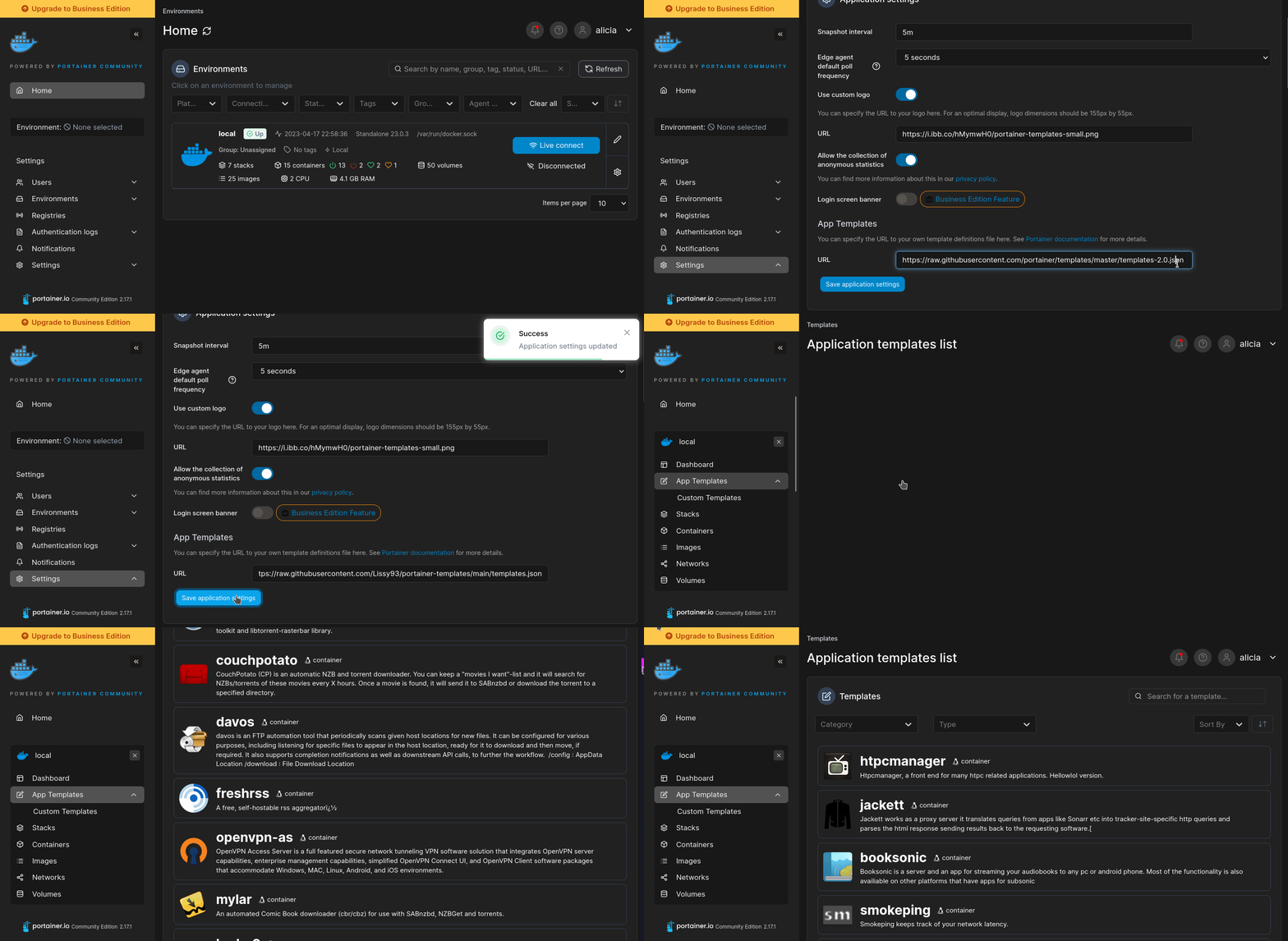
More install options in our documentation, or see RSS-Bridge/rss-bridge for app-specific guidance.
RSS-Bridge
RSS-Bridge is a PHP project capable of generating RSS and Atom feeds for websites that don't have one.



A subset of bridges
YouTube: YouTube user channel, playlist or searchTwitter: Return keyword/hashtag search or user timelineTelegram: Return the latest posts from a public groupReddit: Return the latest posts from a subreddit or userFilter: Filter an existing feed urlVk: Latest posts from a user or groupFeedMerge: Merge two or more existing feeds into oneTwitch: Fetch the latest videos from a channelThePirateBay: Returns the newest indexed torrents from The Pirate Bay with keywords
And many more, thanks to the community!
Full documentation
Check out RSS-Bridge right now on https://rss-bridge.org/bridge01 or find another public instance.
Tutorial
RSS-Bridge requires php 7.4.Install with git:
cd /var/www
git clone https://github.com/RSS-Bridge/rss-bridge.git

# Give the http user write permission to the cache folder
chown www-data:www-data /var/www/rss-bridge/cache

# Optionally copy over the default config file
cp config.default.ini.php config.ini.php

# Optionally copy over the default whitelist file
cp whitelist.default.txt whitelist.txt
Example config for nginx:
# /etc/nginx/sites-enabled/rssbridge
server {
    listen 80;
    server_name example.com;
    root /var/www/rss-bridge;
    index index.php;

    location ~ \.php$ {
        include snippets/fastcgi-php.conf;
        fastcgi_read_timeout 60s;
        fastcgi_pass unix:/run/php/php-fpm.sock;
    }
}
Install with Docker:
Install by using docker image from Docker Hub:# Create container
docker create --name=rss-bridge --publish 3000:80 rssbridge/rss-bridge
# Start container
docker start rss-bridgeBrowse http://localhost:3000/
Install by locally building the image:
# Build image from Dockerfile
docker build -t rss-bridge .

# Create container
docker create --name rss-bridge --publish 3000:80 rss-bridge

# Start the container
docker start rss-bridge
Browse http://localhost:3000/
Install with docker-compose
Create adocker-compose.yml file locally with with the following content:
version: '2'
services:
  rss-bridge:
    image: rssbridge/rss-bridge:latest
    volumes:
      - </local/custom/path>:/config
    ports:
      - 3000:80
    restart: unless-stopped
Then launch with
docker-compose:docker-compose upBrowse http://localhost:3000/
Alternative installation methods


The Heroku quick deploy currently does not work. It might possibly work if you fork this repo and modify the
repository in scalingo.json. See https://github.com/RSS-Bridge/rss-bridge/issues/2688Learn more in Installation.
How-to
How to create a new bridge from scratch
Create the new bridge in e.g.bridges/BearBlogBridge.php:<?php
class BearBlogBridge extends BridgeAbstract
{
const NAME = 'BearBlog (bearblog.dev)';
public function collectData()
{
$dom = getSimpleHTMLDOM('https://herman.bearblog.dev/blog/');
foreach ($dom->find('.blog-posts li') as $li) {
$a = $li->find('a', 0);
$this->items[] = [
'title' => $a->plaintext,
'uri' => 'https://herman.bearblog.dev' . $a->href,
];
}
}
}Learn more in bridge api.
How to enable all bridges
Write an asterisks towhitelist.txt:echo '*' > whitelist.txtHow to enable a bridge
Add the bridge name towhitelist.txt:echo 'FirefoxAddonsBridge' >> whitelist.txtHow to enable debug mode
Create a file namedDEBUG:touch DEBUGHow to create a new output format
Create a new format.Explanation
We are RSS-Bridge community, a group of developers continuing the project initiated by sebsauvage, webmaster of sebsauvage.net, author of Shaarli and ZeroBin.See CONTRIBUTORS.md
RSS-Bridge uses caching to prevent services from banning your server for repeatedly updating feeds. The specific cache duration can be different between bridges. Cached files are deleted automatically after 24 hours.
RSS-Bridge allows you to take full control over which bridges are displayed to the user. That way you can host your own RSS-Bridge service with your favorite collection of bridges!
Reference
FeedItem properties
$item = [
    'uri' => 'https://example.com/blog/hello',
    'title' => 'Hello world',
    // Publication date in unix timestamp
    'timestamp' => 1668706254,
    'author' => 'Alice',
    'content' => 'Here be item content',
    'enclosures' => [
        'https://example.com/foo.png',
        'https://example.com/bar.png'
    ],
    'categories' => [
        'news',
        'tech',
    ],
    // Globally unique id
    'uid' => 'e7147580c8747aad',
]
Output formats:
Atom: Atom feed, for use in feed readersHtml: Simple HTML pageJson: JSON, for consumption by other applicationsMrss: MRSS feed, for use in feed readersPlaintext: Raw text, for consumption by other applications
Licenses
The source code for RSS-Bridge is Public Domain.RSS-Bridge uses third party libraries with their own license:
Parsedown licensed under the MIT License
PHP Simple HTML DOM Parser licensed under the MIT License
php-urljoin licensed under the MIT License
Laravel framework licensed under the MIT LicenseRant
Dear so-called "social" websites.Your catchword is "share", but you don't want us to share. You want to keep us within your walled gardens. That's why you've been removing RSS links from webpages, hiding them deep on your website, or removed feeds entirely, replacing it with crippled or demented proprietary API. FUCK YOU.
You're not social when you hamper sharing by removing feeds. You're happy to have customers creating content for your ecosystem, but you don't want this content out - a content you do not even own. Google Takeout is just a gimmick. We want our data to flow, we want RSS or Atom feeds.
We want to share with friends, using open protocols: RSS, Atom, XMPP, whatever. Because no one wants to have your service with your applications using your API force-feeding them. Friends must be free to choose whatever software and service they want.
We are rebuilding bridges you have willfully destroyed.
Get your shit together: Put RSS/Atom back in.
Serve RSS-Bridge on your own domain behind Caddy, Nginx or Traefik. Fill in your domain and copy the result. It's a starting point, some apps need their own base URL or extra headers set too.
Proxying rss-bridge.example.com to http://rss-bridge:80
Add this to your Caddyfile
rss-bridge.example.com {
	reverse_proxy http://rss-bridge:80
}Check the logs first
Nine times out of ten the logs tell you exactly what went wrong.
- In Portainer, go to Containers, click the container, then Logs. Or run
docker logs rss-bridge - Exit codes help too:
137means killed, usually out of memory.126or127means the command inside the image is broken.
Port already in use
If deployment fails with "Bind for 0.0.0.0:3150 failed: port is already allocated", something else on your server is using that port.
- Find what's using it:
sudo ss -tlnp | grep :3150 - Stop the other service, or pick a different host port. In
3150:80only the left number is yours to change, the right one belongs to the app.
Running but the page won't load
The container is up but nothing appears in your browser.
- Use your server's real IP:
http://your-server-ip:3150. The 0.0.0.0 link Portainer shows isn't a real address. - Give it a minute after first deploy, rss-bridge can take a while to initialise.
- Make sure your firewall allows the port, e.g.
sudo ufw allow 3150
Image won't pull
Test the pull directly on the host: docker pull rssbridge/rss-bridge:latest
- "manifest unknown" means the tag no longer exists. This template uses
latest, so try pinning a specific version instead. - "toomanyrequests" is the Docker Hub rate limit. Log in with
docker loginto raise it. - "no space left on device" means a full disk. Reclaim space with
docker system prune
"exec format error"
This means the image was built for a different CPU architecture than your server.
- This image supports:
amd64, arm64, arm/v7 - Check yours with
uname -m: x86_64 is amd64, aarch64 is arm64. Raspberry Pi and other ARM boards are the usual culprits.
Container keeps restarting
The unless-stopped restart policy relaunches the app after every crash, so the real error can scroll past.
- Check the logs right after a restart, the last few lines before it died are the useful ones.
- Get the exit code with
docker inspect rss-bridge --format '{{.State.ExitCode}}' - Still stuck? Redeploy once with the restart policy set to
noso the failure stays visible.
Data disappears when the container is recreated
This template doesn't define any volumes, so everything rss-bridge saves lives inside the container and is lost on update or recreate.
- Add a volume mapping for rss-bridge's data folder before storing anything you care about.
Required settings are blank
RSSBRIDGE_authentication_token has no default value, and rss-bridge may crash or misbehave if left empty.
- Fill it in on the deploy screen before hitting deploy.
Raise an issue
Found something which isn't working as it should? Here's how to report it.
- Bug within the app: Open an issue on RSS-Bridge/rss-bridge
- Template not working: Open an issue on NotAFlightRisk/portainer-templates-extras
- This website not working: Open an issue on lissy93/portainer-templates
A single container
RSS-Bridge runs as one container, the simplest kind of app here. Just the one image to pull and nothing else wired up alongside it.
The app image
An image is the app packed up ready to go, everything RSS-Bridge needs bundled into one download. This template pulls rssbridge/rss-bridge:latest, which Docker fetches once (about 92 MB) and then starts your own copy from.
Where the image comes from
Docker pulls its images from registries, public libraries of ready-built apps. RSS-Bridge's comes from Docker Hub, published by rssbridge.
Version tags
The bit after the colon in the image name is the version tag. Here it's latest, which always points at the newest build, so a redeploy can bump you to a newer release without you asking. Pin a specific tag if you would rather stay on one version.
Which machines it runs on
Every image is built for particular CPU types. This one ships for amd64, arm64, arm/v7, so it runs on both regular x86 servers and ARM boards like a Raspberry Pi.
Ports
A port is the door the app answers on. A mapping like 3150:80 means it's reachable on port 3150 of your server, where the left number is yours to change and the right one belongs to the app. Once it's running, open http://your-server-ip:3150 in a browser. It opens:
3150:80, likely the web interface
No stored data
This template doesn't mount any storage, so whatever RSS-Bridge writes stays inside the container and is wiped if it's recreated or updated. That's fine for something stateless, but add a volume before trusting it with anything you want to keep.
Environment variables
Environment variables are the settings you hand over when you deploy, things like a password or a timezone. RSS-Bridge takes 1 of them, and one needs a value before it'll start properly:
RSSBRIDGE_authentication_token, needs a value. Leave blank to keep it open. Set one (openssl rand -hex 16 makes one) and every page and feed needs it, as ?token= on the end of the URL.
Restart policy
The restart policy here is unless-stopped, so Docker restarts RSS-Bridge after a crash or reboot, but leaves it off when you stop it on purpose. You can change this on the deploy screen. The choices are no (never restart), on-failure (only after a crash), unless-stopped (restart unless you stop it), and always (bring it back no matter what).
Networking
Nothing custom is set, so RSS-Bridge sits on Docker's default bridge network: its own private space that reaches the outside world only through the ports it publishes.
Container name
Once it's deployed, Portainer names the container rss-bridge. That's what you'll spot in the containers list and use in commands like docker logs rss-bridge.
Platform
The platform is linux, the kind of system the container is built to run on. Docker and Portainer handle this on a normal Linux server.
Open source license
RSS-Bridge is open source, released under the Unlicense license. In plain terms the code is out in the open, so you're free to run it and change it to fit what you need.
Portainer app templates
Zooming out, this whole page comes from a Portainer app template: a short recipe telling Portainer how to set RSS-Bridge up. Add the template list to Portainer once, then deploying RSS-Bridge is a click rather than a wall of config.