
![ReplayHaven]() ReplayHaven
ReplayHaven
Stack
Game clip archive: a Windows client names every clip with a local AI, this server keeps the originals and streams them to your devices. Source: https://github.com/SauerExe/ReplayHaven
Source details
Configuration
TypeComposelinux${REPLAYHAVEN_IMAGE:-ghcr.io/sauerexe/replayhaven:1}${REPLAYHAVEN_HOST_PORT:-8787}:8787/app/vault-data : archive/app/release : ./releaseREPLAYHAVEN_ACCESS_TOKEN=${REPLAYHAVEN_ACCESS_TOKEN:?Set REPLAYHAVEN_ACCESS_TOKEN in .env (copy .env.example)}REPLAYHAVEN_PUBLIC_ORIGIN=${REPLAYHAVEN_PUBLIC_ORIGIN:-http://localhost:8787}REPLAYHAVEN_TRUST_PROXY=${REPLAYHAVEN_TRUST_PROXY:-}REPLAYHAVEN_PLAYBACK=${REPLAYHAVEN_PLAYBACK:-web}REPLAYHAVEN_CONTENT_LANGUAGE=${REPLAYHAVEN_CONTENT_LANGUAGE:-}REPLAYHAVEN_SUPPORT_BANNER=${REPLAYHAVEN_SUPPORT_BANNER:-}REPLAYHAVEN_LOG_LEVEL=${REPLAYHAVEN_LOG_LEVEL:-}REPLAYHAVEN_GAME_METADATA=${REPLAYHAVEN_GAME_METADATA:-}REPLAYHAVEN_IGDB_CLIENT_ID=${REPLAYHAVEN_IGDB_CLIENT_ID:-}REPLAYHAVEN_IGDB_CLIENT_SECRET=${REPLAYHAVEN_IGDB_CLIENT_SECRET:-}REPLAYHAVEN_AI_PROVIDER=${REPLAYHAVEN_AI_PROVIDER:-none}REPLAYHAVEN_AI_MODEL=${REPLAYHAVEN_AI_MODEL:-}REPLAYHAVEN_LOCAL_AI_URL=${REPLAYHAVEN_LOCAL_AI_URL:-}REPLAYHAVEN_LOCAL_AI_KEY=${REPLAYHAVEN_LOCAL_AI_KEY:-}GEMINI_API_KEY=${GEMINI_API_KEY:-}REPLAYHAVEN_OIDC_ISSUER=${REPLAYHAVEN_OIDC_ISSUER:-}REPLAYHAVEN_OIDC_CLIENT_ID=${REPLAYHAVEN_OIDC_CLIENT_ID:-}REPLAYHAVEN_OIDC_CLIENT_SECRET=${REPLAYHAVEN_OIDC_CLIENT_SECRET:-}REPLAYHAVEN_OIDC_NAME=${REPLAYHAVEN_OIDC_NAME:-}REPLAYHAVEN_OIDC_SCOPES=${REPLAYHAVEN_OIDC_SCOPES:-}REPLAYHAVEN_OIDC_ADMIN_GROUP=${REPLAYHAVEN_OIDC_ADMIN_GROUP:-}REPLAYHAVEN_OIDC_AUTO_CREATE=${REPLAYHAVEN_OIDC_AUTO_CREATE:-}REPLAYHAVEN_PASSWORD_LOGIN=${REPLAYHAVEN_PASSWORD_LOGIN:-}REPLAYHAVEN_HOST_PORT=8787unless-stoppedNotes
openssl rand -hex 24; after the first start, the container log shows a setup link for your account. The server needs no GPU; the AI runs on the gaming PC.Standalone Install
Select an install method, to see config/commands for deploying ReplayHaven
Install on Portainer
Import all app templates into your Portainer instance, for easy 1-click deploys
- Ensure both Docker and Portainer are installed, and up-to-date
- Log into your Portainer web UI
- Under Settings → App Templates, paste the below URL
- Head to Home → App Templates, and the list of apps will show up
- Select ReplayHaven, fill in any config options, and hit Deploy
Template Import URL
https://raw.githubusercontent.com/Lissy93/portainer-templates/main/templates.json
Show Me

Original stackfile
The compose file this template deploys, straight from its repo:
# ReplayHaven archive server.
#
#   cp .env.example .env      # set REPLAYHAVEN_ACCESS_TOKEN and REPLAYHAVEN_PUBLIC_ORIGIN
#   docker compose up -d      # pulls the published image and starts the server
#
# Building from a source checkout instead: `bash setup-server.sh` (or
# `docker build -t replayhaven:local .` and REPLAYHAVEN_IMAGE=replayhaven:local in .env).
#
# Behind Coolify/Traefik: remove the `ports:` section (Traefik reaches the container over the
# Docker network), give the service the domain https://<your-domain>:8787 in Coolify and set
# REPLAYHAVEN_PUBLIC_ORIGIN=https://<your-domain> and REPLAYHAVEN_TRUST_PROXY (the proxy's
# address range, or true when only the proxy can reach the container).
# See docs/SERVER.md, "Deploy behind Coolify/Traefik".
services:
  replayhaven:
    image: ${REPLAYHAVEN_IMAGE:-ghcr.io/sauerexe/replayhaven:1}
    container_name: replayhaven
    restart: unless-stopped
    ports:
      - '${REPLAYHAVEN_HOST_PORT:-8787}:8787'
    env_file:
      # Every variable in .env reaches the container (see .env.example).
      - path: .env
        required: false
    environment:
      REPLAYHAVEN_ACCESS_TOKEN: ${REPLAYHAVEN_ACCESS_TOKEN:?Set REPLAYHAVEN_ACCESS_TOKEN in .env (copy .env.example)}
      REPLAYHAVEN_PUBLIC_ORIGIN: ${REPLAYHAVEN_PUBLIC_ORIGIN:-http://localhost:8787}
      # Listed so panels like Portainer and Coolify pass them on (they ignore unlisted
      # variables); empty means the default. See .env.example. REPLAYHAVEN_CLIENT_DOWNLOAD_URL is
      # not listed: an empty value would replace the release URL built into the image, so set
      # it in .env (env_file above) when you need it.
      REPLAYHAVEN_TRUST_PROXY: ${REPLAYHAVEN_TRUST_PROXY:-}
      REPLAYHAVEN_PLAYBACK: ${REPLAYHAVEN_PLAYBACK:-web}
      REPLAYHAVEN_CONTENT_LANGUAGE: ${REPLAYHAVEN_CONTENT_LANGUAGE:-}
      REPLAYHAVEN_SUPPORT_BANNER: ${REPLAYHAVEN_SUPPORT_BANNER:-}
      REPLAYHAVEN_LOG_LEVEL: ${REPLAYHAVEN_LOG_LEVEL:-}
      REPLAYHAVEN_GAME_METADATA: ${REPLAYHAVEN_GAME_METADATA:-}
      REPLAYHAVEN_IGDB_CLIENT_ID: ${REPLAYHAVEN_IGDB_CLIENT_ID:-}
      REPLAYHAVEN_IGDB_CLIENT_SECRET: ${REPLAYHAVEN_IGDB_CLIENT_SECRET:-}
      REPLAYHAVEN_AI_PROVIDER: ${REPLAYHAVEN_AI_PROVIDER:-none}
      REPLAYHAVEN_AI_MODEL: ${REPLAYHAVEN_AI_MODEL:-}
      REPLAYHAVEN_LOCAL_AI_URL: ${REPLAYHAVEN_LOCAL_AI_URL:-}
      REPLAYHAVEN_LOCAL_AI_KEY: ${REPLAYHAVEN_LOCAL_AI_KEY:-}
      GEMINI_API_KEY: ${GEMINI_API_KEY:-}
      REPLAYHAVEN_OIDC_ISSUER: ${REPLAYHAVEN_OIDC_ISSUER:-}
      REPLAYHAVEN_OIDC_CLIENT_ID: ${REPLAYHAVEN_OIDC_CLIENT_ID:-}
      REPLAYHAVEN_OIDC_CLIENT_SECRET: ${REPLAYHAVEN_OIDC_CLIENT_SECRET:-}
      REPLAYHAVEN_OIDC_NAME: ${REPLAYHAVEN_OIDC_NAME:-}
      REPLAYHAVEN_OIDC_SCOPES: ${REPLAYHAVEN_OIDC_SCOPES:-}
      REPLAYHAVEN_OIDC_ADMIN_GROUP: ${REPLAYHAVEN_OIDC_ADMIN_GROUP:-}
      REPLAYHAVEN_OIDC_AUTO_CREATE: ${REPLAYHAVEN_OIDC_AUTO_CREATE:-}
      REPLAYHAVEN_PASSWORD_LOGIN: ${REPLAYHAVEN_PASSWORD_LOGIN:-}
    volumes:
      # Originals, thumbnails, playback copies and the SQLite database.
      - archive:/app/vault-data
      # Optional: drop ReplayHaven-Client-Setup.exe here to serve it from this server
      # instead of redirecting to the GitHub release.
      - ./release:/app/release:ro
volumes:
  archive:
Or deploy it directly from the source:
git clone https://github.com/SauerExe/ReplayHaven
cd ReplayHaven
docker compose -f compose.yaml up -d
More install options in our documentation, or see SauerExe/ReplayHaven for app-specific guidance.
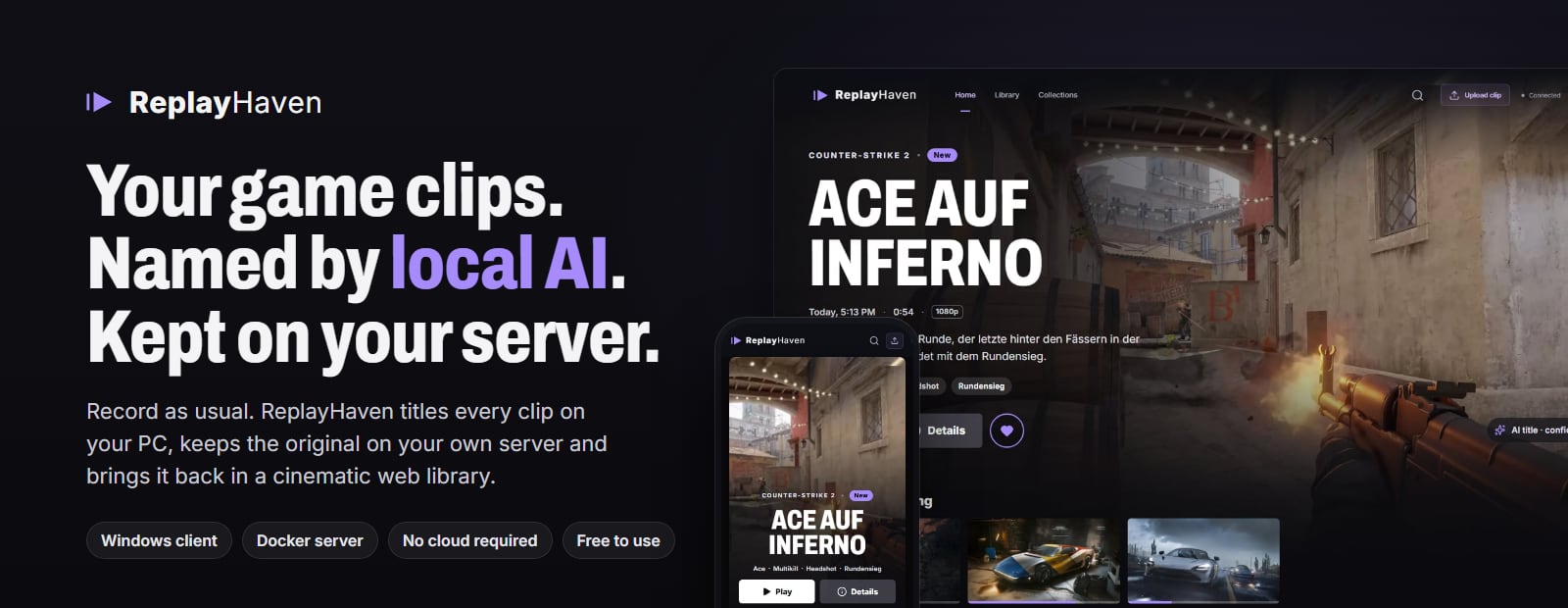





Record as usual. ReplayHaven gives every clip a real title, keeps the original on your own server
and brings it back in a cinematic web library.
Quick start · Screenshots · How it works · FAQ · User guide · Server guide
Your clip folder probably looks like
Counter-Strike 2 2026.09.24 - 21.14.07.02.DVR.mp4, a hundred times over. ReplayHaven turns that into “Ace on Inferno” (or “Ace auf Inferno”, titles are written in English or German) with a short description, tags and jump marks, and it does so on your own hardware: a small Windows client analyses each new recording with a local vision model, your own server keeps the original forever, and every device you sign in becomes a place to watch it again, at home or on the road.Features
The web library and the Windows client are in English by default and switch to German in their settings.
Screenshots
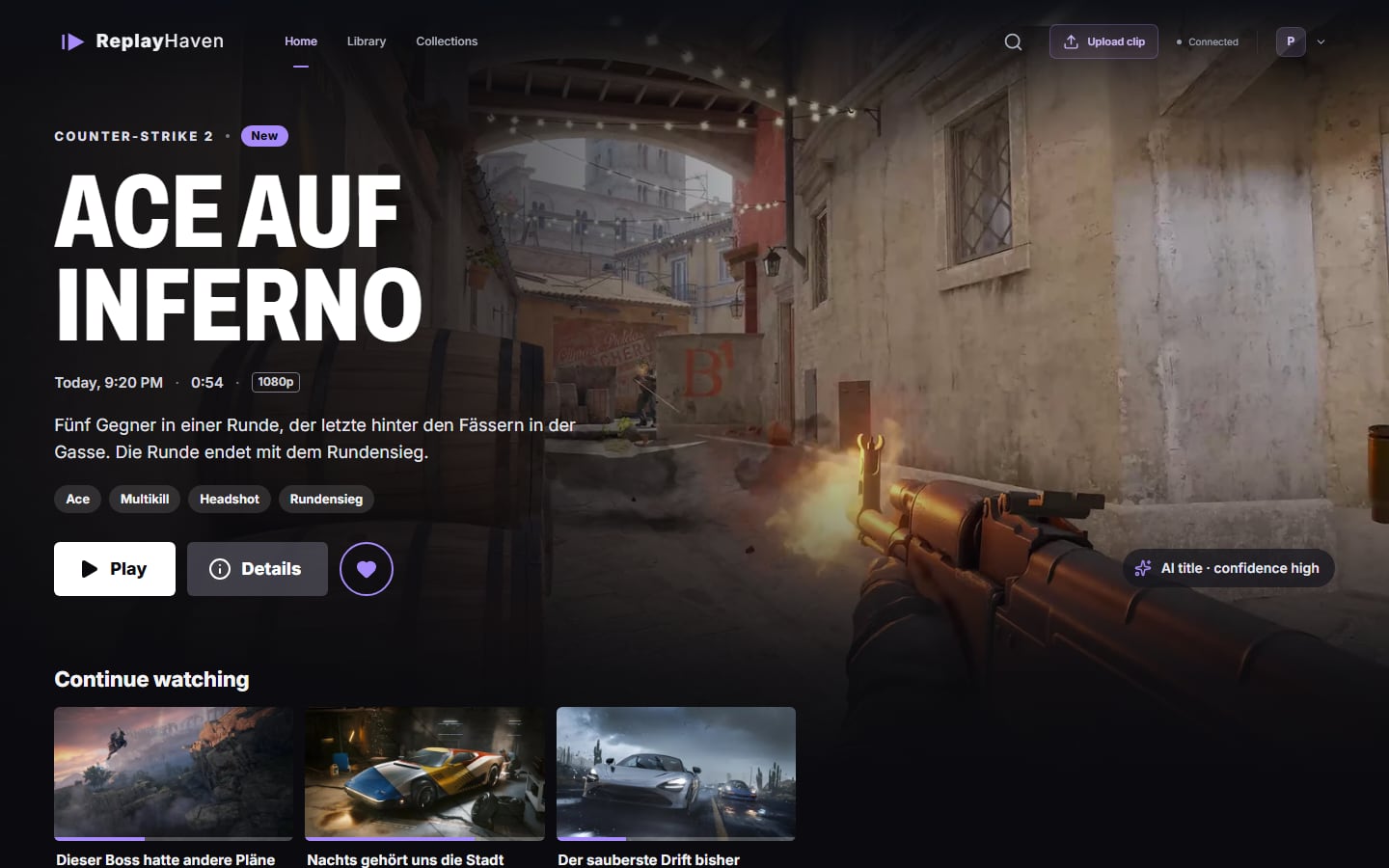
The web library: the newest clip in the spotlight, everything else in rows below.
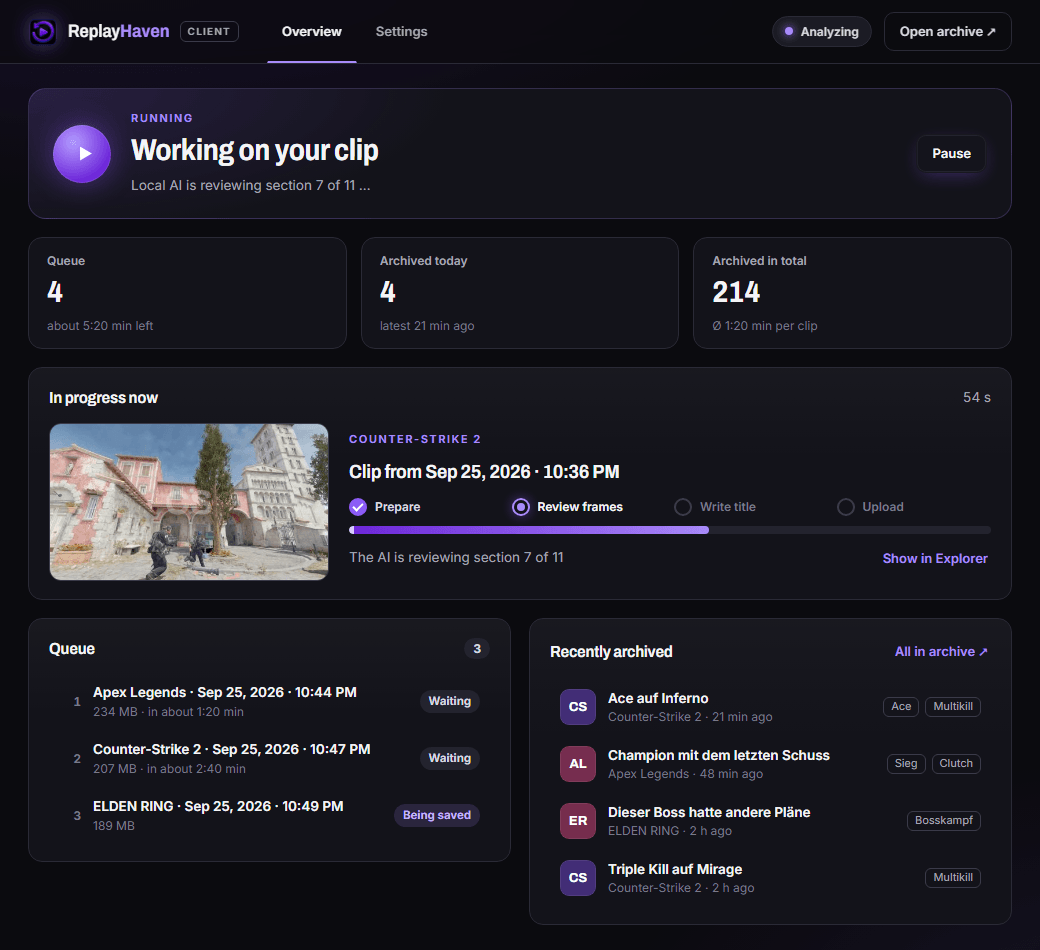
The Windows client: the clip in progress, what is queued and what just arrived in your archive.
On the phone
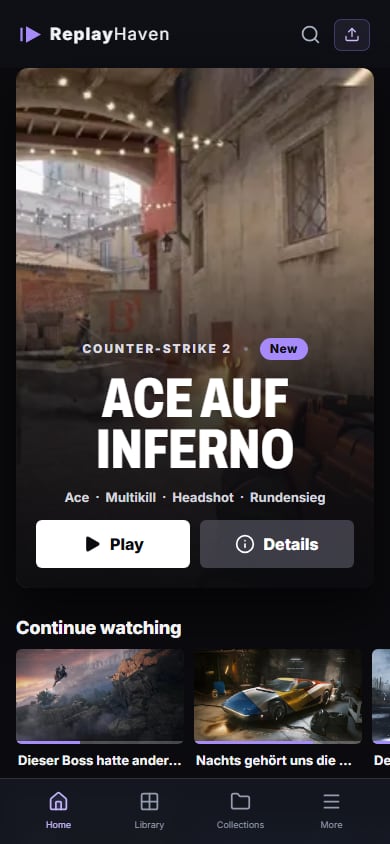
Screenshots use the built-in demo artwork and example texts; the example titles are German, the language the AI writes in is a client setting.
How it works

What happens when you save a clip:
flowchart LR
  rec["Recorder saves a clip"] --> wait["Client waits until<br/>the file is complete"]
  wait --> frames["24 or 48 frames,<br/>or the whole clip"]
  frames --> model["Qwen3.5 via Ollama<br/>describes the frames"]
  model --> rules["Fixed rules read kills, deaths<br/>and round results from the screen"]
  extras["Fortnite replays, R6 and<br/>Valorant text recognition,<br/>voice chat transcript"] -. optional .-> rules
  rules --> check["Title checked<br/>against the events"]
  check --> upload["Upload original<br/>and result"]
  upload --> server["Server: thumbnail,<br/>web version, metadata"]
  server --> library["Web library"]
Analysis can be switched off in the client. Clips are then archived without AI metadata, and the client works as a plain upload agent. How the recognition works and what has been measured is described in docs/AI-RECOGNITION.md.
Quick start
You need a machine for the server (anything that runs Docker) and the Windows PC you play on. Both can be the same machine.- Server
Install Docker Engine with the Compose plugin (guide), then:curl -fsSL https://github.com/SauerExe/ReplayHaven/releases/latest/download/install.sh | bashThe installer creates
./replayhaven with compose.yaml and a .env from the latest release (checked against the release's SHA256SUMS.txt, which catches broken downloads; both come from the same release, so it is no signature), generates the access key, asks for the address you open in the browser (your LAN address is suggested), starts the published multi-arch image ghcr.io/sauerexe/replayhaven and prints a setup link. Running it again, in the same directory or inside replayhaven/, updates to the latest release, keeps your .env and backs up the database first. Want to read it first? Download install.sh and run bash install.sh.Open the setup link to create your admin account. It carries the access key from
.env in the part after #, which the browser never sends to the server; the page removes it from the address bar right away. The key is needed once, so nobody else can claim a server that is already reachable. Lost the link? docker compose logs replayhaven shows it until the first account exists, or open the server address and enter REPLAYHAVEN_ACCESS_TOKEN from .env. Other devices then sign in with name and password, or scan the QR code under Settings → Devices → Connect phone.Using Portainer or Coolify? Add the repository as a stack in Portainer, or deploy
docker-compose.coolify.yml in Coolify, which generates the domain and the access key; both are described in docs/SERVER.md.By hand, or from a source checkout
From a published release, without the installer:
mkdir -p replayhaven && cd replayhaven
curl -fsSLO https://github.com/SauerExe/ReplayHaven/releases/latest/download/compose.yaml
curl -fsSL  https://github.com/SauerExe/ReplayHaven/releases/latest/download/env.example -o .env
# edit .env: REPLAYHAVEN_ACCESS_TOKEN (openssl rand -hex 24) and REPLAYHAVEN_PUBLIC_ORIGIN (http://<server-ip>:8787)
docker compose up -d
From source, building the image yourself:
git clone https://github.com/SauerExe/ReplayHaven.git && cd ReplayHaven
bash setup-server.sh
Running
setup-server.sh again after git pull rebuilds and keeps your .env.Running it behind Coolify, Traefik, Caddy or nginx, with Authelia or another single sign-on, is covered in docs/SERVER.md.
- Gaming PC
- Install
ReplayHaven-Client-Setup.exefrom the releases or from Settings → Recording PCs on your server. The installer is not code-signed yet, so SmartScreen asks for confirmation; every release lists SHA-256 checksums and carries a GitHub build attestation, sogh attestation verify ReplayHaven-Client-Setup.exe --repo SauerExe/ReplayHavenshows it was built by the release workflow from the tagged commit. No release yet? Build it on Windows withnpm ci && npm run client:build. - Connect it: on the gaming PC, open the web library, go to Settings → Recording PCs and click Connect this PC. The client opens and pairs itself, no address or code to type. Alternatively the setup assistant lists servers it finds in your home network, or you enter the address and approve the six-digit code in the web library.
- Pick your recording folder (subfolders included).
- Pick the model size and click Install Ollama: the assistant downloads the official Ollama installer, checks its checksum, installs it without admin rights and then downloads the model once (Qwen3.5 9B, about 6.6 GB, or 4B, about 3.4 GB).
- Enter your in-game names, choose the optional extras and finish. New recordings are analysed once they are completely written and show up in the library a minute or two later.
The full user guide with every option and troubleshooting is docs/START.md.
Game extras
These are optional and off by default. They add facts the frames alone cannot deliver reliably.| Game | What it adds | Where it comes from |
|---|---|---|
| Fortnite | Your kills and knocks with weapon class and distance, your elimination and victory | The match replays Fortnite writes to %LOCALAPPDATA%\FortniteGame\Saved\Demos |
| Rainbow Six Siege | Map name and round results | Text recognition (PaddleOCR on ONNX Runtime) on the CPU, next to the GPU model |
| Valorant | Your kills, headshots and deaths from the killfeed | The same text recognition, matched against the player names you entered |
| Any game | What was said in voice chat, as context for fun clips without kills or round results | Parakeet speech recognition on the CPU; the transcript never leaves your PC |
Command-line tools show what these sources contribute to your own clips before you rely on them, without AI and without uploading anything:
npm run fortnite, npm run r6, npm run audio, npm run laughs and npm run r6-replays. The research notes and measurement plans behind them are in docs.Privacy
- The AI runs on your PC. With the Windows client, frames go to Ollama on the same machine. Nothing is sent to an AI service.
- Clips go to your server only. Apart from Ollama on the same PC, the client talks to the server address you entered. It also learns about client updates from that server, not from GitHub. Models are downloaded once when you ask for them: Qwen3.5 through Ollama, the speech models for the voice chat transcript from Hugging Face and GitHub.
- Your server, your accounts. Passwords are stored as scrypt hashes, sessions and paired PCs can be revoked one by one, and single sign-on only talks to the provider you configure.
- Game info by name. The server looks up game names on Steam (and on IGDB if you add a key) to show covers and descriptions. Only the game name is sent. Without internet access the library simply shows no cover.
- Server-side AI is opt-in. If you configure Gemini as the server's AI provider, clips or frames from them are sent to Google for analysis. It is off unless you set it.
- Replays stay local. Fortnite replays list every player in a match. ReplayHaven takes only your own events from them; the other names are not used. Rainbow Six replays the client keeps for later stay on your PC.
Requirements
| Component | Requirement |
|---|---|
| Server | Docker Engine 24+ with Compose v2.24.4+, linux/amd64 or linux/arm64, disk space for your clips. Without Docker: Node.js 22.13+ and FFmpeg. |
| Gaming PC | Windows 10/11 x64. For local AI: Ollama and a GPU with about 10 GB VRAM for Qwen3.5 9B, or 6 to 8 GB for 4B. CPU-only works, but slowly. |
| Recordings | MP4, M4V, MOV, WebM or MKV, up to 2 GB, 30 minutes and 8K per file. Light H.264 MP4 plays directly; everything else gets a web version transcoded on the CPU. |
| Recorder | Anything that writes files into a folder: NVIDIA App (Instant Replay), OBS, Xbox Game Bar and others. |
| Browser | Any current browser on desktop, tablet or phone. The library can be added to a phone's home screen. |
Configuration
All server settings are environment variables, documented in
.env.example. The important ones:| Variable | Purpose |
|---|---|
REPLAYHAVENACCESSTOKEN | Key for creating the first account; it opens nothing once an account exists. At least 24 characters. Required. |
REPLAYHAVENPUBLICORIGIN | The address people open, e.g. https://clips.example.com. Several are allowed, separated by commas. |
REPLAYHAVENTRUSTPROXY | Trust X-Forwarded- headers behind a reverse proxy such as Traefik, Caddy or nginx. |
REPLAYHAVENHOSTPORT | Host port published by Compose (default 8787). |
REPLAYHAVENIMAGE | Image to run. Defaults to the published GHCR image; setup-server.sh sets replayhaven:local. |
REPLAYHAVENPLAYBACK | web (default) creates lighter web versions of heavy clips; original always plays the original. |
REPLAYHAVENOIDC | Single sign-on through Authelia, Authentik, Keycloak or Pocket ID; REPLAYHAVENPASSWORDLOGIN=false for SSO only. |
REPLAYHAVENCLIENTDOWNLOADURL | Where the download button points when no installer is mounted in ./release. Release images set this. |
REPLAYHAVENAIPROVIDER | Optional server-side analysis (none, local, gemini). Not needed with the Windows client. |
Operations, backups, roles, reverse proxies, single sign-on and server-side AI are covered in docs/SERVER.md.
What's next
Ideas for later: share links, and laughs and shouts from the microphone track as highlight markers. Audio cues and Rainbow Six replay events only go into the analysis once measurements on real clips show that they help.FAQ
Does ReplayHaven delete or move my recordings?
No. The client only reads. Originals on the gaming PC stay where they are, and the server keeps its own copy even after you delete the file at home. Removing a clip from the library keeps the original on the server.
Is the interface in English?
Yes. The web library, the sign-in screens and the Windows client are English by default and can be switched to German under Settings → Appearance (web) or Settings → Language (client). The titles, descriptions and jump marks the AI writes are English or German, set under Settings → Local AI → Title language in the client; on first setup they follow the window language. The analysis itself runs in German, the language all measurements were made in, and the checked German result is translated. The translation must keep the kill count, every number and the map; otherwise the checked German text is kept. Tags are stored in German and shown in the interface language.
Do I need a powerful GPU?
For the local AI, a GPU with about 10 GB VRAM keeps analysis quick with Qwen3.5 9B; with 6 to 8 GB, choose the 4B model in the client, which is smaller but not measured as thoroughly. Without one, Ollama runs on the CPU and takes much longer. You can also switch analysis off and use ReplayHaven as a plain archive. The server needs no GPU at all.
Does the client slow down my games?
It tries hard not to. With Pause while gaming (on by default), analysis and upload wait while a game fills the screen and continue one minute after you stop playing. New clips are still noticed and queued in the meantime.
Which games work?
All of them. Every clip gets a title and a description. Event tags such as kills or round wins need an on-screen message, so games without kill or round banners (co-op, survival, sandbox) get a title and description but no event tags. The voice chat transcript helps those clips get a title that fits. Event messages are recognised in English and German game interfaces; with the game set to another language, clips still get a title and description, but no event tags. The phrases live in
agent/events.ts, and more languages are welcome as contributions.How good are the titles?
They are suggestions from a model that sees frames, not the full video, so short moments can slip between them. Titles are checked against the events read from the screen, and everything can be edited. The analysis records its confidence with every result. Measurements on real clips are in docs/AI-RECOGNITION.md.
Can I reach my library from outside my home?
Yes, behind an HTTPS reverse proxy or a VPN. Every device signs in with its own account (or a QR code), recording PCs are paired by approving their code, and heavy clips get a lighter web version so they play smoothly over a normal upload line. See docs/SERVER.md and SECURITY.md.
Can friends or family watch too?
Yes. An admin creates accounts under Settings → Users, or lets them sign in through your single sign-on. Users can watch and download; editing, uploading, pairing PCs and managing accounts stay with admins.
Is there a macOS or Linux client?
Not yet. The server and the web library run anywhere; the client that watches the recording folder is Windows-only for now. Admins can upload clips from the browser on every system.
Development
Node.js 22.13 or newer is required (SQLite is built in); CI and the Docker image use Node.js 24.node:sqlite is not yet marked stable by Node.js; the server uses only its basic synchronous API, keeps it behind server/database.ts, and the Docker image pins the Node.js major version, so a Node.js update cannot change it unnoticed. The web UI and server run on Windows, macOS and Linux; the client installer is built on Windows.npm ci
npm run media:refresh # optional: game artwork for the demo library, fetched from Steam
npm run dev:all # web UI on http://localhost:5173, server on 127.0.0.1:8787The demo artwork belongs to the game publishers and is not part of the repository; without it the demo library shows empty tiles.
All commands
| Command | What it does |
|---|---|
npm run dev | Web UI only (Vite, demo data, /api proxied to the server), on this machine |
npm run dev:lan | The same, reachable from your network (e.g. a phone); a server without accounts stays closed to it |
npm run server | Server only, loopback, no access key needed |
npm run client:dev | Windows client in Electron |
npm run check | Typecheck, ESLint and unit tests |
npm run format | Prettier |
npm run test:e2e | Playwright browser tests (npx playwright install chromium once) |
npm run build | Production web UI into dist/ |
npm run server:bundle | Server bundle into server-bundle/ |
npm run docker:build | Server image replayhaven:local |
npm run client:build | Windows installer into release/ (Windows only) |
npm run check:browser | Screenshots of all views at 390–1920 px into artifacts/visual/ |
npm run readme:images | Regenerates the images in docs/images from the real interface (needs demo artwork) |
| Directory | Contents |
|---|---|
src | React web UI, domain models, demo data layer; home page and player in src/streaming |
server | Fastify API, SQLite, accounts and pairing, media processing, optional AI providers |
agent | Folder watcher, upload retries, Ollama integration, game extras and measurement tools |
desktop | Electron client (main, preload, renderer) |
scripts | Build, packaging, media refresh, browser checks and README images |
docs | Guides, design briefs, research notes and measurement plans |
The product and design brief is docs/DESIGN.md, and every settings screen follows docs/SETTINGS-DESIGN.md. Read them before changing anything user-facing.
Releasing: work lands in
develop through pull requests; for a release, merge develop into main by pull request, then tag that commit as vX.Y.Z and push the tag (the workflow refuses tags that are not on main). The release workflow builds the Windows installer, publishes the multi-arch server image to ghcr.io/sauerexe/replayhaven and creates a GitHub release with installer, pinned compose.yaml, env template, setup script and checksums.Contributing
Bug reports, ideas and pull requests are welcome, see CONTRIBUTING.md. Please report security issues privately as described in SECURITY.md.Support
ReplayHaven is free for personal use and built in spare time. If it is useful to you, a tip via PayPal (the maintainer's account) helps. Admins see a small reminder in the web library at most every four days; Later or I already donated hide it, andREPLAYHAVEN_SUPPORT_BANNER=false switches it off for the whole server. Family and friends on your server never see it.License
ReplayHaven is source-available, not open source in the OSI sense: the code is public, but commercial use needs permission.PolyForm Noncommercial 1.0.0: free for personal use, hobby projects, research, schools, charities and other non-commercial purposes, including changing and sharing it on the same terms. Selling ReplayHaven, offering it as a paid service or using it for commercial purposes is not allowed without permission; ask via GitHub if you need that.
The demo artwork and trailers belong to their publishers, and the Windows installer bundles GPL-licensed FFmpeg builds; details in THIRD-PARTY.md.
Check the logs first
Nine times out of ten the logs tell you exactly what went wrong.
- In Portainer, go to Containers, click the container, then Logs. Or run
docker logs <container> - Exit codes help too:
137means killed, usually out of memory.126or127means the command inside the image is broken.
Image won't pull
Test the pull directly on the host: docker pull ${REPLAYHAVEN_IMAGE:-ghcr.io/sauerexe/replayhaven:1}
- "manifest unknown" means the tag no longer exists.
- "toomanyrequests" is the Docker Hub rate limit. Log in with
docker loginto raise it. - "no space left on device" means a full disk. Reclaim space with
docker system prune
"exec format error"
This means the image was built for a different CPU architecture than your server.
- Check yours with
uname -m: x86_64 is amd64, aarch64 is arm64. Raspberry Pi and other ARM boards are the usual culprits.
Container keeps restarting
The unless-stopped restart policy relaunches the app after every crash, so the real error can scroll past.
- Check the logs right after a restart, the last few lines before it died are the useful ones.
- Get the exit code with
docker inspect <container> --format '{{.State.ExitCode}}' - Still stuck? Redeploy once with the restart policy set to
noso the failure stays visible.
Stack won't deploy
Compose stacks fail fast on small mistakes, and Portainer shows the reason just above the editor.
- YAML only accepts spaces for indentation, a single tab breaks the whole file.
- Relative volume paths like
./releaseoften fail in Portainer because there's no working directory. Swap them for absolute paths.
Raise an issue
Found something which isn't working as it should? Here's how to report it.
- Bug within the app: Open an issue on SauerExe/ReplayHaven
- Template not working: Open an issue on SauerExe/ReplayHaven
- This website not working: Open an issue on lissy93/portainer-templates
A Compose stack
ReplayHaven is a Compose stack, a set of containers defined in one file and brought up together by Portainer, then started and stopped as a single app.
The app image
An image is the app packed up ready to go, everything ReplayHaven needs bundled into one download. This template pulls ghcr.io/sauerexe/replayhaven:1, which Docker fetches once and then starts your own copy from.
Where the image comes from
Docker pulls its images from registries, public libraries of ready-built apps. ReplayHaven's comes from the GitHub Container Registry, published by sauerexe.
Version tags
The bit after the colon in the image name is the version tag. This one pins 1, so every redeploy gives you that exact build until you bump it yourself.
Volumes
A volume is where ReplayHaven keeps its files so they survive an update or a restart. Without one, anything it saves would sit inside the container and vanish the moment it's recreated. This template mounts:
/app/vault-datakept in thearchivevolume Docker manages/app/releasefrom./releaseon the host
Environment variables
Environment variables are the settings you hand over when you deploy, things like a password or a timezone. ReplayHaven takes 24 of them, and one needs a value before it'll start properly:
REPLAYHAVEN_ACCESS_TOKEN, needs a value. Needed once to create the first account, e.g. from openssl rand -hex 24.REPLAYHAVEN_PUBLIC_ORIGIN, defaults tohttp://localhost:8787. Protocol, host and port exactly as you open ReplayHaven.REPLAYHAVEN_TRUST_PROXY, pulled from your own environmentREPLAYHAVEN_PLAYBACK, defaults towebREPLAYHAVEN_CONTENT_LANGUAGE, pick one ofen, de. Language of game descriptionsREPLAYHAVEN_SUPPORT_BANNER, pulled from your own environmentREPLAYHAVEN_LOG_LEVEL, pulled from your own environmentREPLAYHAVEN_GAME_METADATA, pulled from your own environmentREPLAYHAVEN_IGDB_CLIENT_ID, pulled from your own environmentREPLAYHAVEN_IGDB_CLIENT_SECRET, pulled from your own environmentREPLAYHAVEN_AI_PROVIDER, defaults tononeREPLAYHAVEN_AI_MODEL, pulled from your own environmentREPLAYHAVEN_LOCAL_AI_URL, pulled from your own environmentREPLAYHAVEN_LOCAL_AI_KEY, pulled from your own environmentGEMINI_API_KEY, pulled from your own environmentREPLAYHAVEN_OIDC_ISSUER, pulled from your own environmentREPLAYHAVEN_OIDC_CLIENT_ID, pulled from your own environmentREPLAYHAVEN_OIDC_CLIENT_SECRET, pulled from your own environmentREPLAYHAVEN_OIDC_NAME, pulled from your own environmentREPLAYHAVEN_OIDC_SCOPES, pulled from your own environmentREPLAYHAVEN_OIDC_ADMIN_GROUP, pulled from your own environmentREPLAYHAVEN_OIDC_AUTO_CREATE, pulled from your own environmentREPLAYHAVEN_PASSWORD_LOGIN, pulled from your own environmentREPLAYHAVEN_HOST_PORT, defaults to8787. Port on this host
Restart policy
The restart policy here is unless-stopped, so Docker restarts ReplayHaven after a crash or reboot, but leaves it off when you stop it on purpose. You can change this on the deploy screen. The choices are no (never restart), on-failure (only after a crash), unless-stopped (restart unless you stop it), and always (bring it back no matter what).
Networking
Nothing custom is set, so ReplayHaven sits on Docker's default bridge network: its own private space that reaches the outside world only through the ports it publishes.
Container name
Once it's deployed, Portainer names the container replayhaven. That's what you'll spot in the containers list and use in commands like docker logs replayhaven.
Platform
The platform is linux, the kind of system the container is built to run on. Docker and Portainer handle this on a normal Linux server.
Portainer app templates
Zooming out, this whole page comes from a Portainer app template: a short recipe telling Portainer how to set ReplayHaven up. Add the template list to Portainer once, then deploying ReplayHaven is a click rather than a wall of config.