
![Dagu]() Dagu
Dagu
Container
A powerful, self-contained DAG-based job scheduler with a web UI, YAML definitions, and no dependencies. Source: https://github.com/dagu-org/dagu
Source details
Configuration
TypeContainerlinuxghcr.io/dagu-org/dagu:latest8080:8080/tcp/var/lib/daguunless-stoppedStandalone Install
Select an install method, to see config/commands for deploying Dagu
Install on Portainer
Import all app templates into your Portainer instance, for easy 1-click deploys
- Ensure both Docker and Portainer are installed, and up-to-date
- Log into your Portainer web UI
- Under Settings → App Templates, paste the below URL
- Head to Home → App Templates, and the list of apps will show up
- Select Dagu, fill in any config options, and hit Deploy
Template Import URL
https://raw.githubusercontent.com/Lissy93/portainer-templates/main/templates.json
Show Me

More install options in our documentation, or see dagu-org/dagu for app-specific guidance.
<img src="https://raw.githubusercontent.com/dagu-org/dagu/HEAD/assets/images/hero-logo.png" width="720" alt="Dagu: built for teams whose main work is not orchestration"><a href="https://docs.dagu.sh">Docs</a> ·
<a href="https://docs.dagu.sh/getting-started/cli">CLI</a> ·
<a href="https://petstore.swagger.io/?url=https://raw.githubusercontent.com/dagucloud/dagu/main/api/v1/api.yaml">API</a> ·
<a href="https://docs.dagu.sh/writing-workflows/examples">Examples</a> ·
<a href="https://dagu-demo-f5e33d0e.dagu.sh">Live demo</a>
<code>(username/password: demouser)</code> ·
<a href="https://discord.gg/gpahPUjGRk">Discord</a>Dagu
Dagu is a local-first workflow engine for operations and internal automation. It is open source and self-hostable: a single binary with a built-in Web UI, no external database or message broker, running on Linux, macOS, and Windows. Define DAGs in a declarative YAML format. It natively supports shell commands, Docker containers, Kubernetes Jobs, remote commands via SSH, and more through Dagu Actions.
Dagu turns existing scripts and runbooks into production workflows with scheduling, retries, human tasks, and run history. It runs where your data and credentials live: on-prem, air-gapped, edge, or cloud, and scales from a single node to a fleet of workers.
Highlights:
- Single binary installation.
- Self-contained: no external DBMS or message broker required.
- Runs on Linux, macOS, and Windows.
- Declarative YAML format for defining DAGs.
- Run existing shell commands, Docker containers, Kubernetes Jobs, and remote commands over SSH without modifications.
- Compose reusable Sub-DAGs and run work in parallel with concurrency controls.
- Schedule workflows with cron syntax, timezones, overlap policies, and catch-up windows.
- Keep logs, run history, retries, notifications, and webhook triggers in one place.
- Built-in MCP server for inspecting workflows and runs, maintaining Wiki pages, applying changes, and controlling runs.
Quick Look
For a quick look at how workflows are defined, see the examples.| Run Details | Step Logs | Wiki |
|---|---|---|
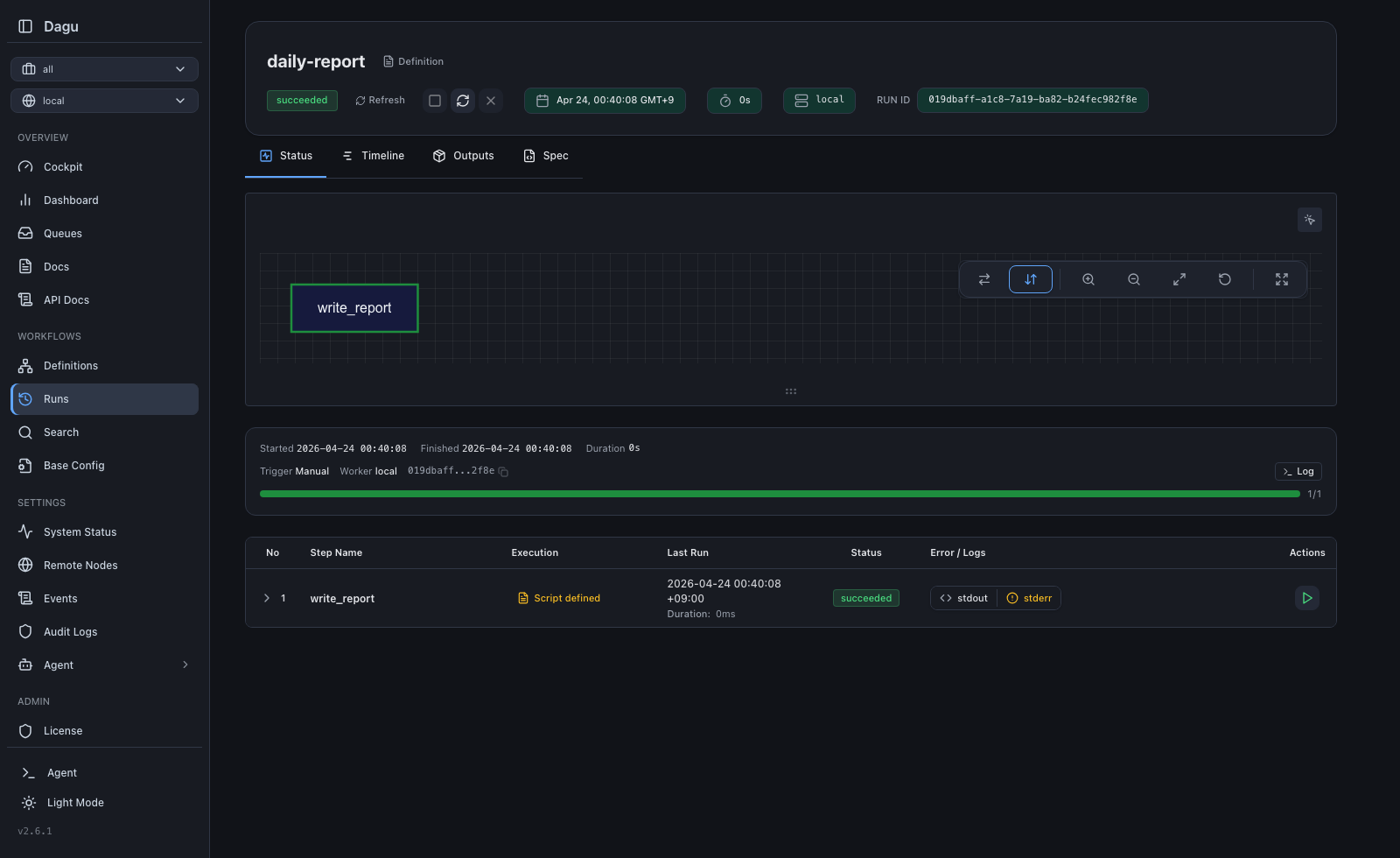 | 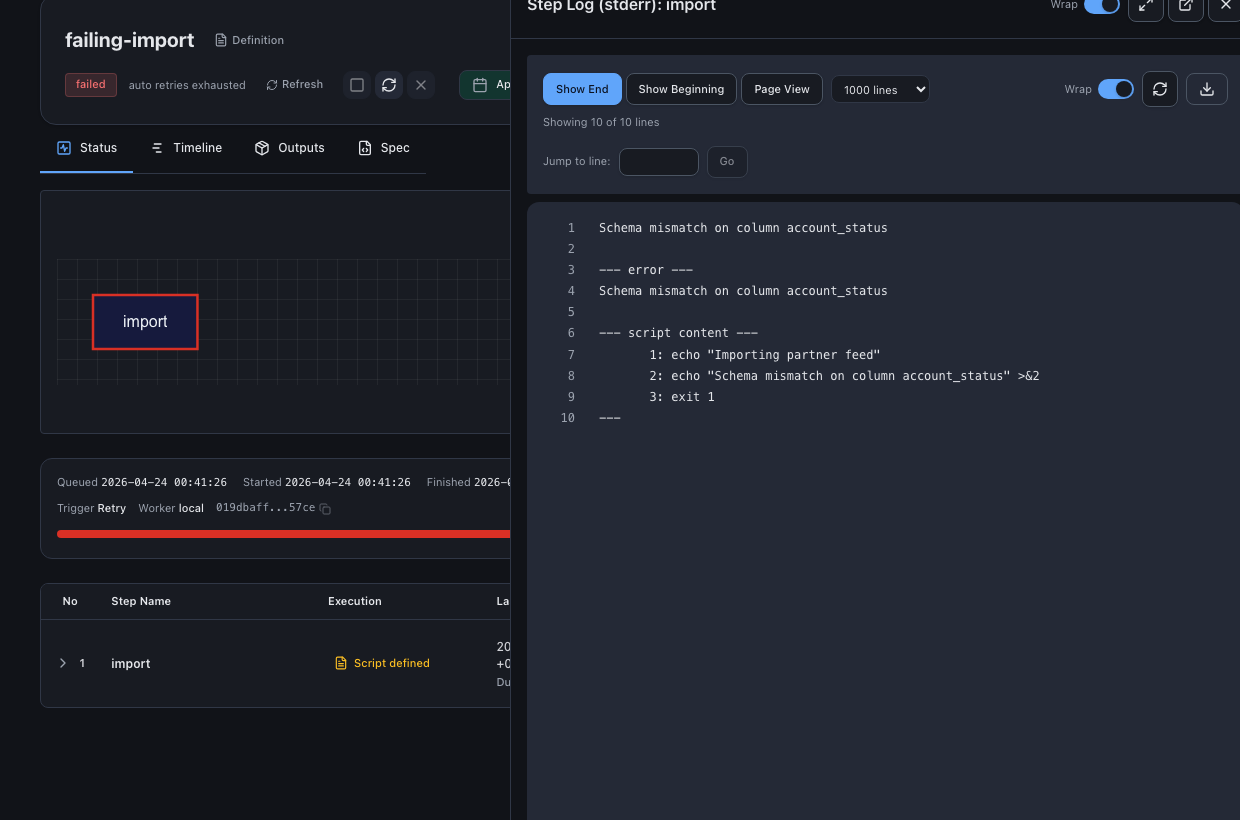 | 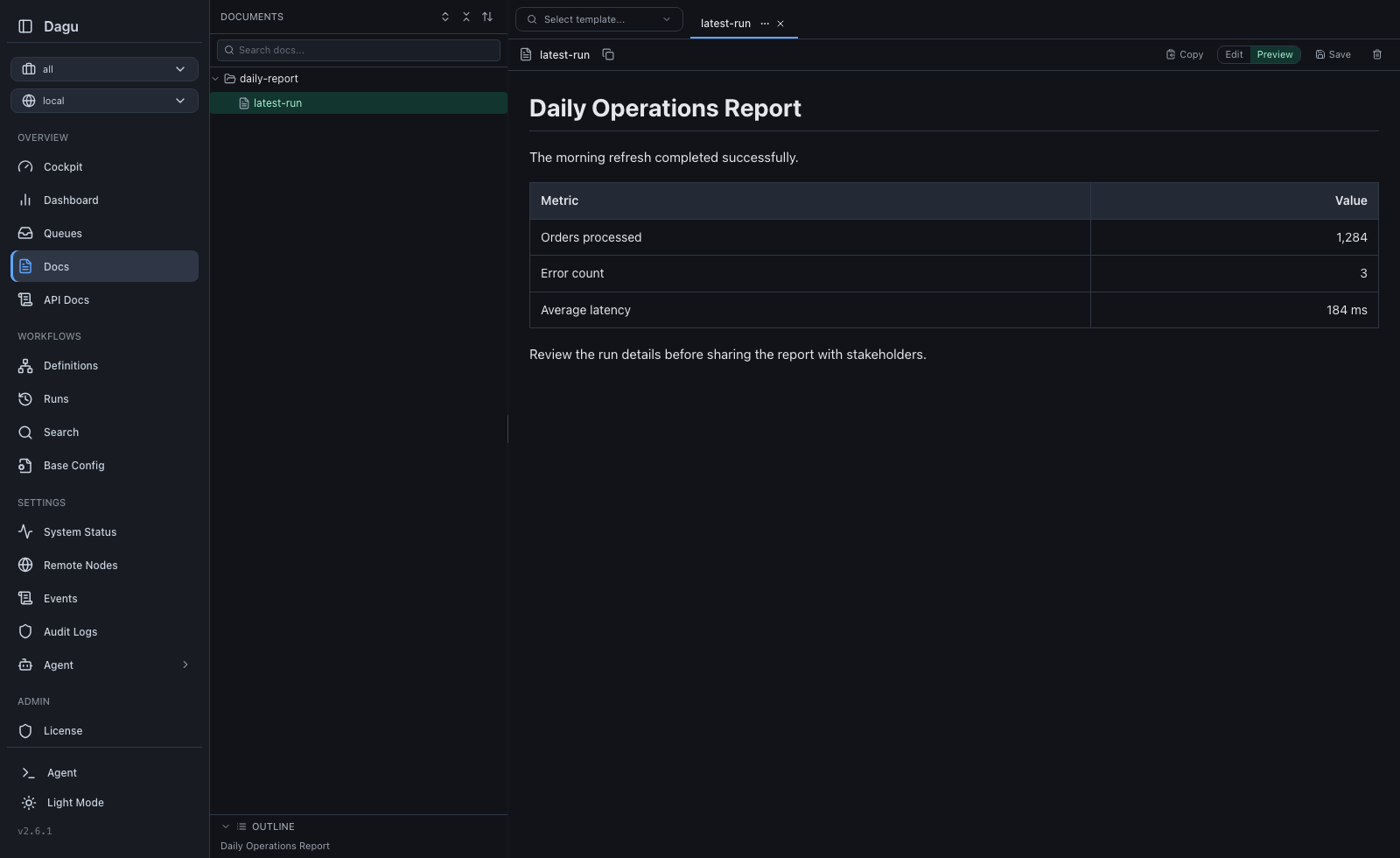 |
Try it live: Live Demo (credentials:
demouser / demouser)Why Dagu?
Orchestration is not your main work. You have scripts and containers that already work. You want a schedule, retries, dependencies, and a place to see logs. The usual options each have a cost:- cron runs commands, but gives you no dependencies, no retries, no history.
- Airflow orchestrates, but you operate a platform for it (scheduler, metadata database, workers, a Python environment), and your jobs get rewritten as
@dag/@taskframework code. - Temporal gives durable execution, but your business logic moves into its SDK and programming model.
You wanted to schedule some jobs. Now you operate a second system, and the orchestrator lives inside the code it was supposed to serve.
Dagu treats workflow structure as configuration, not code. Order, dependencies, retries, schedules, and human tasks go in one YAML file next to your scripts; the engine that runs them is a single process:
Traditional Orchestrator          Dagu
┌────────────────────────┐        ┌──────────────────┐
│  Web Server            │        │                  │
│  Scheduler             │        │  dagu start-all  │
│  Worker(s)             │        │                  │
│  PostgreSQL            │        └──────────────────┘
│  Redis / RabbitMQ      │         Single binary.
│  Python Runtime        │         Self-hosted.
└────────────────────────┘         Adds scheduling, retries, and human tasks around existing automation.
  6+ services to manage
Your scripts never import the orchestrator. Delete the YAML and they run exactly as before. Keep it, and every run gets a dependency graph, retries, per-step logs, history, and a Web UI.
Performance
Dagu stores state in local files and reaches production throughput without external services.- Throughput: A single machine can run thousands of workflow runs per day. Actual capacity depends on CPU, memory, disk, and workflow shape.
- Load control: Queues, concurrency limits, and resource limits control how many runs execute at once and where they run.
- Scale out: Workers spread execution across machines when one node is not enough.
Real-World Use Cases
| Use Case | How Dagu Helps |
|---|---|
| ETL and data operations | Turn data extraction scripts, SQL queries, dbt commands, and data-processing runbooks into observable pipelines with durable execution. |
| Legacy scripts and scheduled jobs | Turn interdependent scripts into maintainable DAGs with a UI, automatic logging, retries, and notifications instead of opaque cron jobs. |
| Media conversion | Run ffmpeg for video transcoding and format conversion. File-backed state allows workers to run heavy conversions in parallel without single-machine bottlenecks or external databases. |
| Infrastructure and server automation | Run any command or script over SSH on remote servers, keeping logs, results, and notifications in one place. |
| GitHub-driven workflows | Trigger workflows from GitHub events to run automation on private infrastructure without exposing servers to the public internet. |
| Container and Kubernetes workflows | Run Docker containers and Kubernetes Jobs as steps in your workflows without building a custom control plane around containers. |
| Customer support automation | Provide self-service workflows that non-engineering teams can run for diagnostics, database queries, and routine operations without escalating to engineering. |
| IoT and edge workflows | Run sensor polling, local ML inference, data preprocessing, backups, offline sync, and health checks close to the data source with Web UI visibility. |
Quick Start
Install
macOS/Linux:curl -fsSL https://raw.githubusercontent.com/dagucloud/dagu/main/scripts/installer.sh | bashHomebrew:
brew install dagunpm:
npm install -g --ignore-scripts=false @dagucloud/daguWindows (PowerShell):
irm https://raw.githubusercontent.com/dagucloud/dagu/main/scripts/installer.ps1 | iexDocker:
docker run --rm -v ~/.dagu:/var/lib/dagu -p 8080:8080 ghcr.io/dagucloud/dagu:latest dagu start-allThis command does not expose the host Docker daemon to Dagu. Workflows that usecontainer:oraction: docker.runneed the container-step Docker setup. Mounting the Docker socket grants workflows control of the host daemon.
Kubernetes (Helm):
helm repo add dagu https://dagucloud.github.io/dagu
helm repo update
helm install dagu dagu/dagu --set persistence.storageClass=<your-rwx-storage-class>Replace<your-rwx-storage-class>with a StorageClass that supportsReadWriteMany. See charts/dagu/README.md for chart configuration.
The script installers run a guided wizard that can add Dagu to your PATH, set it up as a background service, and create the initial admin account. Homebrew, npm, Docker, and Helm install without the wizard. See the Installation documentation for all options.
Create and run a workflow
Createhello.yaml:steps:
- id: hello
run: echo "hello from Dagu"Run the workflow with:
dagu start hello.yamlStart the server
dagu start-all --dags .Visit http://localhost:8080
How You Run Dagu
Dagu runs on one machine, on temporary workers your platform creates for each run, or on workers you keep running. All three are self-hosted, and the same workflow YAML runs on any of them. See the Deployment Models guide.| Topology | Execution | Best for |
|---|---|---|
| Single server | dagu start-all runs the server, scheduler, and steps in one process on one machine. | Development, single-machine scheduled workloads, edge jobs, and internal automation. |
| Temporary workers | Cloud Run Jobs, Kubernetes Jobs, or CI provision a worker per run that invokes the binary and is destroyed when the run ends. The server reads run state from a shared volume. | Ephemeral compute, capacity that falls to zero between jobs, and launchers you already operate. |
| Distributed workers | Workers you keep running poll a coordinator over gRPC and are routed work by label. | Docker and private-network steps, warm toolchains, and multiple execution hosts. |
Licensing
- Community self-host: No license key required. You operate the server, storage, upgrades, networking, and workers. Start with the installation guide.
- Self-host license: Adds SSO, RBAC, audit logging, and incident SaaS integration to Dagu. See self-host licensing.
Key Features
- Observability: Shared workflows and scheduling with clear visualizations, status tracking, and logs in the Web UI.
- Language-agnostic: No framework required. Define workflow steps using shell commands, Docker containers, Kubernetes Jobs, SQL queries, HTTP requests, and any other tool via official and third-party Dagu Actions.
- Build workflows: Reuse a step's result when its command and files have not changed. Dagu can also infer dependencies from matching file paths.
- Reproducibility: Reproducible runs with pinned tools, plus automatic installation and caching on workers, eliminating the need to manually install dependencies on the server or workers.
- Human Tasks: Pause a workflow for acknowledgement or typed operator input, then expose the response to downstream steps.
- Secret management: Built-in secret management with secure log masking, preventing credentials from leaking into logs or the Web UI.
- Self-hosted: A single binary that runs on Linux, macOS, and Windows. Execution scales out to a fleet of workers.
- Permission Control: RBAC and SSO support for team environments, controlling who can view, run, and edit workflows through granular permissions and audit logging.
- MCP Server: Authenticated MCP clients can inspect workflows and runs, maintain Wiki pages, apply changes, and control runs.
Architecture
One binary carries every role. Which roles you start, and where, is what the deployment models differ on.- Server serves the Web UI and REST API.
- Scheduler owns
schedule:and drains the queue. - Coordinator is the gRPC endpoint workers poll. It also persists what they report: run status, streamed logs, and artifacts.
- Worker polls a coordinator, executes dispatched runs locally, and reports back. Routed by labels.
dagu start-allruns the server, scheduler, and coordinator in one process.
Set
DAGU_HEADLESS=true to run without the Web UI, which applies to any of the topologies and suits CI or CLI-only environments.Single server:
┌─────────────────────────────────────────┐
│ dagu start-all │
│ ┌───────────┐ ┌───────────┐ ┌────────┐ │
│ │ HTTP / UI │ │ Scheduler │ │Executor│ │
│ └───────────┘ └───────────┘ └────────┘ │
│ File-based storage (logs, state, queue)│
└─────────────────────────────────────────┘
Distributed workers:
┌────────────┐ ┌────────────┐
│ Scheduler │ │ HTTP / UI │
│ │ │ │
│ ┌────────┐ │ └─────┬──────┘
│ │ Queue │ │ Dispatch (gRPC) │ Dispatch / GetWorkers
│ │(file) │ │─────────┐ │ (gRPC)
│ └────────┘ │ │ │
└────────────┘ ▼ ▼
┌─────────────────────────┐
│ Coordinator │
│ ┌───────────────────┐ │
│ │ Dispatch Task │ │
│ │ Store (pending/ │ │
│ │ claimed) │ │
│ └───────────────────┘ │
└────────▲────────────────┘
│
Worker poll / task response
Heartbeat / ReportStatus /
StreamLogs (gRPC)
│
┌─────────────┴─────────────┐
│ │ │
┌────┴───┐ ┌────┴───┐ ┌────┴───┐
│Worker 1│ │Worker 2│ │Worker N│ Sandbox execution of DAGs
│ │ │ │ │ │
└────────┘ └────────┘ └────────┘
Temporary workers:
┌────────────┐ provisions ┌──────────────┐
│ Launcher │───────────────▶│ dagu start │
│ Cloud Run │ │ exits when │
│ K8s Job/CI │ │ the run ends │
└────────────┘ └──────┬───────┘
│ writes
▼
┌────────────┐ reads ┌──────────────────┐
│ Dagu server│◀───────────────│ Shared volume │
│ UI / API │ │ dags/state/logs │
└────────────┘ └──────────────────┘
No coordinator, and no network path between the two.Parameter Definition
Workflows can define parameters that render as typed input forms in the Web UI and can be referenced by steps.params:
- name: customer_id
type: string
description: Customer or account identifier
- name: change_scope
type: string
description: What the repair is allowed to change
enum:
- metadata_only
- permissions
- full_account
default: metadata_only
- name: dry_run
type: boolean
default: true
steps:
- id: extract
run: >-
./scripts/extract.sh
--customer "${params.customer_id}"
--scope "${params.change_scope}"
--dry-run="${params.dry_run}"
retry_policy:
limit: 3
interval_sec: 30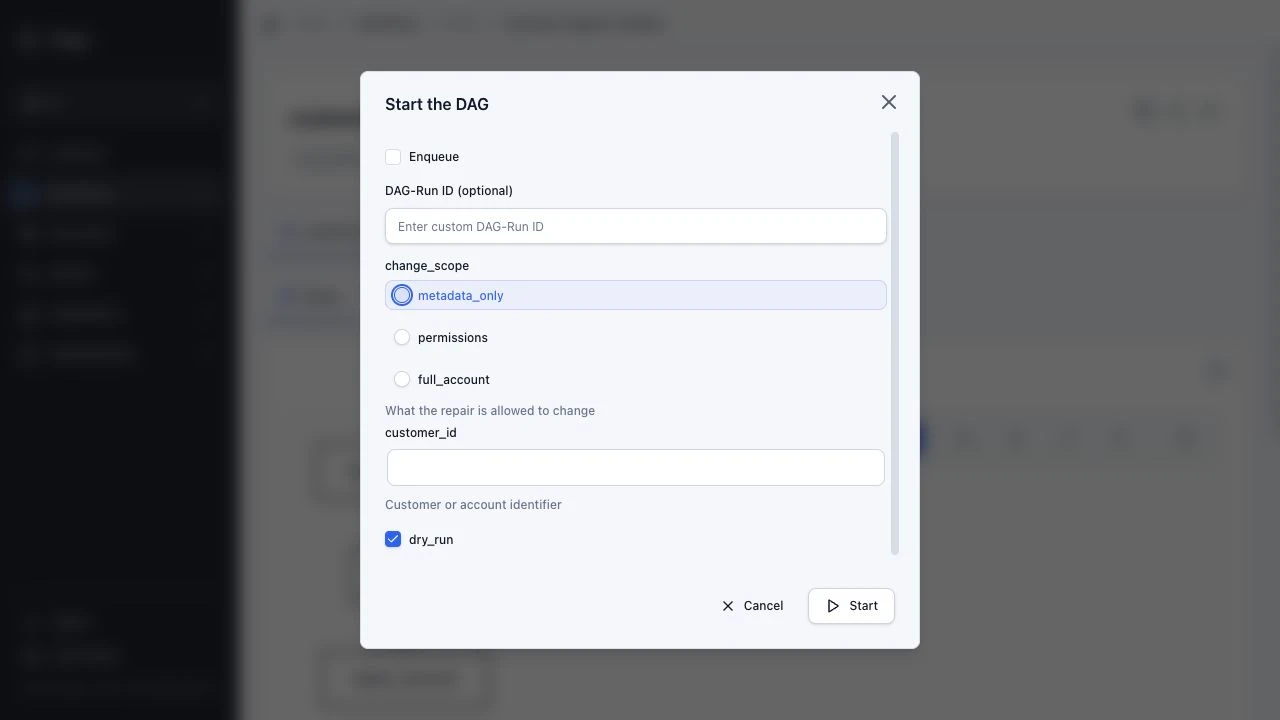
Workflow Examples
Docker step
When Dagu itself runs in Docker, enable Docker daemon access before using container steps.Pass standard
docker run options directly in YAML, including the image, pull policy, platform, volume mounts, working directory, and resource limits:resources:
limits:
cpu: 500m
memory: 512Mi
steps:
- id: report
action: docker.run
with:
image: ghcr.io/acme/reporting:1.4.2
pull: always
platform: linux/amd64
working_dir: /work
volumes:
- ~/orders:/work/data
auto_remove: true
command: python generate_report.py --input /work/data/orders.csvSee the Docker and DAG Run Resource Limits documentation for all configuration options.
Parallel Sub-DAG execution
The parent invokes the same child DAG for multiple targets and limits concurrent child runs:steps:
- id: patch
action: dag.run
with:
dag: patch-host
params:
host: ${ITEM}
parallel:
items:
- web-1.internal
- web-2.internal
- db-1.internal
max_concurrent: 2
---
name: patch-host
params:
- name: host
type: string
ssh:
user: deploy
host: ${params.host}
steps:
- id: apply
run: apt-get update -q && apt-get upgrade -ySee the Sub-DAGs documentation for parameter passing and fan-out options.
SSH remote execution
ssh:
  user: deploy
  host: web-1.internal
  key: ~/.ssh/deploy_key

steps:
  - id: health
    run: curl -f http://localhost:8080/health
    retry_policy:
      limit: 3
      interval_sec: 10

  - id: restart
    run: systemctl restart myapp
    depends: health
See the SSH documentation for authentication and connection options.
Scheduling with overlap control and catch-up
schedule:
  - "0 */6 * * *"          # Every 6 hours
overlap_policy: skip       # Skip if previous run is still active
catchup_window: "5h"       # Catch up missed runs when scheduler is down for up to 5 hours

timeout_sec: 3600
handler_on:
  failure:
    run: notify-team.sh
  exit:
    run: cleanup.sh
See the Scheduling and Lifecycle Handlers documentation for all options.
Retry and error handling
steps:
  - name: flaky-api-call
    run: curl -f https://api.example.com/data
    retry_policy:
      limit: 3
      interval_sec: 10
    continue_on:
      failure: true
See the Durable Execution and Continue On documentation for retry policies and failure handling.
More Workflow Examples
Parallel executions
steps:
  - id: extract
    run: ./extract.sh

  - id: transform_a
    run: ./transform_a.sh
    depends: extract

  - id: transform_b
    run: ./transform_b.sh
    depends: extract

  - id: load
    run: ./load.sh
    depends: [transform_a, transform_b]
%%{init: {'theme': 'base', 'themeVariables': {'background': '#18181B', 'primaryTextColor': '#fff', 'lineColor': '#888'}}}%%
graph LR
A[extract] --> B[transform_a]
A --> C[transform_b]
B --> D[load]
C --> D
style A fill:#18181B,stroke:#22C55E,stroke-width:1.6px,color:#fff
style B fill:#18181B,stroke:#22C55E,stroke-width:1.6px,color:#fff
style C fill:#18181B,stroke:#22C55E,stroke-width:1.6px,color:#fff
style D fill:#18181B,stroke:#3B82F6,stroke-width:1.6px,color:#fffSee the Control Flow documentation for dependencies, conditions, and repetition.
Reuse unchanged results
Save this asworkflow.yaml:type: build
working_dir: .
steps:
- id: uppercase
inputs:
- name: source
path: source.txt
outputs:
- name: result
path: uppercase.txt
run: |
#!/bin/sh
tr '[:lower:]' '[:upper:]' < "${inputs.source}" > "${outputs.result}"Run it:
printf 'alpha\n' > source.txt
dagu start workflow.yaml
Run
dagu start workflow.yaml again and Dagu reuses uppercase.txt. Change source.txt and the step runs again. ${outputs.result} is a temporary path that Dagu publishes as uppercase.txt after the command succeeds.Build workflows currently run locally. See Build Workflows for dependency inference and reuse rules.
External tools with pinning and caching
tools:
  - jqlang/[email protected]

steps:
  - id: inspect
    run: jq --version

  - id: summarize
    action: python-script@v1
    with:
      input:
        rows: [42, 8]
      script: |
        return {"total": sum(input["rows"])}
Dagu installs declared portable CLIs before the DAG run, exposes them on
PATH for host command steps, and caches them on each worker. Tool provisioning uses aqua as the default provider; the standard registry resolves to the latest aqua-registry release automatically. Pin a specific artifact with package@version#sha256:<hex> when the release tag alone is not a strong enough guarantee. See the Tools documentation and Dagu Actions for more details.Third-party Dagu Actions
params:
  - BUILD_ID

steps:
  - id: notify
    action: acme/[email protected]
    with:
      text: "Build ${params.BUILD_ID} finished"

  - id: audit
    depends: notify
    run: 'echo "Notification result: ${steps.notify.outputs.messageId}"'
A third-party Dagu Action package contains a DAG, manifest, schemas, and helper files behind an
action: reference. See the Dagu Actions and Third-Party Actions documentation for details.Kubernetes Pod execution
steps:
  - name: batch-job
    action: kubernetes.run
    with:
      namespace: production
      image: my-registry/batch-processor:latest
      resources:
        requests:
          cpu: "2"
          memory: "4Gi"
      command: ./process.sh
See the Kubernetes documentation for Job configuration options.
For more examples, see the Examples documentation.
MCP
Dagu includes a built-in MCP server athttp://localhost:8080/mcp. MCP clients can inspect workflows and run state, maintain Dagu's built-in Wiki pages, preview and apply DAG or Wiki page changes, and control runs through the same authenticated server boundary as the REST API.See the MCP overview and quickstart.
Built-in Actions
Dagu includes built-in actions that run within the Dagu process or on the selected worker. Local shell commands use therun: field; structured work uses action:.| Action | Purpose |
|---|---|
run: field | Local shell commands and scripts (bash, sh, PowerShell, custom shells) |
exec | Direct process execution without shell parsing |
noop | Output-only or approval-only placeholder step |
log.write | Write structured log messages |
docker.run / container.run | Run containers with registry auth, volume mounts, and resource limits |
kubernetes.run / k8s.run | Execute Kubernetes Jobs with namespace, image, and resource settings |
ssh.run | Remote command execution over SSH |
sftp.upload / sftp.download | File transfer over SFTP |
http.request | HTTP requests with headers, auth, and request bodies |
chat.completion | Run an LLM chat completion step |
harness.run | Run external coding-agent CLIs such as Claude Code, Codex, Gemini CLI, Cursor, and DeepSeek Harness |
browser.extract / browser.run | Automate websites in a local Chrome with natural-language actions, structured extraction, and human input |
computer.extract / computer.run | Automate desktop applications on macOS and Windows workers with natural-language tasks, screen extraction, and human input |
postgres.query / postgres.import | PostgreSQL queries and imports |
sqlite.query / sqlite.import | SQLite queries and imports |
redis.<operation> | Redis commands, pipelines, and Lua scripts |
s3.upload / s3.download / s3.list / s3.delete | Upload, download, list, and delete S3 objects |
file.stat / file.read / file.write / file.copy / file.move / file.delete / file.mkdir / file.list | Local file operations without shell commands |
artifact.write / artifact.read / artifact.list | Write, read, and list DAG-run artifacts |
state.get / state.set / state.delete / state.list / state.diff | Persistent JSON state across DAG runs |
data.convert / data.pick | Convert and select structured data |
jq.filter | JSON transformation using jq expressions |
archive.create / archive.extract / archive.list | Create, extract, and list zip/tar archives |
wait.duration / wait.until / wait.file / wait.http | Wait for time, file state, or HTTP readiness |
human.task | Wait for acknowledgement or typed operator input before downstream steps continue |
mail.send | Send email via SMTP |
mail.search | Find email in an IMAP mailbox |
mail.organize | Mark, move, archive, or trash email |
template.render | Text generation with template rendering |
router.route | Conditional step routing based on values and patterns |
dag.run | Invoke another DAG as a sub-workflow with params and dependencies |
dag.enqueue | Queue another DAG asynchronously and continue after enqueue |
git.checkout | Clone or update Git repositories |
outputs.write | Publish DAG or Dagu Action outputs for callers |
Custom Actions
Custom Actions are inline reusable wrappers defined with the top-levelactions field. They expand to built-in actions during DAG load, so you can wrap a common shell, HTTP, SQL, or other pattern behind a typed interface with validated input.actions:
webhook.send:
input_schema:
type: object
additionalProperties: false
required: [url, text]
properties:
url:
type: string
text:
type: string
template:
action: http.request
with:
method: POST
url: '{{ .input.url }}'
headers:
Content-Type: application/json
body: |
{"text": {{ json .input.text }}}
steps:
- action: webhook.send
with:
url: https://hooks.example.com/ops
text: deploy completeSee Custom Actions and the YAML Specification for the exact
actions, action, and run field behavior.Official Dagu Actions
Dagu Actions are official action packages maintained in thedagucloud GitHub organization. They use the same action package runtime as third-party action packages, but callers use the short form action: name@version.| Dagu Action | Purpose |
|---|---|
node-script@v1 | Run small JavaScript transforms or glue code with action-owned Node.js |
python-script@v1 | Run small Python transforms or glue code with action-owned Python and optional requirements |
dbt@v1 | Run dbt Core commands with action-owned Python and adapter requirements |
duckdb@v1 | Run DuckDB SQL through the DuckDB CLI without adding DuckDB to the core binary |
ffmpeg@v1 | Run FFmpeg conversion, transcoding, probing, and stream-processing tasks |
github-cli@v1 | Run GitHub issue, pull request, release, repository, and API automation through gh |
rclone@v1 | Run portable copy, sync, check, list, and storage-management workflows through rclone |
Versions are required. Pin production workflows to a version tag or commit SHA. See Official Dagu Actions for the current Dagu Action list and exact input/output contracts.
For non-official packages, use Third-Party Actions such as
action: owner/repo@version. They contain a dagu-action.yaml manifest and a DAG entrypoint, run as sub-DAGs, and are transferred to distributed workers as workspace bundles after the reference is resolved. See the documentation for package layout and reference formats.Security and Access Control
Authentication
Dagu supports three top-level authentication modes, configured viaDAGU_AUTH_MODE:none: No authenticationbasic: HTTP Basic authenticationbuiltin: JWT-based authentication with user management, API keys, per-DAG webhook tokens, and optional OIDC/SSO integration
Role-Based Access Control
When usingbuiltin auth, five roles control access:| Role | Capabilities |
|---|---|
admin | Full access including user management |
manager | Create, edit, delete, run, stop DAGs; view audit logs |
developer | Create, edit, delete, run, stop DAGs |
operator | Run and stop DAGs only (no editing) |
viewer | Read-only access |
API keys can be created with independent role assignments. Audit logging tracks all actions.
TLS and Secrets
- TLS for the HTTP server (
DAGU_CERT_FILE,DAGU_KEY_FILE) - Mutual TLS for gRPC coordinator/worker communication (
DAGU_PEER_CERT_FILE,DAGU_PEER_KEY_FILE,DAGU_PEER_CLIENT_CA_FILE) - Secret management with environment variables, files, Kubernetes Secrets, HashiCorp Vault, and cloud-provider secret stores
Production Hardening
For self-hosted production deployments, treat network exposure and execution boundaries as the primary controls:- Prefer
auth.mode: builtinfor any shared or network-exposed instance. Usebasiconly for simple private setups, and avoidnoneoutside isolated local development. - Keep
metrics: privateunless the metrics endpoint is reachable only on a trusted private network. - Bind Dagu to loopback or a private interface when possible. If you must use
0.0.0.0, place it behind a trusted reverse proxy, TLS, and network-level access controls. - Leave
terminal.enabled: falseunless the instance is admin-only and tightly scoped. - In distributed deployments, set
peer.insecure=falseand configure peer TLS when coordinator and workers communicate across host or network boundaries. - Treat Docker socket mounts, root containers, and host-level executors as privileged access to the underlying machine.
See Server Configuration, Docker deployment, and Distributed execution for operator-focused guidance.
Observability
Prometheus Metrics
Dagu exposes Prometheus-compatible metrics:dagu_info: Build information (version, Go version)dagu_uptime_seconds: Server uptimedagu_dag_runs_total: Total DAG runs by statusdagu_dag_runs_total_by_dag: Per-DAG run countsdagu_dag_run_duration_seconds: Histogram of run durationsdagu_dag_runs_currently_running: Active DAG runsdagu_dag_runs_queued_total: Queued runsdagu_workers_registered: Registered distributed workersdagu_worker_info: Worker heartbeat labels as key/value metadatadagu_worker_heartbeat_timestamp_seconds: Last worker heartbeat timestampdagu_worker_health_status: Worker health by heartbeat freshnessdagu_worker_pollers: Worker poller capacity by statedagu_worker_running_tasks: Running tasks per workerdagu_worker_oldest_running_task_age_seconds: Age of the oldest running task per worker
Structured Logging
JSON or text format logging (DAGU_LOG_FORMAT). Logs are stored per-run with separate stdout/stderr capture per step.Notifications
- Email notifications on DAG success, failure, or wait status via SMTP
- Per-DAG webhook endpoints with token authentication
- Delivery requires the event store, notification store, and writable notification state store
SMTP inherited from global or workspace
base.yaml is omitted from new run
snapshots (dag.json). Retries, restarts, and queued runs use the current base
SMTP configuration. Removing it disables email notifications unless the original
DAG defines SMTP. Other base settings and the original DAG YAML remain captured.
Runs without captured base configuration use the current base configuration in
full; an explicitly empty captured configuration only reloads SMTP.SMTP written directly in DAG YAML, values stored in
env, distributed task
payloads, and workspace bundles are still retained. Existing history files and
backups are not rewritten. Upgrade processes that read run snapshots (CLI, API,
and scheduler) together so retries can reload base SMTP.Scoped notification routing is broken in v2.11.0-v2.11.2. Use v2.11.3 or later.
Artifacts
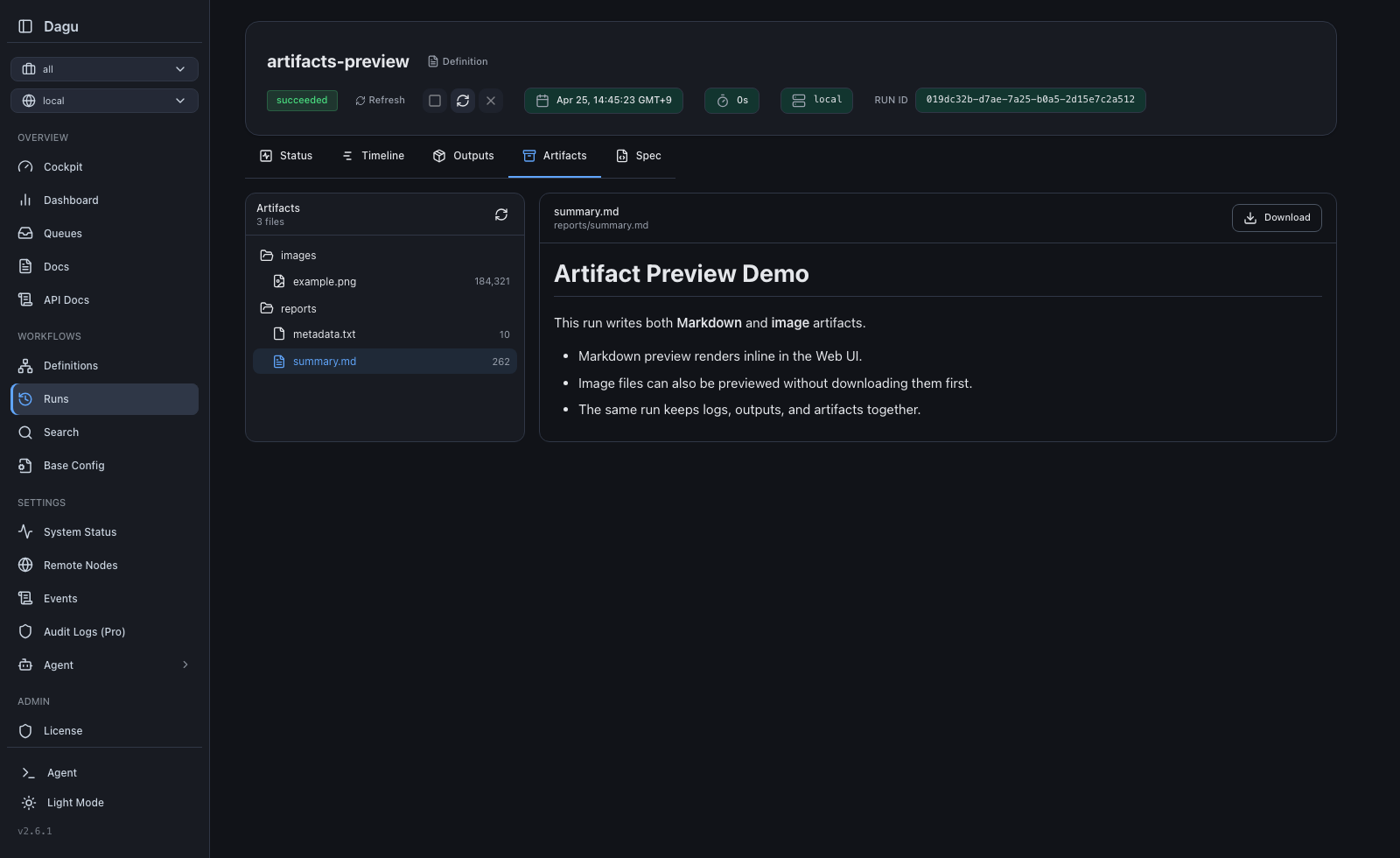
Dagu runs can write arbitrary files under
${context.paths.artifacts_dir} in value-resolved fields, with DAG_RUN_ARTIFACTS_DIR also exposed to step processes. Dagu stores those files per run as Artifacts. In the Web UI, operators can browse the file tree, preview Markdown, text, and image files inline, and download any artifact when they need the raw file.This is useful for generated reports, screenshots, charts, exported JSON or CSV files, and other outputs that do not fit simple key/value outputs.
See the Artifacts documentation and the Web UI guide for the full artifact browser workflow and screenshots.
Scheduling and Reliability
- Cron scheduling with timezone support and multiple schedule entries per DAG
- Overlap policies:
skip(default: skip if previous run is still active),all(queue all),latest(keep only the most recent) - Catch-up scheduling: Automatically runs missed intervals when the scheduler was down
- Zombie detection: Identifies and handles stalled DAG runs (configurable interval, default 45s)
- Retry policies: Per-step retry with configurable limits, intervals, and exit code filtering
- Human tasks: Pause root DAG runs for acknowledgement or schema-validated operator input, locally or on distributed workers, then expose form values to downstream steps
- Lifecycle hooks:
onInit,onSuccess,onFailure,onAbort,onExit,onWait - Preconditions: Gate DAG or step execution on shell command results
- High availability: Scheduler lock with stale detection for failover
Distributed Execution
Operational detail for the distributed workers topology:- Coordinator: gRPC server that manages task distribution, worker registry, and health monitoring
- Workers: Poll the coordinator outbound, execute DAGs locally, and report status, logs, and artifacts back. No inbound port required
- Worker labels: Route DAGs to specific workers based on labels (e.g.,
gpu=true,region=us-east-1) - Health checks: HTTP health endpoints on coordinator and workers for load balancer integration
- Queue system: File-based persistent queue with configurable concurrency limits
# Start coordinator
dagu coordinator --coordinator.host=0.0.0.0 --coordinator.advertise=coordinator.internal

# Start workers (on separate machines)
DAGU_WORKER_COORDINATORS=coordinator.internal:50055 \
  DAGU_WORKER_LABELS=gpu=true,memory=64G dagu worker
See the distributed execution documentation for setup details.
CLI Reference
| Command | Description |
|---|---|
dagu start <dag> | Execute a DAG |
dagu start-all | Start HTTP server + scheduler + coordinator |
dagu server | Start HTTP server only |
dagu scheduler | Start scheduler only |
dagu coordinator | Start coordinator (distributed mode) |
dagu worker | Start worker (distributed mode) |
dagu stop <dag> | Stop a running DAG |
dagu restart <dag> | Restart a DAG |
dagu retry --run-id=<run-id> <dag> | Retry a failed run |
dagu human-task complete --run-id=<run-id> --step=<id> <dag> | Complete a waiting human task |
dagu dry <dag> | Dry run: show what would execute |
dagu status <dag> | Show DAG run status |
dagu history <dag> | Show execution history |
dagu validate <dag> | Validate DAG YAML |
dagu enqueue <dag> | Add DAG to the execution queue |
dagu dequeue <queue-name> --dag-run=<dag>:<run-id> | Remove a DAG-run from the queue |
dagu cleanup <dag> | Clean up old run data |
dagu version | Show version |
The table lists the most common commands. The binary ships 31 in total, including
exec, ls, ps, rm, sync, schema, example, config, profile, context, license, upgrade, and completion; run dagu --help or see the CLI reference for all of them.Environment Variables
Precedence: Command-line flags > Environment variables > Configuration file (~/.config/dagu/config.yaml)Server
| Variable | Default | Description |
|---|---|---|
DAGUHOST | 127.0.0.1 | Bind address |
DAGUPORT | 8080 | HTTP port |
DAGUBASEPATH | - | Base path for reverse proxy |
DAGUHEADLESS | false | Run without web UI |
DAGUTZ | - | Timezone (e.g., Asia/Tokyo) |
DAGULOGFORMAT | text | text or json |
DAGUCERTFILE | - | TLS certificate |
DAGUKEYFILE | - | TLS private key |
DAGUCORSALLOWEDORIGINS | - | Comma-separated list of allowed CORS origins (e.g. https://app.example.com). When unset, cross-origin browser access is disabled. Exact origins enable credentials. An explicit |
DAGUIPACCESSALLOWEDIPS | - | Comma-separated IPv4/IPv6 addresses and CIDR ranges allowed to access the HTTP server. Empty disables filtering. |
DAGUIPACCESSTRUSTEDPROXIES | - | Comma-separated proxy addresses and CIDR ranges permitted to supply forwarded client IP headers. |
DAGUPUBLICURL | - | External Web UI URL used in generated links, including notification and incident DAG-run links |
DAGUSERVERMETRICS | private | Metrics endpoint access: private or public |
DAGUTERMINALENABLED | false | Enable the web-based terminal |
DAGUDEFAULTSHELL | $SHELL, then sh | Default shell for command steps |
DAGUENVPASSTHROUGHPREFIXES | - | Comma-separated env var prefixes forwarded to step execution |
DAGUDEBUG | - | Enable debug mode |
The equivalent YAML protects every HTTP route, including health, metrics, webhooks, SSE, terminal, and MCP:
ip_access:
  allowed_ips:
    - 203.0.113.10
    - 10.0.0.0/8
  trusted_proxies:
    - 127.0.0.1
    - 10.42.0.0/16
Forwarded addresses are used only when the direct peer matches
trusted_proxies. The proxy must remove client-supplied forwarding headers and
set or append the verified client address. Keep trusted proxy ranges narrow.Paths
| Variable | Default | Description |
|---|---|---|
DAGUHOME | - | Overrides all path defaults |
DAGUDAGSDIR | ~/.config/dagu/dags | DAG definitions directory |
DAGUDAGDISCOVERYRECURSIVE | false | Discover DAGs in subdirectories |
DAGUDAGDISCOVERYSYMLINKS | false | Include recursive file symlinks and allow external targets |
DAGULOGDIR | ~/.local/share/dagu/logs | Log files |
DAGUDATADIR | ~/.local/share/dagu/data | Application state |
DAGUSUSPENDFLAGSDIR | {DAGUDATADIR}/suspend | DAG suspension flags |
DAGUTOOLSDIR | {DAGUDATADIR}/tools | Managed DAG tool cache |
DAGUDAGSTATEDIR | {DAGUDATADIR}/dag-state | Persistent DAG state files |
DAGUDAGRUNWORKDIR | {DAGUDATADIR}/dag-run-work | Per-run working directories |
DAGUBASECONFIG | - | Shared base configuration applied to all DAGs |
Suspend flags default to
paths.data_dir/suspend. Explicit
paths.suspend_flags_dir settings, including environment variables and legacy
configuration keys, retain their configured location and disable legacy fallback
and migration. A path outside data_dir produces a warning because all server
and scheduler processes must share the same suspension state.With the default path, flags in the previous default directory remain readable. After acquiring leadership, the scheduler copies them into
data_dir/suspend
before processing runs. Startup preserves the original flags. Suspending a DAG
writes its new flag before removing its legacy flag; resuming removes both.
Migration and state changes are serialized across processes.During upgrade, make the same legacy flags available to the server and scheduler; reconcile any private per-host flag directories first. Upgrade all processes together before changing suspension state. Older processes writing legacy flags are not supported alongside upgraded processes. Until scheduler migration has completed, include the legacy directory in backups. When rolling back, explicitly configure the older version to use the new shared suspend directory.
Set the per-run work root in
config.yaml, or use the corresponding environment variable above:paths:
dag_run_work_dir: /mnt/dagu/dag-run-workDAGU_DAG_RUN_WORK_DIR configures this root for Dagu processes. Workflow code should use the runtime DAG_RUN_WORK_DIR variable for its assigned per-run directory instead of constructing paths under DAG-run history.Processes sharing DAG runs must use the same work root.
Backups that select individual data subdirectories must include both
paths.dag_runs_dir and paths.dag_run_work_dir. A backup of the complete paths.data_dir includes both default locations. The Helm chart's default /data/dag-run-work path uses its existing /data volume and does not need an additional volume.When upgrading a deployment whose processes share a durable work root, do not let old and new Dagu versions execute the same run concurrently: drain or stop the processes, upgrade them together, and then resume execution. Mixed-version processes can otherwise choose the old nested directory and the new separate directory for one run.
Recursive discovery can also be enabled in
config.yaml:dag_discovery:
recursive: trueIt scans
paths.dags_dir, excluding workspaces/, dot-directories, and symlinks. File stems and effective DAG names must each be unique, using case-sensitive comparison; conflicting files are excluded until the conflict is resolved. paths.alt_dags_dir remains lookup-only.Set
dag_discovery.symlinks: true (or
DAGU_DAG_DISCOVERY_SYMLINKS=true) to include YAML file symlinks in recursive
discovery and to allow YAML file symlinks whose targets are outside
paths.dags_dir. Symlinked directories are never traversed. External targets
can be viewed, scheduled, and run, but cannot be updated, deleted, or renamed
through Dagu. Without the opt-in, top-level YAML file symlinks whose targets
remain inside paths.dags_dir continue to work. A symlink configured as
paths.dags_dir itself is also supported.Authentication
| Variable | Default | Description |
|---|---|---|
DAGUAUTHMODE | builtin | none, basic, or builtin |
DAGUAUTHBASICUSERNAME | - | Basic auth username |
DAGUAUTHBASICPASSWORD | - | Basic auth password |
DAGUAUTHTOKENSECRET | (auto) | JWT signing secret |
DAGUAUTHTOKENTTL | 24h | JWT token lifetime (maximum: 8760h / 365 days) |
DAGUAUTHBUILTININITIALADMINUSERNAME | - | Auto-provision the first admin on startup (requires the password variable) |
DAGUAUTHBUILTININITIALADMINPASSWORD | - | Password for the auto-provisioned admin (minimum 8 characters) |
DAGULICENSEKEY | - | License key for licensed self-host features |
OIDC variables:
DAGU_AUTH_OIDC_CLIENT_ID, DAGU_AUTH_OIDC_CLIENT_SECRET, DAGU_AUTH_OIDC_ISSUER, DAGU_AUTH_OIDC_SCOPES, DAGU_AUTH_OIDC_WHITELIST, DAGU_AUTH_OIDC_AUTO_SIGNUP, DAGU_AUTH_OIDC_DEFAULT_ROLE, DAGU_AUTH_OIDC_ALLOWED_DOMAINS.Scheduler
| Variable | Default | Description |
|---|---|---|
DAGUSCHEDULERPORT | 8090 | Health check port |
DAGUSCHEDULERZOMBIEDETECTIONINTERVAL | 45s | Zombie run detection interval (0 to disable) |
DAGUSCHEDULERLOCKSTALETHRESHOLD | 30s | HA lock stale threshold |
DAGUQUEUEENABLED | true | Enable queue system |
Coordinator / Worker
| Variable | Default | Description |
|---|---|---|
DAGUCOORDINATORHOST | 127.0.0.1 | Coordinator bind address |
DAGUCOORDINATORPORT | 50055 | Coordinator gRPC port |
DAGUCOORDINATORHEALTHPORT | 8091 | Coordinator health check port |
DAGUWORKERID | - | Worker instance ID |
DAGUWORKERMAXACTIVERUNS | 100 | Max concurrent runs per worker |
DAGUWORKERHEALTHPORT | 8092 | Worker health check port |
DAGUWORKERLABELS | - | Worker labels (key=value,key=value); os and arch are built in and cannot be overridden |
DAGUCOORDINATORADVERTISE | auto-detected hostname | Address advertised in the service registry |
DAGUWORKERCOORDINATORS | - | Coordinator addresses required by dagu worker (host:port,...) |
Peer TLS (gRPC)
| Variable | Default | Description |
|---|---|---|
DAGUPEERCERTFILE | - | Peer TLS certificate |
DAGUPEERKEYFILE | - | Peer TLS private key |
DAGUPEERCLIENTCAFILE | - | CA for client verification |
DAGUPEERINSECURE | true | Use h2c instead of TLS |
DAGUPEERSKIPTLSVERIFY | - | Skip TLS certificate verification |
Git Sync
Git Sync copies Git-tracked supporting files into the DAGs directory. Workflow and Wiki files retain their existing handling; supporting file IDs include their extension and preserve the executable bit. On Windows, Git Sync retains the repository mode when publishing because local execute-bit changes cannot be detected.| Variable | Default | Description |
|---|---|---|
DAGUGITSYNCENABLED | false | Enable Git sync |
DAGUGITSYNCREPOSITORY | - | Repository URL |
DAGUGITSYNCBRANCH | main | Branch to sync |
DAGUGITSYNCAUTHTYPE | token | token or ssh |
DAGUGITSYNCAUTHTOKEN | - | Personal access token for HTTPS auth |
DAGUGITSYNCAUTHSSHKEYPATH | - | Path to the SSH private key |
DAGUGITSYNCAUTOSYNCENABLED | false | Enable periodic auto-pull |
DAGUGITSYNCAUTOSYNCINTERVAL | 300 | Sync interval in seconds |
These tables cover the variables most deployments touch. The full reference lists about 180
DAGU_* variables, including SSE, tunnel, UI, monitoring, audit, and secret-provider settings: see the configuration reference.Embedded Go API (Experimental)
Go applications can import Dagu and start DAG runs from the host process:import "github.com/dagucloud/dagu/v2"engine, err := dagu.New(ctx, dagu.Options{
HomeDir: "/var/lib/myapp/dagu",
})
if err != nil {
return err
}
defer engine.Close(context.Background())
run, err := engine.RunYAML(ctx, []byte(`
params:
- MESSAGE
steps:
- name: hello
run: echo "${params.MESSAGE}"
`), dagu.WithParams(map[string]string{
"MESSAGE": "hello from the host app",
}))
if err != nil {
return err
}
status, err := run.Wait(ctx)
if err != nil {
return err
}
fmt.Println(status.Status)The embedded API is experimental and may change. See the embedded API documentation and examples/embedded.
Community
- Discord: Questions and discussion
- GitHub Issues: Bug reports and feature requests
- Bluesky
Development
Prerequisites: Go (latest stable), Node.js (latest stable), pnpmgit clone https://github.com/dagucloud/dagu.git && cd dagu
make build # Build frontend + Go binary
make test # Run tests with race detection
make lint # Run golangci-lintFor the local UI development loop, run
make run-server from the repository
root, then follow ui/README.md. See
ARCHITECTURE.md for a human-oriented repository map and
CONTRIBUTING.md for the focused first-PR workflow and
code standards.Acknowledgements
Premium Sponsors
<img src="https://wsrv.nl/?url=https%3A%2F%2Fslashbinlabs.com%2Flogo.png&w=150&h=150&fit=cover&mask=circle" width="100" height="100" alt="/bin labs">Supporters
<a href="https://github.com/gyger">
  <img src="https://wsrv.nl/?url=https%3A%2F%2Fgithub.com%2Fgyger.png&w=128&h=128&fit=cover&mask=circle" width="50" alt="@gyger">
</a>
<a href="https://github.com/disizmj">
  <img src="https://wsrv.nl/?url=https%3A%2F%2Fgithub.com%2Fdisizmj.png&w=128&h=128&fit=cover&mask=circle" width="50" alt="@disizmj">
</a>
<a href="https://github.com/Arvintian">
  <img src="https://wsrv.nl/?url=https%3A%2F%2Fgithub.com%2FArvintian.png&w=128&h=128&fit=cover&mask=circle" width="50" alt="@Arvintian">
</a>
<a href="https://github.com/yurivish">
  <img src="https://wsrv.nl/?url=https%3A%2F%2Fgithub.com%2Fyurivish.png&w=128&h=128&fit=cover&mask=circle" width="50" alt="@yurivish">
</a>
<a href="https://github.com/jayjoshi64">
  <img src="https://wsrv.nl/?url=https%3A%2F%2Fgithub.com%2Fjayjoshi64.png&w=128&h=128&fit=cover&mask=circle" width="50" alt="@jayjoshi64">
</a>
<a href="https://github.com/alangrafu">
  <img src="https://wsrv.nl/?url=https%3A%2F%2Fgithub.com%2Falangrafu.png&w=128&h=128&fit=cover&mask=circle" width="50" alt="@alangrafu">
</a>
<img src="https://img.shields.io/static/v1?label=Sponsor&message=%E2%9D%A4&logo=GitHub&color=%23fe8e86" width="150" alt="Sponsor">Contributing
Contributions of all kinds are welcome. See the Contribution Guide for details.License
GNU GPLv3: See LICENSE. See LICENSING.md for embedded API and commercial embedding notes.Serve Dagu on your own domain behind Caddy, Nginx or Traefik. Fill in your domain and copy the result. It's a starting point, some apps need their own base URL or extra headers set too.
Proxying dagu.example.com to http://dagu:8080
Add this to your Caddyfile
dagu.example.com {
	reverse_proxy http://dagu:8080
}Check the logs first
Nine times out of ten the logs tell you exactly what went wrong.
- In Portainer, go to Containers, click the container, then Logs. Or run
docker logs dagu - Exit codes help too:
137means killed, usually out of memory.126or127means the command inside the image is broken.
Port already in use
If deployment fails with "Bind for 0.0.0.0:8080 failed: port is already allocated", something else on your server is using that port.
- Find what's using it:
sudo ss -tlnp | grep :8080 - Stop the other service, or pick a different host port. In
8080:8080only the left number is yours to change, the right one belongs to the app.
Running but the page won't load
The container is up but nothing appears in your browser.
- Use your server's real IP:
http://your-server-ip:8080. The 0.0.0.0 link Portainer shows isn't a real address. - Give it a minute after first deploy, dagu can take a while to initialise.
- Make sure your firewall allows the port, e.g.
sudo ufw allow 8080
Image won't pull
Test the pull directly on the host: docker pull ghcr.io/dagu-org/dagu:latest
- "manifest unknown" means the tag no longer exists. This template uses
latest, so try pinning a specific version instead. - "toomanyrequests" is the Docker Hub rate limit. Log in with
docker loginto raise it. - "no space left on device" means a full disk. Reclaim space with
docker system prune
"exec format error"
This means the image was built for a different CPU architecture than your server.
- Check yours with
uname -m: x86_64 is amd64, aarch64 is arm64. Raspberry Pi and other ARM boards are the usual culprits.
Container keeps restarting
The unless-stopped restart policy relaunches the app after every crash, so the real error can scroll past.
- Check the logs right after a restart, the last few lines before it died are the useful ones.
- Get the exit code with
docker inspect dagu --format '{{.State.ExitCode}}' - Still stuck? Redeploy once with the restart policy set to
noso the failure stays visible.
Raise an issue
Found something which isn't working as it should? Here's how to report it.
- Bug within the app: Open an issue on dagu-org/dagu
- Template not working: Open an issue within the template's repo
- This website not working: Open an issue on lissy93/portainer-templates
A single container
Dagu runs as one container, the simplest kind of app here. Just the one image to pull and nothing else wired up alongside it.
The app image
An image is the app packed up ready to go, everything Dagu needs bundled into one download. This template pulls ghcr.io/dagu-org/dagu:latest, which Docker fetches once and then starts your own copy from.
Where the image comes from
Docker pulls its images from registries, public libraries of ready-built apps. Dagu's comes from the GitHub Container Registry, published by dagu-org.
Version tags
The bit after the colon in the image name is the version tag. Here it's latest, which always points at the newest build, so a redeploy can bump you to a newer release without you asking. Pin a specific tag if you would rather stay on one version.
Ports
A port is the door the app answers on. A mapping like 8080:8080 means it's reachable on port 8080 of your server, where the left number is yours to change and the right one belongs to the app. Once it's running, open http://your-server-ip:8080 in a browser. It opens:
8080:8080, likely the web interface
Volumes
A volume is where Dagu keeps its files so they survive an update or a restart. Without one, anything it saves would sit inside the container and vanish the moment it's recreated. This template mounts:
/var/lib/daguas a volume Docker manages for you
Restart policy
The restart policy here is unless-stopped, so Docker restarts Dagu after a crash or reboot, but leaves it off when you stop it on purpose. You can change this on the deploy screen. The choices are no (never restart), on-failure (only after a crash), unless-stopped (restart unless you stop it), and always (bring it back no matter what).
Networking
Nothing custom is set, so Dagu sits on Docker's default bridge network: its own private space that reaches the outside world only through the ports it publishes.
Container name
Once it's deployed, Portainer names the container dagu. That's what you'll spot in the containers list and use in commands like docker logs dagu.
Platform
The platform is linux, the kind of system the container is built to run on. Docker and Portainer handle this on a normal Linux server.
Open source license
Dagu is open source, released under the GPL-3.0 license. In plain terms the code is out in the open, so you're free to run it and change it to fit what you need.
Portainer app templates
Zooming out, this whole page comes from a Portainer app template: a short recipe telling Portainer how to set Dagu up. Add the template list to Portainer once, then deploying Dagu is a click rather than a wall of config.