
![Autobrr]() Autobrr
Autobrr
Stack
Autobrr is the modern download automation tool for torrents.
Image details
Source details
Configuration
TypeComposelinuxghcr.io/autobrr/autobrr:latest7474:7474/config : /portainer/Files/AppData/Config/autobrr/configTZ=Europe/Athensunless-stoppedStandalone Install
Select an install method, to see config/commands for deploying Autobrr
Install on Portainer
Import all app templates into your Portainer instance, for easy 1-click deploys
- Ensure both Docker and Portainer are installed, and up-to-date
- Log into your Portainer web UI
- Under Settings → App Templates, paste the below URL
- Head to Home → App Templates, and the list of apps will show up
- Select Autobrr, fill in any config options, and hit Deploy
Template Import URL
https://raw.githubusercontent.com/Lissy93/portainer-templates/main/templates.json
Show Me

Original stackfile
The compose file this template deploys, straight from its repo:
services:
  autobrr:
    container_name: autobrr
    image: ghcr.io/autobrr/autobrr:latest
    restart: unless-stopped
    #logging:
    #  driver: json-file
    #  options:
    #    max-file: ${DOCKERLOGGING_MAXFILE}
    #    max-size: ${DOCKERLOGGING_MAXSIZE}
    user: 1000:1000
    environment:
      - TZ=Europe/Athens
    volumes:
      - /portainer/Files/AppData/Config/autobrr/config:/config
    ports:
      - 7474:7474
Or deploy it directly from the source:
git clone https://github.com/xneo1/portainer_templates
cd portainer_templates
docker compose -f Template/Stack/autobrr.yml up -d
More install options in our documentation, or see autobrr/autobrr for app-specific guidance.

autobrr
autobrr redefines download automation for torrents and Usenet, drawing inspiration from tools like trackarr, autodl-irssi, and flexget. We've combined the best of these worlds into one versatile tool that can do it all, and then some.



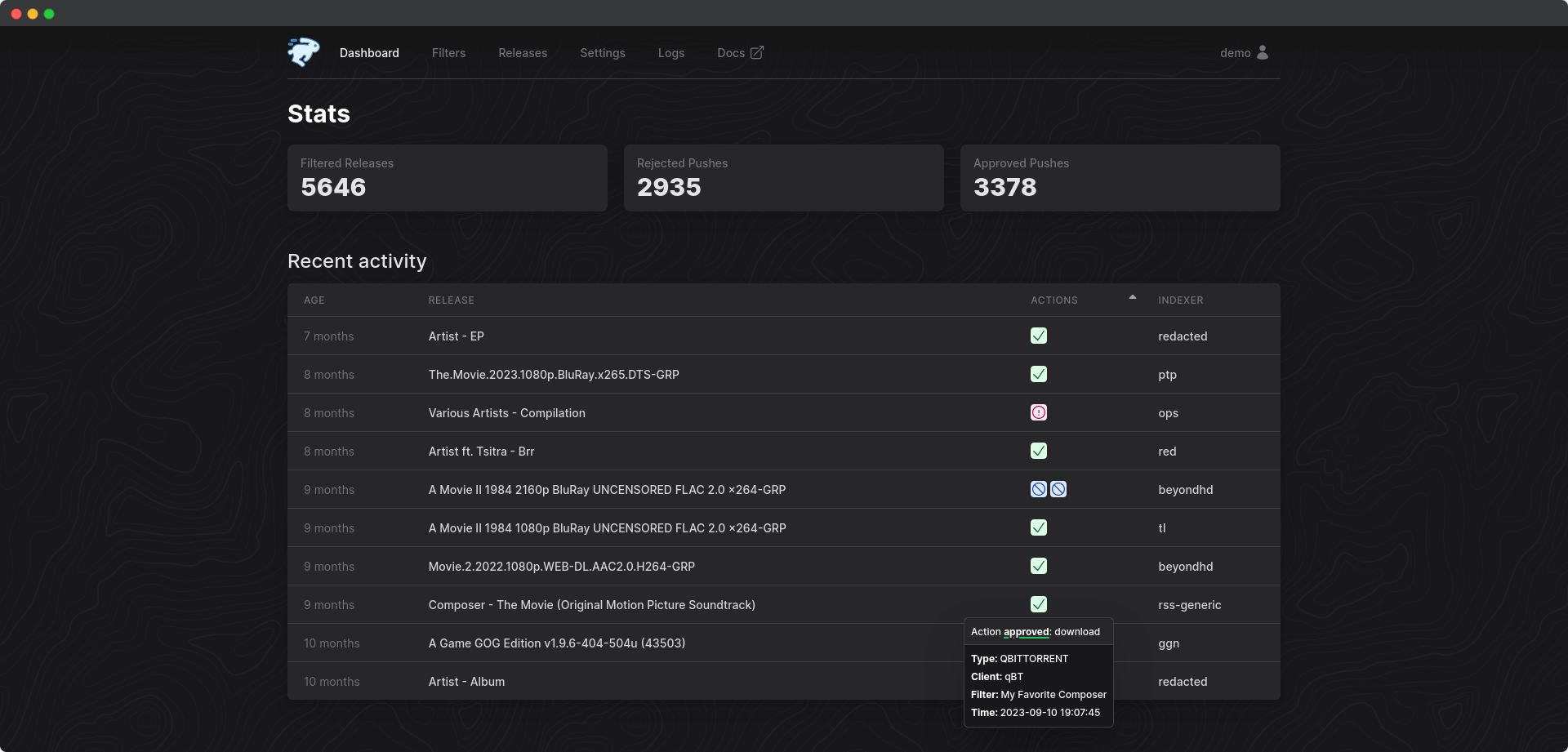
We also have a light theme. Check it out here.

Documentation
Full documentation can be found at https://autobrr.comTable of Contents
- [Available Download Clients and Actions](#available-download-clients-and-actions)
- [RSS and Usenet Support](#rss-and-usenet-support)- [Swizzin](#swizzin-dedi)
- [Saltbox](#saltbox)
- [QuickBox](#quickbox)
- [Shared Seedbox](#shared-seedbox)
- [Docker Compose](#docker-compose)
- [Distroless docker images](#distroless-docker-images)
- [Windows](#windows)
- [MacOS](#macos)
- [Linux Generic](#linux-generic)
- [Environment Variables](#environment-variables)What Is Autobrr?
What is autobrr, and how does it fit into the ecosystem?We can start by talking about torrent trackers (hereby referred to as indexers) and maintaining ratio. You are required to maintain a ratio with most indexers. Ratio is built by seeding your torrents. The earlier you're seeding a torrent, the more peers you make yourself available to on that torrent.
Software like Radarr and Sonarr uses RSS to look for new torrents. RSS feeds are updated regularly, but too slow to let you be a part of what we call the initial swarm of a torrent. This is where autobrr comes into play.
Many indexers announce new torrents on their IRC channels the second it is uploaded to the site. autobrr monitors such channels in real time and grabs the torrent file as soon as it's uploaded based on certain conditions (hereby referred to as filters) that you set up within autobrr. It then sends that torrent file to a download client of your choice via an action set within the filter. A download client can be anything from qBittorrent and Deluge, to Radarr and Sonarr, or a watch folder.
When your autobrr filter is set to send the torrent files to Radarr and Sonarr, they will decide if it's something they want and then forward it to the torrent client they are set up with.
autobrr can also send matches (torrent files that meets your filter's criteria) directly to torrent clients like qBittorrent, Deluge, r(u)Torrent, and Transmission. You don't need to use the arr suite to make use of autobrr.
Key Features
- Torrents and Usenet support
- Support for 100+ torrent trackers with IRC announces
- Newznab, Torznab, and RSS support to easily get access to hundreds of torrent and Usenet indexers
- Torrent Magnet support
- Powerful but simple filtering with RegEx support (like in autodl-irssi)
- Easy to use and mobile friendly web UI (with dark mode!) to manage everything
- Built on Go and React making autobrr lightweight and perfect for supporting multiple platforms (Linux, FreeBSD,
- Great container support (Docker, k8s/Kubernetes)
- Database engine supporting both PostgreSQL and SQLite
- Authentication support including built-in auth and OpenID Connect (OIDC)
- Notifications (Discord, Telegram, Notifiarr, Pushover, Gotify, Shoutrrr, ntfy)
- One autobrr instance can communicate with multiple clients (torrent, Usenet, and \*arr) on remote servers
- Base path / Subfolder (and subdomain) support for convenient reverse-proxy support
Available Download Clients and Actions
- qBittorrent: Includes built-in re-announce, categories, rules, max active downloads, etc.
- Deluge v1+ and v2+
- rTorrent
- Transmission
- Porla
- aria2
- Sonarr, Radarr, Lidarr, Whisparr, Readarr, Sportarr: Pushes releases directly for early swarm participation, rather than relying on RSS feeds.
- SABnzbd and NZBGet (Usenet): Integrates smoothly for Usenet downloads.
- Watch Folder: Monitors specified folders for new files.
- Exec Custom Scripts: Execute tailored scripts for advanced automation.
- Webhook: Offers webhook support for diverse integration needs.
RSS and Usenet Support
A lot of indexers do not announce new torrents in an IRC channel. You can still make use of these indexers with autobrr since it has built-in support for feeds as well. Both Torznab, Newznab, and regular RSS is supported. RSS indexers are treated the same way as regular indexers within autobrr.Usenet support via Newznab feeds allows you to easily manage everything in a single application. While there are a lot of applications that handle RSS well, we think autobrr offers very easy-to-use filtering to help you get the content you want.
You can use Usenet feeds and send to arrs or send directly to SABnzbd or NZBGet.
Installation
For comprehensive installation instructions, visit our Installation Guide. This guide provides detailed steps for different platforms, including Windows, Linux, Docker, and more.Remember to head over to our Configuration Guide to learn how to set up your indexers, IRC, and download clients after you're done installing.
Swizzin (dedi)
Swizzin users can simply run:sudo box install autobrrSaltbox
Saltbox users can simply run:sb install autobrrFor more info check the docs
QuickBox
QuickBox users can simply run:qb install autobrr -u ${username}For more info check the docs
Shared Seedbox
One-Click Installer & Quick Installer
- HostingByDesign (former Seedbox.io) via box -
box install autobrr - Swizzin.net via box -
box install autobrr - Seedit4.me
- SeedHost.eu
- Ultra.cc
- Whatbox.ca - has built-in integration with their apps, have to enable their "Expert" mode for external connections
Installation Scripts
We have support for a couple of other providers out of the box.Please contact us on Discord if your provider is missing. The scripts require some input, but do most of the work.
Feralhosting
wget https://gobrr.sh/install_feral && bash install_feralBytesized Hosting
wget https://gobrr.sh/install_bytesized && bash install_bytesizedOther providers
For other providers the Seedbox.io installer should work. If not, open an issue or contact us on Discordwget https://gobrr.sh/install_sbio && bash install_sbioDocker Compose
Modify accordingly if running with unRAID or setting up with Portainer.- Logging is optional
- Host port mapping might need to be changed to not collide with other apps
- Change
BASE_DOCKER_DATA_PATHto match your setup. Can be simply./data - Set a custom network if needed
Create
docker-compose.yml and add the following. If you have an existing setup change to fit that.version: "3.7"
services:
autobrr:
container_name: autobrr
image: ghcr.io/autobrr/autobrr:latest
restart: unless-stopped
environment:
- TZ=${TZ}
user: 1000:1000
volumes:
- ${BASE_DOCKER_DATA_PATH}/autobrr/config:/config
ports:
- 7474:7474Then start with:
docker compose up -dDistroless Docker Images
!CAUTION This image comes without a shell, and external filtering and actions relying onexecwill therefore not work with anything but compiled static binaries.
To clarify:BASHandSHshell scripts WILL NOT WORK!
Use the standard image if you rely on this functionality.
For users who prioritize container security, one of the long-term maintainers offers alternative Docker images built on Distroless. Specifically the
distroless/static-debian12:nonroot base image.Distroless images do not contain a package manager or shell, thereby reducing the potential attack surface and making them a more secure option. These stripped-back images contain only the application and its runtime dependencies.
The repository for these builds can be found here: https://github.com/s0up4200/autobrr-distroless
Windows
Check the Windows Setup Guide here.MacOS
Install Homebrew
/bin/bash -c "$(curl -fsSL https://raw.githubusercontent.com/Homebrew/install/HEAD/install.sh)"Install autobrr
brew install autobrrRun
brew services start autobrrLinux Generic
Download the latest release, or download the source code and build it yourself usingmake build.wget $(curl -s https://api.github.com/repos/autobrr/autobrr/releases/latest | grep download | grep linux_x86_64 | cut -d\" -f4)Unpack
Run withroot or sudo. If you do not have root, or are on a shared system, place the binaries somewhere in your home directory like ~/.bin.tar -C /usr/local/bin -xzf autobrr*.tar.gzThis will extract both
autobrr and autobrrctl to /usr/local/bin.
Note: If the command fails, prefix it with sudo and re-run again.Systemd (Recommended)
On Linux-based systems, it is recommended to run autobrr as a sort of service with auto-restarting capabilities, in order to account for potential downtime. The most common way is to do it via systemd.You will need to create a service file in
/etc/systemd/system/ called autobrr.service.touch /etc/systemd/system/[email protected]Then place the following content inside the file (e.g. via nano/vim/ed):
```systemd title="/etc/systemd/system/[email protected]" Unit Description=autobrr service for %i After=syslog.target network-online.target
Service Type=simple User=%i Group=%i ExecStart=/usr/bin/autobrr --config=/home/%i/.config/autobrr/
Install WantedBy=multi-user.target
Start the service. Enable will make it startup on reboot.

```bash
systemctl enable --now autobrr@$USER.service
By default, the configuration is set to listen on
127.0.0.1. While autobrr works fine as is exposed to the internet,
it is recommended to use a reverse proxy
like nginx, caddy
or traefik.If you are not running a reverse proxy change
host in the config.toml to 0.0.0.0.Environment Variables
The following environment variables can be used:| Variable | Description | Default |
|---|---|---|
AUTOBRRHOST | Listen address | 127.0.0.1 |
AUTOBRRPORT | Listen port | 7474 |
AUTOBRRBASEURL | Base URL for reverse proxy | / |
AUTOBRRBASEURLMODELEGACY | Base URL Mode Legacy for old proxy setups | true |
AUTOBRRLOGLEVEL | Log level (DEBUG, INFO, WARN, ERROR) | INFO |
AUTOBRRLOGPATH | Log file location | - |
AUTOBRRLOGMAXSIZE | Max size in MB before rotation | 10 |
AUTOBRRLOGMAXBACKUPS | Number of rotated logs to keep | 5 |
AUTOBRRCUSTOMDEFINITIONS | Path to custom indexer definitions | - |
AUTOBRRCHECKFORUPDATES | Enable update checks | true |
AUTOBRRDATABASETYPE | Database type (sqlite/postgres) | sqlite |
AUTOBRRDATABASEMAXBACKUPS | Number of backups to keep | 5 |
AUTOBRRDATABASEDSN | Database connection string. Use this or individual vars | - |
AUTOBRRPOSTGRESHOST | PostgreSQL host | - |
AUTOBRRPOSTGRESPORT | PostgreSQL port | 5432 |
AUTOBRRPOSTGRESDATABASE | PostgreSQL database name | - |
AUTOBRRPOSTGRESDB | PostgreSQL database name | - |
AUTOBRRPOSTGRESUSER | PostgreSQL username | - |
AUTOBRRPOSTGRESPASS | PostgreSQL password | - |
AUTOBRRPOSTGRESPASSWORD | PostgreSQL password | - |
AUTOBRRPOSTGRESSSLMODE | PostgreSQL SSL mode | disable |
AUTOBRRPOSTGRESSOCKET | PostgreSQL unix socket | - |
AUTOBRRPOSTGRESEXTRAPARAMS | Additional PostgreSQL parameters | - |
AUTOBRROIDCENABLED | Enable OpenID Connect authentication | false |
AUTOBRROIDCISSUER | OIDC issuer URL | - |
AUTOBRROIDCCLIENTID | OIDC client ID | - |
AUTOBRROIDCCLIENTSECRET | OIDC client secret | - |
AUTOBRROIDCREDIRECTURL | OIDC callback URL | - |
AUTOBRROIDCDISABLEBUILTINLOGIN | Disable login form (only works when using external auth) | false |
AUTOBRRMETRICSENABLED | Enable Metrics server | false |
AUTOBRRMETRICSHOST | Metrics listen address | 127.0.0.1 |
AUTOBRRMETRICSPORT | Metrics listen port | 9074 |
AUTOBRRMETRICSBASICAUTHUSERS | Metrics basic auth users | - |
AUTOBRRPROFILINGENABLED | Enable profiling | false |
AUTOBRRPROFILINGHOST | Profiling listen address | 127.0.0.1 |
AUTOBRRPROFILINGPORT | Profiling listen port | 6060 |
Docker secrets
All ENV vars have a_FILE option where it can read contents from a file, such as docker secrets. See the example below:services:
autobrr:
image: ghcr.io/autobrr/autobrr:latest
container_name: autobrr
volumes:
- ./config:/config
ports:
- "7474:7474"
restart: unless-stopped
environment:
- AUTOBRR__DATABASE_TYPE=postgres
- AUTOBRR__POSTGRES_HOST=postgres
- AUTOBRR__POSTGRES_PORT=5432
- AUTOBRR__POSTGRES_USER=autobrr
- AUTOBRR__POSTGRES_PASSWORD_FILE=/run/secrets/db_password
- AUTOBRR__POSTGRES_DB=autobrr
secrets:
- db_password
postgres:
image: postgres:12.10
container_name: postgres
volumes:
- postgres:/var/lib/postgresql/data
ports:
- "5432:5432"
environment:
- POSTGRES_USER=autobrr
- POSTGRES_PASSWORD_FILE=/run/secrets/db_password
- POSTGRES_DB=autobrr
secrets:
- db_password
secrets:
db_password:
file: db_password.txt
volumes:
postgres:Community
Join our friendly and welcoming community on Discord! Connect with fellow autobrr users, get advice, and share your experiences. Whether you're seeking help, wanting to contribute, or just looking to discuss your ideas, our community is a hub of discussion and support. We're all here to help each other out, so don't hesitate to jump in!Contributing
Whether you're fixing a bug, adding a feature, or improving documentation, your help is appreciated. Here's how you can contribute:Reporting Issues and Suggestions
- Report Bugs: Encountered a bug? Please report it using our bug report template. Include detailed steps to reproduce, expected behavior, and any relevant screenshots or logs.
- Feature Requests: Submit your feature request by opening a new idea in our discussions. Describe your idea and how it will improve
autobrr.
Code Contributions
Check out the full guide for contributing here.- Fork and Clone: Fork the
autobrrrepository and clone it to start working on your changes. - Branching: Create a new branch for your changes. Use a descriptive name for easy understanding.
- Coding: Ensure your code is well-commented for clarity.
- Commit Guidelines: We appreciate the use of Conventional Commit Guidelines when writing your commits.
- Pull Requests: Submit a pull request with a clear description of your changes. Reference any related issues.
- Code Review: Be open to feedback during the code review process.
Documentation
See an area that needs clarity or additional information? Feel free to update our documentation here.Code of Conduct
We follow a code of conduct that promotes respectful and harassment-free experiences. Please read our Code of Conduct before participating.License
autobrr is proudly open-source and is released under the GNU General Public License v2 or later (GPLv2+). This license allows you the freedom to run, study, share, and modify the software:- Freedom to Run: You can run autobrr in any environment, for any purpose.
- Freedom to Study and Modify: Access to the source code allows you to study and modify autobrr to suit your needs.
- Freedom to Share: You can redistribute copies of autobrr to help others.
- Freedom to Enhance: Contributions to improve autobrr are always welcome.
Copyright 2021-2024
Serve Autobrr on your own domain behind Caddy, Nginx or Traefik. Fill in your domain and copy the result. It's a starting point, some apps need their own base URL or extra headers set too.
Proxying autobrr.example.com to http://autobrr:7474
Add this to your Caddyfile
autobrr.example.com {
	reverse_proxy http://autobrr:7474
}Check the logs first
Nine times out of ten the logs tell you exactly what went wrong.
- In Portainer, go to Containers, click the container, then Logs. Or run
docker logs <container> - Exit codes help too:
137means killed, usually out of memory.126or127means the command inside the image is broken.
Port already in use
If deployment fails with "Bind for 0.0.0.0:7474 failed: port is already allocated", something else on your server is using that port.
- Find what's using it:
sudo ss -tlnp | grep :7474 - Stop the other service, or pick a different host port. In
7474:7474only the left number is yours to change, the right one belongs to the app.
Running but the page won't load
The container is up but nothing appears in your browser.
- Use your server's real IP:
http://your-server-ip:7474. The 0.0.0.0 link Portainer shows isn't a real address. - Give it a minute after first deploy, autobrr can take a while to initialise.
- Make sure your firewall allows the port, e.g.
sudo ufw allow 7474
Permission denied on volumes
If the logs show "permission denied", the app can't write to its data folder on the host.
- Fix the ownership:
sudo chown -R 1000:1000 /portainer/Files/AppData/Config/autobrr/config
Image won't pull
Test the pull directly on the host: docker pull ghcr.io/autobrr/autobrr:latest
- "manifest unknown" means the tag no longer exists. This template uses
latest, so try pinning a specific version instead. - "toomanyrequests" is the Docker Hub rate limit. Log in with
docker loginto raise it. - "no space left on device" means a full disk. Reclaim space with
docker system prune
"exec format error"
This means the image was built for a different CPU architecture than your server.
- This image supports:
amd64, arm64, arm/v7, arm/v6, 386, ppc64le, s390x, riscv64, amd64/v2, amd64/v3, arm64/v8.2, arm64/v8.4, arm64/v9, arm64/v9.2 - Check yours with
uname -m: x86_64 is amd64, aarch64 is arm64. Raspberry Pi and other ARM boards are the usual culprits.
Container keeps restarting
The unless-stopped restart policy relaunches the app after every crash, so the real error can scroll past.
- Check the logs right after a restart, the last few lines before it died are the useful ones.
- Get the exit code with
docker inspect <container> --format '{{.State.ExitCode}}' - Still stuck? Redeploy once with the restart policy set to
noso the failure stays visible.
Stack won't deploy
Compose stacks fail fast on small mistakes, and Portainer shows the reason just above the editor.
- YAML only accepts spaces for indentation, a single tab breaks the whole file.
Raise an issue
Found something which isn't working as it should? Here's how to report it.
- Bug within the app: Open an issue on autobrr/autobrr
- Template not working: Open an issue on xneo1/portainer_templates
- This website not working: Open an issue on lissy93/portainer-templates
A Compose stack
Autobrr is a Compose stack, a set of containers defined in one file and brought up together by Portainer, then started and stopped as a single app.
The app image
An image is the app packed up ready to go, everything Autobrr needs bundled into one download. This template pulls ghcr.io/autobrr/autobrr:latest, which Docker fetches once (about 122 MB) and then starts your own copy from.
Where the image comes from
Docker pulls its images from registries, public libraries of ready-built apps. Autobrr's comes from the GitHub Container Registry, published by autobrr.
Version tags
The bit after the colon in the image name is the version tag. Here it's latest, which always points at the newest build, so a redeploy can bump you to a newer release without you asking. Pin a specific tag if you would rather stay on one version.
Which machines it runs on
Every image is built for particular CPU types. This one ships for amd64, arm64, arm/v7, arm/v6, 386, ppc64le, s390x, riscv64, amd64/v2, amd64/v3, arm64/v8.2, arm64/v8.4, arm64/v9, arm64/v9.2, so it runs on both regular x86 servers and ARM boards like a Raspberry Pi.
Ports
A port is the door the app answers on. A mapping like 7474:7474 means it's reachable on port 7474 of your server, where the left number is yours to change and the right one belongs to the app. It opens:
7474:7474
Volumes
A volume is where Autobrr keeps its files so they survive an update or a restart. Without one, anything it saves would sit inside the container and vanish the moment it's recreated. This template mounts:
/configfrom/portainer/Files/AppData/Config/autobrr/configon the host
Environment variables
Environment variables are the settings you hand over when you deploy, things like a password or a timezone. Autobrr takes 1 of them, all with defaults you can leave alone or tweak:
TZ, defaults toEurope/Athens
Restart policy
The restart policy here is unless-stopped, so Docker restarts Autobrr after a crash or reboot, but leaves it off when you stop it on purpose. You can change this on the deploy screen. The choices are no (never restart), on-failure (only after a crash), unless-stopped (restart unless you stop it), and always (bring it back no matter what).
Users and permissions
Inside the container the app runs as user 1000:1000 rather than root, which keeps it away from parts of the host it has no business touching.
Networking
Nothing custom is set, so Autobrr sits on Docker's default bridge network: its own private space that reaches the outside world only through the ports it publishes.
Container name
Once it's deployed, Portainer names the container autobrr. That's what you'll spot in the containers list and use in commands like docker logs autobrr.
Platform
The platform is linux, the kind of system the container is built to run on. Docker and Portainer handle this on a normal Linux server.
Open source license
Autobrr is open source, released under the GPL-2.0 license. In plain terms the code is out in the open, so you're free to run it and change it to fit what you need.
Portainer app templates
Zooming out, this whole page comes from a Portainer app template: a short recipe telling Portainer how to set Autobrr up. Add the template list to Portainer once, then deploying Autobrr is a click rather than a wall of config.