Portainer Templates logo

Portainer Templates

Mailpit Mailpit

Stack

Email Newsletters

Mailpit - the modern dev mail catcher (MailHog's actively-maintained successor, MIT): an SMTP sink plus a fast web UI with search, HTML preview, link checking, and an API. Stop sending test emails to real inboxes.

Image details

Pulls: 221.5M
Architecture: amd64, arm64, 386, arm64/v8
Image size: 13 MB
Latest: v1.31
User: axllent
Created: Aug 04, 2022
Updated: 4 days ago
Status: active

Source details

Stars: 10.4k
Forks: 341
Language: Go
License: MIT
Updated: 4 days ago

Configuration

Type
Compose
Platform
linux
Image
axllent/mailpit:v1.30.5
Ports
5000:50001025:1025
Volumes
/data : mailpitdata
Env vars
MP_UI_BIND_ADDR=0.0.0.0:5000MP_SMTP_BIND_ADDR=0.0.0.0:1025MP_UI_AUTH=${MP_UI_AUTH}MP_DATABASE=/data/mailpit.dbMP_MAX_MESSAGES=5000
Restart
unless-stopped
Source

Standalone Install

Select an install method, to see config/commands for deploying Mailpit

Installation method

Install on Portainer

Import all app templates into your Portainer instance, for easy 1-click deploys

  1. Ensure both Docker and Portainer are installed, and up-to-date
  2. Log into your Portainer web UI
  3. Under Settings → App Templates, paste the below URL
  4. Head to Home → App Templates, and the list of apps will show up
  5. Select Mailpit, fill in any config options, and hit Deploy

Template Import URL

https://raw.githubusercontent.com/Lissy93/portainer-templates/main/templates.json
Show Me demo

Original stackfile

The compose file this template deploys, straight from its repo:

name: mailpit

services:
  mailpit:
    image: axllent/mailpit:v1.30.5
    restart: unless-stopped
    environment:
      MP_UI_BIND_ADDR: 0.0.0.0:5000
      MP_SMTP_BIND_ADDR: 0.0.0.0:1025
      MP_UI_AUTH: ${MP_UI_AUTH}
      MP_DATABASE: /data/mailpit.db
      MP_MAX_MESSAGES: "5000"
    ports:
      - "5000:5000"
      - "1025:1025"
    volumes:
      - mailpitdata:/data

volumes:
  mailpitdata:

Or deploy it directly from the source:

git clone https://github.com/deployable-sh/stacks
cd stacks
docker compose -f mailpit/compose.yaml up -d

More install options in our documentation, or see axllent/mailpit for app-specific guidance.

Mailpit - email testing for developers

Tests Build status Docker builds CodeQL Go Report Card

WebsiteDocumentationAPI


Mailpit is a small, fast, low memory, zero-dependency, multi-platform email testing tool & API for developers.
It acts as an SMTP server, provides a modern web interface to view & test captured emails, and includes an API for automated integration testing.
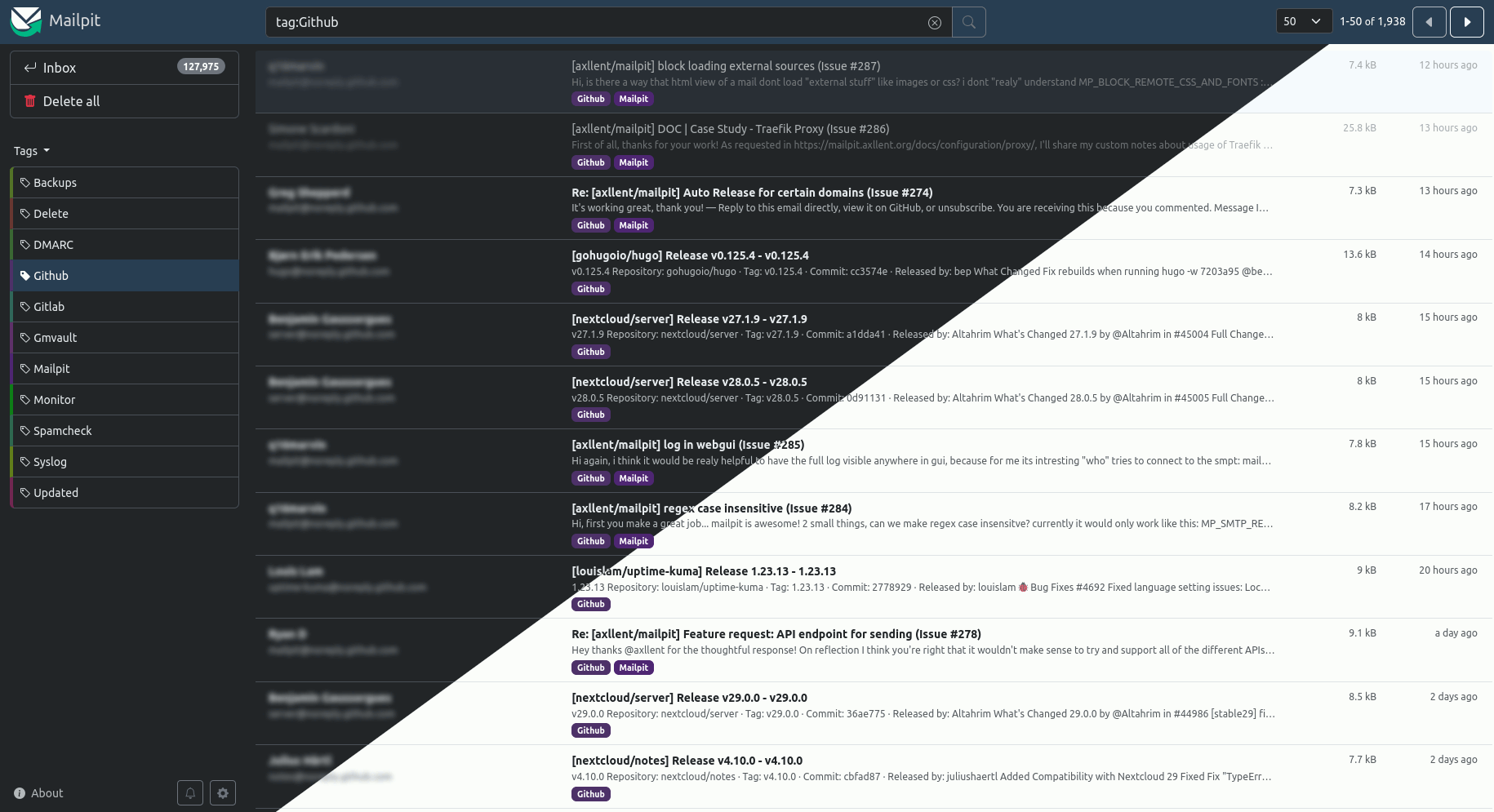
Mailpit

Features

  • Runs entirely from a single static binary or multi-architecture Docker images
  • Modern web UI with advanced mail search to view emails (formatted HTML, highlighted HTML source, text, headers, raw source, and MIME attachments
including image thumbnails), including optional HTTPS & authentication
  • SMTP server with optional STARTTLS or SSL/TLS, authentication (including an "accept any" mode)
  • A REST API for integration testing
  • Real-time web UI updates using web sockets for new mail & optional browser notifications when new mail is received
  • Optional POP3 server to download captured message directly into your email client
  • HTML check to test & score mail client compatibility with HTML emails
  • Link check to test message links (HTML & text) & linked images
  • Spam check to test message "spamminess" using a running SpamAssassin server
  • Create screenshots of HTML messages via web UI
  • Mobile and tablet HTML preview toggle in desktop mode
  • Message tagging including manual tagging or automated tagging using filtering and "plus addressing"
  • SMTP relaying (message release) - relay messages via a different SMTP server including an optional allowlist of accepted recipients
  • SMTP forwarding - automatically forward messages via a different SMTP server to predefined email addresses
  • Fast message storing & processing - ingesting 100-200 emails per second over SMTP depending on CPU, network speed & email size,
easily handling tens of thousands of emails, with automatic email pruning (by default keeping the most recent 500 emails)
  • Chaos feature to enable configurable SMTP errors to test application resilience
  • List-Unsubscribe syntax validation
  • Optional webhook for received messages

Running in docker

An basic example of running Mailpit within Docker:
docker run -d \
--name=mailpit \
--restart unless-stopped \
-p 8025:8025 \
-p 1025:1025 \
axllent/mailpit
You need to ensure you map the correct ports (default Web UI on 8025 and SMTP on 1025).

Setting Mailpit options

Refer to the website for a list of runtime options. Environment variables can be set using the -e flag when starting your docker container, for instance:
docker run -d \
--name=mailpit \
--restart unless-stopped \
-v /path/to/mailpit-data:/data \
-e MP_DATABASE=/data/mailpit.db \
-e MP_UI_AUTH_FILE=/data/authfile \
-e TZ=Europe/London \
-p 8025:8025 \
-p 1025:1025 \
axllent/mailpit


For team features, multiple inboxes, and a hosted setup, try Mailtrap, our friendly companion.

Serve Mailpit on your own domain behind Caddy, Nginx or Traefik. Fill in your domain and copy the result. It's a starting point, some apps need their own base URL or extra headers set too.

Proxying mailpit.example.com to http://mailpit:5000

Add this to your Caddyfile

mailpit.example.com {
	reverse_proxy http://mailpit:5000
}

Check the logs first

Nine times out of ten the logs tell you exactly what went wrong.

  • In Portainer, go to Containers, click the container, then Logs. Or run docker logs <container>
  • Exit codes help too: 137 means killed, usually out of memory. 126 or 127 means the command inside the image is broken.

Port already in use

If deployment fails with "Bind for 0.0.0.0:5000 failed: port is already allocated", something else on your server is using that port.

  • Find what's using it: sudo ss -tlnp | grep :5000
  • Stop the other service, or pick a different host port. In 5000:5000 only the left number is yours to change, the right one belongs to the app.

Running but the page won't load

The container is up but nothing appears in your browser.

  • Use your server's real IP: http://your-server-ip:5000. The 0.0.0.0 link Portainer shows isn't a real address.
  • Give it a minute after first deploy, mailpit can take a while to initialise.
  • Make sure your firewall allows the port, e.g. sudo ufw allow 5000

Image won't pull

Test the pull directly on the host: docker pull axllent/mailpit:v1.30.5

  • "manifest unknown" means the tag no longer exists.
  • "toomanyrequests" is the Docker Hub rate limit. Log in with docker login to raise it.
  • "no space left on device" means a full disk. Reclaim space with docker system prune

"exec format error"

This means the image was built for a different CPU architecture than your server.

  • This image supports: amd64, arm64, 386, arm64/v8
  • Check yours with uname -m: x86_64 is amd64, aarch64 is arm64. Raspberry Pi and other ARM boards are the usual culprits.

Container keeps restarting

The unless-stopped restart policy relaunches the app after every crash, so the real error can scroll past.

  • Check the logs right after a restart, the last few lines before it died are the useful ones.
  • Get the exit code with docker inspect <container> --format '{{.State.ExitCode}}'
  • Still stuck? Redeploy once with the restart policy set to no so the failure stays visible.

Stack won't deploy

Compose stacks fail fast on small mistakes, and Portainer shows the reason just above the editor.

  • YAML only accepts spaces for indentation, a single tab breaks the whole file.

Raise an issue

Found something which isn't working as it should? Here's how to report it.

A Compose stack

Mailpit is a Compose stack, a set of containers defined in one file and brought up together by Portainer, then started and stopped as a single app.

The app image

An image is the app packed up ready to go, everything Mailpit needs bundled into one download. This template pulls axllent/mailpit:v1.30.5, which Docker fetches once (about 13 MB) and then starts your own copy from.

Where the image comes from

Docker pulls its images from registries, public libraries of ready-built apps. Mailpit's comes from Docker Hub, published by axllent.

Version tags

The bit after the colon in the image name is the version tag. This one pins v1.30.5, so every redeploy gives you that exact build until you bump it yourself.

Which machines it runs on

Every image is built for particular CPU types. This one ships for amd64, arm64, 386, arm64/v8, so it runs on both regular x86 servers and ARM boards like a Raspberry Pi.

Ports

A port is the door the app answers on. A mapping like 5000:5000 means it's reachable on port 5000 of your server, where the left number is yours to change and the right one belongs to the app. It opens:

  • 5000:5000
  • 1025:1025

Volumes

A volume is where Mailpit keeps its files so they survive an update or a restart. Without one, anything it saves would sit inside the container and vanish the moment it's recreated. This template mounts:

  • /data kept in the mailpitdata volume Docker manages

Environment variables

Environment variables are the settings you hand over when you deploy, things like a password or a timezone. Mailpit takes 5 of them, all with defaults you can leave alone or tweak:

  • MP_UI_BIND_ADDR, defaults to 0.0.0.0:5000
  • MP_SMTP_BIND_ADDR, defaults to 0.0.0.0:1025
  • MP_UI_AUTH, pulled from your own environment. Web UI basic auth (user:password).
  • MP_DATABASE, defaults to /data/mailpit.db
  • MP_MAX_MESSAGES, defaults to 5000

Restart policy

The restart policy here is unless-stopped, so Docker restarts Mailpit after a crash or reboot, but leaves it off when you stop it on purpose. You can change this on the deploy screen. The choices are no (never restart), on-failure (only after a crash), unless-stopped (restart unless you stop it), and always (bring it back no matter what).

Networking

Nothing custom is set, so Mailpit sits on Docker's default bridge network: its own private space that reaches the outside world only through the ports it publishes.

Container name

Once it's deployed, Portainer names the container mailpit. That's what you'll spot in the containers list and use in commands like docker logs mailpit.

Platform

The platform is linux, the kind of system the container is built to run on. Docker and Portainer handle this on a normal Linux server.

Open source license

Mailpit is open source, released under the MIT license. In plain terms the code is out in the open, so you're free to run it and change it to fit what you need.

Portainer app templates

Zooming out, this whole page comes from a Portainer app template: a short recipe telling Portainer how to set Mailpit up. Add the template list to Portainer once, then deploying Mailpit is a click rather than a wall of config.

